Target New ArrivalsGift Ideas for DadFourth of JulyClothing, Shoes & AccessoriesHome & DecorKitchen & DiningOutdoor Living & GardenGroceryHousehold EssentialsBabyBeautyPersonal CareSports & OutdoorsHealthWellnessLuggageSchool & Office SuppliesToys & GamesElectronicsVideo GamesMovies, Music & BooksParty SuppliesGift IdeasGift CardsPetsUlta Beauty at TargetShop by CommunityTarget OpticalDealsClearanceNew ArrivalsGift Ideas for DadBack to SchoolCollegeTop DealsTarget Circle DealsWeekly AdShop Order PickupShop Same Day DeliveryRegistryRedCardTarget CircleFind Stores
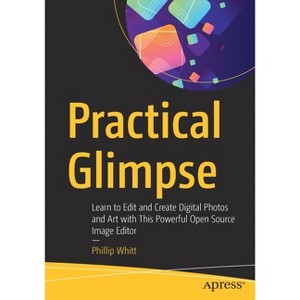
Practical Glimpse - by  Phillip Whitt (Paperback) - 1 of 1

Practical Glimpse - by Phillip Whitt (Paperback)

$44.99

In Stock
Free & easy returns

Free & easy returns

Return this item by mail or in store within 90 days for a full refund.
Eligible for registries and wish lists

About this item

Highlights

  • Learn how to edit images and create compelling digital art with Glimpse, the newest open source alternative to Adobe Photoshop and GIMP.
  • About the Author: Phillip Whitt is an author, photo retouch professional and graphic designer.
  • 248 Pages
  • Computers + Internet, Programming

Description


Book Synopsis


Learn how to edit images and create compelling digital art with Glimpse, the newest open source alternative to Adobe Photoshop and GIMP. This book explores Glimpse's broad selection of tools and features that can create beautiful (raster) digital art; painting, drawings, and art created from photos by applying one of the many filters to create artistic effects.

You will quickly become acquainted with this powerful program and understand how to use workspace tools and layers. You will learn step-by-step how to correct exposure, digitally retouch and repair damaged photos, and handle just about any photo editing task--even colorizing grayscale images. Practice files are provided with step-by-step instructions to jump into photo editing and art creation.

Glimpse is a powerful program that is a viable alternative to Adobe Photoshop and other proprietary software. The possibilities of the art one can create are almost limitless--get started with it using this book today.

What You'll Learn

  • Navigate the Glimpse workspace
  • Use layers, which are essential in any professional quality image editing program
  • Work with the varied tools that Glimpse offers
  • Enhance, retouch, and modify digital images
  • Restore and repair damaged family photos, and create composites such as replacing backgrounds
  • Create compelling digital artwork using the drawing tools and by applying artistic filters

Who This Book Is For

Anyone desiring to learn serious image editing with Glimpse. It can be used by both fledgling and professional photographers, freelance graphic designers, students, genealogists, and more. Because it's free, it can be especially advantageous to teachers, students, and small business owners on a budget.


From the Back Cover


Learn how to edit images and create compelling digital art with Glimpse, the newest open source alternative to Adobe Photoshop and GIMP. This book explores Glimpse's broad selection of tools and features that can create beautiful (raster) digital art; painting, drawings, and art created from photos by applying one of the many filters to create artistic effects.

You will quickly become acquainted with this powerful program and understand how to use workspace tools and layers. You will learn step-by-step how to correct exposure, digitally retouch and repair damaged photos, and handle just about any photo editing task--even colorizing grayscale images. Practice files are provided with step-by-step instructions to jump into photo editing and art creation.

Glimpse is a powerful program that is a viable alternative to Adobe Photoshop and other proprietary software. The possibilities of the art one can create are almost limitless--get started with it using this book today.

You will:

  • Navigate the Glimpse workspace
  • Use layers, which are essential in any professional quality image editing program
  • Work with the varied tools that Glimpse offers
  • Enhance, retouch, and modify digital images
  • Restore and repair damaged family photos, and create composites such as replacing backgrounds
  • Create compelling digital artwork using the drawing tools and by applying artistic filters


About the Author


Phillip Whitt is an author, photo retouch professional and graphic designer. He is the author of several Apress books and video tutorials pertaining to image editing using GIMP and Adobe Photoshop Elements. He has edited, retouched, and restored countless digital images since the late 1990s. He has served both clients from the general public and a number of commercial clients over the years. In addition to over 20 years of image editing and graphic design experience, he also has an Expert Rating Certification in Adobe Photoshop Skills, and VTC certifications in GIMP and Scribus.

Dimensions (Overall): 10.0 Inches (H) x 7.0 Inches (W) x .56 Inches (D)
Weight: 1.04 Pounds
Suggested Age: 22 Years and Up
Number of Pages: 248
Genre: Computers + Internet
Sub-Genre: Programming
Publisher: Apress
Theme: Open Source
Format: Paperback
Author: Phillip Whitt
Language: English
Street Date: October 28, 2020
TCIN: 1011990200
UPC: 9781484263266
Item Number (DPCI): 247-20-0734
Origin: Made in the USA or Imported
If the item details aren’t accurate or complete, we want to know about it.

Shipping details

Estimated ship dimensions: 0.56 inches length x 7 inches width x 10 inches height
Estimated ship weight: 1.04 pounds
We regret that this item cannot be shipped to PO Boxes.
This item cannot be shipped to the following locations: American Samoa (see also separate entry under AS), Guam (see also separate entry under GU), Northern Mariana Islands, Puerto Rico (see also separate entry under PR), United States Minor Outlying Islands, Virgin Islands, U.S., APO/FPO, Alaska, Hawaii

Return details

This item can be returned to any Target store or Target.com.
This item must be returned within 90 days of the date it was purchased in store, delivered to the guest, delivered by a Shipt shopper, or picked up by the guest.
See the return policy for complete information.

Q: What skills will I learn from this book?

submitted by AI Shopping Assistant - 2 days ago
  • A: You will learn to navigate Glimpse, use layers, enhance images, and create digital artwork.

    submitted byAI Shopping Assistant - 2 days ago
    Ai generated

Q: Are practice files included in the book?

submitted by AI Shopping Assistant - 2 days ago
  • A: Yes, practice files are provided with step-by-step instructions for hands-on learning.

    submitted byAI Shopping Assistant - 2 days ago
    Ai generated

Q: What makes Glimpse a viable alternative to Photoshop?

submitted by AI Shopping Assistant - 2 days ago
  • A: Glimpse offers a broad selection of tools and features for image editing, and it's open source.

    submitted byAI Shopping Assistant - 2 days ago
    Ai generated

Q: What type of digital art can I create with Glimpse?

submitted by AI Shopping Assistant - 2 days ago
  • A: You can create raster digital art, paintings, drawings, and apply artistic filters to photos.

    submitted byAI Shopping Assistant - 2 days ago
    Ai generated

Q: Who is the target audience for this book?

submitted by AI Shopping Assistant - 2 days ago
  • A: The book is for anyone interested in image editing, including photographers, graphic designers, and students.

    submitted byAI Shopping Assistant - 2 days ago
    Ai generated

Additional product information and recommendations

Discover more options

Best-selling Computers & Technology Books

Get top deals, latest trends, and more.

Privacy policy