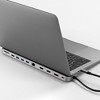

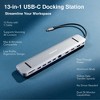
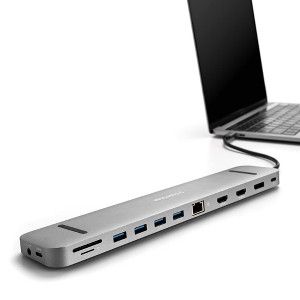
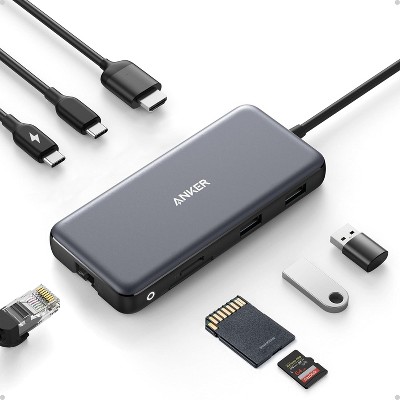
4K Docking Station 13-In-1 - Silver
$59.99 reg $224.99
$165 off
In Stock

Free & easy returns
Return this item by mail or in store within 30 days for a full refund.
Sold & shipped by Stand Steady
Eligible for registries and wish lists
About this item
Additional product information and recommendations
Discover more options
- $24.99 - $34.99Select items on sale5 out of 5 stars with 13 ratings
Frequently bought together
- $30.99reg $51.69 Sale
- $29.99reg $49.99 Sale
- $149.99reg $449.99 Sale

Guests also viewed
- $29.98reg $39.99 Sale
- $29.99reg $54.99 Sale
Related Categories
Guests are saying
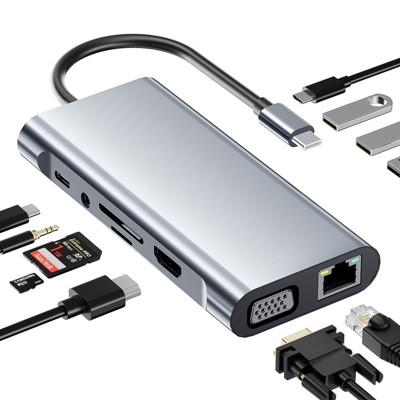
This docking station is highly praised for its functionality and sleek design, allowing guests to connect multiple devices like monitors, keyboards, and printers seamlessly. Many guests appreciate its ease of use and the ability to enhance their workspace, especially for those with limited laptop ports. However, some guests noted that the USB-C cable length and positioning could be improved for better compatibility with various laptop designs.
Summary created by AI from text of reviews reflecting recent feedback provided across different star ratings (includes incentivized reviews)
4.7 out of 5 stars with 16 reviews
5 out of 5 stars
30 August, 2026Verified purchase
(no review title)
This device works great. I plugged 2 monitors, keyboard, mouse, printer. and speakers to it for my laptop. Everything worked with no problem. Make sure you push the cables in fully. One of my monitor's cable was a tight fit and wasn't working until I fully pushed it in. The design is slim and looks good. I would highly recommend if your laptop has minimal ports.
5 out of 5 stars
31 July, 2026
originally posted on Luxor Workspaces

JP
I had this docker at my office and I love it, so I got another one for my home office.
1 reply from Luxor Workspaces team - 28 days ago
Hi JP, thank you for the kind words and for trusting the SideTrak 4K Docking Station enough to bring it home too! Glad it's working well for both setups.
4 out of 5 stars
29 September, 2023
originally posted on Luxor Workspaces
VEry good.
[This review was collected as part of a promotion.] Works perfectly. Easy, fast but have one problem, the C conection only fit good if the entrance is on the left of your laptop and the cable is too short.
3 out of 5 stars
16 September, 2023
originally posted on Luxor Workspaces
Mixed feelings
[This review was collected as part of a promotion.] Likely a limitation of my laptop, the only HDMI port that I can use is what's on the laptop, won't acknowledge SideTrak, but provides four USB-A and USB-C's...
5 out of 5 stars
31 August, 2023
originally posted on Luxor Workspaces
Great product
[This review was collected as part of a promotion.] Easy to set up and use works perfectly with Sidetrak
5 out of 5 stars
1 August, 2023
originally posted on Luxor Workspaces
Solo FHD 15.6" (2) and 4K Docking Station 13-in-1
Recently ordered for our work section so that when someone travels they have the capability to have multiple screens on the road. Realized there was a need while at a conference and found it extremely frustrating to only have a single screen when I was used to having three at the office. The screens and the dock are great. My only, slightly, negative comment is that each Solo FHD needs to be plugged in for power, rather than being powered by the laptop they are being used with. I'm sure this is just an electrical need limitation. Other than that one issue I think everything we ordered is great!
4 out of 5 stars
13 June, 2023
originally posted on Luxor Workspaces
USB-C cable location and length is not ideal
I have had my docking station for 5-6 months now. The device works well and was simple to use. Only negative comment is on the location and or length of the USB-C connection cable is not very good. The design and location of the hardwired USB-C cable on the docking station is clearly intended for laptops having the USB-C port on the left side of the laptop. A users laptop with the USB-C port on the right-side now forces users into using an unwanted position for the docking station. I chose to flip my docking station upside down so the USB-C cable is on the right side allowing it to reach the USB-C port on my laptops right side. By flipping this upside down, the rubber feet which were intended to rest on the desktop (bottom of docking station) are now topside where I rest the laptop onto. This position allows for the docking station to slip and slide on the desk top surface. A few design suggestions: 1. have a hardwired USB-C cable be centered in the back of the docking station so the cable reaches either the left or right side of a laptop. 2. don't hardwire USB-C cable but use a port and allow the consumers to purchase the USB-C cable that meets their length needs. 3. Place rubber feet on both the top and bottom of the docking station so the device can be universally placed and used on either side. Otherwise, it works well, just needs design improvements.
5 out of 5 stars
11 May, 2023
originally posted on Luxor Workspaces
Thank You
Package came in great and works great!!!! Thank You
5 out of 5 stars
16 March, 2023
originally posted on Luxor Workspaces
Same happy customer
I have surface laptop and they lack on port and I want durable docking system and this was the one. Recommend it :+1:
5 out of 5 stars
21 February, 2023
originally posted on Luxor Workspaces
Professional and clean method to
Professional and clean method to power desk technology for an effective work environment
5 out of 5 stars
21 February, 2023
originally posted on Luxor Workspaces
Control of cords for optimal function and style
Two monitors, a camera, a light, laptop, phone and charger all work very well together Perfect amount of ports