Target New ArrivalsFourth of JulyBack to SchoolCollegeClothing, Shoes & AccessoriesHome & DecorKitchen & DiningOutdoor Living & GardenGroceryHousehold EssentialsBabyBeautyPersonal CareSports & OutdoorsHealthWellnessSchool & Office SuppliesToys & GamesElectronicsVideo GamesMovies, Music & BooksParty SuppliesGift IdeasGift CardsPetsUlta Beauty at TargetShop by CommunityTarget OpticalDealsClearanceNew ArrivalsBack to SchoolCollegeTop DealsTarget Circle DealsWeekly AdShop Order PickupShop Same Day DeliveryRegistryRedCardTarget CircleFind Stores
Adobe Premiere Pro for Dummies - by  Keith Underdahl (Paperback) - 1 of 1

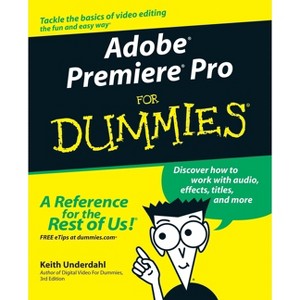
Adobe Premiere Pro for Dummies - by Keith Underdahl (Paperback)

$19.29Save $15.70 (45% off)

In Stock

Free & easy returns
Free & easy returns
Return this item by mail or in store within 90 days for a full refund.
Eligible for registries and wish lists

About this item

Highlights

  • Quiet on set!
  • About the Author: Keith Underdahl is the author of several books on digital video.
  • 384 Pages
  • Computers + Internet,

Description


Book Synopsis


Quiet on set! Time to start your moviemaking adventure -- here's what you need to know about capturing, editing, and publishing your videos

If you're an amateur filmmaker shooting documentaries or a hobbyist putting together a family video, Adobe Premiere Pro For Dummies is the book for you. From setting up a production studio and shooting good footage, to editing clips, adding effects, and working with audio, this user-friendly and comprehensive guide written in plain English can help you create your next video masterpiece and share the finished product.

This handy guide starts with the basics, getting you familiar with the Adobe Premiere Pro software and its interface and helping you set up your dream studio. From there, you'll dive into capturing footage for your videos, learn how to manage multiple movie projects, and edit movies to your liking. You'll learn to:

  • Capture audio and video from your camcorder or video deck (if your computer has the right hardware)
  • Pick and choose scenes to include in a movie, moving frame by frame through video to precisely place edits
  • Add and edit (up to 99) audio soundtracks to your program
  • Create titles and add still graphics to your movie projects
  • Animate titles and graphics
  • Apply one of 73 different transitions to video
  • Modify your movie with 94 video and 22 audio effects
  • Improve and adjust color using an advanced Color Corrector, new to this version of the software
  • Use powerful new audio tools to mix audio, whether it's mono, stereo, or 5.1 channel surround
  • Work with multiple, nestable timelines
  • Preview edits immediately in real time

Once you're finalized your movie project, you can export it, save it to DVD, or publish it online. But that's not all! With this helpful guide, you'll learn pro movie-making tips, third-party software add-ons, and additional tools for your production studio. Pick up your copy and start shooting your film today.


From the Back Cover


Build a studio that lets you edit like a pro

Choose the best video clips, create brilliant movies, and distribute your work

Are you new to video editing? Want to craft a movie like a Hollywood pro? This essential resource gets you started on your filmmaking adventure. You'll discover how to do everything from preparing your production studio and shooting video to adding spectacular effects and burning a DVD. In no time, you'll become an Adobe Premiere Pro expert!

Discover how to:

  • Produce movies with Premiere Pro
  • Import and manage footage on your PC
  • Edit clips and add a high-quality soundtrack
  • Utilize special effects and create title screens
  • Distribute your film project

The Dummies Way

  • Explanations in plain English
  • "Get in, get out" information
  • Icons and other navigational aids
  • Tear-out cheat sheet
  • Top ten lists
  • A dash of humor and fun


About the Author


Keith Underdahl is the author of several books on digital video. He is an experienced videographer and developer of kiosk and marketing videos for Ages Software.

Dimensions (Overall): 9.2 Inches (H) x 7.5 Inches (W) x .9 Inches (D)
Weight: 1.45 Pounds
Suggested Age: 22 Years and Up
Number of Pages: 384
Genre: Computers + Internet
Publisher: For Dummies
Format: Paperback
Author: Keith Underdahl
Language: English
Street Date: October 24, 2003
TCIN: 77838372
UPC: 9780764543449
Item Number (DPCI): 247-16-9625
Origin: Made in the USA or Imported
If the item details aren’t accurate or complete, we want to know about it.

Shipping details

Estimated ship dimensions: 0.9 inches length x 7.5 inches width x 9.2 inches height
Estimated ship weight: 1.45 pounds
We regret that this item cannot be shipped to PO Boxes.
This item cannot be shipped to the following locations: American Samoa (see also separate entry under AS), Guam (see also separate entry under GU), Northern Mariana Islands, Puerto Rico (see also separate entry under PR), United States Minor Outlying Islands, Virgin Islands, U.S., APO/FPO, Alaska, Hawaii

Return details

This item can be returned to any Target store or Target.com.
This item must be returned within 90 days of the date it was purchased in store, delivered to the guest, delivered by a Shipt shopper, or picked up by the guest.
See the return policy for complete information.

Q: What features does Adobe Premiere Pro offer according to the book?

submitted by AI Shopping Assistant - 3 days ago
  • A: The software offers tools for editing, adding effects, managing audio, and exporting projects.

    submitted byAI Shopping Assistant - 3 days ago
    Ai generated

Q: What is the target audience for this book?

submitted by AI Shopping Assistant - 3 days ago
  • A: The book is aimed at amateur filmmakers and hobbyists aged 22 and up.

    submitted byAI Shopping Assistant - 3 days ago
    Ai generated

Q: Who is the author of this book?

submitted by AI Shopping Assistant - 3 days ago
  • A: The author is Keith Underdahl, known for his expertise in digital video.

    submitted byAI Shopping Assistant - 3 days ago
    Ai generated

Q: How does the book help beginners in video editing?

submitted by AI Shopping Assistant - 3 days ago
  • A: It provides user-friendly guidance, starting with basics and progressing to advanced editing techniques.

    submitted byAI Shopping Assistant - 3 days ago
    Ai generated

Q: What topics does the book cover for video editing?

submitted by AI Shopping Assistant - 3 days ago
  • A: The book covers capturing footage, editing clips, adding effects, and managing audio for video projects.

    submitted byAI Shopping Assistant - 3 days ago
    Ai generated

Additional product information and recommendations

Discover more options

Frequently bought together

Get top deals, latest trends, and more.