Target New ArrivalsGift Ideas for MomClothing, Shoes & AccessoriesHome & DecorKitchen & DiningOutdoor Living & GardenGroceryHousehold EssentialsBabyBeautyPersonal CareHealthWellnessLuggageSports & OutdoorsToysElectronicsVideo GamesMovies, Music & BooksSchool & Office SuppliesParty SuppliesGift IdeasGift CardsPetsUlta Beauty at TargetShop by CommunityTarget OpticalDealsClearanceTarget New ArrivalsSpring OutfitsGift Ideas for MomWomen’s Festival OutfitsTop DealsTarget Circle DealsWeekly AdShop Order PickupShop Same Day DeliveryRegistryRedCardTarget CircleFind Stores
Google Workspace for Dummies - by  Paul McFedries (Paperback) - 1 of 1

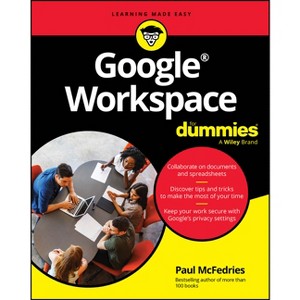
Google Workspace for Dummies - by Paul McFedries (Paperback)

$19.50Save $15.49 (44% off)

In Stock

Free & easy returns

Free & easy returns

Return this item by mail or in store within 90 days for a full refund.
Eligible for registries and wish lists

About this item

Highlights

  • Easy advice for getting the most out of Google Workspace for school, work, or personal use Google Workspace For Dummies is here to show you the tips and tricks for upping your productivity with Google's cloud-based software suite.
  • About the Author: Paul McFedries is a Google(R) Workspace administrator, a thankless job if ever there was one.
  • 464 Pages
  • Computers + Internet, Desktop Applications

Description


About the Book


Google Workspace For Dummies is here to show you the tips and tricks for upping your productivity with Google's cloud-based software suite. This book includes jargon-free instructions on using Gmail, Calendar, Docs, Sheets, Drive, Chat, and Meet. You'll learn about the AI features, updated security, compatibility with other apps, picture-in-picture capability for video meetings, and beyond. Plus, you'll get info on Google's Forms and Notes feature that makes it simple to gather and share data and stay up-to-date with your team. It's easier than ever to collaborate securely in the cloud, thanks to this Dummies book"--


Book Synopsis


Easy advice for getting the most out of Google Workspace for school, work, or personal use

Google Workspace For Dummies is here to show you the tips and tricks for upping your productivity with Google's cloud-based software suite. This book includes jargon-free instructions on using Gmail, Calendar, Docs, Sheets, Drive, Chat, and Meet. You'll learn about the AI features, updated security, compatibility with other apps, picture-in-picture capability for video meetings, and beyond. Plus, you'll get info on Google's Forms and Notes feature that makes it simple to gather and share data and stay up-to-date with your team. It's easier than ever to collaborate securely in the cloud, thanks to this Dummies book.

  • Learn how to collaborate with colleagues in real time using the programs that come with Google Workspace
  • Create and edit contacts, and set up video meetings
  • Work on slides, spreadsheets, and documents
  • Discover tips and tricks to increase productivity and keep your work secure

Google Workspace For Dummies is a must for business users and workers who use Google applications on the job. Casual users and students, you'll love it, too.


From the Back Cover


Stay organized and collaborate anywhere

Google(R) Workspace is a one-stop-shop for emailing, creating documents, working with spreadsheets, and a whole lot more. Google(R) Workspace For Dummies makes it easy to discover all that this online productivity suite has to offer. You get simple instructions on how to make the most of Gmail(R), Calendar, Docs, Drive, and Meet. Go beyond the basics with advanced tips on document formatting, collaboration, and privacy and security. Gone are the days of endlessly searching for files. With Google(R) Workspace, they're all in one place.

Inside...

  • Sorting and filtering email
  • Chatting with your contacts
  • Managing your calendar
  • Creating great presentations
  • Wrangling data in Google(R) Sheets
  • Working with shared files
  • Creating forms and notes
  • Organizing virtual meetings


About the Author


Paul McFedries is a Google(R) Workspace administrator, a thankless job if ever there was one. Paul is also a full-time technical writer who has somehow found the time to write more than 100 books that have sold more than four million copies worldwide.

Dimensions (Overall): 8.9 Inches (H) x 7.2 Inches (W) x 1.4 Inches (D)
Weight: 1.35 Pounds
Suggested Age: 22 Years and Up
Number of Pages: 464
Genre: Computers + Internet
Sub-Genre: Desktop Applications
Publisher: For Dummies
Theme: Presentation Software
Format: Paperback
Author: Paul McFedries
Language: English
Street Date: June 18, 2024
TCIN: 90593119
UPC: 9781394253227
Item Number (DPCI): 247-44-5663
Origin: Made in the USA or Imported
If the item details aren’t accurate or complete, we want to know about it.

Shipping details

Estimated ship dimensions: 1.4 inches length x 7.2 inches width x 8.9 inches height
Estimated ship weight: 1.35 pounds
We regret that this item cannot be shipped to PO Boxes.
This item cannot be shipped to the following locations: American Samoa (see also separate entry under AS), Guam (see also separate entry under GU), Northern Mariana Islands, Puerto Rico (see also separate entry under PR), United States Minor Outlying Islands, Virgin Islands, U.S., APO/FPO, Alaska, Hawaii

Return details

This item can be returned to any Target store or Target.com.
This item must be returned within 90 days of the date it was purchased in store, delivered to the guest, delivered by a Shipt shopper, or picked up by the guest.
See the return policy for complete information.

Q: Who is the author of the book?

submitted by AI Shopping Assistant - 1 month ago
  • A: The author is Paul McFedries, a Google Workspace administrator and experienced technical writer.

    submitted byAI Shopping Assistant - 1 month ago
    Ai generated

Q: How many pages does the book contain?

submitted by AI Shopping Assistant - 1 month ago
  • A: The book contains 464 pages, providing comprehensive guidance on using Google Workspace.

    submitted byAI Shopping Assistant - 1 month ago
    Ai generated

Q: What topics does the book cover about Google Workspace?

submitted by AI Shopping Assistant - 1 month ago
  • A: The book covers Gmail, Calendar, Docs, Sheets, Drive, Chat, Meet, and AI features.

    submitted byAI Shopping Assistant - 1 month ago
    Ai generated

Q: What is the target audience for this book?

submitted by AI Shopping Assistant - 1 month ago
  • A: This book is suitable for business users, casual users, and students looking to enhance their productivity.

    submitted byAI Shopping Assistant - 1 month ago
    Ai generated

Q: What unique features of Google Workspace are discussed?

submitted by AI Shopping Assistant - 1 month ago
  • A: The book discusses AI features, security updates, and the picture-in-picture capability for video meetings.

    submitted byAI Shopping Assistant - 1 month ago
    Ai generated

Additional product information and recommendations

Discover more options

Guests also viewed

Get top deals, latest trends, and more.

Privacy policy