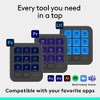


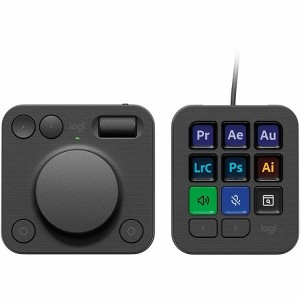
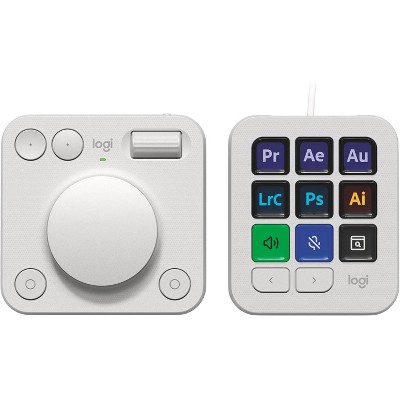
Logitech MX Creative Console, 9 Customizable Buttons with LCD Screens, Graphite
$199.99
Out of Stock
Add plans or services
Make your selection before adding to cart
2 Year Electronics Protection Plan ($175-$199.99) - Allstate
$30.00

Free & easy returns
Return this item by mail or in store within 30 days for a full refund.
Sold & shipped by Spacebound
Eligible for registries and wish lists
At a glance
About this item
Additional product information and recommendations

Guests also viewed
- $101.99reg $119.99 Sale4.7 out of 5 stars with 6 ratings
Guests are saying
The Logitech MX Creative Console is a versatile tool designed to enhance productivity for creative professionals. With customizable buttons and a smooth dial, it allows for quick access to shortcuts in applications like Adobe Photoshop and Premiere Pro. While many guests appreciate its build quality and functionality, some have noted challenges with software compatibility and setup. Overall, it offers a unique solution for streamlining workflows, making it a valuable addition to any creative workspace.
Summary created by AI from text of reviews reflecting recent feedback provided across different star ratings (includes incentivized reviews)
3.9 out of 5 stars with 81 reviews
3 out of 5 stars
6 July, 2026
originally posted on Logitech-emea

Good device, lacks OS support
I use both Linux and Windows for different purposes and it would be great if I could just plug it in and let the Logitech app sort it out. Works fine on Windows, although antivirus sometimes gets in a teist and scans the Logitech Plus app constantly until I restart the Logitech app. No support for Linux at all. It wouldn't take much to either open source it and allow the community to port it, or port it to a Snap, AppImage or Flatpak.
From Logitech team
Mate, We hear you loud and clear. Opening up tools or providing more accessible formats could definitely empower the community and improve the experience. Thanks for sharing your thoughts.
5 months ago
4 out of 5 stars
22 June, 2026
originally posted on logitech-ca

Good for more than just creative work... Gaming... Productivity.
Nice... on multiple levels. We all want that big volume knob. The customizable buttons hit the right spot.
From Logitech team
That’s the kind of feedback we love to hear! The MX Creative Console really nails it with that big volume knob. It’s the centerpiece everyone wants to spin. And those customizable buttons hitting the right spot make the whole setup feel smooth and intuitive. Thanks for sharing, sounds like it’s delivering exactly the creative control you were looking for!
5 months ago
4 out of 5 stars
5 June, 2026
originally posted on Logitech

Slow connect
The dial-wheel pad takes absolutely forever to re-connect after an idle period. I really wish there was a version that could connect to the macro button array and share the USB connect.
2 out of 5 stars
6 May, 2026
originally posted on Logitech
Needs work.
Product works well enough but has many limitations and requires a lot of work to set up. Using for light room and as it has some presets to download it’s very tough to customize and to work with. Most of the time it will work fine. On occasion it will not register my edits. For example will by turning the knob to boost exposure and it will not work. Have to click off of exposure and re-click on it and then it will work. Was hoping this was the device to speed up my workflow but it is not.
4 out of 5 stars
3 April, 2026
originally posted on Logitech
Good, but needs an added feature to make it a solid accessory
Good product. Requires setting up profile to use effectively. Primarily bought to use with Adobe Premiere. Unfortunately, the wheel cannot be used to shuttle the timeline. Hopefully support for this will be added making this a more useful accessory.
2 out of 5 stars
9 March, 2026
originally posted on Logitech-emea
Lots of promise, poor delivery
I like the idea of both of these pieces of kit. The construction of them is solid, the buttons are satisfying to press and well-lit. The ability to design your own button logo/text combinations is useful. The presets available are only for a limited set of software, which I knew before purchase, but I'd hoped that I'd be able to build my own customised presets for other software. Technically I can, but the functionality here is very limited compared to the software that is fully supported. These are all minor niggles. The big problem comes from the interaction between the hardware and the software. Options+ is required to be running in the background to benefit from the functions of the Creative Console, and it is both buggy and a massive resource hog. I can't use it with Zoom, because it is so resource-intensive that it prevents my external microphone from working (and I'm on a high-spec music production machine, not a bog-standard desktop). It frequently causes other software to crash (software that is stable when the Creative Console is unplugged). Occasionally it prevents shutdown, necessitating a hard reboot. Very disappointing.
2 out of 5 stars
2 March, 2026
originally posted on Logitech
Nice Hardware, software is maximally inconvenient
Nice Hardware, but unforgivable failure of Smart Actions. Also…. Can’t transfer your smart actions thru the cloud from PC to Mac?
3 out of 5 stars
22 December, 2025
originally posted on Logitech
Nice hardware, but clearly aimed only at Adobe app
The hardware itself is nice, but if you're not using it with Adobe products then it's a slog to set it all up correctly. It feels like Logitech has gone out of their way to make it difficult to use with non-Adobe products, requiring lots of tedious set-up and no support for community-created setups. I'm disappointed.
From Customer Care team
We're sorry the MX Creative Console didn't meet your needs. This isn't what we want for our users. We'll share this feedback with our team to make improvements.
9 months ago
4 out of 5 stars
29 November, 2025
originally posted on Logitech
Over all, very nice!!
Over all it work really well but I have noticed it picks your apps and compiles them in a list. My Adobe recently updated the Creative Cloud app and the icon populated to pick from doesn’t work now. I have had to use a work around by using the “open file” command instead. It would be nice to be able to just pick your app if it is not in the list or maybe a new short cut after an update.
5 out of 5 stars
18 November, 2025
originally posted on Logitech
Great productivity booster
The more I use the MX Creative Console, the more I like it. I mainly use it in Final Cut Pro where I can quickly skim the timeline and size it to what I'm doing way faster than using a mouse and keyboard. But the real power is how customizable it is. If there is no profile for the app you're using, its super easy to create one and add all kinds of shortcuts to boost productivity. I'm getting very addicted to it!
5 out of 5 stars
11 November, 2025
originally posted on Logitech
INCREDIBLE for design students
The creative console has been incredible for my graphic design classes, especially considering I injured my mouse hand and have been struggling a bit. I got it with a student discount and it came with 3 months of Adobe CC which I already needed for class. It take some time and consideration setting up the hotkeys and icons just how you like, but it's definitely worth it in the end
3 out of 5 stars
10 November, 2025
originally posted on Logitech
Useful but it has issues
Overall the console has improved workflow in LrC. Two significant problems are: the “actions ring” doesn’t work despite following all guidance from Logitech. The other issue is the loss of connectivity. This occasionally requires the removal/reinsertion to get the unit to “wake up.”
2 out of 5 stars
19 August, 2025
originally posted on Logitech
Interesting product for the MX series
The MX Creative Console is well made and is a usefull accessory. My reason for only giving the product 2 stars, I develop applications for the PC and was wanting to use the creative console as an input to some of my applications. I could not find an API that would allow me to use the creative console in my applications. So the MX Creative Console has limited use for me. I suspect that users of applications for which the MX Creative Console was intended, will find it very useful.
4 out of 5 stars
16 June, 2025
originally posted on logitech-ca
Massive gains in productivity - still immature product
The efficiency gain is massive: my workflow speed has increased by at least 50% since I've starting using the console. The dial allows the eyes to remain on the photo rather than having to align the cursor with the sliders. Although the default configuration on the keypad for use in Lightroom felt unnatural, The ability to customize the keypad allows me to match my editing sequence. This prevents having to switch my hand from keyboard to mouse back and forth all the time while moving through all the edition panels. I simply click on each button and edit in sequence as I move down the keyboard, switch to page 2 and start again. It would require a few key updates before I can give it a 5 start rating however. - Not all features are yet available to use: e.g. switching to B&W which means I still often have to rely on my keyboard. A keystroke assignment would be a great way of resolving this issue. - About once a week, my customization doesn't appear on the keypad or the dial simply stops working, requiring an app shutdown/restart or sometimes even a full reboot. Knowing how long a Lightroom shutdown takes, this kills whatever efficiency gains I made on that day. - We cannot customize the keyboard for various tasks or sub-tasks. For instance, in Lightroom, when culling pictures in the library, when applying masks, or removing objects, we are restricted to the default factory settings. The ability to apply filters in a click would do wonders. - We cannot share or download customizations to and from other users in the marketplace and so we're limited to a few options, none of which make much sense to me.
4 out of 5 stars
28 April, 2025
originally posted on Logitech
Mostly good, with a few considerations
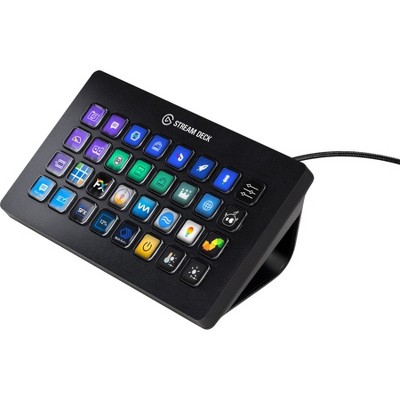
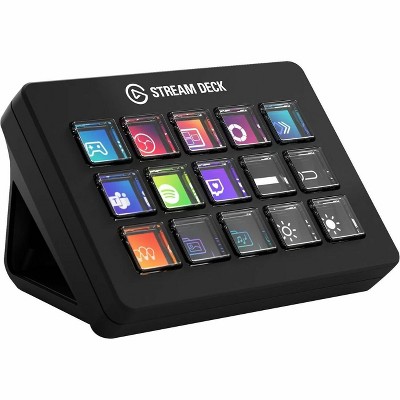
So far, the overall polish and out-of-the-box integrations have been great. My two biggest issues are related to the main dial (for volume) and the default focus settings for the keypad's programmable buttons. 1. There's a delay of well over one second when turning the volume dial. This makes it useless for small volume adjustments. You basically end up needing to "jiggle" the dial (turning it up and down) for one or two seconds for it to "wake up" the Bluetooth connection and start transmitting dial position to Windows. I know this is to save battery (the dialpad isn't hardwired), but it's a step back compared to my Elgato Stream Deck. 2. The keypad buttons change "context" (switching between modes) based on which application has "focus" in Windows. For example, when I launch a Zoom meeting, the keypad (quite noticeably) switches to blue preset buttons for Zoom. Awesome! The problem is when I'm sharing my screen in Zoom and doing something in a shared window. Since I'm technically "focused" on the shared window (my web browser, etc.) and not Zoom, all my keypad buttons jump to whatever the other app's keypad buttons are. This makes it very difficult to seamlessly mute, unmute, or execute other hotkey tasks in Zoom because I lose them every time I click into my screenshared app. Ideally, the MX keypad is smart enough to know when I've hit "share" on the keypad and won't switch my keypad buttons until I stop sharing.
3 out of 5 stars
28 March, 2025
originally posted on http://www.dell.com/en-us

(no review title)
3
1 out of 5 stars
18 February, 2025
originally posted on Logitech
Good idea but bad execution.
[This review was collected as part of a promotion.] I bought it to use Capture One shortcuts but the keys never work. For example, rating with stars or adding color tags just to begin with. I keep waiting and waiting for a software update but still no solution and the device is basically useless on Capture One.
5 out of 5 stars
14 February, 2025
originally posted on logitech-ch

MX Creative Console – A Must-Have for Creators
I’ve been using the MX Creative Console for a few weeks now, and it’s made a huge difference in my workflow. The dials, buttons, and sliders make editing so much faster and smoother, whether I’m working in Photoshop, Premiere Pro, or a music production app. Customization is a big plus—you can set up different controls for each program, which saves a ton of time. The build feels premium and solid, and it fits nicely on my desk without taking up too much space. It does take a little getting used to, but once you do, it’s hard to go back. If you do a lot of creative work, this is definitely worth checking out!
3 out of 5 stars
13 January, 2025
originally posted on Logitech
I like but Sometimes But
[This review was collected as part of a promotion.] I love the concept but having issues. Sometimes the button gets stuck and you have to reset the device. Also, sometime in photoshop if you load an Action script it will only perform some of the action. It would be helpful if they would have a trouble shooting support page that was more detailed. If I can get it to work properly it would be a nice addition, but as of right now I am reverting to pressing keys on my keyboard, and not speeding up my work flow.
2 out of 5 stars
6 January, 2025
originally posted on Logitech
Overhyped marketing, fooled me
[This review was collected as part of a promotion.] I bought it because the marketing convinced me. I liked the ability to display what I want on the keys. Software doesn't work very well and the keys have a strange soft double click when depressed. Not in a good way, feels like an overlooked design flaw. Maybe I'll try using it again when they fix the overly aggresive scroll wheel, changing the speed didn't do anything, or when they have more programs that are compatible with the device.