

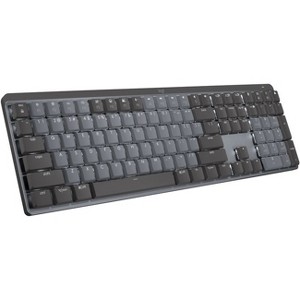
Logitech MX Mechanical Wireless Illuminated Performance Keyboard 920-010547
$179.99
In Stock

Free & easy returns
Return this item in store within 30 days for a full refund.
Sold & shipped by Spacebound
Eligible for registries and wish lists
At a glance
About this item
Additional product information and recommendations
Related Categories
Guests are saying
The Logitech MX Mechanical Keyboard impresses with its premium build quality, tactile feedback, and seamless connectivity across devices. Guests appreciate the satisfying typing experience, customizable features, and long battery life. However, some have noted issues with key sensitivity and layout adjustments. Overall, it serves as a versatile tool for both work and personal use, making it a worthy investment for those seeking an enhanced typing experience.
Summary created by AI from text of reviews reflecting recent feedback provided across different star ratings (includes incentivized reviews)
4.3 out of 5 stars with 446 reviews
3 out of 5 stars
16 September, 2026
originally posted on Logitech

Nice Keyboard but worth the price?
The first keyboard I ordered came damaged. The whole return and repurchase situation was not the best to work through, but I did eventually receive my keyboard. The backspace button doesn't seem to work as well as my tried and true K540/K545. I find myself having to click it with more force than any other key to make sure it actually registers. Due to the whole fiasco of having to return and repurchase, I haven't reached out to support. Overall, it's a decent keyboard but I don't feel the value matches the price.
1 reply from Logitech team - 12 days ago
Having a key that requires extra pressure to register is certainly not the expected experience. Please reach out via email to socialcare@logitech.com so support can assist directly with getting that backspace key working properly. Reassurance is top priority, and assistance is available to make things right.
3 out of 5 stars
15 August, 2026
originally posted on Logitech
Squeaky Shift Key
Overall, the keyboard is good. But the left shift key squeaks horribly every time it is pushed.
1 reply from Logitech team - 1 month ago
Thanks for letting us know about your experience with the MX Mechanical - Graphite. We’ll pass this along to our product team, and our support team would be happy to assist you further at socialcare@logitech.com
5 out of 5 stars
15 August, 2026
originally posted on Logitech
Great
[This review was collected as part of a promotion.] This is a premium quality keyboard, it was everything that I expected
1 reply from Logitech team - 1 month ago
Happy to hear the MX Mechanical lived up to your premium expectations! We built it to combine quality, performance, and style seamlessly. Thanks for recognizing the effort that goes into delivering a top-tier keyboard experience!
3 out of 5 stars
22 July, 2026
originally posted on Logitech
Love the feel but it’s laggy
Love the feel but it’s laggy. It seems to have trouble between my work and personal HP, via the bolt on a common dock
1 reply from Logitech team - 2 months ago
We appreciate your thoughts on the Logitech MX Master 3S Bluetooth Edition. While it’s great to hear the feel works for you, we’re sorry the latency through Bolt on your HP dock isn’t meeting expectations. To help us dig deeper and resolve this, please connect with our Social Care team at socialcare@logitech.com and share: Name Email Address Country Brief summary of the issue This way, our team can review your setup and provide tailored support. Your feedback helps us refine the experience for every user.
5 out of 5 stars
21 July, 2026
originally posted on Logitech
The Sleekest Mechanical Keyboard
Superb, just as advertised. Smooth keyboard. Keep it up Logitech Team!!!
1 reply from Logitech team - 2 months ago
Thanks a ton for the awesome shoutout! We're thrilled to hear that the Logitech MX Mechanical is hitting all the right notes for you. Smooth typing and sleek design are exactly what we aim for, and your feedback made our day.
5 out of 5 stars
11 July, 2026
originally posted on http://www.dell.com/en-us

Very Good Product
Very Good Product
2 out of 5 stars
19 June, 2026
originally posted on Logitech
Great feeling keyboard, not good for corporate com
No print screen button is causing me to return the keyboard. My company locks out most 3rd party software and I cannot use the required Logitech software.
1 reply from Logitech team - 3 months ago
Appreciate you sharing your experience with the MX Mechanical. The typing feel is clearly a highlight, but we understand how the absence of a Print Screen key and the need for software can make it tough in a corporate setup where restrictions are in place. Feedback like yours helps us see where the product doesn’t align with certain work environments, and it’s valuable for our team to hear.
4 out of 5 stars
12 May, 2026
originally posted on Logitech
60 Words Per Minute, 25 errors to fix
My error rate keyboarding is higher withe this keyboard that the previous Logitech keyboard. I don't like how the keys are labeled in the number row with the numbers next to the uppercase component but that is not the reason for the error rate. I think this keyboard is smaller.
1 out of 5 stars
7 May, 2026
originally posted on Logitech
not what it should be
i dont like the way the keyboards feel -- there seems to be too much resistance that creates stress on the fingers. Furthermore, i find the keys to be too loud, and I am using the linear board. I would have imagined with todays technology, i would be able to modify the key's sensitivity.
5 out of 5 stars
31 March, 2026
originally posted on Logitech
Great Keyboard
This is my 2nd one. I work both remote and on site. I use this keyboard at home and love it so much bought a 2nd one for work. I've gotten tons of compliments on it. Highly recommend.
3 out of 5 stars
30 March, 2026
originally posted on Logitech
Fine Keyboard
I had to replace my first one after about 2 years, the device couldn't connect to my computer. The new one has a bit of a squeaky space bar but otherwise it's a good substitute for a very noisy mechanical keyboard if the response times are important for you
3 out of 5 stars
29 March, 2026
originally posted on Logitech
Great quality, not the keypress feedback expected.
Good quality, but keypress feedback not what I expected in the model chosen. Happy with the purchase. Layout slightly different than the flat MX Keys, and I like the dedicated volume up and down buttons, but I have to get used to the smaller Esc key. I happen to use Esc a lot in a company app.
5 out of 5 stars
21 March, 2026
originally posted on Logitech
Amazing
[This review was collected as part of a promotion.] Great keyboard! I got the brown switch and been loving it. Great for productivity.
4 out of 5 stars
11 March, 2026
originally posted on Logitech
Great keyboard with two minor annoyances I didn’t expect
I love the feel of typing on this keyboard but I’m still deciding if I can live with it as my daily driver. The layout is somewhat compact for a full size keyboard, without the usual gap under the top row of function keys. This throws me off now and then, but the biggest annoyance for me is that even when the keyboard is plugged directly into a computer, you still have to use Bluetooth or the wireless adapter for it to work. I just want to be able to plug it in to any machine and have it work right away every time.
5 out of 5 stars
3 March, 2026
originally posted on Logitech
decent keyboard, a bit pricey
unsure if I'm sold on the mechanical feel - don't get me wrong, I've used Logitech keyboards for over a decade (maybe more), overall I like the layout but the keys could use a little more 'oomph'
3 out of 5 stars
2 March, 2026
originally posted on Logitech
Loud and sensitive
Well built, keys feel nice but quiet it is not. Keys are also very sensitive and seem to trigger very early in the stroke - I would routinely find that just having my fingers idle on the keys would result in keystrokes without any key depression. I went back to my MX keys after a couple weeks. Its a shame the switches are soldered, I would have tried the other options.
5 out of 5 stars
22 February, 2026
originally posted on Logitech
Great and Quiet Mechancial Keyboard
Ive spoiled myself with mechanical keyboards working from home the last 6 years but started a new job in an office. I literally could not type on the company issues membrane keyboard. But knew bringing in one from home would likely drive people in the adjoining offices insane. So I purchased this one. Paired it with my house and its perfect. Click and accurate. But not loud
5 out of 5 stars
14 February, 2026
originally posted on Logitech
Wonderful feeling keyboard
Great easy to set up and quick pairing. Nice keyboard feel and comfortable keys
5 out of 5 stars
26 January, 2026
originally posted on Logitech
Great Keyboard!
This keyboard has been in use for a while now and all I can say is it is a dream to use! The build quality and key feel are impressive. The backlighting is nice and comes on when needed. The feel of the keys is nothing but awesome. I have used many keyboards over the years and this is the best one by far!
5 out of 5 stars
22 January, 2026
originally posted on Logitech
Keyboards can only be from Logitech
I feel like I am back to the normal typing experience I used to enjoy.