Target New ArrivalsHalloweenClothing, Shoes & AccessoriesHome & DecorKitchen & DiningPatio, Lawn & GardenGroceryHousehold EssentialsBabyBeautyTarget Beauty StudioPersonal CareSports & OutdoorsPetsHealthWellnessSchool & Office SuppliesToys & GamesElectronics & TechVideo GamesBooks, Music & MoviesParty SuppliesGift IdeasGift CardsShop by CommunityTarget OpticalDealsClearanceNew ArrivalsBack to SchoolCollegeTop DealsTarget Circle DealsWeekly AdShop Order PickupShop Same Day DeliveryRegistryRedCardTarget CircleFind Stores
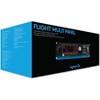
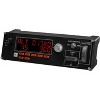
Saitek Pro Flight Multi Panel for PC - Cable - USB - PC - 2 of 4Saitek Pro Flight Multi Panel for PC - Cable - USB - PC - 3 of 4Saitek Pro Flight Multi Panel for PC - Cable - USB - PC - 4 of 4
Saitek Pro Flight Multi Panel for PC - Cable - USB - PC - 1 of 4

Saitek Pro Flight Multi Panel for PC - Cable - USB - PC

$162.99 reg $169.99
Sale save $7.00 (4% off)

In Stock

Free & easy returns
Free & easy returns
Return this item by mail or in store within 30 days for a full refund.
Sold & shipped by antonline
Eligible for registries and wish lists
Save 5% every day
With Target Circle™ Card (restrictions apply)

About this item

Highlights

  • Connectivity Technology: Cable
  • Buttons & Controls: Adjusting DialFlap SwitchThrottle ControlPitch
  • Platform Supported: PC
  • USB: Yes
  • Compatibility: Flight Simulation Software: FSX - Flight Simulator X (PC only) X-Plane 10 (PC and Mac) Prepar3D 2.2(PC on

Description

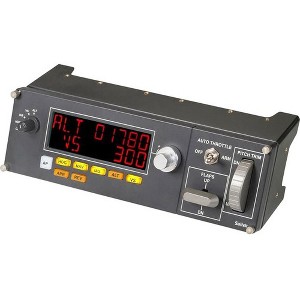
Saitek's Pro Flight Multi Panel is a full autopilot LED display that works with flight simulator software, effectively removing the need to use onscreen controls. An integrated dial adjusts settings for quicker selection of your required altitude. Additional functions also allow adjustment of your aircraft's throttle, flaps, and elevator trim. The full autopilot panel gives you fingertip control over a multitude of settings within FSX, X-Plane*, and Prepar3D software. No longer do you have to zoom into your flight sim's onscreen controls to make modifications; you can manipulate your aircraft's autopilot settings with physical controls that immediately trigger in-sim actions.
Model Compatibility: Personal Computer
Dimensions (Overall): 3.15 inches (H) x 3.15 inches (W) x 11.1 inches (D)
Weight: 1.4 pounds
Electronics Condition: New
Wireless Technology: No Wireless Technology
Number of buttons or keys: 12
Battery: No Battery Used
Warranty: 2 Year Limited Warranty. To obtain a copy of the manufacturer's or supplier's warranty for this item prior to purchasing the item, please call Target Guest Services at 1-800-591-3869
TCIN: 1001253187
UPC: 097855127938
Origin: made in the USA or imported
The above item details were provided by the Target Plus™ Partner. Target does not represent or warrant that this information is accurate or complete. On occasion, manufacturers may modify their items and update their labels.
We recommend that you do not rely solely on the information presented. If you have a specific question about this item, you may consult the item's label, contact the manufacturer directly or call Target Guest Services at 1-800-591-3869.
If the item details aren’t accurate or complete, we want to know about it.

Shipping details

Estimated ship dimensions: 5 inches length x 13 inches width x 6 inches height
Estimated ship weight: 1.95 pounds
This item cannot be shipped to the following locations: American Samoa (see also separate entry under AS), Guam (see also separate entry under GU), Northern Mariana Islands, Puerto Rico (see also separate entry under PR), United States Minor Outlying Islands, Virgin Islands, U.S., APO/FPO, Alaska, Hawaii
item ships from third party seller: antonline

Return details

This item can be returned to any Target store or Target.com.
This item must be returned within 30 days of the date it was purchased in store, delivered to the guest, delivered by a Shipt shopper, or picked up by the guest.
See the return policy for complete information.

Additional product information and recommendations
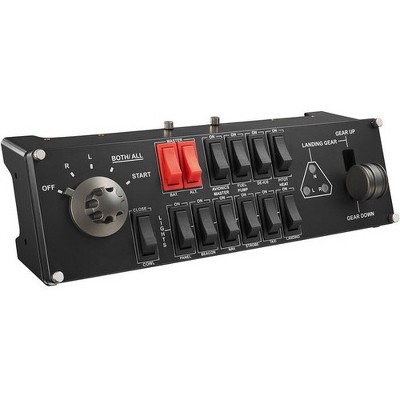
Discover more options

Skip to next section

Frequently bought together

Skip to next section
3.9 out of 5 stars with 14 reviews
4 out of 5 stars
13 January, 2026
originally posted on Logitech

Image

Mixed bag

Once I got it working it was fine, but the trim wheel doesn’t work. The panels don’t show up in ms fs controls options so it kind of sucks you can’t specifically set trim there.
1 reply from Customer Care team - 7 months ago
Hey! We're so pleased to hear that our product is meeting your needs. Your feedback helps guide our future improvements. Thank you for your continued support.
TheRealMPU
Did you find this review helpful?
4 out of 5 stars
28 August, 2025
originally posted on Logitech
Image

well built Auto Pilot

It was fairly easy to setup, works well in MSFS 2020. Plenty of mounting options. Gives your sim a convenient way of using the auto pilot while adding a sense of realism to the game. Would give it 5 stars but it is rather pricey
Wasr
Did you find this review helpful?
1 out of 5 stars
4 September, 2024
originally posted on http://www.dell.com/en-us
Image

(no review title)

1
Did you find this review helpful?
5 out of 5 stars
13 February, 2021
originally posted on http://www.dell.com/en-us
Image

(no review title)

5
Did you find this review helpful?
5 out of 5 stars
25 September, 2020
originally posted on http://www.dell.com/en-us
Image

Works Great!

Works great with the new Microsoft flight simulator. Can't wait to get the other controls when back in stock.
Kleiner
Did you find this review helpful?
5 out of 5 stars
23 September, 2020
originally posted on http://www.dell.com/en-us
Image

(no review title)

5
Did you find this review helpful?
4 out of 5 stars
22 September, 2020
originally posted on http://www.dell.com/en-us
Image

More mushy knobs and dials.

Pitch Trim Dial Feels soft mushy and not responsive. Otherwise it would be 5 stars.
KJO58
Did you find this review helpful?
5 out of 5 stars
23 July, 2020
originally posted on http://www.dell.com/en-us
Image

(no review title)

5
Did you find this review helpful?
5 out of 5 stars
26 May, 2020
originally posted on http://www.dell.com/en-us
Image

(no review title)

5
Did you find this review helpful?
5 out of 5 stars
2 January, 2020
originally posted on http://www.dell.com/en-us
Image

(no review title)

5
Did you find this review helpful?

Get top deals, latest trends, and more.