Target New ArrivalsFourth of JulyBack to SchoolCollegeClothing, Shoes & AccessoriesHome & DecorKitchen & DiningOutdoor Living & GardenGroceryHousehold EssentialsBabyBeautyPersonal CareSports & OutdoorsHealthWellnessSchool & Office SuppliesToys & GamesElectronicsVideo GamesMovies, Music & BooksParty SuppliesGift IdeasGift CardsPetsUlta Beauty at TargetShop by CommunityTarget OpticalDealsClearanceNew ArrivalsBack to SchoolCollegeTop DealsTarget Circle DealsWeekly AdShop Order PickupShop Same Day DeliveryRegistryRedCardTarget CircleFind Stores
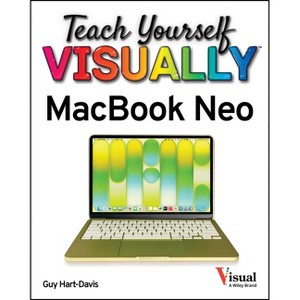
Teach Yourself Visually Macbook Neo - by  Guy Hart-Davis (Paperback) - 1 of 1

Teach Yourself Visually Macbook Neo - by Guy Hart-Davis (Paperback)

$25.00

Pre-order

Free & easy returns
Free & easy returns
Return this item by mail or in store within 90 days for a full refund.
Eligible for registries and wish lists

About this item

Highlights

  • The visual learner's guide to getting up and running with your Apple laptop Teach Yourself VISUALLY MacBook Neo covers all the vital information you need to start working on your MacBook Neo.
  • About the Author: Guy Hart-Davis is the author of more than 175 computer books, including Teach Yourself VISUALLY iPhone 17; iPhone For Dummies, 2025 Edition; macOS Sequoia For Dummies; Teach Yourself VISUALLY Google Workspace; Teach Yourself VISUALLY Chromebook; and Teach Yourself VISUALLY MacBook Pro and MacBook Air, 8th Edition.
  • 208 Pages
  • Computers + Internet, Hardware
  • Series Name: Teach Yourself Visually

Description


Book Synopsis


The visual learner's guide to getting up and running with your Apple laptop

Teach Yourself VISUALLY MacBook Neo covers all the vital information you need to start working on your MacBook Neo. With this highly-illustrated and easy-to-follow guide, you'll learn to navigate the macOS interface like a pro; customize your desktop with the widgets you need; and get your Neo working with iCloud, your iPhone, and your iPad. This book's graphical, step-by-step instructions walk you through everything from installation to organizing your life and enjoying multimedia, helping you to get the most out of the investment you've made in your MacBook.

This fully updated edition helps you become a MacBook Neo power user and exploit the features in macOS, Apple's state-of-the-art operating system, and the apps that come with it. If you prefer to learn visually, this is the book you need.

  • Get up to speed with the latest macOS version and its new features
  • Perform everyday tasks quickly and easily
  • Customize settings to make macOS and its apps work the way you prefer
  • Communicate via audio and video with FaceTime, via instant messaging with Messages, and via email with Mail
  • Organize your life with Calendar, Contacts, Reminders, Notes, and Maps
  • Make the most of your iCloud account

Instead of confusing tech-speak and vague instructions, this guide is packed with screenshots, easy-to-follow instructions, and a practical sensibility. Grab Teach Yourself VISUALLY MacBook Neo and explore all that your Neo can do.


From the Back Cover


Teach yourself VISUALLYâ"[

Are you a visual learner? Do you prefer instructions that show you how to do something â " and skip the long-winded explanations? If so, then this book is for you. Open it up and youâ (TM)ll find clear, step-by-step screen shots that show you how to tackle dozens of MacBook Neo tasks. Each task-based spread covers an essential technique that will help you get up and running on your MacBook Neo in no time.

Youâ (TM)ll learn to:

  • Make your Neo work your way
  • Talk to friends on FaceTime
  • Use instant messaging and email
  • Organize your calendar and contacts
  • Keep your info safe and private


About the Author


Guy Hart-Davis is the author of more than 175 computer books, including Teach Yourself VISUALLY iPhone 17; iPhone For Dummies, 2025 Edition; macOS Sequoia For Dummies; Teach Yourself VISUALLY Google Workspace; Teach Yourself VISUALLY Chromebook; and Teach Yourself VISUALLY MacBook Pro and MacBook Air, 8th Edition.

Dimensions (Overall): 9.0 Inches (H) x 7.2 Inches (W) x .7 Inches (D)
Weight: .95 Pounds
Suggested Age: 22 Years and Up
Number of Pages: 208
Genre: Computers + Internet
Sub-Genre: Hardware
Series Title: Teach Yourself Visually
Publisher: Visual
Theme: Personal Computers, Macintosh
Format: Paperback
Author: Guy Hart-Davis
Language: English
Street Date: July 8, 2026
TCIN: 1012303858
UPC: 9781394452972
Item Number (DPCI): 247-07-9749
Origin: Made in the USA or Imported
If the item details aren’t accurate or complete, we want to know about it.

Shipping details

Estimated ship dimensions: 0.7 inches length x 7.2 inches width x 9 inches height
Estimated ship weight: 0.95 pounds
We regret that this item cannot be shipped to PO Boxes.
This item cannot be shipped to the following locations: American Samoa (see also separate entry under AS), Guam (see also separate entry under GU), Northern Mariana Islands, Puerto Rico (see also separate entry under PR), United States Minor Outlying Islands, Virgin Islands, U.S., APO/FPO, Alaska, Hawaii

Return details

This item can be returned to any Target store or Target.com.
This item must be returned within 90 days of the date it was purchased in store, delivered to the guest, delivered by a Shipt shopper, or picked up by the guest.
See the return policy for complete information.

Additional product information and recommendations

Discover more options

Best-selling Computers & Technology Books

Get top deals, latest trends, and more.