


Amazon Kids Echo Dot (5th Gen 2022) - Fire Dragon
$89.99
In Stock
Eligible for registries and wish lists
At a glance
About this item
Additional product information and recommendations
Guests also viewed
Related Categories
Guests are saying
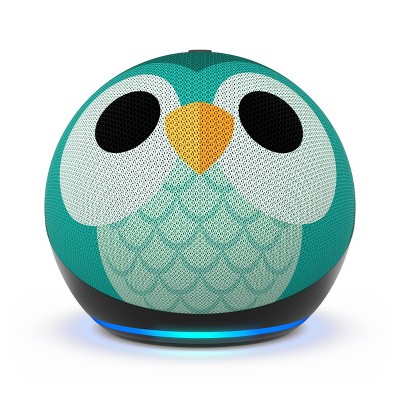
The Echo Dot Kids 5th Generation is a delightful device that combines fun and functionality for children. With its adorable owl design, it engages kids through music, stories, and interactive games. Parents appreciate the easy setup and robust parental controls, allowing for a safe and enjoyable experience. This device not only entertains but also aids in learning, making it a valuable addition to any child's room.
Summary created by AI from text of reviews reflecting recent feedback provided across different star ratings (includes incentivized reviews)
4.7 out of 5 stars with 214 reviews
quality: 4.35 out of 5
value: 4.35 out of 5
78% would recommend
23 recommendations
5 out of 5 stars
Thumbs up graphic, would recommend
10 August, 2026Verified purchase
(no review title)
My kids absolutely love this its great for starting a routine for them especially when school starts. They use there imagination with the create a store mode and love when they hear jokes and fun facts. i love that it tells great bedtime stores. And then plays sleepy music to help them at night. I got it on sale so I think the sale price was great.
5 out of 5 stars
Thumbs up graphic, would recommend
29 July, 2026Verified purchase
My kids love it
Both my sons love it. And I really like it too. They have it in their bedroom. The only thing is that it was very hard to set up. Since we also have an Alexa in our room, I had a difficult time doing the drop in and then you also have to be careful because then your kids have access to your Alexa so you have to also figure that out so they don’t mess with your Alexa other than that it was good. I really like it cause I can drop in on the room and let them know anything.
1 out of 5 stars
Thumbs down graphic, would not recommend
17 March, 2026
not worth it
I realize this is a kids version. But it offers very little flexibility with what you're aloud to do on it. It's not worth it.
1 reply from Amazon Devices Customer Support team - 6 months ago
Hi Katie, Thank you for sharing your feedback on the Amazon Kids Echo Dot (5th Gen). We're sorry to hear that the device didn't meet your expectations regarding flexibility and functionality. We understand that even with kid-focused features, you were hoping for more options and control over what can be done on the device. The Kids Edition is designed with parental controls and age-appropriate content in mind, which does limit some features compared to the standard Echo Dot. However, we appreciate you taking the time to share your experience, as feedback like yours helps us understand what families are looking for in these products. If you'd like to explore the standard Echo Dot (5th Gen) for more flexibility, or if you have any questions about the device's capabilities, please don't hesitate to reach out to our support team at 1-888-280-4331 or through the Alexa app.
5 out of 5 stars
Thumbs up graphic, would recommend
9 January, 2026Verified purchase
Usefull
Does everything it says.
5 out of 5 stars
12 December, 2025Verified purchase
(no review title)
Good
1 out of 5 stars
Thumbs down graphic, would not recommend
9 December, 2025Verified purchase
Dissapointed in lack of respect for my purchase
The delivery by Fed X was caught on my Ring camera. The delivery person just through the box containing the eco dot on to my porch. When I opened the box, the echo dot wasn’t even wrapped with cushioning paper. This is a gift. I am very offended by the treatment of my order. Both by Target and by FedX.
5 out of 5 stars
Thumbs up graphic, would recommend
18 November, 2025Verified purchase
echo owl
cute colorful
5 out of 5 stars
Thumbs up graphic, would recommend
9 January, 2025Verified purchase
A gift
It’s a really good purchase, the color, form.
1 out of 5 stars
26 December, 2024Verified purchase
Do not recommend
Switches off at random moments, often just doesn’t respond at all.
1 reply from Amazon Devices Customer Support team - 2 years ago
Hi Useless, I'm sorry to see that your Amazon Echo Dot Kids is not performing to your satisfaction. Most problems with the device can be resolved by doing the following. * Check that your device has a strong internet connection.* If your device setup uses the Alexa app, check that you have the latest version of the app.* Restart your Echo device. Unplug it from power, wait 30 seconds, then plug it back in. *If none of these steps help, or if you have problems registering the device, reset your Echo device to clear up most issues. If these steps do not help and you are still experiencing issues, you can reach out to Amazon Customer Support 24/7 at 1-888-280-4331. Thank you for your feedback. Happy Holidays!
5 out of 5 stars
Thumbs up graphic, would recommend
18 November, 2024Verified purchase
Owl
It calms my child down and helps her stay asleep
5 out of 5 stars
Thumbs up graphic, would recommend
19 October, 2024Verified purchase
Great gift for kids!
This Alexa version can be programmed -to give notice for bedtime, snack break, dance time -to answer all sorts of questions -to provide music -yes, to help with homework! My grandkids (ages 8 and 3.5) are enjoying this technology and savor the communication!
1 out of 5 stars
Thumbs down graphic, would not recommend
6 July, 2024Verified purchase
Stopped working after 7 monthhs
Stopped working after 7 months
1 reply from Amazon Devices Customer Support team - 2 years ago
Hello Mid 30s mom, sorry to hear your Amazon Kids Echo Dot (5th Gen 2022) has stopped working after 7 months. The Amazon Kids Echo Dot (5th Gen 2022) has an included 2 years worry free warranty, please contact Amazon’s customer service at 1-888-280-4331 to start a warranty exchange your device. Hope this information helps you with your device. Have an amazing day!
5 out of 5 stars
Thumbs up graphic, would recommend
23 May, 2024Verified purchase
Buy it now!
I’ve bought a lot of non sense items, and this is not one. Best 60 dollars spent ! My daughter can play music in room, ask Alexa questions, even can call my husband and I! I may have jammed out to matchbox 20 today with it! Best money spent !
2 out of 5 stars
Thumbs down graphic, would not recommend
9 February, 2024Verified purchase
Does not work
Maybe I just received a bad one, but this thing doesn't work properly. Alexa keeps saying she can't do that or just completely ignores the request and starts over. Very frustrating. 2 stars cuz its cute at least.
1 reply from Amazon Devices Customer Support team - 3 years ago
Thank you for your feedback on the Kids Echo Dot. I am sorry to hear of the issues you are having with the functionality of the device. Here are a few troubleshooting tips for you to try to resolve the issues: 1. Check that your device has a strong internet connection. 2. If your device set up uses the Alexa app, please check that you have the latest version of the app. 3. Restart your Echo device-Unplug it from power, wait 30 seconds, and then plug it back in. 4. If none of these steps help or if you are having problems registering the device, reset your Echo device to clear up most issues. If you are still having issues with the functionality of the Echo Dot, Amazon Customer service is available 24/7 for assistance on the device. You can reach them at 1-888-280-4331. I hope this information is helpful to get your device working properly for you. Thank you! Check that your device has a strong internet connection.
5 out of 5 stars
Thumbs up graphic, would recommend
20 January, 2024Verified purchase
Great for tge kids
Bought for my grandson as a Christmas present to replace the “tiger” Echo I had bought years ago. Didn’t work. Returned and had another shipped - Target customer service was great. He’s loving it
5 out of 5 stars
Thumbs up graphic, would recommend
2 December, 2023Verified purchase
Kid friendly and easy to set up
The owl is really cute! Looks just like the photo shown. Kid friendly, and easy to set up! All our kids have one and enjoy listening to music in their rooms. We also use these as “intercoms” instead of yelling for one another when we are across the house. Love them!!
1 out of 5 stars
Thumbs down graphic, would not recommend
23 November, 2023Verified purchase
Does not work with echo show
After setting up this echo dot our echo show stopped answering to my son’s questions and keeps asking to enable amazon kids on it as well. So there is a huge bug in alexa echo show and echo dot’s work.
5 out of 5 stars
Thumbs up graphic, would recommend
10 November, 2023Verified purchase
Love it
I was happy to see this cute item on sale. My son loves it. Very useful because you can drop from other dots in your home so no more yelling from downstairs to his room 😁
5 out of 5 stars
Thumbs up graphic, would recommend
18 October, 2023Verified purchase
Very cute Echo Dot
This will be a Christmas gift. I got the owl pattern and it looks so cute.
5 out of 5 stars
22 August, 2023
originally posted on Amazon Devices

Perfect for kids
[This review was collected as part of a promotion.] We were tired of our kids always taking over the dot in our living room to play music so when we saw this kids version, we knew it was just what we needed. It works every bit as well as the adult version but comes in an adorable design perfect for kids. We love it!