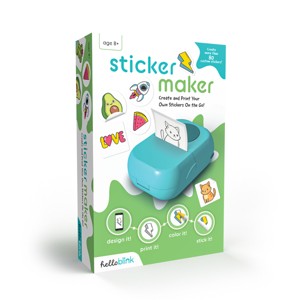
Ceaco Hello Blink Sticker Maker Create Your Own Stickers - Bluetooth Mini Thermal Sticker Printer Craft
$27.99
In Stock
Eligible for registries and wish lists
At a glance
About this item
Additional product information and recommendations
Related Categories
Guests are saying
The Hello Blink sticker maker is a fun and creative tool that allows guests to easily design and print custom stickers. Many guests appreciate its user-friendly app and portability, making it perfect for kids and family projects. However, some guests have experienced issues with printing accuracy and the frequent dispensing of blank stickers. Overall, it offers a unique way to engage in arts and crafts, though some improvements could enhance its functionality.
Summary created by AI from text of reviews reflecting recent feedback provided across different star ratings (includes incentivized reviews)
3.5 out of 5 stars with 212 reviews
quality: 2.64 out of 5
value: 2.84 out of 5
broad age appeal: 3.65 out of 5
ease of use: 2.72 out of 5
length of play: 2.75 out of 5
35% would recommend
62 recommendations
5 out of 5 stars
Thumbs up graphic, would recommend
11 September, 2026Verified purchase
Geeat
Very easy
1 out of 5 stars
Thumbs down graphic, would not recommend
7 September, 2026Verified purchase
beware of app availability
unable to use sticker maker since the required app is not available for my current android version only available for older androids and is also not available for fire tablet
5 out of 5 stars
Thumbs up graphic, would recommend
2 August, 2026
got as a gift
Easy to use and works perfect with the app. 0 issues and we love it
1 out of 5 stars
Thumbs down graphic, would not recommend
20 June, 2026
Very glitchy
Took forever for the Bluetooth button to even come on as an option. So couldn’t connect for a while. When it finally started printing. It prints but rolls out a blank sticker with it each time! Very glitchy.
5 out of 5 stars
Thumbs up graphic, would recommend
26 May, 2026
a very nice little project printer
this is a fabulous little sticker printer we've used it on so many things from school projects to just little creative stickers for gifts and other such things we've had it for a year now never had an issue. you will have to look online for refills.
1 out of 5 stars
Thumbs down graphic, would not recommend
26 May, 2026
Disappointed
The green light has never stopped blinking no matter what we do and it won’t print anything. It says it’s printing but never does.
5 out of 5 stars
Thumbs down graphic, would not recommend
23 May, 2026Verified purchase
it works for me may 2026
was easy
1 out of 5 stars
Thumbs down graphic, would not recommend
16 May, 2026
Disappointing
Prints an extra sticker every time wasting the roll or you have to open it and reset the paper.
1 out of 5 stars
Thumbs down graphic, would not recommend
10 May, 2026
(no review title)
Item was broken - flywheel isn’t strong enough to push paper through the printer, and no troubleshooting to repair.
5 out of 5 stars
25 April, 2026Verified purchase
(no review title)
My granddaughter uses this all the time! She really likes it!
4 out of 5 stars
Thumbs up graphic, would recommend
20 April, 2026
Great present
I. T. W. A. S. V. E .R .Y . F .U .N
1 out of 5 stars
Thumbs down graphic, would not recommend
14 March, 2026Verified purchase
(no review title)
Never got it to work it’s a faulty item. Sadly
1 reply from EastPoint Product Expert team - 6 months ago
We are sorry this did not meet your expectations. Please contact our team at customerservice@buffalogames.com so that we can work through a solution.
1 out of 5 stars
Thumbs down graphic, would not recommend
26 February, 2026Verified purchase
Do not buy, super glitchy
Very glitchy. Will print a sticker and it will continue to spit out another blank sticker right after, no matter how I align the roll in the printer. So you end up wasting stickers or having to realign the sticker roll every single time...which is incredibly annoying. Once I figured out I couldn't fix the problem my return window closed so now I'm stuck with a bad product which sucks since my daughter loves stickers so I thought this what such a cool gift initially.
1 reply from EastPoint Product Expert team - 7 months ago
please reach out to us at customerservice@buffalogames.com
1 out of 5 stars
Thumbs down graphic, would not recommend
15 February, 2026Verified purchase
Wouldnt buy - hard to use and doesnt print corrcetly
Hard to use and doesn’t print accurately. The paper is really hard to align, it always prints the sticker and then a blank sticker too - so it’s wastes 1 every time. Most the time the image is cut off too.
1 reply from EastPoint Product Expert team - 7 months ago
please reach out to us at customerservice@buffalogames.com
1 out of 5 stars
Thumbs down graphic, would not recommend
14 February, 2026Verified purchase
(no review title)
Dont work at all . Junk
1 reply from EastPoint Product Expert team - 7 months ago
Oh no! Please contact our team at customerservice@buffalogames.com so that we can work through a solution.
1 out of 5 stars
Thumbs down graphic, would not recommend
11 February, 2026Verified purchase
(no review title)
Doesn’t work. Target won’t let me return.
1 reply from EastPoint Product Expert team - 7 months ago
You can always reach out to us at customerservice@buffalogames.com! We will try our best to help with whatever you need.
2 out of 5 stars
Thumbs down graphic, would not recommend
6 February, 2026Verified purchase
(no review title)
I never write reviews but this was such a frustrating device for me that I had to. Not only did it never print any sticker correctly I had to always wind back up the sticker roll between each sticker to not waste one. It was a frustrating process for a young child and for the stickers never to come out printed the same depending on how you lined up the paper which is also difficult. I am returning it is not worth the $$
1 reply from EastPoint Product Expert team - 7 months ago
We are so sorry to hear this did not meet your expectations but thank you for the honest feedback. Your opinion is important to us-we will share your review with our product development and quality teams
5 out of 5 stars
Thumbs up graphic, would recommend
5 February, 2026Verified purchase
(no review title)
Easy to use
5 out of 5 stars
Thumbs up graphic, would recommend
30 January, 2026Verified purchase
(no review title)
Bought for my 7 yr old daughter. She loves being able to print a picture she took as a sticker or draw her own to print.
1 out of 5 stars
Thumbs down graphic, would not recommend
28 January, 2026Verified purchase
(no review title)
This completely stopped working after a few uses. I emailed customer service at hello blink and received no response whatsoever. I would buy different brand.
1 reply from EastPoint Product Expert team - 8 months ago
We're sorry if we missed you! Please reach out to customerservice@buffalogames.com.