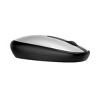
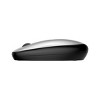
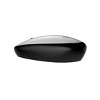
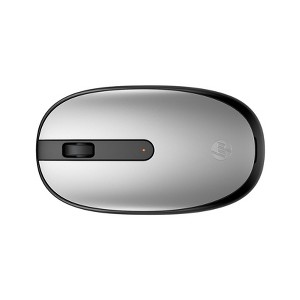
HP 240 Pike Silver Bluetooth Mouse
$21.99 reg $24.99
$3 off
In Stock

Free & easy returns
Return this item in store within 30 days for a full refund.
Sold & shipped by HP Official Store
Eligible for registries and wish lists
About this item
Additional product information and recommendations
Discover more options
- $29.99reg $32.99 Sale1 out of 5 stars with 1 ratings
- $21.99reg $29.99 Sale
Frequently bought together

Guests also viewed


Related Categories
Guests are saying
The HP 240 Silver Bluetooth Mouse is a compact and reliable device that excels in ease of use and portability, making it ideal for daily tasks and travel. Guests appreciate its quick setup, comfortable design, and solid Bluetooth connection, although some have noted occasional connectivity issues. Overall, it offers great value for those seeking a lightweight and efficient mouse for their computing needs.
Summary created by AI from text of reviews reflecting recent feedback provided across different star ratings (includes incentivized reviews)
4.4 out of 5 stars with 134 reviews
5 out of 5 stars
25 August, 2026
originally posted on hp.com

Reliable, sleek design, and seamless Bluetooth connectivity
The HP 240 Bluetooth Mouse in Pike Silver is a great companion for daily work and multitasking. The color matches my HP laptop perfectly, giving the workspace a clean, modern aesthetic. Pairing via Bluetooth was quick and effortless with no need for an extra USB dongle, which keeps my ports completely free. It is comfortable in hand, lightweight for travel, and offers smooth, precise tracking across multiple surfaces. Highly recommended for everyday productivity.
5 out of 5 stars
26 June, 2026
originally posted on hp.com
Great Mouse for Everyday Use
I am very happy with my new HP 240 Silver Bluetooth Mouse. It was very easy to set up and works perfectly for my daily needs. I would definitely recommend it to others looking for a reliable mouse.
4 out of 5 stars
11 April, 2026
originally posted on hp.com
Review for HP 240 Pike Silver Bluetooth Mouse HP 240 Pike Silver Bluetooth.
Nice budget mouse. Tracks and scolls nice. Not for use on glass as it does not track well. Besides this issue, mouse works well on most suraces. Highly recommend this device
3 out of 5 stars
4 March, 2026
originally posted on hp.com
Noisy little mouse
A little slow to connect. And it's noisy, click can be heard by others.
5 out of 5 stars
12 July, 2025
originally posted on store.hp.com

Good
Good product
5 out of 5 stars
16 June, 2025
originally posted on store.hp.com
Good Mouse
Good Mouse
4 out of 5 stars
23 May, 2025
originally posted on hp.com

small but durable
its small but mighty
5 out of 5 stars
23 February, 2025
originally posted on store.hp.com
Mouse Review.
You can safely buy this.
4 out of 5 stars
7 February, 2025
originally posted on store.hp.com
Little hard for old people
Good and light weight
2 out of 5 stars
28 October, 2024
originally posted on hp.com
I don't recommend.
It is very unstable. Drops connection constantly so I am back to a mouse with a fob.
5 out of 5 stars
9 October, 2024
originally posted on hp.com
Nice mouse for the price.
It is good mouse for the day to day work
4 out of 5 stars
2 October, 2024
originally posted on hp.com
Good value for this mouse
Everything works as expected
2 out of 5 stars
24 September, 2024
originally posted on hp.com
Setup
I bought this mouse, but it only pairs with my MacBook, not my PC or smart TV.
1 out of 5 stars
30 August, 2024
originally posted on hp.com
West of money
Not getting connected to HP laptop
5 out of 5 stars
27 August, 2024
originally posted on hp.com
No Dongle!
This is my first Bluetooth mouse and I'm very pleased with it. It pairs well and easily with my machines; I prefer it when I travel with my laptop as it frees up a USB port for content carrying SSDs. Thank you for a quality component at a very reasonable sale price!
5 out of 5 stars
3 August, 2024
originally posted on hp.com
Great travel mouse.
A light and compact mouse that great for travel, BT connection have been solid and battery life still at 100% after 30hrs(guessing) of use.
4 out of 5 stars
8 July, 2024
originally posted on hp.com
mouse
only issue with the new mouse which was purchased along with a new laptop is that every so often the blue tooth connection is lost, no rhyme or reason have been found by me yet. Other than that all is good with mouse and laptop.
5 out of 5 stars
24 June, 2024
originally posted on hp.com
HP 240 Pike Silver Bluetooth Mouse
quality is good
5 out of 5 stars
6 June, 2024
originally posted on hp.com
New Mouse !!
Extremely easy to use. Tapered and fits my hand better than any other mouse I've tried.
5 out of 5 stars
8 May, 2024
originally posted on hp.com
Bluetooth Mouse
I love this mouse. It’s convenient because it does not take up a USB port on your computer. It’s also comfortable to use.