

Target New ArrivalsChristmasTarget Black FridayGift IdeasHoliday Kids CatalogHome & DecorKitchen & DiningToys & GamesElectronics & TechVideo GamesGift CardsClothing, Shoes & AccessoriesGroceryBabyBeautyTarget Beauty StudioPersonal CareHousehold EssentialsHealthWellnessBooks, Music & MoviesSports & OutdoorsPetsSchool & Office SuppliesParty SuppliesAutomotiveTarget OpticalClearanceNew ArrivalsChristmasGift IdeasTop DealsTarget Circle DealsWeekly AdShop Order PickupShop Same Day DeliveryRegistryRedCardTarget CircleFind Stores
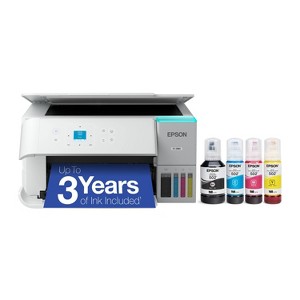
Epson EcoTank ET-2980 Wireless All-in-One Color Supertank Printer - White: Automatic 2-Sided Printing, Borderless Photos, Print From Mobile Device - 2 of 4Epson EcoTank ET-2980 Wireless All-in-One Color Supertank Printer - White: Automatic 2-Sided Printing, Borderless Photos, Print From Mobile Device - 3 of 4Epson EcoTank ET-2980 Wireless All-in-One Color Supertank Printer - White: Automatic 2-Sided Printing, Borderless Photos, Print From Mobile Device - 4 of 4
Epson EcoTank ET-2980 Wireless All-in-One Color Supertank Printer - White: Automatic 2-Sided Printing, Borderless Photos, Print From Mobile Device - 1 of 4

Epson EcoTank ET-2980 Wireless All-in-One Color Supertank Printer - White: Automatic 2-Sided Printing, Borderless Photos, Print From Mobile Device

39 Questions
$329.99

In Stock


Add plans or services
Make your selection before adding to cart
2 Year Electronics Protection Plan ($300-$349.99) - Allstate
$45.00

Eligible for registries and wish lists
Save 5% every day
With Target Circle™ Card (restrictions apply)

About this item

Highlights

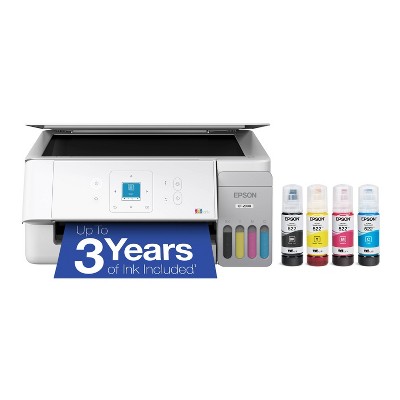
  • INCREDIBLE VALUE — Epson EcoTank includes enough ink to last up to 3 years. And if you run low, you’ll save up to 90% with replacement ink bottles vs. ink cartridges
  • WORRY-FREE PRINTING — Epson EcoTank comes with enough ink to print up to 6,600 pages black/5,500 color for fewer out-of-ink frustrations. Each replacement ink bottle set is equivalent to about 80 cartridges
  • SIMPLE INK REFILLING — Supersized ink tanks and uniquely keyed EcoFit bottles make refilling ink simple—no mess, no stress and no ink bottle mix-ups
  • THE WORLD’S #1 SELLING SUPERTANK PRINTER — Epson invented EcoTank to revolutionize the way people print; we’ve sold 100 million EcoTanks worldwide and this is our 7th generation of cartridge-free printers
  • ADVANCED PRODUCTIVITY FEATURES — Fast 15 black/8 color ISO ppm print speeds with zero warmup time, built-in scanner, 100-sheet paper tray, auto duplex printing and a 1.44" color display for easy navigation
  • STUNNING PRINT QUALITY — High 4800 x 1200 dpi print resolution for exceptional photos and text; enjoy amazing image quality on a wide range of media
  • WIRELESS MOBILE PRINTING — Print and scan from the convenience of your smart device with enhanced mobile printing from the Epson Smart Panel app; supports Apple AirPrint
  • ENGINEERED FOR RELIABILITY — Epson PrecisionCore Heat-Free technology delivers a unique permanent printhead designed to last the life of the printer, plus professional-grade reliability with duty cycle more robust than its predecessor
  • ZERO CARTRIDGE WASTE — Join the club with the millions of EcoTank owners who’ve already helped to reduce millions of pounds of plastic from going into landfills  
  • USE GENUINE EPSON INK ― For optimal print quality and performance. Non-genuine ink could cause damage not covered by the printer’s limited warranty

Description

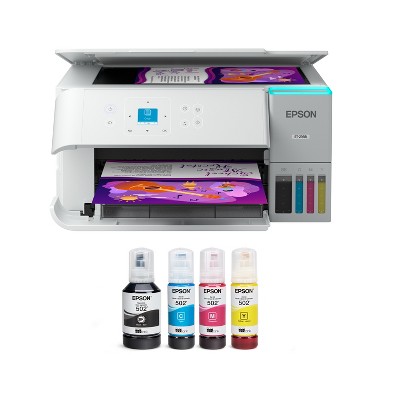
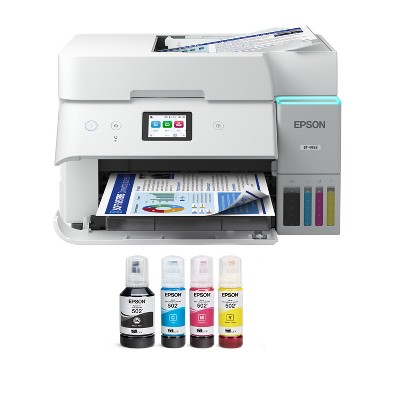
Introducing the EcoTank ET-2980—The Perfect Family Printer. Say goodbye to expensive cartridges with the Epson EcoTank ET-2980, the newest innovation from a recognized leader in photographic printing. Combining simplicity with a modern design, the ET-2980 features advanced technology that enhances both performance and print quality, making it an ideal choice for everyday family printing—including content created by AI. Powered by PrecisionCore Heat-Free technology, the ET-2980 delivers print speeds 50% faster than its predecessor. And unlike conventional thermal inkjet printers, its unique permanent printhead is engineered to last the life of the printer. Designed to be simple and error-free, refilling ink is a breeze with large ink tanks and uniquely keyed EcoFit bottles—no mess, no stress and no ink bottle mix-ups. And with enough ink in the box to last up to three years, you'll enjoy affordable, worry-free color printing without the hassle of frequently replacing cartridges. Featuring built-in USB and Wi-Fi for seamless connectivity, along with the user-friendly Epson Smart Panel app, you can easily print, scan, and more directly from your computer or wireless mobile device. Choose Epson EcoTank, the World’s #1 Selling Supertank Printer. With more than 100 million units sold globally across seven generations of innovation, EcoTank consistently delivers affordable, photo-quality prints, making it a reliable choice for all your printing needs.
Dimensions (Overall): 7.4 Inches (H) x 14.8 Inches (W) x 13.7 Inches (D)
Weight: 11.5 Pounds
B&W Print Speed: 15 Pages per Minute
Color Print Speed: 8 Pages per Minute
Electronics Condition: New
Electronics Features: Automatic 2-Sided Printing, LCD Display, Copier, Scanner, Printer, Borderless Photo Prints, Print From Mobile Device
Maximum capacity: 100 Sheets
Operating System Compatibility: Apple iOS, Android
Maximum Resolution: 4800 x 1200 (Color), 4800 x 1200 (Black and White)
Wireless Technology: Apple AirPrint, Wi-Fi, Mopria
Printer Ink Color: Multiple Colors, Black
Compatible With: Up to 8.5" x 14" Documents
Model name: EcoTank ET-2980 White
Ink Series: Epson T502
Battery: No Battery Used
Warranty: 1 Year Limited Warranty. To obtain a copy of the manufacturer's or supplier's warranty for this item prior to purchasing the item, please call Target Guest Services at 1-800-591-3869
TCIN: 94732411
UPC: 198390000554
Item Number (DPCI): 056-03-0024
Origin: Imported
If the item details aren’t accurate or complete, we want to know about it.

Shipping details

Estimated ship dimensions: 17.2 inches length x 16 inches width x 10.2 inches height
Estimated ship weight: 15.73 pounds

Return details

This item can be returned to any Target store or Target.com.
This item must be returned within 30 days of the date it was purchased in store, delivered to the guest, delivered by a Shipt shopper, or picked up by the guest.
See the return policy for complete information.

Q: Compare Ecco tank ET2900 to ET2980

submitted by Jerry - 29 days ago
  • A: Hello Jerry. Both printers are very similar in design. However, the ET-2980 offers slightly faster print and copy speeds, automatic two-sided printing, and updated Wi‑Fi. Regards, Kevin - The Epson Team.

    submitted byEpson - 26 days ago
    Brand expert
  • A: Hi, thanks for reaching out about Epson EcoTank ET-2980 Wireless All-in-One Color Supertank Printer - White: Automatic 2-Sided Printing, Borderless Photos, Print From Mobile Device. If you're choosing between the Epson EcoTank ET-2900 and the newer Epson EcoTank ET-2980, the ET-2980 is the better printer overall. Why the ET-2980 is Better Automatic duplex (2-sided) printing, which the ET-2900 does not have. Faster printing for both black and color documents. Improved wireless connectivity with Wi‑Fi 5 instead of Wi‑Fi 4. Higher scan resolution, useful for photos and detailed document archiving. Which One Should You Buy? If you print only occasionally and find the ET‑2900 for $50-$100 less, it's still a solid value. If the price difference is under about $75, I'd recommend the ET‑2980 because the automatic double-sided printing alone can save a lot of paper and hassle over time. If you have any additional questions, we welcome you to contact MyTGTtech at 833-848-8324 every day, between 7am-11pm CST.

    submitted byJoe - 29 days ago
    Target staff support

Q: will it print 8.5x11 borderless?

submitted by Colleen - 2 months ago
  • A: Hello Colleen. Yes, the ET-2980 can print borderless on 8.5" x 11" paper. Please be aware that borderless printing is only available when selecting specific paper types and sizes. For more details, see the "Borderless Paper Type Compatibility" section in the User Guide. Regards, Kevin - The Epson Team.

    submitted byEpson - 2 months ago
    Brand expert
  • A: Hi, thank you for reaching out about Epson EcoTank ET-2980 Wireless All-in-One Color Supertank Printer - White: Automatic 2-Sided Printing, Borderless Photos, Print From Mobile Device. Yes, the Epson EcoTank ET-2980 supports 8.5" x 11" (Letter size) borderless printing, but you must use specific settings for it to work. If you have any additional questions, we welcome you to contact MyTGTtech at 833-848-8324 every day, between 7am-11pm CST.

    submitted byMatt - 2 months ago
    Target staff support

Q: Can this be used for sublimation

submitted by Tweety - 2 months ago
  • A: Hello Tweety. The ET-2980 is not designed for sublimation. Using any ink or ink-like substance other than 502 Epson Ink Bottles may damage the print head and affect warranty coverage. Regards, Kevin - The Epson Team.

    submitted byEpson - 2 months ago
    Brand expert
  • A: Hi, thank you for reaching out about Epson EcoTank ET-2980 Wireless All-in-One Color Supertank Printer - White: Automatic 2-Sided Printing, Borderless Photos, Print From Mobile Device. Yes, the Epson EcoTank ET-2980 can be used for sublimation if you fill it with third-party sublimation ink instead of the regular ink that comes in the box. If you have any additional questions, we welcome you to contact MyTGTtech at 833-848-8324 every day, between 7am-11pm CST.

    submitted byMatt - 2 months ago
    Target staff support

Q: Does this printer use an Ink Maintenance Pad” that I can change out myself?

submitted by TXmom - 2 months ago
  • A: Hello TXmom. The ET-2980 includes a user-replaceable maintenance box. The item number for the maintenance box is T04D100. Regards, Kevin - The Epson Team.

    submitted byEpson - 2 months ago
    Brand expert
  • A: Hi, thanks for reaching out about the Epson EcoTank ET-2980 Wireless All-in-One Color Supertank Printer - White: Automatic 2-Sided Printing, Borderless Photos, Print From Mobile Device Yes. The Epson EcoTank ET-2980 uses a replaceable ink maintenance box, and it is designed to be changed by the user. Epson provides instructions for replacing the maintenance box yourself when the printer indicates it is full. If you have any additional questions, we welcome you to contact MyTGTtech at 833-848-8324 every day between 7 am and 11 pm CST.

    submitted byRena - 2 months ago
    Target staff support

Q: What does 3 years of ink free mean? How do you receive it?

submitted by Donna - 2 months ago
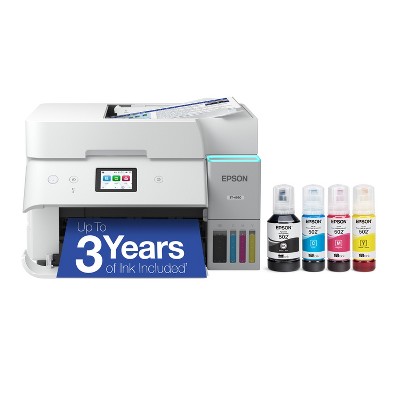
  • A: Hello Donna. The printer includes four ink bottles and, depending on the paper size, print settings, and paper type, can produce up to 6,600 black-and-white pages or 5,500 color pages. Based on typical usage, the included ink may last up to three years, though actual results can vary. For more information, please visit the official Epson Savings Info page. Regards, Kevin - The Epson Team.

    submitted byEpson - 2 months ago
    Brand expert
  • A: Hi, thanks for reaching out about Epson EcoTank ET-2980 Wireless All-in-One Color Supertank Printer - White: Automatic 2-Sided Printing, Borderless Photos, Print From Mobile Device. “Up to 3 years of ink included” does not mean you receive free ink shipments for three years. For the Epson EcoTank ET-2980, the ink is included in the box with the printer. Epson estimates that the included ink can last up to three years based on typical printing usage. The included ink is rated for up to 6,600 black pages and 5,500 color pages. You fill the printer's EcoTank reservoirs using the included ink bottles. There is no separate redemption, registration, coupon, or recurring shipment required to receive the advertised ink. It comes in the box. “Up to 3 years” is an estimated supply duration, so someone who prints heavily could use the included ink much sooner. If you have any additional questions, we welcome you to contact MyTGTtech at 833-848-8324 every day, between 7am-11pm CST.

    submitted byJoe - 2 months ago
    Target staff support

Q: Can this Epson FAX ?

submitted by cathy - 4 months ago
  • A: Hello. The ET-2980 can print, copy, and scan only. Unfortunately, it does not have fax functionality. Regards, Kevin - The Epson Team.

    submitted byEpson - 4 months ago
    Brand expert
  • A: Hi, thanks for reaching out about Epson EcoTank ET-2980 Wireless All-in-One Color Supertank Printer - White: Automatic 2-Sided Printing, Borderless Photos, Print From Mobile Device. No. The Epson EcoTank ET‑2980 is an all-in-one printer for printing, copying, and scanning, but it does not include fax functionality. If you have any additional questions, we welcome you to contact MyTGTtech at 833-848-8324 every day, between 7am-11pm CST.

    submitted byJoe - 4 months ago
    Target staff support

Q: Back load paper feed ?

submitted by ET - 5 months ago
  • A: Hello ET. Yes, the ET-2980 uses a rear feed for loading paper. Regards, Kevin - The Epson Team.

    submitted byEpson - 5 months ago
    Brand expert
  • A: Hi, thanks for reaching out about Epson EcoTank ET-2980 Wireless All-in-One Color Supertank Printer - White: Automatic 2-Sided Printing, Borderless Photos, Print From Mobile Device Yes — you can feed paper into the back of the Epson EcoTank ET‑2980. If you have any additional questions, we welcome you to contact MyTGTtech at 833-848-8324 every day, between 7am-11pm CST.

    submitted byJustin - 5 months ago
    Target staff support

Q: Does this machine have a scanner function?

submitted by Pat - 7 months ago
  • A: Hello Pat. Yes, the ET-2980 is an All-in-One printer that includes print, copy, and scan functionality. Regards, Kevin - The Epson Team.

    submitted byEpson - 7 months ago
    Brand expert
  • A: Hi, thanks for reaching out about the Epson EcoTank ET-2980 Wireless All-in-One Color Supertank Printer - White: Automatic 2-Sided Printing, Borderless Photos, Print From Mobile Device Yes, the Epson EcoTank ET‑2980 does have a scanner function ✅ If you have any additional questions, we welcome you to contact MyTGTtech at 833-848-8324 every day between 7 am and 11 pm CST.

    submitted byRena - 7 months ago
    Target staff support

Q: Will this print doubled sided ?

submitted by Dlm - 8 months ago
  • A: Hi, thanks for reaching out about Epson EcoTank ET-2980 Wireless All-in-One Color Supertank Printer - White: Automatic 2-Sided Printing, Borderless Photos, Print From Mobile Device The Epson EcoTank ET-2980 features Automatic 2-Sided Printing (also known as auto-duplexing). Unlike more basic models where you have to manually flip the pages yourself, this printer has a built-in mechanism that pulls the paper back in to print on the other side automatically. If you have any additional questions, we welcome you to contact MyTGTtech at 833-848-8324 every day, between 7am-11pm CST.

    submitted byMike - 8 months ago
    Target staff support
  • A: Hello Dlm. Yes, the ET-2980 includes automatic 2-sided printing. Regards, Kevin - The Epson Team.

    submitted byEpson - 8 months ago
    Brand expert

Q: How many pages can one set of printer ink print?

submitted by CanCan - 9 months ago
  • A: Hello CanCan. Epson uses ISO/IEC 24711 tests to determine page yield. Your results can vary based on print settings, image size, paper type, etc. With a new set of Epson 502 ink bottles, the ET-2980 can print approximately 6,600 Black or 5,500 Color ISO pages. Regards, Kevin - The Epson Team.

    submitted byEpson - 9 months ago
    Brand expert
  • A: Hi, thanks for reaching out about Epson EcoTank ET-2980 Wireless All-in-One Color Supertank Printer - White: Automatic 2-Sided Printing, Borderless Photos, Print From Mobile Device According to Epson it can print up to 6500 color pages before needing to be refilled. If you have any additional questions, we welcome you to contact MyTGTtech at 833-848-8324 every day, between 7am-11pm CST.

    submitted byJustin - 9 months ago
    Target staff support

Additional product information and recommendations
Discover more options

Skip to next section

Guests also viewed

Skip to next section

Guests are saying

The Epson EcoTank ET-2988 printer offers a blend of convenience and quality, featuring easy ink refilling and decent print quality. Guests appreciate its wireless connectivity and the ability to print from various devices. However, some have experienced issues with paper jams and a small display screen. Overall, it serves well for home use, especially for those looking to save on ink costs with its eco-friendly tank system.
    Summary created by AI from text of reviews reflecting recent feedback provided across different star ratings (includes incentivized reviews)
    3.6 out of 5 stars with 257 reviews
    quality: 1.95 out of 5
    value: 2.25 out of 5
    17% would recommend
    23 recommendations
    1 out of 5 stars
    Thumbs down graphic, would not recommend
    21 November, 2026Verified purchase

    You can do better

    Dislike this printer so much after 6 months using. Display is 1” only and unreadable, app is constantly freezing and unusable, printing is skipping even after cleaning printing heads multiple times. Once the ink runs out I am going to give it away and get another HP.
    Rosti_SF
    quality: 2 out of 5
    value: 3 out of 5
    Did you find this review helpful?
    1 out of 5 stars
    Thumbs down graphic, would not recommend
    20 November, 2026Verified purchase

    Dont buy. Paper jams

    Got one paper jam and now it won’t print front to back or else it will get jammed again.
    Lanae
    quality: 1 out of 5
    value: 1 out of 5
    Did you find this review helpful?
    2 out of 5 stars
    4 November, 2026
    originally posted on epson.com

    Image

    Beautiful colors but stopped working

    Well, the printing was absolutely beautiful. And so was the color I had this printer for three days before it stopped working. It kept cleaning there was a paper jam, and there was no pieces of paper left in there. I did everything I could to reset it I literally only had it two maybe three days. And it stopped working.. I do think that maybe it’s just a faulty printer. I’m not sure but I now need to go through the really difficult process of returning it through class Wallet with ESA funds.
    kpom
    Did you find this review helpful?
    4 out of 5 stars
    3 November, 2026
    originally posted on epson.com
    Image

    EPSON the name say all .

    Quality matters…
    Lhuccas
    Did you find this review helpful?
    1 out of 5 stars
    Thumbs down graphic, would not recommend
    29 October, 2026

    Bad store

    This printer was marked at a sale price and simpsonville manager told me no she couldn’t honor it and I clearly asked why no answer
    Jamie
    Did you find this review helpful?
    2 out of 5 stars
    Thumbs down graphic, would not recommend
    14 October, 2026Verified purchase

    Paper jams when printing double sided

    Printer worked perfect for a couple days, but now every time I try to print double sided, the paper gets jammed. I’ve tried all the tricks I can find online to fix the issue, and nothing works.
    Ellie
    quality: 2 out of 5
    value: 2 out of 5
    Did you find this review helpful?
    5 out of 5 stars
    13 October, 2026
    originally posted on epson.com
    Image

    Great printer at a great price!

    Works like new! I wouldn’t hesitate to buy another refurbished printer from them!
    Kelten
    Did you find this review helpful?
    4 out of 5 stars
    11 October, 2026
    originally posted on epson.com
    Image

    Decent printer

    So far, the printer does what it is supposed to do. Getting on my network was easy. Updating the software was easy and quick. Printing speed, while not fast, is sufficient for my needs. Refilling ink couldn’t be easier. I like the automatic output tray deployment. About the only complaint I have is the printer feels flimsy. We’ll see how long it lasts before it breaks.
    Big Rick
    Did you find this review helpful?
    1 out of 5 stars
    7 October, 2026
    originally posted on epson.com
    Image

    This refurb keeps jamming

    Using the advanced driver that allows changing paper type, I still am getting paper jams. I would like to get this solved because when it prints, it's great.
    T Powell
    Did you find this review helpful?
    5 out of 5 stars
    6 October, 2026
    originally posted on epson.com
    Image

    Printing costs and connectivity

    Printer and functions are great. Ecotank will reduce printing cost. Wifi connectivity and ET-1980 operation confused me a little, especially finding the hidden copy menu for enlargement/reduction.
    raw1
    Did you find this review helpful?
    5 out of 5 stars
    5 October, 2026
    originally posted on epson.com
    Image

    Excellent value and works like new!

    This certified renewed Epson EcoTank ET-2988 works perfectly and arrived in brand-new condition. The supertank design makes refilling ink incredibly easy and saves a ton on printing costs, while the print quality is crisp and clear. I am extremely satisfied with this purchase and highly recommend it!
    Baker1993
    Did you find this review helpful?
    1 out of 5 stars
    Thumbs down graphic, would not recommend
    4 October, 2026Verified purchase

    (no review title)

    Target is a company that encourages scams, purchases do not arrive, but neither do they.The customer loses their money, total scam,
    JR
    Did you find this review helpful?
    3 out of 5 stars
    3 October, 2026
    originally posted on epson.com
    Image

    Great printer, lousy app

    The printer seems good and i love the refillable tank format but the Epson software stinks out loud. I was not able to get Epson smart panel to print at all from my Galaxy s25. I had to manually enter the ip address to register it at all, then the app looks fine on the screen but only prints blank pages whereas the generic android print ap works just fine. I installed it three times and deleted it just as many times. Epson print enabler is worse, it doesn't do anything at all. My printer works fine from my computer, though, and makes good prints .
    Dave47
    Did you find this review helpful?
    1 out of 5 stars
    1 October, 2026
    originally posted on epson.com
    Image

    Won't work unless you share private info

    What a nightmare to set this piece of junk up. I just want a printer. I just want a printer to turn on and connect with a cord to my computer. But no, I have to hand over all my personal information first and go through an hours long tedious set up so that the tech gods my allow me to print a page, after I already spend a fortune on this printer. You really do not hate technology and its overlords nearly enough.
    hatetech2026
    Did you find this review helpful?
    1 out of 5 stars
    1 October, 2026
    originally posted on epson.com
    Image

    Installation difficult

    Cannot set up, constant error messages. Start never appeared.
    Wright
    Did you find this review helpful?
    1 out of 5 stars
    30 September, 2026
    originally posted on epson.com
    Image

    Worst Printer Ever.

    Keeps getting a wifi error every week or two, so many times over the past year I lost count. Have to factory reset and then setup the whole printer again and again and again. As for print quality, very dull color prints, I do not print photos, but as bad as the colors are on regular color prints, I would not even waste my photo paper.
    NoMoreEpsonPrinters
    Did you find this review helpful?
    1 out of 5 stars
    30 September, 2026
    originally posted on epson.com
    Image

    Won’t connect

    This printer has good print quality when it will print. Every once in a while, it will access my network and actually print from my phone or computer. For the past three weeks. I haven’t been able to get it to print at all. When I try to troubleshoot, the printer says it’s busy. Nothing I have tried has worked to resolve this problem
    Pamn
    Did you find this review helpful?
    3 out of 5 stars
    27 September, 2026
    originally posted on epson.com
    Image

    Photos not crisp

    Cheaper ink, but photo prints miss the photo black ink
    Artist susan
    Did you find this review helpful?
    5 out of 5 stars
    26 September, 2026
    originally posted on epson.com
    Image

    Best Printer

    I have found no complaints with this product! I loved the eco friendly packaging and the set up process was fairly easy and straight forward. I have printed from my phone and laptop in full color and with different paper size and thickness and it has worked amazingly well and is so quick. Also my little kids love that the tray can come out on its own
    SZE123
    Did you find this review helpful?
    1 out of 5 stars
    25 September, 2026
    originally posted on epson.com
    Image

    Garbage product! Junk- DO NOT BUY or accept as a gift.

    DO NOT BUY this garbage product! If anyone offers it to you for free, don't accept it. I am truly surprised that EPSON produced this unreliable product. Anyone who wasted money should receive a full refund. It's simply JUNK, it works 1 time out of 10. I would donate it; however, I would feel bad to expose anyone to the frustration of dealing with this GARBAGE product!
    Janep
    Did you find this review helpful?

    Get top deals, latest trends, and more.