

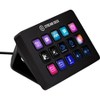
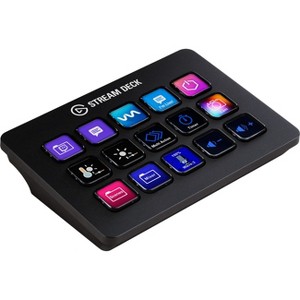
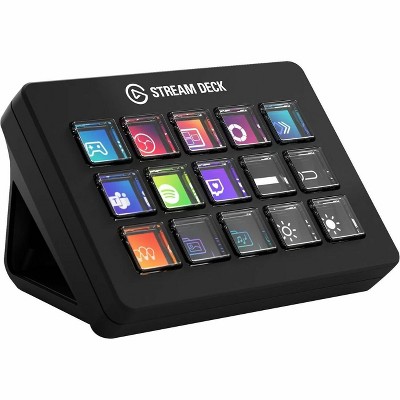
Elgato Stream Deck MK.2 - Cable Connectivity - USB 2.0 Interface - 15 Key(s) - PC, Mac - Black
$152.99
In Stock

Free & easy returns
Return this item by mail or in store within 30 days for a full refund.
Sold & shipped by antonline
Eligible for registries and wish lists
About this item
Additional product information and recommendations




Related Categories
Guests are saying
The Stream Deck is a versatile tool that enhances productivity for both streamers and non-streamers alike. Its customizable buttons allow for quick access to various functions, making it ideal for managing tasks in streaming, video editing, and even everyday computer use. Guests appreciate its user-friendly interface and the ability to program multiple actions to a single button, significantly streamlining workflows. While some guests noted minor software issues, the overall consensus is that it is an invaluable addition to any setup.
Summary created by AI from text of reviews reflecting recent feedback provided across different star ratings (includes incentivized reviews)
4.9 out of 5 stars with 181 reviews
5 out of 5 stars
9 March, 2026
originally posted on elgato.com

Automate, automate, automate
Super Reliable. Part of my default setup for new clients.
5 out of 5 stars
15 February, 2026
originally posted on elgato.com
it just works
although I haven't tested the longevity yet this is shaping up to be a great product
4 out of 5 stars
16 January, 2026
originally posted on elgato.com
Nice, could be improved.
The new scissor keys are nice. I'd like to see a couple of improvements: — I really wish this thing had retina-level resolution on the keys. Complex graphics or fine lines aren't very legible on the little diplays. It's cool to be able to show album art, etc. but it's very difficult to see. — Would also be nice if it had a built-in light sensor like an iphone, to make the screen brighter in sunlight and dimmer (also warmer?) at night, rather than having to adjusting brightness manually.
5 out of 5 stars
7 July, 2025
originally posted on elgato.com
Scissor Keys Are A Must!
I already love it! In my opinion, it's a must have upgrade over the original keys. Trust me.
5 out of 5 stars
9 April, 2025
originally posted on elgato.com
Stream Deck for Accounting
I know that the Stream Deck was made for streamers, but for accounting and general productivity, it is a game changer. The ability to open files that are 8 clicks deep in another file, the ability to add repetitive formulas in Excel, open my most use master files, having the most use general ledger code mapped to a key, creating files for my most used action while doing payroll, prepaids, accruals, and financial reviews, and so much more is amazing. The most amazing thing is programing a 10-step Excel action to a single button, saving me precious time when I have to do this 200 times a week.
1 out of 5 stars
16 July, 2023
originally posted on elgato.com
unreliable: constant software crashing !
Looks like stream deck software uses QT and is super unreliable. Constantly crashing on Mac OS.
From Technical Marketing team
Hi darrenl, We're sorry to hear about your experience with Stream Deck. Our support team would be happy to help out. You can contact them by going to http://e.lga.to/help. Best regards, - Elgato
3 years ago
1 out of 5 stars
14 July, 2023
originally posted on elgato.com
Comprehensive Manual
There is no comprehensive manual for this piece of electronic equipment. A quick start guide is provided both in the box and on the website but other than that I've been looking high and low and can't find a, "Manual for Stream Deck MK.2. The unit might very well be fantastic but I need a long manual with pictorials for my ease of use to kick in.
From Tech-Marketing team
Thank you for your feedback — we understand that having thorough documentation is important, especially when getting started with a new device. While the Stream Deck MK.2 doesn't ship with a traditional printed manual, the Stream Deck software itself is designed to be the guide. It walks you through setup, action configuration, and customization step by step once installed. Beyond that, Elgato offers a growing library of tutorials and walkthroughs at help.elgato.com covering everything from first-time setup to advanced workflows like Multi Actions, profiles, and plugin installation. We'd encourage you to install the Stream Deck software from elgato.com/downloads and explore from there — most customers find that once the software is open, the interface is intuitive enough to get up and running quickly. And if you get stuck at any point, our support team at help.elgato.com is always happy to walk you through it.
6 months ago
5 out of 5 stars
18 March, 2023
originally posted on elgato.com
Stream Deck MK.1 Best buy I ever done.
I was in Canada and got the MK.1 Best Buy, Kamloops after Christmas last year. And I been amazed how powerful this device is. You are able to do basically everything to control your computer, stream and games and is really good quality. I currently have this mounted to my simulation racing rig and it matches so well with my rig. So glad i got one. most definitely be looking at the other products.
3 out of 5 stars
12 December, 2022
originally posted on elgato.com
good, but laks some ergonomics
good, but needs an ergonomic directional support, you can have it almost flat on the desk or in the 45° (?) angle. Why not make something that you can place in a comfortable corner?
4 out of 5 stars
14 September, 2022
originally posted on elgato.com
Great little box
Many useful features - I use mine mainly because I no longer have multimedia keys on my keyboard. I have also written a plugin - which was easy enough. Analogue clock plugin doesn't always work following the PC in-and-out of sleep but no great disaster.
5 out of 5 stars
9 March, 2022
originally posted on elgato.com
Makes streaming so much easier
I’ve been using this product for a few years now and I’m happy to say it’s still working perfect and makes streaming much easier, from using different commands for my stream to simply changes scenes in OBS and even changing songs on Spotify it makes my streaming life so much easier! I Definitely recommend this product.
5 out of 5 stars
7 March, 2022
originally posted on elgato.com
HUGE LIFESAVER!
I have been using my Stream Deck for quite some time now as a streamer and even when I'm not streaming. The Stream Deck has made my life as a streamer 100% easier to navigate while live. I can be in a boss fight during a stream and simply tap a button to add multiple commands in chat to help me continue to raise money for charities. A room for improvement is connection to services within the Stream Deck. My connection to Spotify sometimes runs into issues where I have to force shut it down and re-open it. Despite that issue, the Stream Deck is a life saver that is essential for any content creator.
5 out of 5 stars
6 March, 2022
originally posted on elgato.com
Doesn't get better than this!
I have two as part of my streaming setup, one to control my wavelink program in a pinch and the other to control OBS settings as well as other programs! The multi action is ESSENTIAL to making streaming an ease! With one button, I can have OBS launch, open up my wave link program, open twitch dashboard, send out a tweet of going live, change my display name on Twitter to LPxDC (STARTING SOON ON STREAM!) and even change the lighting in my room! If that's not power, I don't know what is!
5 out of 5 stars
4 March, 2022
originally posted on elgato.com
Must have for any streamer or photographer!
I’ve nearly used my stream deck every day since purchasing. Streamlined my live streaming, video editing and photo editing routines. Worthy investment!
2 out of 5 stars
17 February, 2022
originally posted on elgato.com
Malfunction within 2 months!
I brought the stream deck during the Christmas period and barely used it only a few times until Faruary. It has malfunctioned now! All buttons were fresh and blacked out once I plugged it into my computer! Extremely low product quality! Not worth this price at all! Not recommend anyone to buy it!
From Technical Marketing team
Hi Bullet1002, We're sorry to hear about your experience with the Stream Deck. Our support team would be happy to help out with any issues you might be experiencing. You can contact them by going to http://e.lga.to/help and submit a request. Best regards, - Elgato
5 years ago
5 out of 5 stars
23 January, 2022
originally posted on elgato.com
The Best Purchase Every
This is the best it makes streaming so much easier and everything is just right at my finger tip0s. No longer will I have 50 hotkeys that interfere with my gaming I also love the soundboard I troll my friends all the time.
5 out of 5 stars
12 January, 2022
originally posted on elgato.com
Great for twitch streamers!
I have been using this for over 6 months, and it has been an amazing investment for my streaming setup!
5 out of 5 stars
25 December, 2021
originally posted on elgato.com
good
very good and easy to use understood what to do instantly good for streaming and having fun with mates never has let me down
4 out of 5 stars
13 December, 2021
originally posted on elgato.com
can someone help me
[This review was collected as part of a promotion.] How do I even download the software for the stream deck im so confuse
From Technical Marketing team
Hi bobbeh, You can download the Stream Deck software by going to https://www.elgato.com/downloads Best regards, - Elgato
5 years ago
5 out of 5 stars
13 December, 2021
originally posted on elgato.com
Amazing product
[This review was collected as part of a promotion.] I love this product! This help me a lot along side with the XL version. The Halloween faceplate is AMAZING