


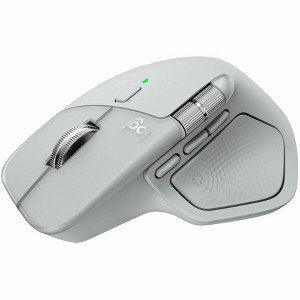
Logitech MX Master 4 Ergonomic Wireless Mouse Pale Gray 910-007559
$131.01
In Stock

Free & easy returns
Return this item in store within 30 days for a full refund.
Sold & shipped by Spacebound
Eligible for registries and wish lists
At a glance
About this item
Additional product information and recommendations






Guests also viewed







Related Categories
Guests are saying
The MX Master 4 mouse is a remarkable upgrade, offering exceptional ergonomics, customizable features, and a smooth scrolling experience that enhances productivity. Guests appreciate its comfortable design, programmable buttons, and seamless connectivity across multiple devices. While some users note concerns about its size and polling rate, the overall feedback highlights its premium build quality and innovative features that make it a valuable tool for both work and leisure.
Summary created by AI from text of reviews reflecting recent feedback provided across different star ratings (includes incentivized reviews)
4.4 out of 5 stars with 681 reviews
4 out of 5 stars
21 October, 2026
originally posted on Logitech

Beyond expectations for a mouse
[This review was collected as part of a promotion.] Endlessly customizable, haptic options, full control of everything you work on and removing a lot of tediousness in all programs. The only issue is the low polling/report rate. The mouse is noticeably less smooth than it should be due to this.
5 out of 5 stars
11 October, 2026
originally posted on Logitech
Supper nice product
I have tried various ergonomic mice, and this one meets my expectation in respect of comfort. The functionalities are A+.
From Logitech team
Comfort and useful features have come together just the way you hoped with the MX Master 4! We’re delighted that it feels right in your hand. An A+ for functionality is quite a compliment. Thanks for giving us your verdict!
14 days ago
5 out of 5 stars
10 October, 2026
originally posted on Logitech
Look no further
I can’t believe I’ve been using a different mouse for so many years.
From Logitech team
It sounds like the MX Master 4 made an immediate impression! We’re happy you found a mouse that feels so right for you. Your “look no further” endorsement says plenty. Thank you for making it part of your desk setup!
14 days ago
5 out of 5 stars
6 October, 2026
originally posted on Logitech
Nice
Actually a noticeable improvement over the previous gen that I had.
From Logitech team
It’s great to hear that the MX Master 4 has made a noticeable impression on you. You know what you like in a mouse, so that feedback means a lot. We’re happy you’re enjoying this addition to your setup. Thanks for taking a moment to tell us!
18 days ago
5 out of 5 stars
6 October, 2026
originally posted on Logitech
Great Mouse
Great Mouse. Verry responsive and easy to program.
From Logitech team
It’s wonderful to hear that your MX Master 4 feels responsive and easy to program. Having the controls set up your way can make everyday use feel more natural. We’re happy the mouse is working well for you. Thanks for sharing your experience!
18 days ago
5 out of 5 stars
5 October, 2026
originally posted on Logitech
I like it
good, does its work. no complain. quality is pretty good
From Logitech team
Your MX Master 4 is getting the job done, and we’re glad to hear it! We appreciate your positive comments on its quality. Sometimes a straightforward review says everything it needs to. Thanks for sharing yours!
12 days ago
5 out of 5 stars
2 October, 2026
originally posted on Logitech
All things are great!
I love the quality, performance, and comfort of this mouse. Obviously not being able to try something before buying can be scary, but I am glad that I went with my gut to buy this one. It was super easy set up!
From Logitech team
Choosing a mouse online paid off for you with the MX Master 4! We’re delighted that its comfort, quality, and performance have lived up to your hopes. An easy setup makes that first experience even better. Thanks for trusting your choice and sharing the result!
11 days ago
4 out of 5 stars
1 October, 2026
originally posted on Logitech
I do not like the rubber on the thumb
Look, this is a good mouse. All of the MX Master series mice are good. On this edition they changed the material for the thumb rest and pinky rest area. I find this material to be more slippery than the old material used on the last mouse. This kinda defeats the purpose of having rubber in the first place. I've cleaned this rubber numerous times, and I keep waiting for it to sorta "break in" and be grippy, but it's not. It's slippery. I wish I could buy a different thumb rest cover, even hard plastic would be better than the rubber used on this mouse. This is me nitpicking though. The thumb press button is pretty cool when you pair it to a gesture. It's a quality mouse all around. It's a decent upgrade from the last version.
2 out of 5 stars
1 October, 2026
originally posted on Logitech
The mouse wheel keep dragging
Whenever i use the wheel to scroll down or up it will go reverse in the end and also sometimes scroll without me touching it.
From Logitech team
You’ve noticed the scroll wheel reversing direction at the end of a scroll and sometimes moving the page without contact. Thank you for describing both behaviours so precisely. Our Social Care team can examine what is happening with your MX Master 4. Email your name, email address, country, and a brief summary to socialcare@logitech.com.
12 days ago
5 out of 5 stars
28 September, 2026
originally posted on Logitech
Quality continues
Maintains MX LEGACY quality and innovation. Keeps getting better and better.
From Logitech team
Seeing the MX Master 4 live up to what you value in the MX range means a lot to us! We’re delighted that its quality and innovation stand out to you. Your continued enthusiasm for the series is much appreciated. Thank you for making it part of your setup!
28 days ago
5 out of 5 stars
27 September, 2026
originally posted on Logitech
Polling rate
A mouse like this deserves a better polling rate. Besides that, its perfect for what I do on my personal pc.
From Logitech team
It’s good to know the MX Master 4 fits what you do on your personal PC so well. We hear that a higher polling rate is something you’d like to see. Thank you for making that preference clear alongside your positive experience. We appreciate knowing what would make it an even better fit for you.
28 days ago
5 out of 5 stars
26 September, 2026
originally posted on Logitech
MX Master 4
Very smooth and easy to use. Great Quality and very responsive.
From Logitech team
Smooth, responsive, and easy to use is a combination we’re happy you’ve found in the MX Master 4! It’s a pleasure to hear that the quality has impressed you, too. Your feedback captures what you enjoy about using it. Thanks for choosing MX for your desk!
28 days ago
4 out of 5 stars
25 September, 2026
originally posted on Logitech
nice step forward but too big
Its a nice step forward, but its a little too large. I'm a big guy with big hands, and I can't maneuver the 3 thumb buttons without moving my hand.
5 out of 5 stars
25 September, 2026
originally posted on Logitech
Solid mouse
Need to learn it a bit more but I like it so far. The haptic button is nice and both scroll wheels are super premium
From Logitech team
Your MX Master 4 is off to a promising start! We’re pleased the haptic button and the feel of both scroll wheels have already caught your attention. There’s plenty to explore as you get familiar with it. Thanks for sharing your first impressions, and enjoy making it your own!
26 days ago
5 out of 5 stars
25 September, 2026
originally posted on Logitech
awesome product
Awesome Item, I love it, very useful - helps a lot
From Logitech team
Making your day a little easier is a lovely role for the MX Master 4! We’re happy it’s proving so useful. Your excitement about using it is a pleasure to read. Thanks for letting us know it’s making a difference!
26 days ago
4 out of 5 stars
17 September, 2026
originally posted on Logitech
Love the mouse. adjusting the side button took a little.
Love it. Once I was able to adjust and get used to the side button, it was off to the races
From Logitech team
It’s fantastic to hear you’re enjoying the MX Master 4. We truly appreciate you taking the time to share your experience!
20 days ago
5 out of 5 stars
16 September, 2026
originally posted on Logitech
Shortcuts
Its works quickly and very fine I love the shortcuts
4 out of 5 stars
16 September, 2026
originally posted on Logitech
Great mouse...Logi Options+ not ideal
This mouse has extra features a standard mouse does not. Unfortunately, some are locked behind the "online" version of Logi Options+ such as the action wheel. So if you work somewhere, you best check with your IT department to see if you're able to even use the mouse as company policy could disallow the app. With that being said, you can still customize a good chunk of the mouse using the "offline" version of Logi Options+. I'm still getting used to the SmartShift feel as it feels off to me. At first I thought it was a QC issue to be honest. The nice thing is you can turn it off if you don't like it which I may end up doing so. So 4* when considered the Logi Options+ nuances.
From Logitech team
Thank you for your detailed feedback and 4-star rating of the MX Master 4.We’re glad you appreciate its features and the customization available through the offline version of Logi Options+. We understand that features like Action Ring may require the online version and could be restricted by workplace IT policies, so checking with your IT department is a sensible step. SmartShift can take some getting used to, and we’re pleased you can disable it if needed.
20 days ago
3 out of 5 stars
15 September, 2026
originally posted on Logitech
Need on board memory.
Need on board memory. Other than that, all looks good.
From Logitech team
We’re happy to hear you’re enjoying the MX Master 4. Thank you also for your suggestion about the on board memory. We’ll share this with our team for improvement
1 month ago
5 out of 5 stars
15 September, 2026
originally posted on Logitech
MX Master 4
I'm still getting use to all the features this one mouse has built-in. At this time I think it's AWESOME and crazy how many features and functions can be put into a piece of equipment like this. Very Cool and so glad I made this purchase.