
Target New ArrivalsChristmasTarget Black FridayGift IdeasHoliday Kids CatalogHome & DecorKitchen & DiningToys & GamesElectronics & TechVideo GamesGift CardsClothing, Shoes & AccessoriesGroceryBabyBeautyTarget Beauty StudioPersonal CareHousehold EssentialsHealthWellnessBooks, Music & MoviesSports & OutdoorsPetsSchool & Office SuppliesParty SuppliesAutomotiveTarget OpticalClearanceNew ArrivalsChristmasGift IdeasTop DealsTarget Circle DealsWeekly AdShop Order PickupShop Same Day DeliveryRegistryRedCardTarget CircleFind Stores
HP DeskJet 2825e Wireless All-in-One Color Printer, Scanner, Copier with 3 Months Free Instant Ink (6W7F4A) - 2 of 4HP DeskJet 2825e Wireless All-in-One Color Printer, Scanner, Copier with 3 Months Free Instant Ink (6W7F4A) - 3 of 4HP DeskJet 2825e Wireless All-in-One Color Printer, Scanner, Copier with 3 Months Free Instant Ink (6W7F4A) - 4 of 4
HP DeskJet 2825e Wireless All-in-One Color Printer, Scanner, Copier with 3 Months Free Instant Ink (6W7F4A) - 1 of 4

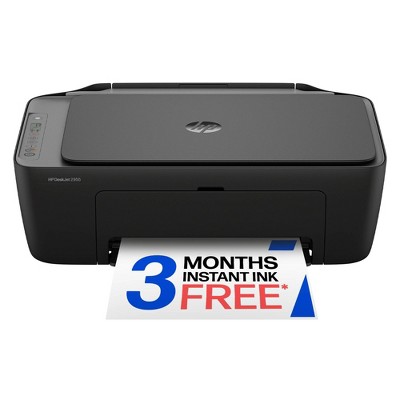
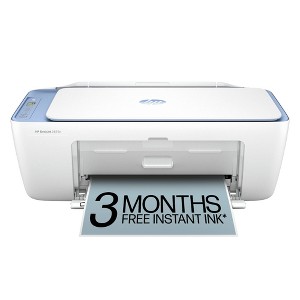
HP DeskJet 2825e Wireless All-in-One Color Printer, Scanner, Copier with 3 Months Free Instant Ink (6W7F4A)

93 Questions
$84.99

Out of Stock


Add plans or services
Make your selection before adding to cart
2 Year Electronics Protection Plan ($75-$99.99) - Allstate
$11.00

Free & easy returns
Free & easy returns
Return this item by mail or in store within 30 days for a full refund.
Find alternative

Skip to next section
Eligible for registries and wish lists
Save 5% every day
With Target Circle™ Card (restrictions apply)

About this item

Highlights

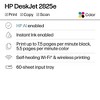
  • Best for home printing
  • Print, scan, copy and fax on the go with HP Smart app
  • 3 months of free Instant Ink included
  • Built-in wireless
  • Easy mobile setup
  • Print up to 7.5 pages per minute (black), 5.5 pages per minute (color)
  • USB 2.0

Description

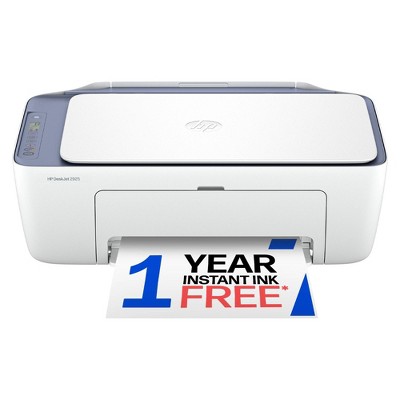
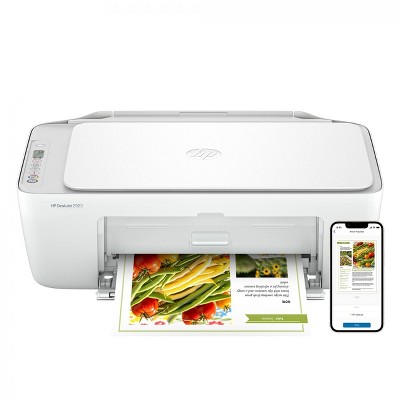
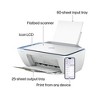
The HP Deskjet 2825e delivers color printing, 60-sheet paper capacity, and a flatbed scanner for easy scanning and copying. It also includes 3 months of free Instant Ink with HP+ activation at printer setup.

FROM AMERICA'S MOST TRUSTED PRINTER BRAND: The Deskjet 2825e is perfect for homes printing to-do lists, letters, financial documents and recipes. Print speeds up to 5.5 ppm color, 7.5 ppm black.

KEY FEATURES: Color printing, copy, scan, and a 60-sheet input tray.

WIRELESS PRINTING: Stay connected with our most reliable Wi-Fi®, which automatically detects and resolves connection issues.

HP APP: Print, scan, copy, or fax right from your smartphone with the easiest-to-use print app.

3 MONTHS OF FREE INK when you activate HP+: Subscribe to Instant Ink delivery service to get ink delivered directly to your door before you run out. After 3 months, monthly fee applies unless cancelled, and you save up to 50%.

COMPACT DESIGN: Made to fit any home.

ICON LCD: Print your basic documents with ease from the intuitive control panel.

SUSTAINABLE DESIGN: Made with at least 60% recycled plastic. Meets industry efficiency standards and is Energy Star® and EPEAT® certified.

DYNAMIC SECURITY: This printer is intended to work only with cartridges with original HP chips or circuitry and will block cartridges using non-HP chips or circuitry. Periodic firmware updates will maintain the effectiveness of these measures. More at www.hp.com/learn/ds.
Dimensions (Overall): 13.94 Inches (H) x 18.7 Inches (W) x 7.52 Inches (D)
Weight: 10.1 Pounds
B&W Print Speed: 7.5 Pages per Minute
Color Print Speed: 5 Pages per Minute
Electronics Condition: New
Electronics Features: Printer
Connection Type: USB
Maximum capacity: 60 Sheets
Operating System Compatibility: Microsoft Windows, macOS
Maximum Resolution: 1200 x 1200 (Color)
Wireless Technology: Wi-Fi
Printer Ink Color: White
Compatible With: Up to 8.5" x 14" Documents
Ink Series: Printer
Battery: No Battery Used
Warranty: 1 Year Limited Warranty. To obtain a copy of the manufacturer's or supplier's warranty for this item prior to purchasing the item, please call Target Guest Services at 1-800-591-3869
TCIN: 94816185
UPC: 198990334080
Item Number (DPCI): 056-03-0052
Origin: Imported
If the item details aren’t accurate or complete, we want to know about it.

Shipping details

Estimated ship dimensions: 18.7 inches length x 13.8 inches width x 7.3 inches height
Estimated ship weight: 10.35 pounds

Return details

This item can be returned to any Target store or Target.com.
This item must be returned within 30 days of the date it was purchased in store, delivered to the guest, delivered by a Shipt shopper, or picked up by the guest.
See the return policy for complete information.

Q: I am getting an E0 Code - unusable cartridge. I just set this up with the cartridges that were provided in the box. I do not understand how they can be "unusable". Please help. Thank You.

submitted by Patrai - 1 year ago
  • A: Can I use hp 65 for this printer ?

    submitted byPijama - 11 months ago
  • A: Same happened to me. Call HP (very hard to get a person but don’t give up) and they will analyze it and send you a free hp67 cartridge. Mine came in less than a week and it works. The inks provided with printer are just set up size and don’t last for nothing!

    submitted bySD - 1 year ago
  • A: Hi, thanks for reaching out about the HP DeskJet 2825e Wireless All-in-One Color Printer, Scanner, Copier with 3 Months Free Instant Ink (6W7F4A) E0 Cartridge Troubleshooting Steps 1. Reseat the Cartridges (Check Installation) 2. Perform a Power Reset (Clear the Glitch) 3. Clean the Contacts (Communication Issue) If the E0 error continues after trying all three steps above, it is very likely that one or both of the original SETUP cartridges are defective. Since the cartridges came directly from HP in the box, they are covered under your printer's warranty. You should contact HP Support directly to request a free replacement for the faulty cartridge(s). If you have any additional questions, we welcome you to contact MyTGTtech at 833-848-8324 every day between 7 am and 11 pm CST.

    submitted byRena - 1 year ago
    Target staff support

Q: Is there a way to connect the printer to a computer without using wireless? Like is there a cord or something I can buy to connected to my computer?

submitted by This girl has a question - 1 year ago
  • A: Yes, you can connect using a Printer USB Cable

    submitted byDLou - 1 year ago
  • A: Hi, thanks for reaching out about HP DeskJet 2825e Wireless All-in-One Color Printer Scanner Copier with 3 Months Free Instant Ink (6W7F4A) Yes, the HP DeskJet 2825e supports a USB connection, which can be used to connect it to a computer for printing, scanning, and copying. While the printer is designed for wireless use, it also has a USB 2.0 port and can be used with a USB cable for a wired connection to a PC or Mac. If you have any additional questions, we welcome you to contact MyTGTtech at 833-848-8324 every day, between 7am-11pm CST.

    submitted byJustin - 1 year ago
    Target staff support

Q: Does this printer come with ink in the box?

submitted by Vbbbbv - 1 year ago
  • A: The cartridges that come with printer are SetUp size, not much in them

    submitted bySD - 1 year ago
  • A: Hi, thanks for reaching out about HP DeskJet 2825e Wireless All-in-One Color Printer, Scanner, Copier with 3 Months Free Instant Ink (6W7F4A) Yes, the HP DeskJet 2825e comes with starter ink tanks so you can begin printing immediately after setup. Additionally, the purchase includes a 3-month free trial of HP Instant Ink, which requires HP+ activation at setup. If you have any additional questions, we welcome you to contact MyTGTtech at 833-848-8324 every day, between 7am-11pm CST.

    submitted byJustin - 1 year ago
    Target staff support

Q: Does the printer take a HP black 65 ink cartridge?

submitted by Nancy - 5 months ago
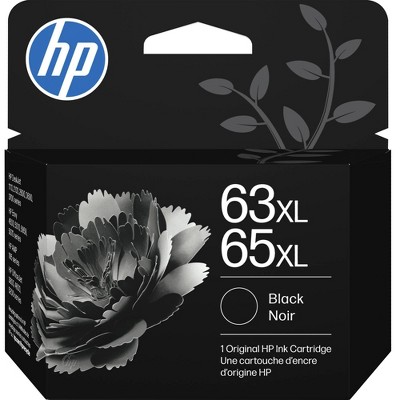
  • A: Hi, thank you for reaching out about HP DeskJet 2825e Wireless All-in-One Color Printer, Scanner, Copier with 3 Months Free Instant Ink (6W7F4A). No, the HP DeskJet 2825e printer does not take an HP 65 ink cartridge. It requires HP 67 or HP 67XL ink cartridges instead. If you have any additional questions, we welcome you to contact MyTGTtech at 833-848-8324 every day, between 7am-11pm CST.

    submitted byMatt - 5 months ago
    Target staff support

Q: Is it chrome book compatible

submitted by LJ - 6 months ago
  • A: Hi, thanks for reaching out about HP DeskJet 2825e Wireless All-in-One Color Printer, Scanner, Copier with 3 Months Free Instant Ink (6W7F4A) Yes, the HP DeskJet 2825e Wireless All-in-One Printer (6W7F4A) is compatible with Chromebooks. It supports Chrome OS natively, allowing you to print and scan without drivers. If you have any additional questions, we welcome you to contact MyTGTtech at 833-848-8324 every day, between 7am-11pm CST.

    submitted byJustin - 6 months ago
    Target staff support

Q: will this printer be compatible with my MAC OS X v10.15.8 from 2013? I tried another epson printer once and it was not compaticble.

submitted by no2techsavvy - 8 months ago
  • A: Hi, thanks for reaching out about the HP DeskJet 2825e Wireless All-in-One Color Printer, Scanner, Copier with 3 Months Free Instant Ink (6W7F4A) Yes, the HP DeskJet 2825e is compatible with macOS 10.15 (Catalina), which is the version you are currently running. However, because your Mac is from 2013 and 10.15 was the very last operating system that specific hardware could support, you are at the "end of the line" for compatibility. If you have any additional questions, we welcome you to contact MyTGTtech at 833-848-8324 every day between 7 am and 11 pm CST.

    submitted byRena - 8 months ago
    Target staff support

Q: hp printer that prints index cards?

submitted by nolahope - 10 months ago
  • A: Hi, thanks for reaching out about HP DeskJet 2825e Wireless All-in-One Color Printer, Scanner, Copier with 3 Months Free Instant Ink (6W7F4A) Yes, the HP DeskJet 2825e (6W7F4A) is capable of printing on index cards and similar cardstock media. As an inkjet printer, it handles various media types, although you will likely need to adjust the paper size settings to the card size (e.g., 3x5 or 4x6) and ensure they are fed correctly into the 60-sheet input tray. If you have any additional questions, we welcome you to contact MyTGTtech at 833-848-8324 every day, between 7am-11pm CST.

    submitted byJustin - 10 months ago
    Target staff support

Q: What is the cost for the ink? For someone who will do very little printing, how often would the ink need to be replaced?

submitted by Unhappy - 10 months ago
  • A: Hi, thanks for reaching out about the HP DeskJet 2825e Wireless All-in-One Color Printer, Scanner, Copier with 3 Months Free Instant Ink (6W7F4A) Cost: A standard set (Black & Tri-Color) costs about $45. If you have any additional questions, we welcome you to contact MyTGTtech at 833-848-8324 every day between 7 am and 11 pm CST.

    submitted byRena - 10 months ago
    Target staff support

Q: Will the printer make copies if I only use black ink?

submitted by Sam - 10 months ago
  • A: Hi, thank you for reaching out about HP DeskJet 2825e Wireless All-in-One Color Printer, Scanner, Copier with 3 Months Free Instant Ink (6W7F4A). Yes, the HP DeskJet 2825e can make copies using only a black ink cartridge by operating in "single-cartridge mode". If the color cartridge is removed or empty, the printer will operate with just the black cartridge, though you may need to press "OK" to bypass error messages. If you have any additional questions, we welcome you to contact MyTGTtech at 833-848-8324 every day, between 7am-11pm CST.

    submitted byMatt - 10 months ago
    Target staff support

Q: Can you double sided print?

submitted by Bah - 10 months ago
  • A: Hi, thanks for reaching out about HP DeskJet 2825e Wireless All-in-One Color Printer, Scanner, Copier with 3 Months Free Instant Ink (6W7F4A) The HP DeskJet 2825e supports manual duplex printing only, meaning it cannot automatically print on both sides of a page. Users must manually reload the paper into the input tray to print the second side, with driver support provided for this process. It does not have an automatic duplexer or automatic document feeder. If you have any additional questions, we welcome you to contact MyTGTtech at 833-848-8324 every day, between 7am-11pm CST.

    submitted byJustin - 10 months ago
    Target staff support

Additional product information and recommendations

3.6 out of 5 stars with 2604 reviews
quality: 2.39 out of 5
value: 2.61 out of 5
30% would recommend
63 recommendations
1 out of 5 stars
Thumbs down graphic, would not recommend
14 November, 2026Verified purchase

DO NOT BUY IT

This is the worst printer I have ever owned in my entire life. It frequently just drops connection and stops working. Truly a lemon of a printer.
Heather
quality: 1 out of 5
value: 1 out of 5
Did you find this review helpful?
5 out of 5 stars
9 November, 2026
originally posted on hp.com
Image

Easy to use

I hate technology and worry about not being able to do basic stuff but this is so easy to use I love it!
Lorna Cuddy
Did you find this review helpful?
2 out of 5 stars
5 November, 2026
originally posted on hp.com
Image

trouble with printing

I'm writing for the second printer which replaced the fiirst one bought, as it was not repaired but replaced as per guarantee policy. From begining the current printer it has difficulties occasionally to insert the paper sheet inside the machine for printing Over last 3 months its starts printing and when reaches 1/3 of the printing paper sheet then rejects the printing taking out the printing paper unfinised . I then insert another sheet and printer continues printing the rest of document on the second paper. Then I manually cut the papers and attached the to one to other and connect them. If document file is in PDF there is not such an issue.
George Varlamis
Did you find this review helpful?
5 out of 5 stars
3 November, 2026
originally posted on hp.com
Image

Good quality printer at an extremely good price

The purchase price excellent well made ideal for home use reasonably quick printing easy to use easily stored away in a cupboard not too big print quality is very good for a low value printer HP instant ink plan can be good value only downside is the HP App painfully slow which is surprising from a company like HP !
Stuall
Did you find this review helpful?
5 out of 5 stars
3 November, 2026
originally posted on hp.com
Image

A very good experience

The product was fairly straightforward to set up. I downloaded the app on my phone. I have had no jams or other problems. I don't use it very frequently. It is quite adequate for my needs. Altogether an excellent product.
Maureen
Did you find this review helpful?
1 out of 5 stars
Thumbs down graphic, would not recommend
2 November, 2026Verified purchase

(no review title)

Printer never works, needs constant WiFi reconnection, ink says is at high level but paper does not print correctly even after calibration
Mary Q
From HP Team team
Hello Mary, we are sorry to hear that your printer is not working as expected. Our HP support team would be happy to assist you with all the issues mentioned above. Please contact them at (800) 474-6836, available 24/7. We hope this resource can get you printing as soon as possible. Thank you for taking the time to leave your feedback. Sincerely, Mark - The HP Team.
22 days ago
quality: 1 out of 5
value: 1 out of 5
Did you find this review helpful?
5 out of 5 stars
29 October, 2026
originally posted on hp.com
Image

Printing

Good quality prints
James
Did you find this review helpful?
4 out of 5 stars
29 October, 2026
originally posted on hp.com
Image

Ink??

I think it is quite good but the ink readings aren't accurate.
Victoria
Did you find this review helpful?
5 out of 5 stars
28 October, 2026
originally posted on hp.com
Image

Excellent

Excellent printer, easy to use .
Zeza
Did you find this review helpful?
2 out of 5 stars
27 October, 2026
originally posted on hp.com
Image

Disappointed

This printer seems to be more complicated than our old hp printer instead of point and print you have to download the document as a pdf and then retrieve it from your phone and then print it out so takes twice as long for a "quick print".
Hp printer owner
Did you find this review helpful?
4 out of 5 stars
25 October, 2026
originally posted on hp.com
Image

Reliable

My 2855e is reliable with good color and clarity. I am happy with it.
Jon V.
Did you find this review helpful?
1 out of 5 stars
23 October, 2026Verified purchase

(no review title)

The wireless print doesn’t work and stopped working after 6 months
Donna
Did you find this review helpful?
1 out of 5 stars
23 October, 2026
originally posted on hp.com
Image

Didnt work for me

Kept printing faded, ink was full, never would print, got rid of it and bought a newer model HP
GabeNKY
Did you find this review helpful?
4 out of 5 stars
21 October, 2026
originally posted on hp.com
Image

Love it, but.

I love the printer, and particularly the ink replacement system, however, the connectivity with my laptop and phone, is hit and miss. Far too often, I get a message saying printer offline, or printer can't be found. Heaven knows why. I have a fairly new laptop, and full fibre. Heaven knows what the reason is. That aside, I do like the printer. This is my second Deskjet over a ten year span.
Steve
Did you find this review helpful?
2 out of 5 stars
20 October, 2026
originally posted on hp.com
Image

poor quality

the unit is only 1 year old and it no longer draws blank paper in to be printed!
joel
Did you find this review helpful?
4 out of 5 stars
20 October, 2026
originally posted on hp.com
Image

All in one printer

Overall printer is a good size and printing or copying is very easy to use. Love the way I can print off my phone and the monthly charge for ink etc
L E
Did you find this review helpful?
1 out of 5 stars
19 October, 2026
originally posted on hp.com
Image

HP DeskJet 2855e All-in-One Printer

I am so dissatisfy with this printer. Constantly I have to adjust print head alignment. Skip lines when it prints. I will never buy another HP printer.
KT
Did you find this review helpful?
5 out of 5 stars
19 October, 2026
originally posted on hp.com
Image

Works very well

Not having to worry about low ink and paper
Holly
Did you find this review helpful?
5 out of 5 stars
18 October, 2026
originally posted on hp.com
Image

Excellent sale program

I like your monthly program to pay for item every month
Alveraz
Did you find this review helpful?
4 out of 5 stars
18 October, 2026
originally posted on hp.com
Image

HP DeskJet 2810e

The printer does optimally fine.
Imoh
Did you find this review helpful?

Get top deals, latest trends, and more.