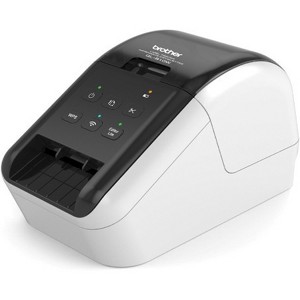
Brother QL-810W Ultra-Fast Label Printer with Wireless Networking
$210.12
In Stock

Free & easy returns
Return this item by mail or in store within 30 days for a full refund.
Sold & shipped by Spacebound
Eligible for registries and wish lists
At a glance
About this item
Additional product information and recommendations
Frequently bought together
- $17.09 - $29.99reg $25.49 - $44.99 Sale
Related Categories
Guests are saying
The Brother QL-810W label printer offers a blend of efficiency and versatility, making it a great choice for both personal and business use. Guests appreciate its fast printing speed, high-quality output, and the convenience of wireless connectivity. The P-Touch software provides a range of templates and customization options, enhancing the user experience. However, some guests have encountered challenges with setup and connectivity, particularly with Wi-Fi, which may require patience and troubleshooting.
Summary created by AI from text of reviews reflecting recent feedback provided across different star ratings (includes incentivized reviews)
3.7 out of 5 stars with 81 reviews
2 out of 5 stars
18 February, 2026
originally posted on brother-usa.com

Connection Difficulty Especially Over WiFi
This printer prints nicely overall, but there is much struggle in the connectivity with other devices, especially using the WiFi feature. I have also had difficulty connecting my computer with the device over the cable port. This printer would be so excellent if the wireless connectivity would work consistently.
From Brother Customer Service team
Thanks for taking the time to review your experience with the Brother QL810W. We appreciate your feedback. I’m sorry to hear that you are having some issues with the Brother QL810W. We sincerely apologize for any inconvenience this issue may have caused you. We’d like an opportunity to help. Please contact us directly at: https://www.brother-usa.com/support/QL810W
8 months ago
5 out of 5 stars
18 June, 2025
originally posted on brother-usa.com
Excellent Label Printer
I freely admit that I have not used all the Brother QL-810W features. I have not used the WPS button, which allows the user to connect this device easily and quickly to other computers on the network, provided those other computers are also WPS capable, but I am thrilled to use this feature when the need arises. This is also true for the Wi-Fi button as well as the Wi-Fi LED indicator. Again, this is a terrific feature that I plan to use when needed. The Editor Lite button is another terrific feature that I have not used but will come in handy when I do. The Editor Lite is a Windows-only application but is great if you are in a hurry and do not have the time to create a complicated, time-consuming label. I have my label printer plugged in. Thus, I do not use the battery feature, but this is another handy attribute of an excellent product and is beneficial if you have limited outlets or are in a location deprived of electricity. The P-touch software has a rich layout and is adaptable to the novice to the advanced user. I love the P-touch application feature where once you create a label, you next press the print button and the label in the P-touch application ejects, and the printer automatically cuts the label. You cannot go wrong with this choice for an efficient, easy-to-use label printer.
4 out of 5 stars
8 September, 2024
originally posted on brother-usa.com
Label printing
Toooo much trouble settling up and connecting plus download p touch and Then installer. Directions not clear enough. Difficult to wifi and bluetooth. Not bad after that tho
1 out of 5 stars
6 September, 2023
originally posted on brother-usa.com
Don't buy one!
I received this as a gift. I spent 4 hours of my time plus at least 2 hours with Brother technical support trying to get it to print. It would spit out labels but printed nothing on them. I asked Brother to replace the unit. But since I did not have the original receipt, they would not. Thank goodness I had my old QL-570 that did work. I will not buy another Brother product.
From Brother Customer Service team
We would like to take this opportunity to thank you for your feedback. We are sorry to hear that you are having issues with your Brother QL810W. At Brother, customer satisfaction is something we take seriously. Your feedback is important to us and will be reviewed to help us improve our future products. Thank you for being a Brother customer. Please know that we will be here, should you need to contact us in the future. Our Brother customer support team is available to assist you directly at www.brother-usa.com/brother-support
3 years ago
1 out of 5 stars
31 January, 2023
originally posted on brother-usa.com
CODABAR 14 start and stop codes should be axed
We need CODABAR 14 with NO start and stop codes for our database. But the Brother software requires start and stop codes for CODABAR 14, so we sent it back.
5 out of 5 stars
26 November, 2022
originally posted on brother-usa.com
Great printer...
Excellent value. Easy to learn operation. Fantastic it prints in black & red and that there are colour editing options for graphics.
5 out of 5 stars
14 October, 2022
originally posted on brother-usa.com
quality output so so network printing
quality label output, works on network (but install is tedious) but not with ARM based windows computers, software is overly complex
5 out of 5 stars
12 September, 2022
originally posted on brother-usa.com
Great Product
[This review was collected as part of a promotion.] This printer has been a time saver as a small business owner. It is super easy to set up and use.
5 out of 5 stars
20 May, 2022
originally posted on brother-usa.com
Great little label maker
This label maker works great and was easy to set up
1 out of 5 stars
29 December, 2021
originally posted on brother-usa.com
Least user friendly tool i have ever seen
Its a royal pain to setup. When you connect to the wifi to your phone an go through this weird password process, why would you need a password, like is someone going to steal my label maker. Once connected it never redirects to the Home Wifi network to set the printer to wifi. When you look at the phone after connecting it just sets there and spins saying "your device is connecting with 'QL-810W'. Its a great idea to have a wireless connection to a label maker.....Brother really missed on the setup process execution
From Brother Customer Service. team
We are sorry that you are experiencing connection issues issues with your Brother QL810W machine and we understand your disappointment. If you continue to have issues, our Brother Customer Support Team is available to assist you direct: www.brother-usa.com/brother-support
5 years ago
5 out of 5 stars
1 June, 2021
originally posted on brother-usa.com
lightning fast printing and wirelessly!
The label printer is only option I have since the envelopes wasn't fitting on my HP printer and will not work on my HP printer and I didn't have any label sheets so I looked at these before deciding on Brother QL-810W because my notebook computer didn't have many ports.... I am using this printer to make series of labels necessary for mailing 10 to 40 letters.... That is time saving works,,,
5 out of 5 stars
28 May, 2021
originally posted on brother-usa.com
EXCELLENT MACHINE!!!!!!!!!!!!!!!!!!!!!!!!!!!1
WORKS PERFECTLY EVERY TIME! SHOULDA HAD THIS SOONER! HAPPY I CHOSE BROTHER!
3 out of 5 stars
6 May, 2021
originally posted on brother-usa.com
A nice label printer, works good
The label print works well but the address book is horrible. They really don't make it easy to change. It has 5 lists (Personal, Business, Other1, Other2, and Other3) that can't be edited or added to, why is that? I tried to make a simple label but I need to change the templet in the lists and can't.
5 out of 5 stars
5 May, 2021
originally posted on brother-usa.com
Works great!
My organization is very happy with this product. Works as expected and is pretty reliable.
5 out of 5 stars
15 April, 2021
originally posted on brother-usa.com
Very useful
Excellent business labels and personal labels saves a lot of time handwriting.
5 out of 5 stars
4 April, 2021
originally posted on brother-usa.com
iPad connects to it quite easily.
Wonderful connectivity and very easy to use. I use it for my mailing list.
1 out of 5 stars
3 April, 2021
originally posted on brother-usa.com
Whatever you do, do not buy this for labels
This printer is absolutely horrible. Purchased with the intent of printing shipping labels through usps for e-commerce and has been an absolute nightmare, the quality is terrible. I repeat DO NOT BUY.
From Brother Customer Service team
We understand that you are experiencing issues printing shipping labels with the Brother QL-810W label printer and we'd like to help. Poor print quality when printing shipping labels can occur if the label is not formatted for your label size. Here is a link with step by step instructions on how to print shipping labels from a Mac or Windows computer. Macintosh: https://help.brother-usa.com/app/answers/detail/a_id/154675 Windows: https://help.brother-usa.com/app/answers/detail/a_id/155840 If the problem persists, feel free to contact Brother Customer Service directly at https://www.brother-usa.com/support/ql810w
6 years ago
5 out of 5 stars
10 March, 2021
originally posted on brother-usa.com
love it
use it the most use for address,lables easy to use on cell
4 out of 5 stars
3 March, 2021
originally posted on brother-usa.com
Works as expected
Had to call customer service to get it up and running but now works fine!!
5 out of 5 stars
28 February, 2021
originally posted on brother-usa.com
Works great. FAst & Quiet
Wireless connected to multiple computers. Works quiet and fast. Simple to use.