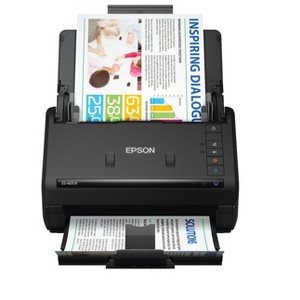
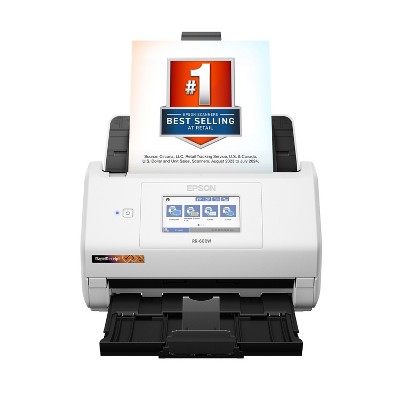
Epson WorkForce ES-400 II Color Duplex Desktop Document Scanner
$329.99 reg $379.99
$50 off
In Stock

Free & easy returns
Return this item by mail or in store within 30 days for a full refund.
Sold & shipped by Epson
Eligible for registries and wish lists
About this item
Additional product information and recommendations
Discover more options
- $139.99reg $159.99 Sale3.9 out of 5 stars with 114 ratings
Frequently bought together
- $24.99reg $29.99 Sale
- $336.99reg $375.00 Sale
- $23.99reg $28.79 Sale


Guests also viewed
- $139.99reg $159.99 Sale3.9 out of 5 stars with 114 ratings
Guests are saying
The Epson Workforce ES 400 II Duplex Desktop Document Scanner is a highly efficient and user-friendly device that excels in scanning both sides of documents quickly and clearly. Guests appreciate its compact design, making it ideal for home offices or small businesses. The setup process is straightforward, and the scanner's ability to handle large volumes of paperwork enhances productivity. Despite some concerns about software limitations, many guests find it a valuable tool for managing documents effectively.
Summary created by AI from text of reviews reflecting recent feedback provided across different star ratings (includes incentivized reviews)
4.5 out of 5 stars with 123 reviews
5 out of 5 stars
31 August, 2026
originally posted on http://www.dell.com/en-us

receipt and document scanner
this works great with our system in the office to scan receipts and documents to attach to invoices and files. easy to setup and can default scan destination
5 out of 5 stars
23 August, 2026
originally posted on epson.com

Great Scanner
Great product. Arrived yesterday. Set it up a bit ago. Very easy instructions. Works great the first time.
1 out of 5 stars
10 September, 2025
originally posted on epson.com
service sucks
JUST TRY TO DOWNLOAD A DRIVER
From The Epson Team team
Hi BJC11234, we are sorry to hear you are having issues with your Epson printer. Your ES-400 II includes free technical telephone support for the life of your product. Our Epson Support Team would be happy to help you and can be reached at (562) 276-4382; Hours: Monday – Friday, 7 a.m. to 4 p.m. (PT). Sincerely, Joseph
1 year ago
1 out of 5 stars
12 June, 2025
originally posted on epson.com
Scan software is unsuitable for medium to large businesses
The new software lacks the very simplest and most useful feature of old, reliable Epson Scan 2 and Scan Manager. Smart Scan only allows only one file destination and you cannot set scan profiles like before. For businesses with many types of documents to scan to different folders on a network share, this makes the process of filing documents very inefficient. The AI features that are supposed to determine a file name are not suitable for a business with large documents. OCR is far too slow and it disrupts workflows. Also, the options of saving to a multitude of cloud locations or emailing to an address set by the user is like begging for data exfiltration. I can hide those options from the user interface but there is nothing preventing the user from simply adding the options back and saving our intellectual property to their personal cloud storage. The only good thing about this scanner is that it makes quality scans (if you set the resolution correctly), it holds a lot of pages and replacement rollers are easy to obtain and install. Overall, the old saying applies here. If it ain't broke, don't fix it. Epson Scan was simple but it worked and we had a GT-S50 on every desk. As those are going out of service, I have been replacing them with newer models but the new software has degraded the functionality so much that I will be looking at alternatives to Epson. Our users dislike it very much, and I don't like telling them "sorry, your job just got harder". I do not recommend this at all.
From The Epson Team team
Hi jada99, we apologize that you are having issues with your scanner. Your Epson ES-400II includes free technical support for the life of your product. Our Epson Support Team would be happy to help and can be reached at (562) 276-4382; Hours: Monday – Friday, 7 a.m. to 4 p.m. (PT). Sincerely, Joseph – The Epson Team.
1 year ago
5 out of 5 stars
15 May, 2025
originally posted on http://www.dell.com/en-us
easy to use scanner
nice scanner, easy to use, i prefer scansnap but need a twain scanner to be able to use within our EMR system this one is reliable and lasts
5 out of 5 stars
9 February, 2025
originally posted on http://www.dell.com/en-us
Great purchase
This product is used in my home office and it helps us tremendously when I cannot get to the corporate office.
5 out of 5 stars
6 February, 2025
originally posted on http://www.dell.com/en-us
Great Sanner
This machine is an Easy set up. Follow the instructions' and wa-la, easy to use. I recommend this machine. I purchased it for an individual that is not tech savy. They could easily work with the machine.
1 out of 5 stars
23 January, 2025
originally posted on epson.com
No Windows 10 support
Keep trying to install on Windows 10, still the most popular operating system currently in use. Go to support page and it tells me there is no software for your operating system. Try to install via Windoes device setup, it shows the device, ES-400II, but says the driver is unavailable.
From The Epson Team team
Hi fred888, we apologize for the disappointing experience you’re having installing your Epson WorkForce ES-400 II. We can help. Please call the Epson Support Team at (562) 276-4382; Hours: Monday – Friday, 7 a.m. to 4 p.m. (PT). Sincerely, Joseph – The Epson Team.
2 years ago
1 out of 5 stars
30 December, 2024
originally posted on epson.com
Not a good user experience
Difficult to set up with software errors on installation. Scan button does not work.
From The Epson Team team
Hi JasonW, we apologize that you are having issues with your scanner. Your Epson WorkForce ES-400 II includes free technical support for the life of your product. Our Epson Support Team would be happy to help and can be reached at (562) 276-4382; Hours: Monday – Friday, 7 a.m. to 4 p.m. (PT). Sincerely, Joseph – The Epson Team.
2 years ago
5 out of 5 stars
22 June, 2024
originally posted on epson.com
Ease of Set-up
The WorkForce ES is very easy to set up the device itself; and, downloading the driver is straight-forward. I recommend for moderate personal or small business use.
5 out of 5 stars
18 June, 2024
Reliable, Durable and User-Friendly
[This review was collected as part of a promotion.] If you're in the market for a top-tier document scanner, the Epson WorkForce ES-400 II should be at the top of your list. Its remarkable capabilities and user-friendly features make it a standout choice that won't disappoint. We were are using this scanner remotely on project locations and it has streamlined our data entry/document management process in ways we never imagined. It significantly reduced the time spent on digitizing documents. This scanner's efficiency has been a major productivity booster, especially for the projects we have with sensitive timelines. It's ability to manage large volumes of paperwork swiftly; has allowed us to improve our process and meet our deadlines. Fantastic investment for our team.
1 out of 5 stars
14 June, 2024
originally posted on http://www.dell.com/en-us
Poor Dell customer service
Poor Dell customer service
2 out of 5 stars
9 May, 2024
originally posted on epson.com
Not happy
I purchased my scanner to be able to utilize it as a mobile scanner. After I bought it, I had just assumed that it was wifi capable. Considering they have wifi capable before my model and after my model. Yes it was my fault for assuming. But I don’t understand why they didn’t just add that feature to this model as well
From The Epson Team team
Hi Rocky6, thank you for providing feedback on your Epson WorkForce ES-400 II. We apologize for the disappointing experience you were having and will be sure to pass the information along to our product teams. Should you need assistance in the future, your product comes with free lifetime tech support and we’d be happy to help. You can call Epson Support at (562) 276-4382 between 7 a.m. - 4 p.m. (PT), Monday - Friday. Regards, Joseph. – The Epson Team.
2 years ago
5 out of 5 stars
3 April, 2024
originally posted on epson.com
5 Stars Epson WF ES 400II Scanner
I bought this April 2024. Excellent and Easy to Set Up and Use. Thank you Epson
5 out of 5 stars
25 March, 2024
originally posted on epson.com
Office Super Manager
Scanning made easy
5 out of 5 stars
2 December, 2023
originally posted on http://www.dell.com/en-us
Epson Scans it all
Easy to use. Scans quickly.
5 out of 5 stars
21 September, 2023
originally posted on epson.com
ES-400 ii review
I have upgraded my scanner to the Epson ES-400ii and it works great and it's fast.
5 out of 5 stars
20 July, 2023
originally posted on http://www.dell.com/en-us
Efficient scanner
Scanning made simple. Easy to use and efficient.
5 out of 5 stars
13 March, 2023
Epson 400ll Scanner
[This review was collected as part of a promotion.] Fantastic 5 Star Product
5 out of 5 stars
9 January, 2023
Good office scanner
[This review was collected as part of a promotion.] We've been using this scanner, Epson ES-400, for many years in the office. Very easy to use, scans quickly and clearly.