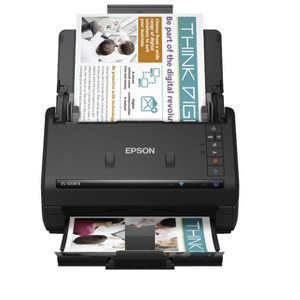
Epson WorkForce ES-500W II Wireless Color Duplex Desktop Document Scanner
$419.99
In Stock

Free & easy returns
Return this item by mail or in store within 30 days for a full refund.
Sold & shipped by Epson
Eligible for registries and wish lists
About this item
Additional product information and recommendations
Discover more options
- $239.99reg $279.99 Sale4.1 out of 5 stars with 24 ratings
- $139.99reg $159.99 Sale3.9 out of 5 stars with 114 ratings

Guests also viewed
- $239.99reg $279.99 Sale4.1 out of 5 stars with 24 ratings
- $139.99reg $159.99 Sale3.9 out of 5 stars with 114 ratings
Related Categories
Guests are saying
The Epson DS 500W II wireless duplex document scanner impresses guests with its quick setup, compact design, and high-quality scanning capabilities. It efficiently handles multiple pages with a 50-sheet auto document feeder and duplex scanning, making it ideal for home offices and small businesses. Guests appreciate its wireless functionality and the ability to scan directly to cloud storage, enhancing productivity and organization. While some guests noted software challenges, the overall performance and features make it a valuable addition to any workspace.
Summary created by AI from text of reviews reflecting recent feedback provided across different star ratings (includes incentivized reviews)
4.7 out of 5 stars with 79 reviews
quality: 5 out of 5
value: 4 out of 5
100% would recommend
1 recommendations
4 out of 5 stars
25 January, 2026
originally posted on epson.com

Not What I’m Familiar With
I purchased this scanner to replace a 14 year old ScanSnap which died. I have not used the new scanner very much, as yet, but can offer this info. The scanner was very easy to connect and set up, and does a nice job of scanning. The weak part may be the software, which seems clunkier than the software for the old scanner. The software with the old scanner was more how I wanted it to work. It could be that I just haven’t learned how to make the new software work differently. For now, it seems that I may need to adjust my process to something less efficient.
5 out of 5 stars
Thumbs up graphic, would recommend
21 January, 2026Verified purchase
Desk vs cloud
After setting up and plugging in the scanner, it only took minutes to be able to start right away. Ìt was heavier and larger than I thought, but stores away easily. I really like how it can adjust to any size receipt or document you choose to scan .It’s going to be very useful in getting papers off my desk !
5 out of 5 stars
23 November, 2025
(no review title)
[This review was collected as part of a promotion.] 5
1 out of 5 stars
19 August, 2025
originally posted on epson.com
Incompatible with ARM-based Windows 11
I bought this product a few days ago and it does not work with ARM-based Windows 11 computers. The drivers required for you to use this product will not install on your operating system, and they do not advertise this. I actually found a post by Epson that stated they planned on rolling out software for this specific product in April of 2025. When will this be addressed??
From The Epson Team team
Hi SadBuyer, we're sorry for the disappointing experience you had with your Epson printer. Your WorkForce ES-500 includes free technical support for the life of your product. Please give us the opportunity to assist you by calling our Epson Advanced Support Team. We can be reached at 1-800-241-5794; Hours: Monday – Friday, 7 a.m. – 4.p.m. PT. We're here to help. Sincerely, Joseph
1 year ago
5 out of 5 stars
17 February, 2025
originally posted on epson.com
Amazing Scanner
Love this scanner. It scans multiple pages, both sides, super quick. The image quality once the image or document is digitized is perfect! :)
5 out of 5 stars
26 December, 2024
originally posted on http://www.dell.com/en-us

Great product and fast service delivery
Great product. This is my second purchase for my 2nd office.
4 out of 5 stars
1 March, 2024
originally posted on epson.com
Inefficient for Law Firm Needs
I wish there was an option to scan everything at once and just save them separately. That way we don't have to scan, save, scan, save, scan save, we could just scan, and then save save save save.
2 out of 5 stars
1 August, 2023
Balancing the good performance v.s. ease of setup
[This review was collected as part of a promotion.] Installation s/w could have been done better hence WIFI setup is way more difficult than anticipated. Even USB setup requires more works than normal. Otherwise, the scan quality and performance is quite good.
4 out of 5 stars
30 June, 2023
originally posted on http://www.dell.com/en-us
(no review title)
4
5 out of 5 stars
31 May, 2023
originally posted on http://www.dell.com/en-us
Epson Document Scanner
The wireless was not pleasant to set up a lot of trouble with that, but the usb cord worked perfectly fine. We have a very secure network so I'm not really a fan of anything wireless. So far this document scanner seems to scan very clearly, quickly and well👍👍
5 out of 5 stars
5 April, 2023
originally posted on http://www.dell.com/en-us
Best Bang for the Buck!
Great scanner and its fast.
5 out of 5 stars
8 January, 2023
originally posted on http://www.dell.com/en-us
Great Machine
Super fast, many features, great for archiving high quality scans of photos as well as documents. Got one for my retired father after using one in the office for a while.
5 out of 5 stars
20 December, 2022
originally posted on http://www.dell.com/en-us
(no review title)
5
5 out of 5 stars
28 October, 2022
originally posted on epson.com
Worth the money
Worth the money
5 out of 5 stars
10 October, 2022
originally posted on http://www.dell.com/en-us
(no review title)
5
5 out of 5 stars
14 August, 2022
originally posted on epson.com
Unbelievably efficient
I have been using a MFP with auto-document feeder for years. I finally decided to try this and it is great. Simple interface. VERY clear double sided scans. Happy I clicked "buy".
3 out of 5 stars
28 July, 2022
originally posted on http://www.dell.com/en-us
(no review title)
3
5 out of 5 stars
15 April, 2022
originally posted on http://www.dell.com/en-us
(no review title)
5
5 out of 5 stars
6 April, 2022
originally posted on http://www.dell.com/en-us
Love It!
Love this little work horse. Fits perfect on my desk. It is quick and easy to set up. Easy to use.
5 out of 5 stars
24 December, 2021
originally posted on epson.com
Fastest scanner on the market
I brought this scanner to scan loan documents and it has exceeded my expectations. The scanner scans fast, the pages are clear, and I love the fact that I can create a pdf and send it to the signing company in a few clicks.