Sponsored
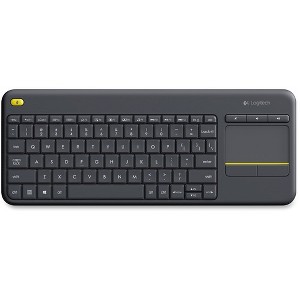
Logitech K400 Plus Touchpad Wireless Keyboard Black - USB Wireless Connectivity - On/Off Power Switch - 2.40 GHz Operating Frequency
$56.99
Out of Stock
Eligible for registries and wish lists
Sponsored
About this item
Highlights
- Wireless Technology: USB Wireless Receiver
- Hot Keys: Mute,Volume Up,Volume Down
- Switch Type: Mechanical
- Keyboard Connectivity: Wireless
Description
A compact keyboard with integrated touchpad puts all your controls in a single device. Enjoy your entertainment without the clutter of multiple devices. A wireless range of 10m (33') enables a responsive, uninterrupted connection in even the largest rooms. Watch video, stream music, connect with friends, browse web pages and more without annoying delays or dropouts. The familiar key layout eliminates the learning curve so you already know how to use the K400 Plus. Your media interactions are enhanced with comfortable keys, easy-access volume controls, and an arrow-key layout that simplifies navigation. A second left-click button permits two-hand navigation and selection. Shortcuts simplify control for Android and Windows users. Hot keys work right from the box with no configuration is required. Keyboard includes a unifying receiver, two AA batteries (pre-installed) and user documentation. System Requirements: Google Chrome OS, Microsoft Windows 7 / 8 / 10 or later, Android 5.0 or later
Connection Type: USB
Primary use: Home
Model name: 920-007119
Number of buttons or keys: 85
Battery: 2 AA Alkaline, Required, Included
TCIN: 78407278
UPC: 097855115300
Origin: made in the USA or imported
The above item details were provided by the Target Plus™ Partner. Target does not represent or warrant that this information is accurate or complete. On occasion, manufacturers may modify their items and update their labels.
We recommend that you do not rely solely on the information presented. If you have a specific question about this item, you may consult the item's label, contact the manufacturer directly or call Target Guest Services at 1-800-591-3869.
If the item details aren’t accurate or complete, we want to know about it.
Shipping details
Estimated ship dimensions: 15 inches length x 6 inches width x 1 inches height
Estimated ship weight: 1.2 pounds
This item cannot be shipped to the following locations: American Samoa (see also separate entry under AS), Guam (see also separate entry under GU), Northern Mariana Islands, Puerto Rico (see also separate entry under PR), United States Minor Outlying Islands, Virgin Islands, U.S., APO/FPO, Alaska, Hawaii
item ships from third party seller: antonline
Return details
This item can be returned to any Target store or Target.com.
This item must be returned within 30 days of the date it was purchased in store, shipped, delivered by a Shipt shopper, or made ready for pickup.
See the return policy for complete information.
Frequently bought together
Related Categories
Guests are saying
This wireless keyboard is a versatile option for media control and workstations, featuring a built-in trackpad that enhances usability. While it is lightweight and compact, making it easy to handle, some guests noted concerns about its durability and the touchpad's performance. Overall, it serves well for basic tasks and is particularly appreciated for its price point and functionality in various settings, including home theaters and classrooms.
Summary created by AI from text of reviews reflecting recent feedback provided across different star ratings (includes incentivized reviews)
4.0 out of 5 stars with 46 reviews
quality: 5 out of 5
value: 5 out of 5
50% would recommend
2 recommendations
2 out of 5 stars
1 October, 2025
originally posted on Logitech

It’s not very good
Pros: lets me control my PC from the couch and has a useful mouse button at the top left corner, for holding the keyboard like a big gamepad. Cons: keys are really squishy, no backlight, trackpad gesture controls don’t work in all windows apps, two-finger scrolling jumps multiple lines when starting to scroll (this is the intended behavior from this device), uses disposable batteries, feels incredibly cheap. This fit my requirement for a combination keyboard and touchpad, but it is not pleasant to use. If Logitech made an MX (high quality) keyboard with this form factor and a trackpoint under the touchpad, I would buy one in a heartbeat.
3 out of 5 stars
18 August, 2025
originally posted on Logitech
It gets the job done
It's an okay, inexpensive keyboard that I'm using for a media computer hooked up to my TV. It does the job, but it is extremely flimsy feeling. I had a similar logitech wireless keyboard probably 15 years ago that had a much more sturdy feel, and I was hoping it would be the same but it's not nearly as good. The trackpad tracks well, that's definitely worth mentioning. It's a solid 3 stars; it gets the job done but it's nothing exceptional.
5 out of 5 stars
15 January, 2025
originally posted on Logitech
Great basic Keyboard with no
[This review was collected as part of a promotion.] Great basic Keyboard with no separate mouse to lose! We love this keyboard for workstations in the grocery industry that use LP Labeler Systems to create their custom labels. They are reliable and the right price to easily replace when needed.
3 out of 5 stars
12 December, 2024
originally posted on Logitech
Nice 👍 keyboard
[This review was collected as part of a promotion.] We love it except for the power switch…. It could be better than it is But we definitely would buy it again 👍
4 out of 5 stars
11 December, 2024
originally posted on Logitech
Nice but slightly outdated
[This review was collected as part of a promotion.] I've been wanting to get this for a while to be able to more easily control my Chromecast and enter text more easily. I like the colors and the mouse control with the top left click button on the keyboard, really smart! My gripes are: 1) It's a bit larger than i imagined. It's still very close to a full size keyboard, and I would have expected it to be smaller and less obtrusive to my living room. 2) Connections: In order to connect to a chromecast I need an additional adaptor, which is chromecast's fault, but then a USB-C dongle would have been nice and smaller. Somehow all old USB connectors just feel obsolete at this point. Ideally this would actually have bluetooth, so I could just connect it wirelessly directly to the device with no adaptor or dongle at all. 3) Maybe Logitech are still treating this as a computer device, but I have a feeling 80% of the people who get this, get this to control their TVs or media stations. Why not just acknowledge that and make it a keyboard/remote hybrid? add dedicated buttons for top apps like youtube or netflix, add an arrow keypad to navigate left/right/up/down? Get with the times.
5 out of 5 stars
30 November, 2024
originally posted on Logitech
Great product
[This review was collected as part of a promotion.] I have a computer hooked up to my home theatre system I wanted a small keyboard and mouse to be able to sit away and have a remote like experience. This so a great addition. Sold connection and a built in track pad so no losing one component. Compact enough to set on an end table or keep away from the kids. Just a great product. Wish I could have found something a bit smaller, but this does the trick all the same.
4 out of 5 stars
10 November, 2024
originally posted on Logitech
Bought this to supplement another
[This review was collected as part of a promotion.] Bought this to supplement another keyboard for my HTPC. Gets the job done but I wish it had background lighting for the keys.
5 out of 5 stars
31 August, 2024
originally posted on Logitech
K400 Plus Wireless Touch Keyboard
[This review was collected as part of a promotion.] Touchpad adds comfort giving freedom from conventional mouse. Light and easy to carry.
5 out of 5 stars
29 February, 2024
originally posted on Logitech
I could not use with
[This review was collected as part of a promotion.] I could not use with my new computer hp series . It would not hook up with its blue tooth wireless setting...tried many times ,very un-happy . Can you help with this problem ?
5 out of 5 stars
4 February, 2024
originally posted on Logitech
Perfect simple combo
Perfect simple keyboard with excellent battery life that get things done!
5 out of 5 stars
19 December, 2023
originally posted on Logitech
Great media keyboard! Great value.
Great all around media keyboard. Adjust scrolling speed and ready to use with your fingers.
5 out of 5 stars
16 December, 2023
originally posted on Logitech
A good keyboard/mouse combo.
I like the fact that it has a trackpad built into it, the scrolling with the trackpad takes a bit of time to get used to but it’s not too difficult on my fingers . I haven’t used the keyboard for a while but battery life is good so far.
5 out of 5 stars
10 December, 2023
originally posted on Logitech
This keyboard is extremely useful
This keyboard is extremely useful for testing/building different PCs. So convenient compared to dragging around individual mice and keyboards. Pretty much any PCs that aren't in a long-term desk situation, this is a must have. They are fantastic for media center pc's. It is wife tested and approved . The keyboard has survived many drops from a height of as much as 5 feet onto to a hard wood floor . For the price, it is one of the best wireless keyboards I have found ..Just buy it .
4 out of 5 stars
26 November, 2023
originally posted on Logitech
Great, but with Software Quirks
Overall, this keyboard is more than adequate, especially for the price. General build quality is great. The keys have a good weight and feel, and I'm able to type as fast and accurately on this keyboard as I am on keyboards that cost double or triple this. The trackpad also has a good feel, and the physical left- and right-click buttons provide confidence in what you're doing, especially in darker scenarios. My only gripe is how it handles two-finger scrolling. Out of the box, scrolling is not inverted, while inverted scrolling is my preference. After finding that there were no tuning options in Windows, I had to download the companion Logitech app, which gave me inverted scrolling, but it broke the scrolling speed. Prior to the app installation, scrolling speed was exactly what I expected, but after tweaking those settings, swipe scrolling is now unusable, as it is incredibly fast. Attempting to move down a couple lines of text results in jumping to the bottom of the page, with no apparent options in the software to adjust this. However, this isn't a deal breaker, as I don't anticipate needing to scroll much while using this keyboard.
4 out of 5 stars
4 August, 2023
originally posted on Logitech
super light and functional
keyboard is very light and ıt works vey well. I am happy with it and I recommend it to everyone
5 out of 5 stars
27 July, 2023
originally posted on Logitech
No Wires
Purchased this for it's small size and connection ability. I have 3 Logitech keyboards and mice. No wires.
5 out of 5 stars
4 July, 2023
originally posted on Logitech
We use it with our
We use it with our dining room TV. It works well and easy to use.
5 out of 5 stars
24 May, 2023
originally posted on Logitech
Great combo keyboard
Works as intended. Love the keyboard/mouse combo in our dental operatories.
4 out of 5 stars
21 May, 2023
originally posted on Logitech
Well... Where's the standby key?
I replaced another K400 wireless keyboard with this one. It's a really great keyboard. This one doesn't have a standby key... and I miss the standby key. You should put that back.
5 out of 5 stars
26 April, 2023
originally posted on Logitech
Great In The Classroom!
This was an impulse buy one day. Best decision ever! I use this keyboard with in my classroom to control the computer I have connected to my projector. Being able to stand at my podium in front of the class and control my computer, or walk around the room and still control it has been an absolute game changer for me and my teaching.