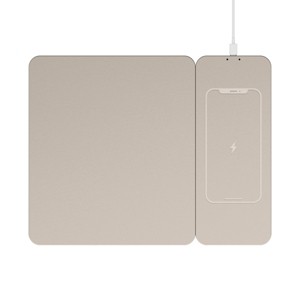
North Wireless Charging Mouse Pad - Beige: Polyurethane Desk Accessory
$14.99
In Stock


Eligible for registries and wish lists
At a glance
About this item
Additional product information and recommendations
Frequently bought together
- $17.99 - $19.99reg $24.00 - $27.00 Sale1 out of 5 stars with 1 ratings

Guests are saying
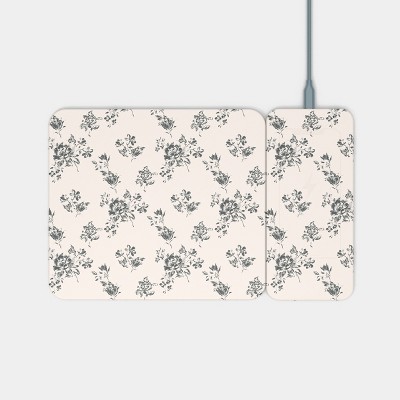
This wireless charging mouse pad combines functionality and style, offering a detachable charging pad that can be positioned on either side for convenience. Guests appreciate its sleek design and the ability to charge their phones while working. However, some have noted that it requires a plug-in for charging, which may not meet everyone's expectations for a truly wireless experience. Overall, it serves as a practical addition to any workspace.
Summary created by AI from text of reviews reflecting recent feedback provided across different star ratings (includes incentivized reviews)
4.1 out of 5 stars with 59 reviews
quality: 3.43 out of 5
value: 3.71 out of 5
82% would recommend
29 recommendations
3 out of 5 stars
18 July, 2026Verified purchase
(no review title)
It works, but you have to plug in the phone to the pad to charge, so it’s not actually wireless. At thar point just plug it in to the computer
5 out of 5 stars
Thumbs up graphic, would recommend
22 May, 2026
(no review title)
wonderful 💫👌🏻🤗
4 out of 5 stars
Thumbs up graphic, would recommend
22 April, 2026Verified purchase
Cute
Cute, clean look. The charging pad separates from the mouse pad if you want it to which is nice but it doesn’t work well.
5 out of 5 stars
18 April, 2026Verified purchase
Buy it!
I love the color and that’s detachable. I’ve had zero issues with this combo. I haven’t had them for several months and I recommend.
1 out of 5 stars
Thumbs down graphic, would not recommend
4 February, 2026Verified purchase
Doesn’t Hold a Charge at All
I’m extremely disappointed with this wireless charging mouse pad. It will not hold a charge for more than 5 seconds before it starts beeping and shuts off. I’ve tried using different charging blocks, cords, and outlets, but nothing works. It constantly beeps like it’s malfunctioning and stops charging almost immediately. This product is basically unusable and feels very low quality. I would not recommend this to anyone. Save your money and buy a better brand. Pros: None Cons: Won’t stay charged, beeps nonstop, stops charging after seconds
5 out of 5 stars
25 January, 2026Verified purchase
(no review title)
Great works well
1 out of 5 stars
Thumbs down graphic, would not recommend
24 January, 2026
Not working . Returning
Just bought . It doesn’t work . I would like for the brand to offer more information regarding which phones you can charge on this pad.
1 out of 5 stars
Thumbs down graphic, would not recommend
4 January, 2026Verified purchase
(no review title)
Mousepad is fine. After an hour of my phone sitting on the charging pad, the battery level is lower than when it started.
1 out of 5 stars
4 January, 2026Verified purchase
(no review title)
Didn’t work and customer service didn’t refund they just kept it
5 out of 5 stars
Thumbs up graphic, would recommend
4 September, 2025
Love the color
I love this mousepad it’s easy to use and you can setup many ways and you plug in to usb to charge and the wireless pad is magnetic and comes off and on easily. It’s my new favorite item for my office and has replaced my old mouse pad. Wireless charger works but charges slow but it’s good for overnight charges. Love the color
3 out of 5 stars
11 August, 2025
Cute but the charge is slow
Wanted to love this but I’m not sure that I do. It’s really cute and feels like good quality, and I love the color however it is a VERY slow charge. I had my phone on it (with no case to make sure it was making full contact) for about an hour and it only went up 5%.
5 out of 5 stars
Thumbs up graphic, would recommend
26 July, 2025Verified purchase
love this thing
i love this mousepad such nice quality and the charger works well
3 out of 5 stars
Thumbs down graphic, would not recommend
2 July, 2025Verified purchase
Mouse pad is a hard plastic
Charger works well but wrist started getting irritation and redness after using the mousepad for a day. The mousepad is a hard plastic so when your wrist naturally lays against the edge of pad while using the mouse, it will rub against the edge of the mouse pad. Color is nice. I wanted to make it work, but it's not worth the irritation and pain,
5 out of 5 stars
Thumbs up graphic, would recommend
24 May, 2025
Love It!!!
I love this mousepad with charging capabilities. It is comfortable to use. It doesn’t take up much space. I love how I can charge my phone on it. Convenient enough that I don’t have to stop doing what I’m doing. I love it and the color is spot on.
5 out of 5 stars
Thumbs up graphic, would recommend
22 May, 2025
Works great
I have been using this mouse pad with built in charger at my work desk everyday and it works great. The charging pad is removable, the sides connect magnetically. You can disconnect it and charge to the side if needed but when it is all together it is very convenient. I can have my phone readily available to use and keep it charged up, the charger works decently fast in comparison to other chargers. The mouse pad is nice too, this is a great set up.
5 out of 5 stars
Thumbs up graphic, would recommend
22 May, 2025
Nice feature!
This mouse works nice. Its smooth and the magnetic mouse pad is a nice feature. It charges my Samsung Galaxy quickly. I would definitely recommend this charging mouse pad. It allows me to use my phone while working at my computer.
4 out of 5 stars
Thumbs up graphic, would recommend
21 May, 2025
Only thing this lacks is MagSafe technology!
This product is amazing! My first impression wasn’t very good, but after reading through the instructions and messing around with it that quickly changed! I discovered rather than the wireless charger being permanent it is removable and you can even swap the sides! It does this through the clever use of magnets! So you can accidentally drop this and it will most likely survive as mine did. My one gripe is it doesn’t work with MagSafe, or at least not my phone if it’s really sensitive maybe. Other than that I love the look and feel of this mouse pad/charger. It is phenomenal at work for charging my phone and having a resting place for my mouse.
4 out of 5 stars
Thumbs up graphic, would recommend
21 May, 2025
Decent set up- good if you need this
Not too bad- a stiffer mouse pad, didn’t feel soft as a typical mouse pad would. The charger part can seperate - it’s magnetic so you can attach side to side, on top of the mouse pad or seperate it. It does include a charging cable. The charger works fine- nothing spectacular but works as it should.
4 out of 5 stars
Thumbs up graphic, would recommend
20 May, 2025
Really Like
I was really impressed with this mouse pad. The color is a nice, neutral one. I like how you can move the phone charger portion, making it right hand and left hand friendly. Magnetic is sturdy. Mouse pad is easy to use.
5 out of 5 stars
Thumbs up graphic, would recommend
16 May, 2025
So classy!
Oh my gosh I love this! It’s classy looking but serves multiple purposes! It’s genius because my phone is always to the right of my mouse now. I wish I could work from home and have this setup as it matches my home and is aesthetically pleasing.