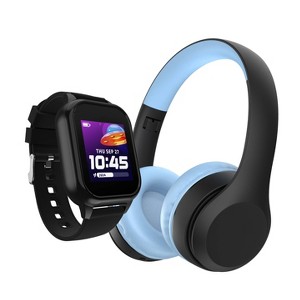
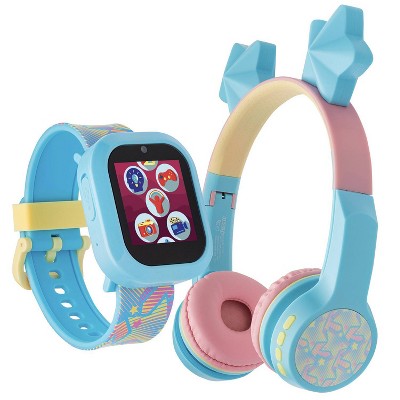
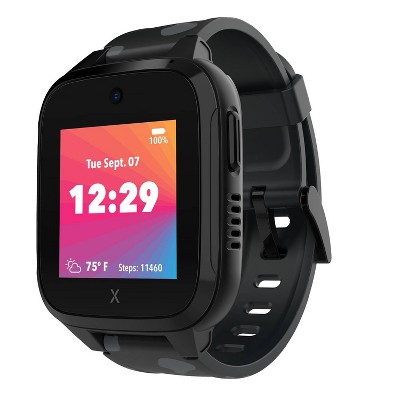
PlayZoom Kids' Smart Watch and Bluetooth Headphone Bundle Gift Set - Black/Blue
New at target
$29.99
In Stock

Free & easy returns
Return this item in store within 30 days for a full refund.
Eligible for registries and wish lists
At a glance
About this item
Additional product information and recommendations
Discover more options
- $19.99 - $29.99Select items on clearance3.7 out of 5 stars with 46 ratings
Frequently bought together
- $49.99 - $69.99reg $79.99 Sale3.4 out of 5 stars with 1999 ratings
- $159.99 - $169.99reg $349.99 Sale4.2 out of 5 stars with 3638 ratings
- $49.99 - $69.99reg $79.99 Sale3.4 out of 5 stars with 1999 ratings
- $159.99 - $169.99reg $349.99 Sale4.2 out of 5 stars with 3638 ratings
Guests also viewed
- $19.99 - $29.99Select items on clearance3.7 out of 5 stars with 46 ratings
Related Categories
Guests are saying
The product has received mixed feedback from guests, with some children enjoying it while others faced significant issues. Many guests expressed disappointment over the lack of a functioning charger and limitations in features, particularly regarding music playback. Despite some positive experiences, the overall sentiment leans towards frustration due to product reliability and unmet expectations. Guests recommend caution when considering this item, especially for its advertised capabilities.
Summary created by AI from text of reviews reflecting recent feedback provided across different star ratings (includes incentivized reviews)
3.3 out of 5 stars with 51 reviews
quality: 1.85 out of 5
value: 2.07 out of 5
13% would recommend
15 recommendations
1 out of 5 stars
Thumbs down graphic, would not recommend
11 September, 2026
(no review title)
Would not charge and the headphones were broken in the sealed box.
5 out of 5 stars
27 March, 2026
(no review title)
This product was so good for my son. My son loved it.
1 out of 5 stars
Thumbs down graphic, would not recommend
10 March, 2026
Shady company and unhelpful manufacturer
My kid lost her charger and this specific charging cable is not even made anymore which makes the whole product worthless. I contacted the company in order to buy a replacement and was informed of this. They offered no solution except to go to a "gadget store" to try and find an old replacement. This product was highly advertised in Christmas catalogs 4 months ago and already the charger has been discontinued. Seems like a scheme to get people to repurchase products. Will never purchase from this company again.
3 out of 5 stars
29 January, 2026Verified purchase
Decent product, but not quite as advertised by Target.
This product works reasonably well and my kids have been enjoying theirs. However, comment from "Target expert support" in product Q&A suggests file transfer capability and storage capacity that are NOT a feature of the PlayZoom 4 GO watch in this bundle. I purchased these with the intention of filling the watch with my kids favorite songs and they were beyond dissapointed when I found out they were limited to the more toddler-appropriate songs that came pre-loaded on the watch. If this limitation were made clear I would not have purchased this product, but I only discovered the limitation after return window had closed. Target should change this description as the watch is easily confused with the Playzoom 4 (not Playzoom 4 GO) that they also sell and does appear to support file transfer. It is not a bad product for what it is, but mostly dissapointed by false expectations set by Target.
1 out of 5 stars
Thumbs down graphic, would not recommend
27 January, 2026Verified purchase
(no review title)
broke within the first month , wouldn't refund or replace
1 out of 5 stars
Thumbs down graphic, would not recommend
12 January, 2026Verified purchase
(no review title)
Only worked for one day.
5 out of 5 stars
7 January, 2026Verified purchase
(no review title)
Like
1 out of 5 stars
Thumbs down graphic, would not recommend
6 January, 2026Verified purchase
No music!
Does not play music! Advertised that it is able to play music and there are instructions in the Q&A on how to add music but the watch doesn’t even have a micro usb port! Frustrating as this is the only reason I purchased
1 out of 5 stars
Thumbs down graphic, would not recommend
4 January, 2026Verified purchase
Headphones Busted...I would not purchase!
We bought these for our granddaughter for Christmas. Unfortunately, the headphones won’t charge or turn on.
2 out of 5 stars
Thumbs down graphic, would not recommend
1 January, 2026Verified purchase
The Watch Froze.
My Granddaughter loved this gift but she only had ONE day to enjoy it; if frozen on on screen and never unfrozen, I have to replace it. I believe that I got a defective Watch.
1 out of 5 stars
Thumbs down graphic, would not recommend
1 January, 2026Verified purchase
Cant return
Headphone were broken but didn’t notice until box was thrown away so unable to return.
1 out of 5 stars
Thumbs down graphic, would not recommend
28 December, 2025Verified purchase
Defective Product?!
We bought this gift for our kid and they are so sad because the headphones do not work. It won't turn on or charge. I do not recommend this item.
1 out of 5 stars
Thumbs down graphic, would not recommend
26 December, 2025Verified purchase
(no review title)
This only worked for one day after Christmas. I bought early before holiday rush and now Target won’t let me return it. Don’t waste your money. And don’t let this seller on here Target.
1 out of 5 stars
Thumbs down graphic, would not recommend
25 December, 2025Verified purchase
(no review title)
I had received the order for my daughter, and the headphones were a bust wouldn’t even turn on not satisfied.
5 out of 5 stars
24 December, 2025Verified purchase
(no review title)
Great
1 out of 5 stars
Thumbs down graphic, would not recommend
24 December, 2025Verified purchase
(no review title)
Dislike ran out of need money back
5 out of 5 stars
21 December, 2025
(no review title)
My kids loved them sooo much
5 out of 5 stars
Thumbs up graphic, would recommend
16 December, 2025Verified purchase
Wrong delivery
Was supposed to be delivered to Washington township not newton0
1 out of 5 stars
7 December, 2025
(no review title)
Your system sucks.
5 out of 5 stars
6 December, 2025Verified purchase
Hope she likes it!
Looks adorable! Can’t wait to give it to her for Christmas.