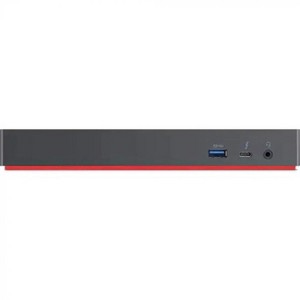
Lenovo Docking Station - for Workstation - Thunderbolt
$420.99 reg $478.47
Sale save $57.48 (12% off)
Out of Stock

Free & easy returns
Return this item by mail or in store within 30 days for a full refund.
Sold & shipped by antonline
Eligible for registries and wish lists
About this item
Additional product information and recommendations
Related Categories
Discover more options
- $201.99reg $229.99 Sale
- $244.99reg $289.99 Sale
- $226.99reg $349.99 Sale
- $169.99reg $269.99 Sale
Guests also viewed
- $94.99reg $99.99 Sale
4.1 out of 5 stars with 50 reviews
2 out of 5 stars
21 March, 2022
originally posted on lenovo.com

Lots of monitor flickering
It blinks, flickers, and disconnects from the monitor several times per day. I have 3 of these connected to 3 different monitors (different models) and 3 different laptops (all Lenovo P1 Gen 4's). The flickering stops when I connect the monitors directly to the laptops in all cases. Pretty disappointed with the quality of these as they're the only ones that can pass through enough power for a P1 Gen4.
1 reply from Customer Service team - 4 years ago
Lenovo appreciates all feedback and thank you for taking the time to rate and review our product! We apologize for any inconvenience. Please refer to our Technical Support at https://support.lenovo.com/ca/en/. Very Respectfully, Adrian_Lenovo
4 out of 5 stars
10 March, 2022
originally posted on lenovo.com
Functional Dock! Needs Important Firmware update
(This review was collected as part of a promotion.) Great dock as it serves all of the requirements (Display Ports/HDMI Ports/Aux ports/USB C Port/Ethernet Port) but it needed a firmware upgrade or the monitors kept flicker on and off a few times a day. That was confusing to say the least and it was a little expensive
5 out of 5 stars
28 February, 2022
originally posted on lenovo.com
Works perfectly.
(This review was collected as part of a promotion.) Works perfectly. I messed around with a cheaper third party device and had all sorts of driver problems.
5 out of 5 stars
28 February, 2022
originally posted on lenovo.com
Great device, works as expected, nice design
(This review was collected as part of a promotion.) Works well, enough connectors for my need. Only con is the placement of the start button. I am using the holder to attach the dockstation to my desk but the button is not easily accessible with the holder in place.
4 out of 5 stars
24 February, 2022
originally posted on lenovo.com
Decent Dock for X13 Gen2 with 2 screens.
(This review was collected as part of a promotion.) Dock is decent but you might as well get the Thunderbolt 4 dock.
5 out of 5 stars
12 February, 2022
originally posted on lenovo.com
Nice but some issues with the second monitor
(This review was collected as part of a promotion.) This dock is really nice but I got some issue with the second monitor. I had to run an old version of the firmware and after, rerun the Lenovo Vantage update to install the latest firmware. This seems to be caused by some devices I have plugged into it. Once removed, the firmware seems to be correctly installed and now, my second screen is working. So if it's stay the way it is right now, I am more than glad of this purchase!
5 out of 5 stars
7 January, 2022
originally posted on lenovo.com
The perfect desktop companion for your workstation
(This review was collected as part of a promotion.) The perfect desktop companion for your workstation.
5 out of 5 stars
21 December, 2021
originally posted on lenovo.com
A must have for your laptop
(This review was collected as part of a promotion.) The dock allows me to hook up dual external monitors and all my USB accessories. The extra power supply allows me to keep one packed in my travel bag.
2 out of 5 stars
25 October, 2021
originally posted on lenovo.com
Great device but good luck having it be dependable
(This review was collected as part of a promotion.) I give it 2 stars because when it works its great. But I have had it for less then a month and I'm becoming increasingly annoyed that it just up and randomly goes static for a screen. At one point it also just randomly refused to work with a monitor till I unplugged and restarted. For something that costs as much as it does you would think it would work. If it keeps it up I'm going to look at returning it because review show it having similar issues with high power draw which surprise surprise its the dock designed form my P73 system. Since I have been home this past year i decided to buy a dock to directly drive my two screens. Now I have one in the dock and the other in my laptop and it works fine with the occasional hiccups but it should work with everything into the dock... That's literally the point. I was almost better off paying to upgrade my desktop and working on my dual monitors from that instead of my pricey laptop which sucks
1 reply from Customer Service team - 5 years ago
Lenovo appreciates all feedback and thank you for taking the time to rate and review our product! We apologize for your inconvenience. Please refer to our Technical Support at https://support.lenovo.com/ca/en/. Very Respectfully, Adrian_Lenovo
5 out of 5 stars
6 October, 2021
originally posted on lenovo.com
Finally! hook up 3 Monitors!
(This review was collected as part of a promotion.) Had to wait awhile for the workstation but was worth the wait. Can finally hook up a third Monitor! hooking up was easy, speeds are great. It is a great product!
5 out of 5 stars
5 October, 2021
originally posted on lenovo.com
Lightning Dock
(This review was collected as part of a promotion.) Works as expected. Perfect way to be able to add multiple monitors
5 out of 5 stars
20 September, 2021
originally posted on lenovo.com
Perfect companion for my T14s
(This review was collected as part of a promotion.) Very nice dock. Couldn't expect less from a Thinkpad product.
5 out of 5 stars
22 July, 2021
originally posted on lenovo.com
Great product!
(This review was collected as part of a promotion.) Working great. More than enough power for our P52 and T15g.
1 reply from Customer Service team - 5 years ago
Lenovo appreciates all feedback and thank you for taking the time to rate and review our product! We want our customers to have a superb experience as you help us to continually evaluate our current products and services, and if necessary, change to meet your needs better. Very Respectfully, Adrian_Lenovo
3 out of 5 stars
16 January, 2021
originally posted on lenovo.com
Performs great for most applications
I bought this based on a recommendation from a Lenovo sales representative. I needed to run 3 external displays and I was told the unit would be able to tackle the task. I have to say that yes it is able to tackle the task but one of the displays keeps turning black on me. I spoke with support regarding this issue but I am still experiencing the problem. So far I have to unplug said monitor and then re-plug it and the problem goes away for a while. As far as ports and charging the laptop, the unit performs flawlessly. So if you are in need of up to 2 external monitors on top of your laptop screen this unit will serve you beautifully. But if you need a 3rd external monitor, might want to consider some eGPUs instead.
1 reply from Customer Service team - 5 years ago
Lenovo appreciates all feedback and thank you for taking the time to rate and review our product! We apologize for your inconvenience. Also, please refer to our Premium Support at https://pcsupport.lenovo.com/ca/en/solutions/support. Very Respectfully, Adrian_Lenovo
2 out of 5 stars
14 January, 2021
originally posted on lenovo.com
ThinkPad Thunderbolt 3 Workstation Dock Gen 2
For the price, this is expensive. I was forced to purchase because the new ThinkPad no longer has the traditional docking station so you are stuck with this contraption that was obviously an afterthought from Lenovo. The wring cables are not very convenient. Also, there is only one USB-C port...seriously? Also, quality: I had to return because the HDMI port didn't work - Lenovo was excellent on the support and return. No complaints about Lenovo service; it is excellent. So, Lenovo support and service is great. But this product really needs to be improved.
1 reply from Customer Service team - 5 years ago
Lenovo appreciates all feedback and thank you for taking the time to rate and review our product! We apologize for your inconvenience. In looking to better accommodate your needs, please visit our website at https://www.lenovo.com/ca/en/pc and contact our sales team for assistance at 1-855-253-6686. Very Respectfully, Adrian_Lenovo
4 out of 5 stars
27 December, 2020
originally posted on lenovo.com
Best thunderbolt dock and only 230w option
Works well. Occasionally freezes my multiple monitors coming out of hibernation so I have to unplug the thunderbolt and it returns to normal. Other than that works well.
4 out of 5 stars
16 December, 2020
originally posted on lenovo.com
Great product! Just one little issue.
Great product, just one issue. I find the monitor image gets digital interference if applications are left open through a sleep cycle. This issue is easily resolved by minimizing and re-maximizing the application; not a huge issue. The installation was simple and the performance has been excellent.
5 out of 5 stars
4 November, 2020
originally posted on lenovo.com
Simple to setup, works like a peach
This was very simple to setup and works like a peach. I might just have to 3D print a holder tho, so I can slide in/out my X1 Extreme instead of pulling the cables out and/or plugging them in all the time. Very small real estate space on the desk - which is nice.
4 out of 5 stars
26 October, 2020
originally posted on lenovo.com
Dock for Thinkpad Extreme
Nice quality product, works well with the Thinkpad Extreme Gen2/3. Have not experienced any issues with the dock. The kit should have come with a longer split cable as the the one included is too short and a universal desk mount kit. It is made even more expensive after having to purchase the longer split cable.
1 out of 5 stars
19 October, 2020
originally posted on lenovo.com
Do Not Purchase
Faulty Hardware, Buggy Software. Constantly have to restart the system to get the dock to recognize the laptop. Constantly shuts the laptop on and off without warning. BIOS is impossible to update.
1 reply from Customer Service team - 6 years ago
Lenovo appreciates all feedback and thank you for taking the time to rate and review our product! We apologize for your inconvenience. Please refer to our Technical Support at https://support.lenovo.com/ca/en/. Very Respectfully, Adrian_Lenovo