Sponsored
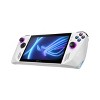
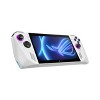
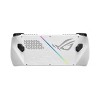
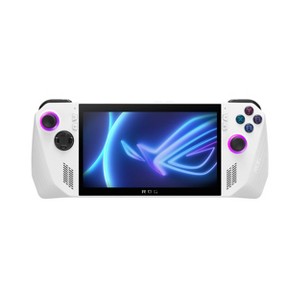
ASUS ROG Ally 7" 120Hz FHD 1080p Gaming Handheld - AMD Ryzen Z1 Processor - 512GB Storage - White: Lightweight Design
Out of Stock
At a glance
Sponsored
About this item
Highlights
- Play All Your Games – The ROG Ally supports all Windows-compatible games across platforms such as Steam, Xbox Game Pass, Epic, GOG, and more.
- 90-Day Xbox Game Pass Ultimate Included - Play Minecraft Legends and hundreds of PC games on the ROG Ally with 3 months of Game Pass. With games added all the time, there’s always something new to play. *Terms apply.
- Play the Way You Want – Embrace versatility with the ROG Ally. Game on-the-go with handheld mode, or share the fun with friends and family by hooking it up to your TV and connecting multiple controllers.
- Incredible Power – Equipped with AMD’s Z1 APU with RDNA 3 graphics and 2.8 TFLOPs, the Ally makes playing any game on the palm of your hand possible.
- Stunningly Beautiful Visuals – On the Ally, games are crisp and clear thanks to its 7” Full HD touchscreen display with a smooth 120Hz refresh rate and AMD FreeSync Premium technology.
- ROG Intelligent Cooling – The Ally is the culmination of ROG’s years of experience in cooling the highest end components. Dual fans with fluid dynamic bearing design, dust filters, and Anti-Gravity heatpipes work in harmony to sustain peak performance while keeping fan noise low.
- Blazing Fast Memory and Upgradeable Storage – The Ally features 16GB LPDDR5 RAM to ensure ultra-fast boot up time. With 512GB of PCIe Gen4 SSD and a dedicated UHS-II microSD card slot to add high-speed storage to your machine, you’ll have plenty of space for all your games.
- Always Ready to Go – Enjoy up to 2 hous of local gaming or up to 6.8 hours of cloud gaming and video playback. Fast charge gives you the ability to charge from 0% to 50% in just 30 minutes.
- Immerse Yourself with Dolby Atmos and Smart AMP –
- Virtual 5.1.2-channel surround sound powered by Dolby Atmos technology puts you in the center of the action. Turn up the volume at parties and events to enjoy louder, more dynamic audio.
Description
Shipping details
Return details
Q: Is this the extreme proccessor model?
A: The original Ally can be purchased with a Z1 Extreme. It is recommended to purchase the Z1 Extreme model of the Ally as it has much better performance in game. That version is not listed for sale.
submitted bySliceOfRy - 1 year agoA: Hi Amy, thanks for reaching out about ASUS ROG Ally 7" 120Hz FHD 1080p Gaming Handheld - AMD Ryzen Z1 Processor - 512GB Storage - White. No, this is not the extreme model. The main difference between the ASUS ROG Ally and the ROG Ally X is that the Ally X is essentially an upgraded version with significantly more RAM, storage, and a much larger battery compared to the standard Ally, while still featuring the same 7-inch 120Hz display and AMD Ryzen Z1 Extreme processor; making the Ally X capable of longer gaming sessions with better performance overall. If you have any additional questions, we welcome you to contact MyTGTtech at 833-848-8324 every day, between 7am-11pm CST.
submitted byJoe - 1 year agoTarget staff supportA: The standard ROG Ally comes with the AMD Ryzen Z1 processor. The ASUS ROG Ally X is the model that features the AMD Ryzen Z1 Extreme processor.
submitted byASUS Answers - 1 year agoBrand expert
Q: Is the steam deck better?
A: It’s not . Asus is better you could literally just download the steam deck app on your asus and it runs windows 11 and you could also play games from Xbox game pass on there
submitted byJujua720 - 1 year agoA: Hi Really good guy, thanks for reaching out about ASUS ROG Ally 7" 120Hz FHD 1080p Gaming Handheld - AMD Ryzen Z1 Processor - 512GB Storage - White Both devices come with 16GB of LPDDR5 memory, and they both include a Micro SD card slot for storage expansion. They also both support USB-C for charging and come with a 3.5mm headphone jack. However, the Ally supports 1080p while the SteamDeck doesn't. If you have any additional questions, we welcome you to contact MyTGTtech at 833-848-8324 every day, between 7am-11pm CST.
submitted byJustin - 1 year agoTarget expert supportA: 100%. It's a shame retail stores don't sell the steam deck. If you're looking for a top of the line handheld device get the steam deck, you can purchase it on the steam website. Hope this helps
submitted bywait 6 months - 1 year ago
Q: Can you play Fortnite and use your Fortnite account?
A: Hi MelGibson, thanks for reaching out about ASUS ROG Ally 7" 120Hz FHD 1080p Gaming Handheld - AMD Ryzen Z1 Processor - 512GB Storage - White. Yes, this will play Fortnite and use the same account. If you have any additional questions, we welcome you to contact MyTGTtech at 833-848-8324 every day, between 7am-11pm CST.
submitted byMatt - 10 months agoTarget expert support
Q: Impressive, but can it run Doom?
A: Yes, the ASUS ROG Ally can run Doom Eternal! You can enjoy smooth gameplay at 1080p resolution with settings adjusted for optimal performance.
submitted byASUS Answers - 11 months agoBrand expert
Q: Can u hook up gaming headphones to this?
A: Yes, you can connect gaming headphones to the ROG Ally. It has a 3.5mm combo audio jack for wired headphones, and it also supports Bluetooth 5.2 for wireless connections.
submitted byASUS Answers - 11 months agoBrand expert
Q: Can you use parental controls on this device? Either controlling what games are downloaded or setting time limits?
A: Hi Brooke, thanks for reaching out about ASUS ROG Ally 7" 120Hz FHD 1080p Gaming Handheld - AMD Ryzen Z1 Processor - 512GB Storage - White. This handheld uses Windows 11, and parental control software can be installed on this device, many of the game launchers, such as Steam, have parental control settings as well. If you have any additional questions, we welcome you to contact MyTGTtech at 833-848-8324 every day, between 7am-11pm CST.
submitted byMatt - 11 months agoTarget expert support
Q: My kids want to know if they could play roblox on here
A: Yes, your kids can play Roblox on the Asus ROG Ally. The ROG Ally is a PC gaming handle that's compatible with Windows 10 and later operating systems, which is what Roblox requires to run.
submitted byASUS Answers - 1 year agoBrand expert
Q: I was looking for something faster to play pubg mobile on. Can I play pubg mobile on this?
A: Hi Madmortigan, thanks for reaching out about ASUS ROG Ally 7" 120Hz FHD 1080p Gaming Handheld - AMD Ryzen Z1 Processor - 512GB Storage - White This ROG Ally will play PUBG If you have any additional questions, we welcome you to contact MyTGTtech at 833-848-8324 every day, between 7am-11pm CST.
submitted byJustin - 1 year agoTarget expert support
Trending Xbox 360

![Fosmon [2 Pair/4 Pcs] For Nintendo Switch 2 Thumb Grips, Switch Joycon Grip, Silicone PS5 Controller Thumb Grips For Xbox One X S PS3 PS4,Black/Blue](https://target.scene7.com/is/image/Target/GUEST_2b6a999e-ff05-4eb5-b506-4d21834cb8de)
Discover more options
Related Categories

Honest review
1 reply from CLM team - 23 days ago
Playing gta 4
Pretty good
Great gaming handheld
Awesome Machine, 2 yrs Out .
Very convenient device to have
Crappy sd
1 reply from CLM team - 2 months ago
Best in the segment.
1 reply from ASUS India team - 2 months ago
Performance
Simple
The stuff I wish my rog had
Almost perfect
Pretty fancy!
Great Product
Great but comes with problems
1 reply from CLM team - 4 months ago
My birthday
What’s the point
1 reply from ASUS Customer Loyalty US Support team - 4 months ago
Eh
1 reply from CLM team - 4 months ago
Great system with one flaw.
1 reply from CLM team - 4 months ago