Sponsored
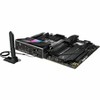
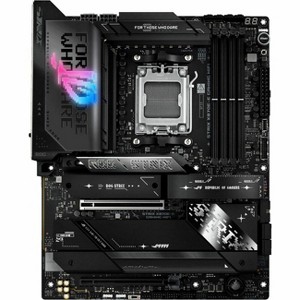
Asus ROG Strix X870E-E GAMING WIFI Gaming Desktop Motherboard - AMD X870E Chipset - Socket AM5 - ATX - Ryzen 7, Ryzen 8, Ryzen 9 Processor Supported
$388.99 reg $529.99
Sale save $141.00 (27% off)
Out of Stock
Eligible for registries and wish lists
Sponsored
About this item
Highlights
- AI-powered: Yes
- Chipset Manufacturer: AMD
- Chipset Model: X870E
- Total Processor Supported: 1
- Processor Socket: Socket AM5
Description
ROG Strix X870E-E Gaming WiFi The ROG Strix X870E-E Gaming WiFi is engineered to harness the full potential of AMD Ryzen 9000 Series processors. Featuring PCIe5.0 support, AI Overclocking, AI Cooling II, AI Networking II, and AEMP, setup is streamlined while performance is maximized. Dual USB4Type-C ports and WiFi 7 with Realtek 5Gb Ethernet ensure top-tier connectivity, while robust heatsinks keep M.2 drives cool under heavy loads. This motherboard not only meets the demands of gaming and professional applications but also delivers the power and connectivity essential for advanced AI PC applications.ASUS AI INTELLIGENCE | AI OVERCLOCKINGASUS AI Overclocking profiles the CPU and cooling to predict the optimal configuration and push the system to its limits.AI OVERCLOCKINGASUS AI Overclocking profiles the CPU and cooling to predict the optimal configuration and push the system to its limits. Predicted values can be engaged automatically or used as a launching ground forfurther experimentation.AI COOLING IIBalance the thermals and acoustics of any build with a single click.AI COOLING IIBalance the thermals and acoustics of any build with a single click. A proprietary ASUS algorithm slashes unnecessary noise while running a quick stress test, and then monitors CPU temperatures to dynamically adjust fans to optimal speeds.AI NETWORKING IIAI Networking II combines intelligent technologies to continuously optimize network performance, provide trustworthy and seamless connectivity, and unleash the full speed of WiFi 7.Performance OVERCLOCKING | Dynamic OC SwitcherLightly-threaded tasks get fantastic uplift using AMD Precision Boost Overdrive (PBO), but all-core frequencies can be pushed higher via traditional overclocking. The Dynamic OC Switcher dynamically engages PBO or your preferred settings based on the CPU current or temperature, giving you the best of both worlds. Core Flex and PBO Enhancement can also be deployed to work in tandem with the Dynamic OC Switcher and further bolster performance on both sides of the aisle.Core FlexCore Flex empowers you to smash limits farther than ever before by letting you control clock, power, and thermals in creative new ways. In its simplest form, you can maximize base clock during lighter loads and set breakpoints to gradually reduce CPU core frequency as temperature or current increases. But the system is extremely adaptable, supporting multiple user-controlled functions that can manipulate power, current, and temperature limits independently so that you can bend CPU performance to your will.Asynchronous ClockFor next-level frequency flexibility, the ROG Strix X870E-E features a built-in clock generator that isolates CPU base clock from memory, PCIe, and the Infinity Fabric speed. Drive CPU performance to its absolute brink while maintaining the stability of related clock domains.Separate CPU BCLK from other domains for unfettered overclockingPBO ENHANCEMENTAMD Precision Boost Overdrive (PBO) pushes the CPU current and voltage budget to opportunistically increase performance. By aggressively tuning the PBO parameters, AMD's algorithm can leverage the motherboard's robust power solution to ramp up performanceeven higher.PerformanceMEMORY | DDR5 DOMINATIONThe Strix X870E-E is primed and ready for enthusiast-grade kits courtesy of vast AMD EXtended Profiles forOverclocking (EXPO) support.
Dimensions (Overall): 3.4 inches (H) x 11.1 inches (W) x 14.4 inches (D)
Socket Type: AM5
RAM Configuration: Up to 192GB (4x48GB)
Number of PCI Slots: 3
Model name: X870E-E GAMING WIFI
Battery: Required, Installed
Warranty: 3 Year Limited Warranty. To obtain a copy of the manufacturer's or supplier's warranty for this item prior to purchasing the item, please call Target Guest Services at 1-800-591-3869
TCIN: 1005083824
UPC: 197105724167
Origin: made in the USA or imported
The above item details were provided by the Target Plus™ Partner. Target does not represent or warrant that this information is accurate or complete. On occasion, manufacturers may modify their items and update their labels.
We recommend that you do not rely solely on the information presented. If you have a specific question about this item, you may consult the item's label, contact the manufacturer directly or call Target Guest Services at 1-800-591-3869.
If the item details aren’t accurate or complete, we want to know about it.
Shipping details
Estimated ship dimensions: 3.4 inches length x 14.4 inches width x 11.1 inches height
Estimated ship weight: 6.67 pounds
This item cannot be shipped to the following locations: American Samoa (see also separate entry under AS), Guam (see also separate entry under GU), Northern Mariana Islands, Puerto Rico (see also separate entry under PR), United States Minor Outlying Islands, Virgin Islands, U.S., APO/FPO, Alaska, Hawaii
item ships from third party seller: antonline
Return details
This item can be returned to any Target store or Target.com.
This item must be returned within 30 days of the date it was purchased in store, shipped, delivered by a Shipt shopper, or made ready for pickup.
See the return policy for complete information.
Frequently bought together
Guests also viewed
Discover more options
Related Categories
Guests are saying
The motherboard has received high praise for its performance, ease of setup, and extensive features, making it a great choice for both gaming and productivity. Guests appreciate the multiple M.2 slots, USB connectivity, and overall build quality. While some minor issues were noted, such as BIOS quirks and audio limitations, the overall sentiment remains positive. This motherboard is ideal for those looking to maximize their AMD builds with cutting-edge technology.
Summary created by AI from text of reviews reflecting recent feedback provided across different star ratings (includes incentivized reviews)
4.4 out of 5 stars with 86 reviews
5 out of 5 stars
27 November, 2025
originally posted on https://www.asus.com

Beast
So far I love it. Had to replace a motherboard due to own stupidity and found this on a discount. The board is heavy and well built with a lot of heat sinks. Make sure to read the manual online as it explains the express lanes. If you have a gen 5 x16 pci gpu, you shouldn’t use the 2 and 3 m2 slots as it will down grade to x8. I got my rig up and going and started overclocking and stress testing and was very happy with results. I’ve always been partial to ROG boards and this one will keep me coming back.
5 out of 5 stars
26 November, 2025
originally posted on https://www.asus.com
Best motherboard out there!
If you're on Ryzen and Gen 5 PCIe and DDR5 RAM, this motherboard is the best that is around!
1 out of 5 stars
22 November, 2025
originally posted on https://www.asus.com
Clown car on fire.
Doing this on my phone as system wont get out of post. error codes red31 red 4d red ec, i could go on. Probably going to return all of it and go back to intel.
1 reply from CLM team - 22 days ago
Dear R Manley, Thank you for your comment. We do understand your disappointment with this motherboard and the inconvenience this may have caused if it won't get out of POST if you plugged-in your phone. If the motherboard fails to boot with a phone plugged in, it is likely due to the USB port itself, or a power issue. To troubleshoot, first disconnect all external devices and try booting again. If it works, reconnect devices one by one to identify the faulty one. If the problem continues, perform a power drain, clear the CMOS, or check for shorts between the motherboard and case. Should you need further assistance with the product, please email me at cl-rodel@asus.com and I would be more than happy to help. Or you are most welcome to call Product Support Hotline at: 1(888) 678-3688. Also, you can chat with an ASUS live support agent from the link: https://www.asus.com/us/support/article/1135/. Thank you for choosing an ASUS product. Regards, Rodel ASUS Customer Loyalty
4 out of 5 stars
14 November, 2025
originally posted on https://www.asus.com
Great looking board, more power than I can yet use
Nice motherboard. The documentation could be improved. It didn’t tell me how to use the M.2 clip style holders. It didn’t tell me the order of the 5 M.2 slots. It was hard to see how to connect all the little chassis feature wires. It was hard to align the cooler clips to the AM5 mounts. For all these things I am sure the 2nd time would be easier. The CPU power connectors interfered with my 230mm radiator sonI had to offset the radiator on the top. I tried to overclock my DDR once and it went badly. I never used AMD bios before and it is very different. I got the PC (with the 9900X CPU) installed and running quickly. It ran great for a week or so. Now it has started to hang a couple times per day and I don’t know how to get a clue as to the cause yet. The hang occurs when it is lightly loaded and almost at idle. It hasn’t hing while I am actively using it. Weird. The board looks great (of course). I have barely started to use its capacity or stress it.
5 out of 5 stars
7 November, 2025
originally posted on https://www.asus.com
Gaming Motherboard
Great motherboard for gaming. Nice how the board is setup.
5 out of 5 stars
5 November, 2025
originally posted on https://www.asus.com
Nice motherboard
It’s not only a good looking motherboard, but it’s extremely powerful and the bios is much easier to navigate than others
5 out of 5 stars
3 November, 2025
originally posted on https://www.asus.com
Theres room for soo many activities!!
Just finished a build using my first Asus MB. Went with the X870-E Gaming Wifi due to the flexibility with so many USB ports, M.2 slots, and overall aesthetics. For someone who hasn't built my own computer in over 20 years the MB installation was a breeze. So to start out with I went with 1 DDR5 4tb M.2 and 1 2tb DDR5 and was able to install both without having to share PCIE lanes with another component that would drop performance down to DDR4 levels. Also with the USB ports I have I cant see a day when I'm going to run out. If I do need to add additional drives I'll most likely just go with DDR4 drives as I will not need the same performance for basic data storage but I doubt that will happen since I'm now adding a NAS to my own setup. I figure when that happens it will be time to upgrade my 9800x3d to some new AM6 CPU which will be the perfect time to upgrade this MB as well.
5 out of 5 stars
27 October, 2025
originally posted on https://www.asus.com
Great board
Updated bios works perfectly. Love the pcie lane arrangement
5 out of 5 stars
26 October, 2025
originally posted on https://www.asus.com
The X870E-E is great value in a gaming motherboard
The ASUS ROG Strix X670E-E Motherboard has been a game-changer. It has an ample collection of M.2 slots for both Gen 5 and Gen 4 NVMe drives. One necessary caveat is the PCIe lane allocation: if you populate a specific M.2 slot that links directly to the CPU, your main video card slot will switch its connection from x16 to x8 lanes. This is not a dealbreaker, just something to be aware of. This motherboard supports fast DDR5 memory and the latest AM5 processors, such as my AMD Ryzen 9 9950X. For most users, x8 mode still provides enough bandwidth to avoid any real-world gaming bottleneck. I am extremely happy with this purchase and can recommend it to anyone looking for a high-performance AM5 platform
1 out of 5 stars
22 October, 2025
originally posted on https://www.asus.com
Beware of USB 4.0 issues.
USB 4.0 port speed is acting like poor USB 3.0 speed. Everything else is fine.
1 reply from CLM team - 2 months ago
Dear Mr. Omgslowusbport, Thank you for your comment. We do understand the inconvenience this may have caused if you are experiencing a slow speed from the USB 4.0 ports. To resolve this, ensure the chipset and USB drivers for this motherboard were installed. Updates for this motherboard are available at: https://rog.asus.com/us/motherboards/rog-strix/rog-strix-x870e-e-gaming-wifi/helpdesk_download/. Additionally, ensure your USB 4.0 devices are working properly, and old drivers were uninstalled properly to avoid any driver or software conflict that can affect the speed of the ports. To eliminate potential driver or software conflict, we recommend to install Windows clean or fresh from scratch using this motherboard with all updates installed. Furthermore, ensure Windows is up to date. Should you need further assistance with the product, please email me at cl-rodel@asus.com and I would be more than happy to help. Or you are most welcome to call Product Support Hotline at: 1(888) 678-3688. Also, you can chat with an ASUS live support agent from the link: https://www.asus.com/us/support/article/1135/. Thank you for choosing an ASUS product. Regards, Rodel ASUS Customer Loyalty
5 out of 5 stars
16 October, 2025
originally posted on https://www.asus.com
ROG STRIX X870E-E Gaming Wifi (Very Daring)
Very high end board all the bells and whistles, Robust and powerful.
5 out of 5 stars
14 October, 2025
originally posted on https://www.asus.com
Lots of nice futures and the future
Just using one week hard to say something look nice good quality lots of futures
5 out of 5 stars
23 September, 2025
originally posted on https://www.asus.com
Great MOBO
Great MOBO, plenty of usb to run whatever,have to use factory cord to power supply, tried Lian Li rgb cable and the usb 20g connection in the way. Paired this board with a 9950x3d chip and a gigabyte 5090. Very happy with the results
5 out of 5 stars
21 September, 2025
originally posted on https://www.asus.com
must have for gamers
Great motherboard for its price point a must have for gamers love it
5 out of 5 stars
20 September, 2025
originally posted on https://www.asus.com
Great motherboard
Great motherboard, easy to install and the ai overclocking has come a long way. Paired this 9950x3d, 48gb klegg ddr5, and a 7900xtx. It's a monster
1 out of 5 stars
18 September, 2025
originally posted on https://www.asus.com
Too Much software/hardware conflicts
Unfortunately, I have had a lot of problems with my DDR5 Corsair RAM, the Ryzen 7 9800X3D CPU, and the motherboard all getting along with Windows 11 on a 1000w PSU (plenty of power). It has been very frustrating. A lot of OD failure to boots through the Q-Code display at first (everything was random with no predictability on the OD code, happening with restarts and not full system starts from shut down). After a week of testing at night around a full-time job and a family (which meant I was not able to actually use the computer for fun for a full week), I was finally able to figure the problem through a combination of a friend and Microsoft's CoPilot. We lowered the RAM's MHz to 5600 and this resolved the issue. With all of that said, I would expect better cooperation between ASUS, AMD, and Cosair with how the motherboard interacts with everything. Or, better yet, maybe ASUS should just make their own RAM, since the company makes everything else except for case fans and RAM (which is the only reason why I do not have a full ASUS system). ASUS should just keep everything in house except for GPUs and CPU chips.
1 reply from CLM team - 3 months ago
Dear Jason A from Colorado, Thank you for sharing your experience with the ASUS ROG STRIX X870E-E GAMING WIFI motherboard. We apologize for the inconvenience caused by the compatibility issues with your DDR5 Corsair RAM and Ryzen 7 9800X3D CPU. We're glad to hear you were able to resolve the issue by adjusting the RAM frequency. Your feedback regarding hardware integration is appreciated and will be shared with our product team. We stand behind our products and continuously strive to improve our products and processes to achieve customer service excellence. If you require any further assistance, please email us at customerloyalty@asus.com and include the case number "N2503035843-0005" as a reference. We will do our best to resolve your case quickly. Your feedback is very important to us, and it enables us to improve our support channels. Thank you for choosing ASUS. Best Regards, Chantae ASUS Customer Loyalty US Support
5 out of 5 stars
18 September, 2025
originally posted on https://www.asus.com
good
good PRODUCT GODDDDDDDDDDDDDDDDDDDDDDDDDDDDDDDDDDDDDDDDDD
5 out of 5 stars
8 September, 2025
originally posted on https://www.asus.com
You won't regret buying the ASUS ROG Strix 870e-e
Chose the motherboard for all the options available. Easy to set up, works great. Ryzen 9950x, Corsair DDR5 6000. Only two minor issues, needed to reseat a video card and WiFi antenna broken. No deal breakers. Love the speed and ease of use.
3 out of 5 stars
25 August, 2025
originally posted on https://www.asus.com
Good MoBo
Good MoBo with same USB flaw as any X870E motherboards
1 reply from CLM team - 4 months ago
Dear Konstantin Adamov, Thank you for sharing your experience with the ASUS ROG STRIX X870E-E GAMING WIFI motherboard. We're glad to hear you're satisfied with its overall performance. We understand your concern regarding the USB functionality, and we appreciate you bringing this to our attention. Your feedback is important and will be shared with our product team as we continue to evaluate and improve future designs. To address the issue you've described, we recommend reviewing the steps in the troubleshooting guide linked below. If the issue continues, please contact our support team at https://www.asus.com/us/support/CallUs so we can assist you further or arrange repair service if necessary. We stand behind our products and continuously strive to improve our products and processes to achieve customer service excellence. For more information, email us at customerloyalty@asus.com and include the case number "N2504034418-0002" as a reference. We will do our best to resolve your case quickly. Your feedback is very important to us and enables us to improve our support channels. Thank you for choosing ASUS. Best Regards, Chantae ASUS Customer Loyalty US Support [Windows 11/10] Troubleshooting - USB Functionality Issues - https://www.asus.com/support/faq/1043160/
5 out of 5 stars
12 August, 2025
originally posted on https://www.asus.com
good build quality
excellent product overall built to a good standard. does what its suposed to do