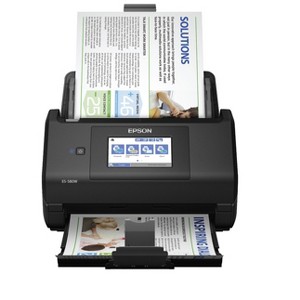
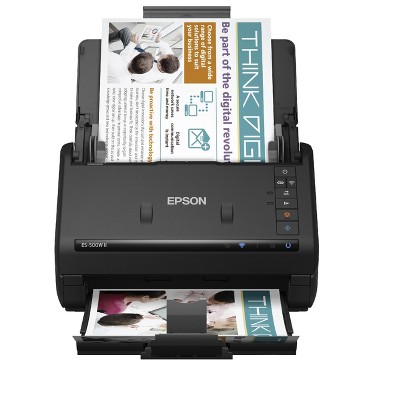
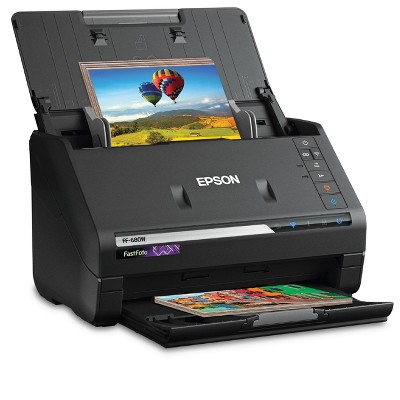
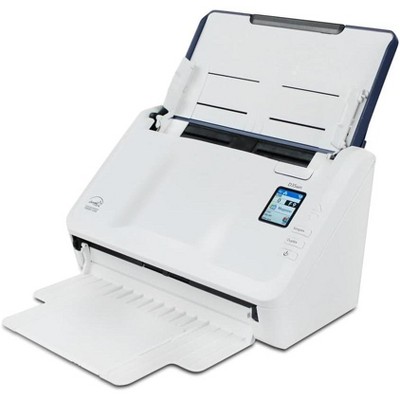
Epson WorkForce ES-580W Wireless Color Duplex Desktop Document Scanner
$449.99
Out of Stock

Free & easy returns
Return this item by mail or in store within 30 days for a full refund.
Sold & shipped by Epson
Find alternative
- $139.99reg $159.99 Sale3.9 out of 5 stars with 114 ratings
Eligible for registries and wish lists
About this item
Additional product information and recommendations
Best-selling Scanners
- $139.99reg $159.99 Sale3.9 out of 5 stars with 114 ratings
- $459.00reg $495.00 Sale
Guests are saying
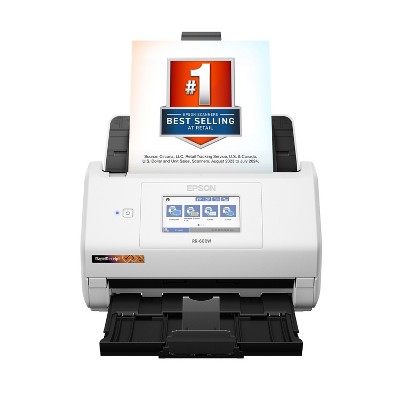
The Epson Workforce ES 580W scanner is praised for its speed, ease of use, and high-quality scanning capabilities. Guests appreciate its duplex feature, allowing for double-sided scanning, and the convenience of wireless connectivity. Many find the touchscreen interface intuitive, making navigation simple. While some guests faced setup challenges, the overall performance and efficiency of the scanner make it a valuable tool for both home and office use, especially for those managing large volumes of documents.
Summary created by AI from text of reviews reflecting recent feedback provided across different star ratings (includes incentivized reviews)
4.5 out of 5 stars with 104 reviews
2 out of 5 stars
5 October, 2026
originally posted on epson.com

wifi reconnect is PATHETIC
When it works it is great but anytime we lose power or internet it is such a hassle to get it back online with wifi. Between the app on my phone and logging into my account on my computer it takes hours.... yes, hours and most times when i accomplish the task i don't even know how i did it. Nothing in this day and age should be this convoluted! Wish I had bought another brand and will in the future. And for the amount of money this thing cost it should have come with a cord to connect to computer
1 out of 5 stars
7 September, 2026
originally posted on epson.com
Horrible, illogical instructions. Illogical!
We've wasted 28 hours of my life on this Epson ES-580W scanner. Instructions illogical.
2 out of 5 stars
27 July, 2026
originally posted on epson.com
Many connection issues
Works great when it works.
3 out of 5 stars
1 May, 2026
originally posted on epson.com
Set Up was a huge headache
Hard as heck to set up. I had to use CLOD for assistance. It was my last ditch effort before returning it, I hope it has consistent quality and connection over the next few days or it is going back, The test scan was fast and quality was very good.
From The Epson Team team
Hi Patina, thank you for taking the time to write a review of your new Epson scanner. We appreciate your business, and value your feedback. Your ES-580W includes free technical support for the life of your product, so if you’d like help, feel free to contact us at (562) 276-4382; Hours: Monday – Friday, 7 a.m. to 4 p.m. (PT). Kind Regards, Joseph – The Epson Team.
6 months ago
5 out of 5 stars
15 January, 2026
originally posted on epson.com
Doc Scanner WorkForce ES-580W Wireless
We now have two of these scanners. This one is mine. It is working perfectly.
4 out of 5 stars
12 January, 2026
originally posted on epson.com
Sturdy enough.
I have owned this scanner for over three years. It has always worked well and is sturdy enough to take on Notary Signing Agent appointments. The only problem I have found is when scanning documents over legal size, the machine will stop as if a jam, which needs to be cleared. All other pages up to legal size work great and feeding issues are minimal and easily correctable. I highly recommend this scanner for work products and home use.
5 out of 5 stars
29 September, 2025
originally posted on epson.com
Works like a champ!
Used the unit to document 40,000 pages of a national organization's magazine (70 years worth). Worked flawlessly. PDFs are OCRed and allow research across all issues of the magazine including advertisements. Brilliant unit! Only wish it could do larger than 8.5x11" format too.
1 out of 5 stars
17 April, 2025
originally posted on epson.com
doesn't work with mac
Bought it a week ago and it doesn't work. Returning it.
From The Epson Team team
Hi Epson Customer, thank you for taking the time to write a review of your Epson scanner. We appreciate your business, and value your feedback. Your WorkForce ES-580W includes free technical support for the life of your product, so if you ever need assistance, feel free to contact us at (562) 276-4382; Hours: Monday – Friday, 7 a.m. to 4 p.m. (PT). Kind Regards, Joseph – The Epson Team.
2 years ago
5 out of 5 stars
19 March, 2025
originally posted on epson.com
Awesome machine!!!
I haven't been this excited about an office product since my first laser printer! I LOVE this scanner! It's so fast, it does double sided sheets, I don't get arm cramps from lifting lids and putting papers on the glass. It is AWESOME.
1 out of 5 stars
22 November, 2024
originally posted on epson.com
UGH
CANT GET IT TO CONNECT TO MY LAPTOP
From The Epson Team team
Hello bbBBBBB, we apologize for the disappointing experience you’ve encountered with your Epson scanner's wireless connection. Your ES-580W includes free technical support for the life of your product. Please call and let our Epson Support Team assist. Our support number is (562) 276-4382. Our support hours of operation are Monday – Friday, 7 a.m. to 4 p.m. (PT). We’re here to help. Sincerely, Joseph – The Epson Team.
2 years ago
5 out of 5 stars
11 March, 2024
Works as advertised, really fast.
[This review was collected as part of a promotion.] Works as advertised. It was easy to setup. It took about 15 minutes from the start of unboxing it.
5 out of 5 stars
28 August, 2023
originally posted on epson.com
Great Scanner!
Works great and I love the duplex feature. I have mine connected to my Wi-Fi but no computer. That way I can put it where I have room. Most of the time, I'm scanning to the cloud so I don't need the computer anyway. I've had the scanner about 2 1/2 years with no issues.
4 out of 5 stars
7 August, 2023
originally posted on epson.com
nice, but...
Fast and high quality images. Only disappointment is wireless feature doesn't work for me reliably. Good results with usb cable.
5 out of 5 stars
4 August, 2023
originally posted on epson.com
Replace Neat Scanner
Worked perfectly to replace aged Neat Scanner
1 out of 5 stars
29 May, 2023
originally posted on http://www.dell.com/en-us

(no review title)
1
1 out of 5 stars
4 April, 2023
originally posted on epson.com
Not Reliable
I have this scanner for a few months. It works sporadically. Most of the time it can't connect to my computer. This is even with using the USB cable. I've done the updates but doesn't help at all. I am very frustrated. A machine that works one out of every 20 tries is not worth using.
2 out of 5 stars
29 March, 2023
originally posted on epson.com
Horrible setup and software
Scans well once you go take your advanced technical degree. I'm a Mac user. The software, setup and help screens for this thing are right out of 2002 or something. Took forever to get it setup, and the help docs were not very instructive. If you like being Mr. IT-Solve-It guy for 90 minutes, be my guest. Otherwise, maybe look for a brand that has a UX at least in 2009.
3 out of 5 stars
28 March, 2023
Not a good replacement for Scansnap models.
[This review was collected as part of a promotion.] Bought to replace Scansnap model. Resolution and interface are not very business oriented. At other than the lowest resolution, the scan is very slow. At the lowest (default) resolution, quality is not acceptable. Probably good for the casual home consumer user and then only for receipts, text documents, etc., where scan quality is not as important. That being said, setup and use was generally easy.
5 out of 5 stars
3 March, 2023
originally posted on http://www.dell.com/en-us
(no review title)
5
5 out of 5 stars
23 January, 2023
originally posted on http://www.dell.com/en-us
easy
easy to set up and use right out of the box