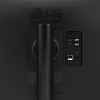
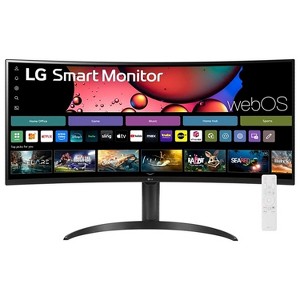
LG 34 Inch Smart Monitor WQHD 1440P Curved Screen 100Hz Adjustable Stand
$376.99 reg $379.99
Sale save $3.00 (1% off)
In Stock
Eligible for registries and wish lists
About this item
Additional product information and recommendations
Discover more options
Frequently bought together
Guests also viewed
$299.99
reg $329.99 Sale
Related Categories
4.6 out of 5 stars with 16 reviews
5 out of 5 stars
20 March, 2026
originally posted on lg.com/ca

Très bon achat et écran clair-Moniteur LG-Incurvée
J'adore la grandeur du moniteur ainsi que le fait que celle-ci soit incurvée. Image clair et facile à utiliser. Parfait pour la gestion avec plusieurs fichiers
1 reply from LG CareQ team - 10 days ago
Merci beaucoup pour votre retour! Nous sommes ravis que vous appréciez la taille et la courbure de votre moniteur LG 34U601SA‑W, ainsi que la clarté de l’image et la facilité d’utilisation. Profitez pleinement de votre expérience multitâche! Si vous avez des questions ou besoin d’assistance, notre équipe LG CareQ est à votre disposition : 1-888-542-2623 | https://www.lg.com/ca_en/support/contact-us/
5 out of 5 stars
1 March, 2026
originally posted on lg.com/ca
Great find
Great screen for productive work. Nice to have the tv options on. It’s my first wide screen and my first curved screen and I love it. With 2 vertical 21 inch screens, one on each side, I can see all I need to see.
1 reply from LG CareQ team - 1 month ago
Thank you for sharing your experience with your 34U601SA-W monitor! We’re thrilled to hear you’re enjoying the curved widescreen and the TV options, and that it’s helping boost your productivity with your multi-screen setup. Should you ever have questions or need assistance, please don’t hesitate to reach out at 1-888-542-2623 or online: • https://www.lg.com/ca_en/support/contact-us/ Thank you for choosing LG Electronics!
4 out of 5 stars
24 February, 2026
originally posted on lg.com

Feedback
Product is good, just getting problem, every time I restart the monitor I have to "ON" it using the remote, monitor screen is not automatically booted when the CPU starts
5 out of 5 stars
2 February, 2026
originally posted on lg.com
Excellent Product Value For Money
Fully loaded with features, I am using the product for 2 laptops, it has ease the things much better, increased my productivity and efficiency
5 out of 5 stars
31 January, 2026
originally posted on lg.com/ca
Excellent Smart Monitor
I bought this monitor to improve my productivity, and it has exceeded my expectations. The picture quality is sharp, the setup was straightforward, and it performs very well for both work and media use. I would appreciate additional guidance on how to fully optimize the ultrawide features—such as setting up split-screen views to work side by side more efficiently while watching Netflix or other entertainment. I am also interested in learning how to connect and use two laptops at the same time on this monitor and work side by side on both devices (often referred to as picture-in-picture or a dual-device workspace). If there are any helpful YouTube tutorials or online resources that explain how to configure these features, I would greatly appreciate them. Overall, this monitor would be an even greater value with clear guidance on setting it up for productivity, entertainment, and multitasking.
1 reply from LG CareQ team - 2 months ago
We’re thrilled to hear that the 34SR63QA-W monitor has exceeded your expectations and is helping boost your productivity! Your feedback regarding guidance for ultrawide features, split-screen, and multi-device setups is greatly appreciated, and we’ll share it with our product team. For step-by-step guidance, you can explore LG’s official support resources and online tutorials, including YouTube videos on setting up picture-in-picture (PIP) and split-screen features for multitasking across multiple devices. Should you need more personalized assistance configuring these features, please don’t hesitate to contact LG Customer Support at 1‑888‑542‑2623, Monday–Sunday, 8 a.m. to 9 p.m. ET. We’re happy to help you get the most out of your ultrawide monitor!
2 out of 5 stars
27 January, 2026
originally posted on lg.com/ca
30 days
Bought the day before Christmas and the screen went black and no longer works
1 reply from LG CareQ team - 2 months ago
We’re very sorry to hear about this experience, especially so soon after purchase. We understand how frustrating it must be to have the screen stop working unexpectedly. This is not the experience we want for our customers. Please contact LG Customer Support at 1-888-542-2623, Monday–Sunday, 8 a.m. to 9 p.m. ET, so our team can assist with troubleshooting, warranty options, or next steps to resolve this for you.
4 out of 5 stars
13 November, 2025
originally posted on lg.com
Aspect ratio needs serious improvement.
This monitor is overall good but aspect ratio is a huge concern. For most of the connection type the aspect ratio is disabled. Even if for webos also for most of thapp like youtube, hotstar totally reduce the aspect ratio and its even diabled. Despite being 34 inch it feels like using 24 inch monitor. LG should look into this asap.
5 out of 5 stars
12 November, 2025
originally posted on lg.com/ca
LG 34SR63QA-W
Excelent product, I use it as an extended screen of my laptop. When not working use it as a smart TV. Great purchase, I really recommend it.
1 reply from LG CareQ team - 5 months ago
Hi Tanya! Thank you so much for your fantastic review! We’re thrilled to hear that you’re enjoying your LG 34SR63QA-W and finding it so versatile for both work and entertainment. It’s great to know that it’s serving as an excellent extended screen for your laptop and also making a great smart TV when you’re off the clock! Your recommendation means a lot to us, and we’re glad to see that the product is meeting your needs. If you ever have any questions or need further assistance, feel free to reach out—we’re always happy to help. Thank you again for your feedback, and enjoy your new LG monitor!
4 out of 5 stars
16 August, 2025
originally posted on lg.com

Having difficulty with docking station
I have had this monitor for several months and i really like it. I used it directly connected to my M4 MacbookPro in clamshell mode. I recently bought a Ascrono docking station with 5-1 adapter. The monitor will not work with the docking station, but still works if I directly connect.
1 reply from LG Digital Team team - 7 months ago
Hey Dave. Thanks for sharing your experience with the LG 34SR65QC-B monitor—excellent choice! 😊 To help troubleshoot the connection to your docking station, could you clarify a few details: 1. When connected through the docking station, does the monitor power on but show no image, or does it stay completely off? 2. What type of video connection are you using—HDMI, DisplayPort, or USB-C? 3. Have you tested the docking station with another monitor or device to confirm it’s outputting video correctly? In the meantime, please double-check that the docking station’s video output is compatible with your monitor’s input, and that all cables are securely connected. You can also use the joystick button under the screen to confirm the input source matches the docking station’s output. For step-by-step support, please email us at lg.sprinklrsupport.com with your contact details and setup info. We’ll work with you to connect everything so you can enjoy your monitor to the fullest!
5 out of 5 stars
17 January, 2025
originally posted on lg.com
It embodies what a small screen provides both atta
[This review was collected as part of a promotion.] Attached to my laptop the world of computing has expanded to a new reality. Makes my work so much easier and more productive. Also love the TV.
1 reply from LG Digital Team team - 1 year ago
From work mode to TV time—sounds like your LG monitor's working overtime and loving it! 🖥️💪 The curved WQHD screen and webOS really make productivity and entertainment seamless. Glad to hear it’s leveling up your computing world! If you ever need help in the future, we're @LGUSSupport on social media! Feel free to give us a shout! 😊 *Joseph
5 out of 5 stars
25 December, 2024
originally posted on lg.com
great features
[This review was collected as part of a promotion.] i love this thing. you can watch tv and play on your playstation. it’s so fun and a perfect size.
1 reply from LG Digital Care Team - Diego team - 1 year ago
Hey there. So happy to hear that your loving your gaming and tv experience on your brand new LG monitor. Thanks again for sharing your lovely experience. ^ Diego
5 out of 5 stars
23 December, 2024
originally posted on lg.com
Great monitor at a good price
[This review was collected as part of a promotion.] I had a 27in monitor and was always running out of space with more than two windows open. The LG 34in monitor easily solved that problem and gave me much higher resolution to boot. I don't use the smart TV features, but the remote and "look" is exactly the same as our LG Smart TV that we use every day. The only two (minor) "issue" with the monitor is that it is heavy compared to the 27in it replaced and I have to wake up the monitor before I turn on the PC to avoid a no HDMI signal error (probably my not understanding how to configure something). Nonetheless, I'm very happy with the monitor! Sales price made it an even better buy.
1 reply from LG Digital Care Team - Diego team - 1 year ago
Hey there. It’s awesome that the 34-inch LG monitor has solved your space issue and boosted your resolution! It sounds like it’s really helped streamline your workflow. The similarities with your LG Smart TV are a nice touch too. Overall, it sounds like it’s been a great upgrade for you, especially with that sales price! ^ Diego
5 out of 5 stars
3 December, 2024
originally posted on lg.com/uk

Value for Money.
Value for Money. High Text, Picture, Sound Quality. would recommend for sure.
5 out of 5 stars
28 October, 2024
originally posted on lg.com
Great picture
[This review was collected as part of a promotion.] I love it! My first curved monitor and it looks great.
1 reply from LG Digital Care Team team - 2 months ago
Hi there, thank you for sharing your thoughts about your LG 34 Inch Smart WQHD Curved Monitor, model 34SR65QC‑B. It’s great to hear how much you’re enjoying your first curved display. The wider field of view and immersive curve really do make a noticeable difference, especially with that crisp WQHD resolution. Sounds like it’s been a strong upgrade for your setup. If you ever need assistance, feel free to reach out to lgdigitalcare@lg.sprinklrsupport.com. LG Digital Care Team ^Rich #LifesGood ❤️
5 out of 5 stars
27 October, 2024
originally posted on lg.com/uk
Sexy monster!
A really good, really SEXY monitor. So happy i bought it.