

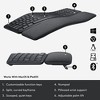
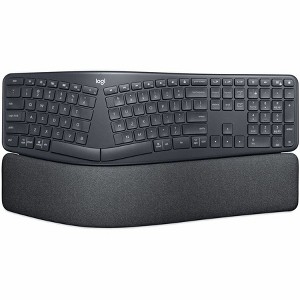
Logitech ERGO K860 Split Ergonomic Keyboard 920-010175
$174.63
In Stock

Free & easy returns
Return this item by mail or in store within 30 days for a full refund.
Sold & shipped by Spacebound
Eligible for registries and wish lists
About this item
Additional product information and recommendations

Guests also viewed
Related Categories
Guests are saying
The wireless keyboard offers exceptional comfort and ergonomic design, making it ideal for long typing sessions. Guests appreciate its seamless connectivity options, including Bluetooth and Logi Bolt, which allow for easy switching between devices. While the keyboard excels in performance and quiet typing, some guests noted the absence of backlighting and occasional issues with the Flow feature. Overall, it is a solid choice for both work and gaming environments.
Summary created by AI from text of reviews reflecting recent feedback provided across different star ratings (includes incentivized reviews)
4.5 out of 5 stars with 39 reviews
5 out of 5 stars
8 July, 2026
originally posted on http://www.dell.com/en-us

(no review title)
5
2 out of 5 stars
8 August, 2025
originally posted on http://www.dell.com/en-us
Good keyboard but legs are defective
Decent feel on the keys, and the wrist support is pretty good, easy to keep clean. Some things are funky, such as no Windows key, and the way to use function keys is bad. But as an ergonomic keyboard, a big part of that is the ability to raise the front of the keyboard for easier use. I do not abuse, but one broke pretty soon. Logi replaced it, but did not send a 2nd one that I told them was showing cracks. Now that one is broke. They made me go thru so many hoops, I now will waste $ buying them
5 out of 5 stars
8 July, 2024
Best keyboard for wrist pain
[This review was collected as part of a promotion.] One of the best keyboards, I have own. Relieves the pain in my wrists.
5 out of 5 stars
1 July, 2024
originally posted on Logitech

Ergo mouse and keyboard
[This review was collected as part of a promotion.] Was nervous to use a wireless mouse and keyboard for gaming because of any delay. And they were expensive. But after using them I couldn’t be happier. Awesome products. 5/5 stars all day
5 out of 5 stars
28 May, 2024
originally posted on Logitech
Great product + easy setup
[This review was collected as part of a promotion.] Works perfect! nearly zero effort to set up and auto connect with my work set up. This is my second product purchase with Logitech. No hesitation in buying their products
3 out of 5 stars
20 May, 2024
originally posted on http://www.dell.com/en-us
(no review title)
3
5 out of 5 stars
14 May, 2024
originally posted on http://www.dell.com/en-us
(no review title)
5
5 out of 5 stars
23 April, 2024
originally posted on Logitech
Quiet keyboard
[This review was collected as part of a promotion.] It's a really great keyboard. I like the accuracy and the feel. The features are good, but It misses the backlight. It would better if they could add it.
5 out of 5 stars
11 April, 2024
originally posted on http://www.dell.com/en-us
(no review title)
5
3 out of 5 stars
21 March, 2024
originally posted on Logitech
Hardware is great, software is poor, Logitech branding shows incredibly poor choice
[This review was collected as part of a promotion.] Works great for a single computer. What’s missing is backlit lights on the keyboard and Flow is an awesome feature when it works but it’s just awful. Flow stops working multiple times throughout the day and needs to have LogiOptions software restarted multiple times. I really like the multiple connection methods - Bolt, Bluetooth and unencrypted dongle so 1 mouse + keyboard control everything. The keyboard Smart Actions is a gimmick, lacking useful options like a decent editing annd troubleshooting stepper. Use AutoHotKey as a better alternative. For goodness sake, the K860 Bolt keyboard is different than K860 Unifying dongle keyboard so they need to be different designations besides K860 - seriously need to change the branding because online they look compatible and they’re not - I had to order and return multiple times.
5 out of 5 stars
21 March, 2024
originally posted on http://www.dell.com/en-us
Love it!
I love this keyboard! I've had one for years and my other one just quit working properly. I love the subtle wave of this keyboard which helps my carpel tunnel issues a great deal compared to a regular keyboard. I highly recommend this to anyone looking at it.
5 out of 5 stars
6 March, 2024
originally posted on http://www.dell.com/en-us
(no review title)
5
2 out of 5 stars
5 March, 2024
originally posted on Logitech
Was too large
[This review was collected as part of a promotion.] This keyboard was too big for me. It just didn’t fit anywhere that’s not to say it’s not bad for people, but it wasn’t for me.
5 out of 5 stars
4 March, 2024
originally posted on Logitech
I love it, I own
[This review was collected as part of a promotion.] I love it, I own the regular and the business. 1 for at home and a 1 business for at the office. I wish the keys were the same as the regular k860. I only bought the business edition so I could pair both mouse and keyboard with logo bolt.
5 out of 5 stars
10 January, 2024
originally posted on Logitech
Wonderful Keyboard!
Amazing keyboard. Uses the same Logi Bolt receiver (unlike the non-business version) as my MX Master 3 mouse, meaning only one USB port is being used for 2 devices, or zero if I want to use Bluetooth. And I don't notice any lag with either connection technology. Key travel and feel is very nice. Ergonomics are spot on. The only way I could be more comfortable is if it was split into 2 pieces so I could spread my hands even wider. I kinda like the different function key layout compared to the non-business version as well. I like to keep the F keys active because I use them pretty often, so this new layout has the volume up/down keys on non-F-keys so I don't need to switch off F-keys to use them. The one thing I'd like to see changed, though is the Home/End/Delete/P Up/P Down buttons. I wish they were arranged like the K350 keyboard. I used that keyboard for a long time and always thought the layout of those keys on that keyboard made so much more sense. This isn't worth docking stars from this keyboard, though, because very very very few keyboards use that layout.
5 out of 5 stars
25 November, 2023
originally posted on Logitech
Like the OG ERGO K860, but better!
I've been using the ERGO K860 (non-business model) for a couple years and love it - in fact, I decided to take it in to work to use there, and bought the Business model to replace it at home. I chose the Business model because it uses the newer Bolt receiver, which can be shared with my mouse (MX Master 3S). I didn't pay close attention to product images and assumed the keyboards were identical, but while they are physically identical there are some changes to the function keys, which I think are a big improvement - the Business model shifts some keys around and moves the "right click (menu)" key and function lock key, which I never use, to be secondary which give room for an emoji and mic mute key, which I use all the time. I only have two complaints. Fist is that, once muting the mic with the keyboard, unmuting without the keyboard is very cumbersome - if you are using this keyboard with a laptop that isn't permanently docked and use the mic mute key it's going to be annoying when you're not sitting at your desk with the keyboard. You basically have to go into system settings and increase input volume or use a 3rd party app to add a toggle to the menu bar. The Logitech Options+ app already placed an icon in the menu bar when the keyboard mutes the mic, so it would be great if you could click that to unmute. My second complaint is that there's no option to enable syncing EasySwitch between the keyboard and mouse. Logitech has suggested Flow for this functionality but I can't (and don't want to) sign in to the cloud software on my work computer. I'm currently using a USB switcher with Bolt receiver to allow for single-button switching between computers but if they added an EasySwitch sync option in the software I could pair keyboard and mouse with Bluetooth and remove the need for the Bolt receiver and USB switcher.
5 out of 5 stars
8 November, 2023
originally posted on Logitech
Faster than the previous version.
Faster than the previous version. Very comfortabe and great feel.
5 out of 5 stars
2 May, 2023
originally posted on Logitech
Best keyboard I've owned
I've been using the keyboard for several months now and I find it comfortable over long typing secessions. I'm also happy with the action of the keys. I like the initial resistance on the keys and they have a good amount of travel. Not only is it comfortable but I also seem to have a lot fewer typos. I was surprised by that. At first I thought that I was just move conscious of my typing since the keyboard feels different from other keyboards I've had in the past, but as I mentioned I've been using the keyboard for months now. I'm still typing with better accuracy. Maybe the keyboard got me to slow down for a little while and I've kept the accuracy now that I'm used to the keyboard. I don't feel that I'm typing any slower than have have in the past. It could all be in my head but I'll take the win.
5 out of 5 stars
26 April, 2023
originally posted on http://www.dell.com/en-us
Logitech ERGO K860 for Business Keyboard - Graphite
Amazing product!! Just perfect for the wrists when typing. Definitely 5 stars product!
5 out of 5 stars
14 March, 2023
originally posted on Logitech
Pricey but worth it. Still
Pricey but worth it. Still getting used to it, but it types super quietly. Love that it’s wireless. Comfy to use. Easy setup.