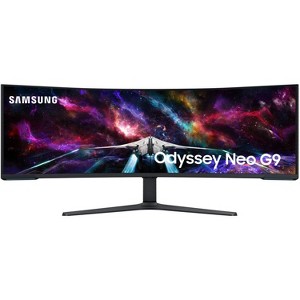
Samsung 57" Odyssey Neo G9 Dual 4K UHD Quantum Mini LED 240Hz HDR Curved Gaming Monitor
$2,299.99 reg $2,499.99
Sale save $200.00 (8% off)
In Stock
Eligible for registries and wish lists
About this item
Additional product information and recommendations
Discover more options
Frequently bought together
Guests also viewed
Related Categories
Guests are saying
This monitor offers an exceptional gaming experience with its immersive curved design and stunning picture quality. Guests appreciate its versatility for both gaming and productivity, making it suitable for various uses, from video editing to casual streaming. The high refresh rate and vibrant colors enhance gameplay, while its large screen real estate allows for efficient multitasking. Overall, it stands out as a top choice for anyone seeking a premium display.
Summary created by AI from text of reviews reflecting recent feedback provided across different star ratings (includes incentivized reviews)
4.7 out of 5 stars with 634 reviews
1 out of 5 stars
2 April, 2026
originally posted on Samsung US

False Advertisement and Room Heater
This monitor DOES NOT support 240Hz at native resolution! (5120x1440) The hardware ONLY supports 60Hz at native resolution. COMPLETE SCAM AND FALSE ADVERTISING. Other non native resolutions support 240Hz, like 1440p. Why would I purchase a 5K monitor in order to game at 1440p? ABSOLUTELY horrible for anyone with Epilepsy! Not listed in system specs in ANY WAY! FALSE SPECS GIVEN! WILL NOT RUN 240Hz at 5120x1440 PERIOD! Great if you want to want to run dual display and dual lower resolutions with a higher refresh rate. Samsung advertised very specifically this monitor will run 240Hz refresh rate at 5120x1440. It is NOT physically capable. In addition, the monitor produces a insane amount of heat. You will need a separate AC unit just for the monitor. AVOID AT ALL COSTS. - 25 year IT veteran
1 reply from Samsung Brand Ambassador team - 7 days ago
DigitalCow: We appreciate your feedback regarding your Neo G9 Monitor’s performance. If you're experiencing freezing or lag in general response time, please try the following steps: 1. Check for firmware updates – Keeping your Monitor up to date can resolve many performance issues: Home > left directional key > Settings > Support > Software Update > Update Now 2. Run Device Care – This tool checks system memory, frees up cached data, and closes background apps that could be slowing things down: Home > left directional key > Settings > Support > Device Care > Start Device Care 3. Cold boot your Monitor – With the Monitor powered on, press and hold the Power button on your remote for 5+ seconds until the Monitor restarts. This helps refresh the system. If you're still noticing performance snags after these steps, please contact Samsung Support at 1-800-SAMSUNG between 8AM - 9PM EST Monday - Friday, and 8AM - 6PM Saturday and Sunday. You can also connect with a LiveChat agent via the ‘Support’ link on our website. ~ Samsung Monitors
5 out of 5 stars
26 March, 2026
originally posted on Samsung UK

Simply superb
Superb great monitor, the resolution is superb, equivalent to 4 normal screens at the same time! Super widescreen games are simply jaw dropping the brightness and contrast make everything on the display look great. The curvature of the screen means I can have a display wider than my desk on my desk without any problems
1 out of 5 stars
4 March, 2026
originally posted on Samsung US
10 bad pixels !!! on a productivity display !!!
Came with about 10 bad pixels all placed at less that a 10th of a square inch. I have the QN90A flagship from 2021 and the F8000 from 2024 and it seems that Samsung screens have horrible yield regarding bad pixels. Image quality and brightness are unquestionable, but local dimming is having trouble supporting professional work of thin bright lines over a black background. This is the most expensive screen one can buy....... but Samsung is too big to care. Not even possible to add the images to this review for some reason.
1 reply from Samsung Brand Ambassador team - 1 month ago
Oren Shlomo: Thank you for your feedback regarding the screen abnormalities you're seeing on your Monitor. To help determine if the issue is related to the panel itself, we recommend starting with a Picture Test, which displays a high-definition image you can examine for flaws: Settings > Support > Device Care > Self Diagnosis > Picture Test If the issue appears during the test and across all sources (built-in apps, HDMI devices, etc.), it may indicate a panel-related concern. You can also try displaying solid-color test videos (red, green, blue, black, white) from a USB drive or YouTube. This can help you identify whether any pixels are stuck or not functioning properly. In some cases, unplugging the Monitor for a few minutes and rebooting it can help resolve stuck pixels caused by temporary display behavior. If the problem persists after these steps, the Monitor may require service. To set up a service appointment, please contact Samsung Support at 1-800-SAMSUNG between 8AM - 9PM EST Monday - Friday, and 8AM - 6PM Saturday and Sunday. LiveChat and additional support resources are also available through the Support link on our website. ~ Samsung Monitors
5 out of 5 stars
18 January, 2026
originally posted on Samsung US
This product has great quality!
[This review was collected as part of a promotion.] I would love to use this monitor for gaming & maybe try streaming in the future.
3 out of 5 stars
4 January, 2026
originally posted on Samsung US
Gaming? Just OK.
It's great 50% of the time. But I have a 3080ti, and sometimes when I game I get horrible screen tearing down the center left hand side. I can sometimes turn the monitor off and on again to get it back to normal. Otherwise I have to restart. Before purchase, I was unaware most games don't actually support this wide of a screen, and to compensate, they just stretch the left and right sides. Its obvious and annoying. So, I'm not actually getting the peripheral advantage I thought I would when I ordered this monitor. P.S. - Samsung enabled AI to help users write reviews here, and as I write it tries to autofill what thinks I'm writing and keeps messing up! VERY ANNOYING!!!
1 reply from -Samsung team - 3 months ago
"We are sorry to see that you rated this product 3 stars, which indicates dissatisfaction. If there is anything we can do to assist you and improve your product experience, please contact Samsung Customer Support via: 1-800-SAMSUNG, available 8AM - 12AM EST (Mon-Fri) / 9AM - 11PM EST (Sat-Sun). Your thoughts and opinions are very important to Samsung and we hope to hear from you. "
5 out of 5 stars
31 December, 2025
originally posted on Samsung Canada

Perfect productivity screen and some gaming
Been using this as a replacement for my 49" Samsung monitor for a couple weeks now and it has been pretty solid. The extra vertical screen was the want of getting the dual 4K monitor. The built in KVM makes switching between work and play without needing a couple keyboards.
5 out of 5 stars
30 December, 2025
originally posted on Samsung Canada
(no review title)
Excellent product. Love the display and clarity. Definitely recommend.
5 out of 5 stars
29 December, 2025
originally posted on Samsung US
Great graphics
l like the game, it is so good and excellent resolution and also brightness and response time and refresh logistics and curvature. l like Samsung the best and forever
5 out of 5 stars
24 December, 2025
originally posted on Samsung US
Great for gaming
[This review was collected as part of a promotion.] I use it for gaming purposes and its awesome. Nothing beats a jet 2 holiday when it comes to having a gaming system.
5 out of 5 stars
23 December, 2025
originally posted on Samsung US
Best Gaming Monitor I ever Had !!!
[This review was collected as part of a promotion.] I use my Odyssey Neo G9 for gaming, watching Youtube and searching the web. When i have multiple tabs open i can literally spread them out on the entire display screen and not worry about minimizing any. This is by far the best gaming monitor i ever had and i highly recommend this to anyone looking for a new experience with their monitor setup!
5 out of 5 stars
22 December, 2025
originally posted on Samsung UK
The best monitor I’ve ever owned
The best monitor Ive ever owned. This monitor is absolutely magical, I use it for gaming and if you’re on the fence I say take the step in buying this monitor. There isn’t a single game where it doesn’t blow my mind.
1 reply from CX team - 4 months ago
It is great to see that you are loving your new Odyssey Neo Monitor! Thanks to the 240Hz refresh rate, you'll get the ultimate gaming experience to last years! ^LB at Samsung Support
1 out of 5 stars
16 December, 2025
originally posted on Samsung US
Incredible Performance, Shockingly Fragile
I purchased the 57” Odyssey Neo G9 Dual 4K UHD monitor just two weeks ago. From a performance standpoint, it was outstanding: stunning image quality, smooth 240Hz refresh rate, and an immersive experience that justified the premium price. Unfortunately, that is where the positives end. Without any impact, misuse, or visible external cause, the panel developed a crack and immediately became unusable. The monitor has not been moved, struck, or handled improperly. Given the size, cost, and positioning of this product as a flagship, ultra-premium display, this kind of failure is deeply concerning. What makes this situation worse is the lack of clarity and support around Samsung Care+. I purchased extended coverage specifically for peace of mind on a product of this value. However, when attempting to file a claim, the system reports that the product was “not under warranty at the time of the incident,” despite the additional two years of coverage. There is no clear explanation, no transparent path forward, and no obvious way to resolve the discrepancy. I have been a long-time Samsung customer, purchasing Samsung electronics and appliances almost exclusively. This experience has genuinely shaken my confidence. A monitor at this price point should not fail this easily, and when it does, support and coverage should be straightforward, responsive, and reliable. As it stands, I am left with a very large, very expensive, unusable display and no resolution in sight. While the technology itself is impressive, durability and post-purchase support are just as important. Until those aspects are addressed, I cannot recommend this product or feel confident investing in similar high-end Samsung displays in the future.
1 reply from -Samsung team - 4 months ago
Thank you for your review. Samsung is committed to providing the best possible product experience, quality, and value. Samsung greatly values our customers’ feedback and we utilize your concerns and opinions in our relentless efforts towards delivering world-class products. We are very sorry to hear this product didn't meet your expectations and hope to have you back as a customer again. If there is anything we can do to assist you and improve your product experience, please don't hesitate to contact Samsung Customer Support via: 1-800-SAMSUNG, available 8AM - 12AM EST (Mon-Fri) / 9AM - 11PM EST (Sat-Sun)
5 out of 5 stars
14 December, 2025
originally posted on Samsung Canada
Nothing on the market comes close
I've been completely spoiled by this monitor and can't imagine upgrading to anything else in the next few years. Resolution, refresh rate, response time and color accuracy are all great, with deep blacks and brightness in HDR that reaches 1500 nits on my unit. I previously owned several OLED monitors, but prefer the peace of mind that comes with mini LED since I also use it for work.
5 out of 5 stars
4 December, 2025
originally posted on Samsung US
Productivity beast!
[This review was collected as part of a promotion.] I primarily use the monitor for work and personal productivity. I’ve heard people have compatibility issues with this monitor- my two year old Dell business laptop is able to run native resolution at 60hz comfortably via DP 1.4 (DSC enabled) - just make sure you get a good TB4 to DP adapter or a good quality DP40 certified cable. I also use it with my MacBook Pro and it works just fine in picture-by-picture mode. No complaints so far. It’s really elevated my productivity set up.
5 out of 5 stars
29 November, 2025
originally posted on Samsung US
Beautiful display
[This review was collected as part of a promotion.] I use it for engineering and coding primarily, so much room for activities on this display it feels even bigger than it is! I can from a triple 27" setup and even though they were wider the monitor is better
5 out of 5 stars
26 November, 2025
originally posted on Samsung Canada
size and quality
great monitor, I already own a 57 inch monitor. great experience.
5 out of 5 stars
16 November, 2025
originally posted on Samsung US
Beautiful, great!!
[This review was collected as part of a promotion.] I love this tv, it is great. Great picture, awesome, amazing!!
5 out of 5 stars
14 November, 2025
originally posted on Samsung US
Very awesome but pricey
[This review was collected as part of a promotion.] Would recommend even for price. It's memory and visual above reproach
5 out of 5 stars
12 November, 2025
originally posted on Samsung US
It's a must have
[This review was collected as part of a promotion.] I have not had not one bad thing to say about my new monitor .
4 out of 5 stars
7 November, 2025
originally posted on Samsung UK
I dont think I will ever go back to dual monitors
I got this for multiple reaso its amazing large display means I can have multiple this open at the same time and dont have to keep going back and forth between folders and tabs its all there ready and for gaming I love how the ultra wide screen can create a really good immersion on the games that are compatible with ultra wide its like having a dual monitor set up woth put the extra cables and the annoying bezzels in the middle
1 reply from Samsung team - 5 months ago
Thank you for the love and for sharing your superb experience with us; your words put a smile on our faces. ^KF at Samsung Support