
Target New ArrivalsGift Ideas for MomClothing, Shoes & AccessoriesHome & DecorKitchen & DiningOutdoor Living & GardenGroceryHousehold EssentialsBabyBeautyPersonal CareHealthWellnessLuggageSports & OutdoorsToysElectronicsVideo GamesMovies, Music & BooksSchool & Office SuppliesParty SuppliesGift IdeasGift CardsPetsUlta Beauty at TargetShop by CommunityTarget OpticalDealsClearanceTarget New ArrivalsSpring OutfitsGift Ideas for MomWomen’s Festival OutfitsTop DealsTarget Circle DealsWeekly AdShop Order PickupShop Same Day DeliveryRegistryRedCardTarget CircleFind Stores
Ring 1080p Indoor Cam (2nd Gen) Security Camera - 2 of 4Ring 1080p Indoor Cam (2nd Gen) Security Camera - 3 of 4Ring 1080p Indoor Cam (2nd Gen) Security Camera - 4 of 4
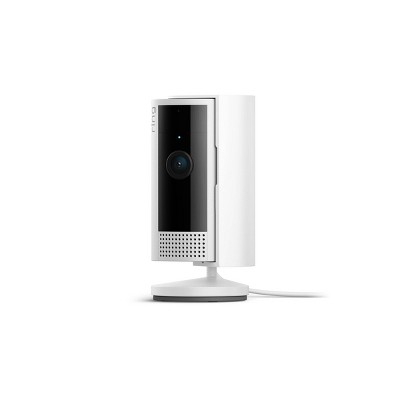
Ring 1080p Indoor Cam (2nd Gen) Security Camera - 1 of 4

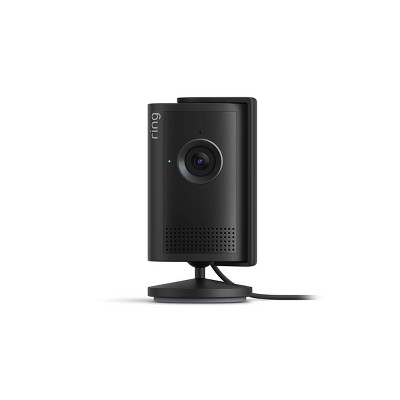
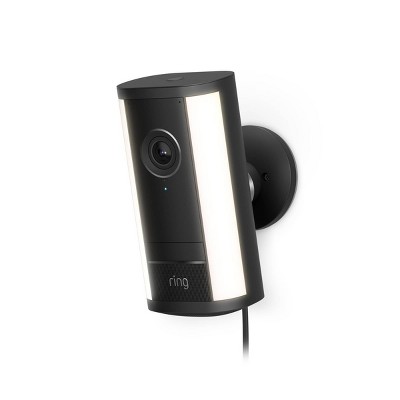
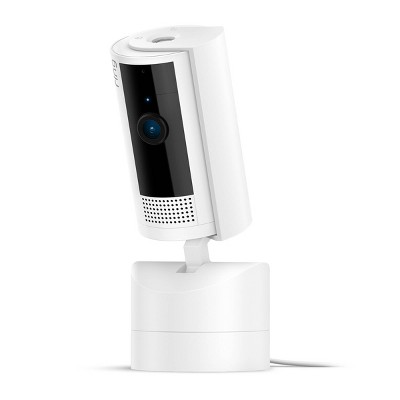
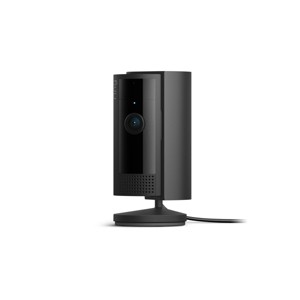
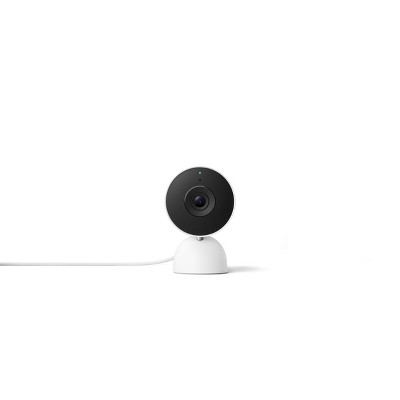
Ring 1080p Indoor Cam (2nd Gen) Security Camera - Black: Motion Activated, Alexa Compatible

$29.99 reg $49.99
Sale save $20.00 (40% off)

ColorBlack
  • Black
  • White

Out of Stock

Free & easy returns

Free & easy returns

Return this item by mail or in store within 30 days for a full refund.
Eligible for registries and wish lists

At a glance

About this item

Highlights

  • Watch over your home day or night in 1080p HD video with Color Night Vision.
  • See, hear, and speak in real time with Two-Way Talk and Live View.
  • Get real-time alerts when the camera detects movement—and choose exactly what your camera covers so you only get notified above movement that matters.
  • Sound off your powerful siren from the Ring App—whether you’re scaring off intruders or breaking up a cat fight.
  • Find the perfect angle on a table—or mount up high with the flexible swivel mount. Indoor Cam is plug-in, making it easy to move where you need it.
  • Turn off your camera and mic with the manual Privacy Cover, then reactivate with a simple swivel.
  • Scroll back in time to rewatch what you missed, get AI-powered alerts that tell you what’s happening, and so much more, with a compatible Ring Protect subscription (sold separately).
  • Link with select Ring devices, allowing them to activate when this camera detects movement for additional security, recording angles, and more. Subscription required, sold separately.
  • Works with Alexa so you can hear audio announcements when motion is detected.

Description

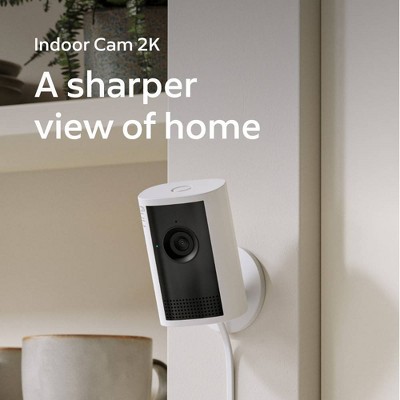
Versatile protection and personalized peace of mind. That’s Indoor Cam (2nd Gen). Get the whole picture in real time with 1080p HD video and Color Night Vision, right from your phone. Or keep the picture private by using the manual, removable Privacy Cover to turn off audio and video with a simple swivel.

Indoor Cam includes an adjustable camera mount—and can plug in wherever there’s a power outlet—making it easy to find the perfect view up high or down low.
Dimensions (Overall): 4.06 Inches (H) x 4.38 Inches (W) x 4.38 Inches (D)
Weight: 2.55 Pounds
Features: Night Vision, Controlled by Smartphone App, Motion Activated, Cell Phone Alert, 2-Way Talk
Indoor/Outdoor: Indoor
Assembly Details: Adult Assembly Required, Some Tools Provided
Connection Type: No Wired Connection Ports
Model #: B0B6GJBKRK
Number of Cameras: 1
Mount Type: Hardware Mounted
Operating System Compatibility: Apple iOS, Android
Maximum Resolution: 1080 x 1080
Image Sensor Type: PIR Sensor
Wireless Technology: Wi-Fi, Bluetooth
Compatible With: Amazon Alexa
Night Vision Range: 20 Feet
Focal Length: 4mm
Minimum Operating Temperature Fahrenheit: -5
Maximum Operating Temperature Fahrenheit: 120
Motion Detection Angle: 143 Degrees
Power Source: Electric
Battery: No Battery Used
Warranty: 1 Year Limited Warranty. To obtain a copy of the manufacturer's or supplier's warranty for this item prior to purchasing the item, please call Target Guest Services at 1-800-591-3869
TCIN: 88347912
UPC: 840268948733
Item Number (DPCI): 056-16-0009
Origin: Imported
If the item details aren’t accurate or complete, we want to know about it.

Shipping details

Estimated ship dimensions: 4.4 inches length x 4 inches width x 2.2 inches height
Estimated ship weight: 0.46 pounds

Return details

This item can be returned to any Target store or Target.com.
This item must be returned within 30 days of the date it was purchased in store, delivered to the guest, delivered by a Shipt shopper, or picked up by the guest.
See the return policy for complete information.

Q: Will the camera automatically come back on after power outage?

submitted by Sara - 2 years ago
  • A: Can i give access to my ring camera through my partner internationally?

    submitted byJay - 7 months ago
  • A: Hi Sara. Great question. Yes, the Ring Indoor Cam (2nd Gen) should automatically reconnect to your home wifi network after a power outage. The Ring Indoor Cam (2nd Gen) is compatible with 2.4 GHz wifi (802.11 B/G/N) networks. Learn more here: https://ring.com/support/articles/et42e/Indoor-Cam-Information. We invite you to reach out to our Community if any additional information is needed regarding your question. The Ring Community is our first peer-to-peer community forum, giving our customers the ability to help one another by sharing their feedback and experiences with each other. You can find it here: https://community.ring.com/. All the best, Nicole from Ring.

    submitted byRing - 2 years ago
    Brand expert
  • A: Hi Sara, thanks for reaching out about Ring 1080p Indoor Cam (2nd Gen) Security Camera. If the Ring 1080p Indoor Cam (2nd Gen) Security Camera is properly connected, after a power outage, it should come back on. If you have any additional questions, we welcome you to contact MyTGTtech at 833-848-8324 every day, between 7am-11pm CST.

    submitted byJoe - 2 years ago
    Target staff support

Q: If you unplug the camera will the footage of the previous day delete ?

submitted by Abby - 3 months ago
  • A: Hi Abby. Thank you for your question today! Unplugging your Ring camera will not immediately delete the footage from the previous day. Your recordings are stored in the cloud, not on the device itself. If you have an active Ring Protect Plan subscription, your recordings remain saved in the cloud for up to 180 days by default (though you can customize this storage time from one to 180 days). The footage will only be automatically deleted once it reaches the end of your chosen storage period, starting with the oldest events We invite you to reach out to our community if any additional information is needed regarding your question. The Ring Community is our first peer-to-peer community forum, giving our customers the ability to help one another by sharing their feedback and experiences with each other. You can find it here: https://community.ring.com/. Thank you, Miyuki from Ring.

    submitted byRing - 3 months ago
    Brand expert
  • A: Hi, thank you for reaching out about Ring 1080p Indoor Cam (2nd Gen) Security Camera. No, unplugging your Ring 1080p Indoor Cam (2nd Gen) will not delete previously recorded footage. Ring cameras store recorded events in the cloud, meaning all videos from the previous day remain accessible in your account’s history for 60 to 180 days, regardless of the camera's power status. If you have any additional questions, we welcome you to contact MyTGTtech at 833-848-8324 every day, between 7am-11pm CST.

    submitted byMatt - 3 months ago
    Target expert support

Q: Do you have to subscribe to Ring services in order to use this camera ?

submitted by Ange B - 2 years ago
  • A: Hi Ange B, thanks for reaching out about Ring 1080p Indoor Cam (2nd Gen) Security Camera Without a subscription, you can still use Ring devices to view live video, answer doorbell notifications, and receive instant alerts. A subscription service with additional features is available. If you have any additional questions, we welcome you to contact MyTGTtech at 833-848-8324 every day, between 7am-11pm CST.

    submitted byJustin - 2 years ago
    Target expert support

Q: What is the length of the cable included with the camera?

submitted by patitay2k - 2 years ago
  • A: Hi patitay2k, thanks for reaching out about Ring 1080p Indoor Cam (2nd Gen) Security Camera. The Ring Indoor Cam (2nd Gen) is a versatile plug-in camera that comes with a 6.5 ft Micro USB Power Adapter. For higher wall or ceiling mounting, the 10 ft Micro USB Power Cable can be purchased separately. If you have any additional questions, we welcome you to contact MyTGTtech at 833-848-8324 every day, between 7am-11pm CST.

    submitted byJoe - 2 years ago
    Target staff support
  • A: Hi Good question. The Ring Indoor Cam (2nd Gen) comes with a 6.5-foot Micro USB Power Cable and Power Adapter. The Ring Indoor Cam (2nd Gen) can be mounted anywhere indoors on its own stand or mounted to a wall or ceiling. Learn more here: https://ring.com/support/articles/et42e/Indoor-Cam-Information. We invite you to reach out to our Community if any additional information is needed regarding your question. The Ring Community is our first peer-to-peer community forum, giving our customers the ability to help one another by sharing their feedback and experiences with each other. All the best, Nicole from Ring.

    submitted byRing - 2 years ago
    Brand expert

Q: Does the camera have to be plugged in or can it stand alone? Want to use in an appartment hallway.

submitted by Kim - 2 years ago
  • A: Hi Kim. Good question. Yes, the Ring Indoor Cam (2nd Gen) must be plugged in. The device uses plug-in power with a 7-W USB-A power adapter. Visit our support center for more information: https://ring.com/support/articles/et42e/Indoor-Cam-Information. We invite you to reach out to our Community if any additional information is needed regarding your question. The Ring Community is our first peer-to-peer community forum, giving our customers the ability to help one another by sharing their feedback and experiences with each other. You can find it here: https://community.ring.com/. All the best, Nicole from Ring.

    submitted byRing - 2 years ago
    Brand expert
  • A: Hi Kim, thanks for reaching out about Ring 1080p Indoor Cam (2nd Gen) Security Camera. This does need to be plugged in to a power source to operate. If you have any additional questions, we welcome you to contact MyTGTtech at 833-848-8324 every day, between 7am-11pm CST.

    submitted byMike - 2 years ago
    Target expert support

Q: My current indoor cam swivels. If it detects motion it will swivel to capture that. Does this camera do that?

submitted by mmmorris19 - 2 years ago
  • A: Hi mmmorris19. Great question. No, the Ring Indoor Cam (2nd Gen) does not swivel. It does offer a 143-degree diagonal, 115-degree horizontal, and 59-degree vertical field of view so that you can capture the view you want inside your home. Learn more here: https://ring.com/support/articles/et42e/Indoor-Cam-Information. We invite you to reach out to our Community if any additional information is needed regarding your question. The Ring Community is our first peer-to-peer community forum, giving our customers the ability to help one another by sharing their feedback and experiences with each other. You can find it here: https://community.ring.com/. All the best, Nicole from Ring.

    submitted byRing - 2 years ago
    Brand expert
  • A: Hi mmmorris19, thanks for reaching out about Ring 1080p Indoor Cam (2nd Gen) Security Camera. To better understand your individual needs, we welcome you to contact MyTGTtech at 833-848-8324 every day, between 7am-11pm CST.

    submitted byMike - 2 years ago
    Target expert support

Q: Do you need wifi for it to work?

submitted by Tpf676913 - 2 years ago
  • A: Hi Tpf676913, thanks for reaching out about the Ring 1080p Indoor Cam (2nd Gen) Security Camera. Yes, wifi is needed to connect the Ring 1080p Indoor Cam (2nd Gen) Security Camera. If you have any additional questions, we welcome you to contact MyTGTtech at 833-848-8324 every day, between 7 am -11 pm CST.

    submitted byRena - 2 years ago
    Target expert support
  • A: Hi Tpf676913. Good question. Yes, the Ring Indoor Cam (2nd Gen) requires a wifi connection. Ring Indoor Cam is compatible with b/g/n wifi networks operating on 2.4 GHz frequencies. Learn more here: https://ring.com/support/articles/et42e/Indoor-Cam-Information. We invite you to reach out to our Community if any additional information is needed regarding your question. The Ring Community is our first peer-to-peer community forum, giving our customers the ability to help one another by sharing their feedback and experiences with each other. You can find it here: https://community.ring.com/. All the best, Nicole from Ring.

    submitted byRing - 2 years ago
    Brand expert

Q: Does this chain multiple cameras? For example, if i buy 3 of these and put one at each entrance, would i be able to chain them together into 1 app and be alerted on my phone simultaneously?

submitted by Kobebeef24 - 2 years ago
  • A: Hi Kobebeef24. Good question. Yes, you can set up and manage all of your Ring devices through one account in the Ring app. Device linking (a feature in the Ring app) connects your Ring devices together and provides instructions for a group of devices to begin recording whenever any of them are activated. Learn more here: https://ring.com/support/articles/0cz1k/Link-Your-Ring-Devices. We invite you to reach out to our Community if any additional information is needed regarding your question. The Ring Community is our first peer-to-peer community forum, giving our customers the ability to help one another by sharing their feedback and experiences with each other. You can find it here: https://community.ring.com/. All the best, Nicole from Ring.

    submitted byRing - 2 years ago
    Brand expert
  • A: Hi Kobebeef24, thanks for reaching out about Ring 1080p Indoor Cam (2nd Gen) Security Camera. There is no limit to the number of Ring devices that can be connected to the Ring app. You can view, monitor, and be alerted to each camera depending on your personalized settings and Ring subscription type. If you have any additional questions, we welcome you to contact MyTGTtech at 833-848-8324 every day, between 7am-11pm CST.

    submitted byMel - 2 years ago
    Target staff support

Q: Hey! Very interested for my nana inside of her living room for christmas, but she doesn't have WIFI but she has unlimited data on her cell phone can she still watch the cam from anywhere?

submitted by ring cam - 2 years ago
  • A: Hi ring cam, thanks for reaching out about Ring 1080p Indoor Cam (2nd Gen) Security Camera. To set up the Ring camera using a cellular data plan, you will need to insert a SIM card into the camera's SIM card slot. Once the SIM card is inserted, you can connect the camera to a mobile hotspot or a cellular-enabled device using Bluetooth or WiFi Direct. Please note that Ring video doorbells and security cameras are intended to be used with a home wifi network, rather than a mobile device hotspot. Using a hotspot instead of your home wifi network may cause failed setup attempts or cause your Ring device to continually disconnect from wifi. She would need to be near the camera at all times to view it so she would not be able to view the camera from anywhere without home wifi. If you have any additional questions, we welcome you to contact MyTGTtech at 833-848-8324 every day, between 7am-11pm CST.

    submitted byMel - 2 years ago
    Target staff support
  • A: Hi ring cam. Good question. No, the Ring Indoor Cam (2nd Gen) requires a wifi connection. Ring Indoor Cam is compatible with b/g/n wifi networks operating on 2.4 GHz frequencies. Learn more here: https://ring.com/support/articles/et42e/Indoor-Cam-Information. We invite you to reach out to our Community if any additional information is needed regarding your question. The Ring Community is our first peer-to-peer community forum, giving our customers the ability to help one another by sharing their feedback and experiences with each other. You can find it here: https://community.ring.com/. All the best, Nicole from Ring.

    submitted byRing - 2 years ago
    Brand expert

Q: can I turn the camera towards the window to see what's going on outside

submitted by Tee - 3 years ago
  • A: Hi Tee. Good question. Yes, you can place your Ring Indoor Cam facing a window. However, if your camera is facing a window, you may get distorted images at night. You can use the Ring app to turn the infrared light off to minimize glare. Learn more here: https://support.ring.com/hc/en-us/articles/360033911431-Indoor-Cam-Troubleshooting. We invite you to reach out to our Community if any additional information is needed regarding your question. The Ring Community is our first peer-to-peer community forum, giving our customers the ability to help one another by sharing their feedback and experiences with each other. You can find it here: https://community.ring.com/. All the best, Nicole from Ring.

    submitted byRing - 3 years ago
    Brand expert
  • A: Hi Tee, thanks for reaching out about Ring 1080p Indoor Cam (2nd Gen) Security Camera. While it can't be used outdoors, it can be placed inside literally anywhere there is access to a power outlet. The compact Indoor Cam can be placed on a table or out of the way on a high bookshelf. If you have any additional questions, we welcome you to contact MyTGTtech at 833-848-8324 every day, between 7am-11pm CST.

    submitted byJoe - 3 years ago
    Target staff support

Additional product information and recommendations

Discover more options

Guests also viewed
4.6 out of 5 stars with 790 reviews
quality: 4.66 out of 5
value: 4.63 out of 5
85% would recommend
56 recommendations
4 out of 5 stars
18 April, 2026
originally posted on influenster.com

Image

Reliable!

Audio is wonderful on these, performance is reliable. Setup was easy, the cameras are durable. Video quality is excellent. I use these to keep an eye on my dogs when I am away from home.
MeghanS
Did you find this review helpful?
3 out of 5 stars
13 April, 2026Verified purchase

(no review title)

Doesn't capture audio very well decent otherwise
1 reply from Ring team - 12 days ago
Hi asa. Thank you for taking the time to share your experience with us. We understand how important it is for your Ring Indoor Cam (2nd Gen.) to record clear and concise videos so that you can effectively monitor your home. The features and technology provided by the Ring Indoor Cam (2nd Gen.) are incredibly valuable and help provide you with peace of mind about your home security. We want to ensure that your device is working as intended by providing you with solutions to resolve the concern you mentioned in your review. It sounds like the device is not performing as expected in regards to audio. Poor wifi can often cause Ring device issues, including capturing audio. We recommend following these steps in the Ring app: Tap the top menu (☰), then Devices. Choose your Ring Indoor Cam (2nd Gen.). Tap "Device Health." Under the "Network" section, you'll see your device's "Signal Strength." If your "Signal Strength" (RSSI) is amber or red, your Ring device likely has a poor connection to your location's wifi. Moving your Wi-Fi router closer to your Ring device may improve its connection. If your Wi-Fi connection is strong and you're still experiencing audio issues, reboot your Ring camera by following these steps: Open the Ring app. Tap the top menu (☰), then "Devices." Choose your Ring device. Tap the "Device Settings" tile. Tap "Device Health." Scroll down and tap "Reboot This Device." Wait a few minutes for your device to reboot. For more information on fixing audio issues, please visit this link: https://ring.com/support/articles/odu0k/fixing-audio-and-video-issues?redirect=true. For more information on your Ring Indoor Cam (2nd Gen.), we invite you to reach out to our community. Ring Community is our first peer-to-peer community forum, giving our customers the ability to help one another and share their personal feedback and experiences with Ring. You can find it here: https://community.ring.com/. We look forward to hearing from you if we can be of any further assistance! Thank you, Miyuki from Ring.
asa
Did you find this review helpful?
4 out of 5 stars
4 April, 2026
originally posted on influenster.com
Image

Second set of eyes

Ring is a great security camera brand. This is the first Ring Cam and it works well on my mantle in the living room. The picture and sound are clear. It has two-way communication, and records any and everything in its view. It’s easy to just plug in and place. It gives me peace of mind when I’m away and need to check on my fur babies!
PuaR
Did you find this review helpful?
3 out of 5 stars
Thumbs up graphic, would recommend
3 April, 2026Verified purchase

(no review title)

I love it just wish it didn’t skip some events
1 reply from Ring team - 20 days ago
Hi Bella. Thank you for taking the time to share your experience with us. We understand how important it is for your Ring Indoor Cam (2nd Gen.) to function consistently and reliably, so you are alerted to any wanted or unwanted activity in or around your home. The features and technology provided by the Ring Indoor Cam (2nd Gen.) are incredibly valuable and help provide you with peace of mind about your home security. We are eager to address the issue you raised in your review and provide you with a resolution today. It sounds like your Ring Indoor Cam (2nd Gen.) is not performing as expected. We would love the opportunity to share with you some troubleshooting steps that you can try to get your Ring Indoor Cam (2nd Gen.) functioning as intended. You can adjust three preset motion zones and their distances under the "Motion Settings" tab on the device's page in the Ring app. Additionally, you can choose how often the camera checks for movement in those predefined zones via the "Motion Frequency" setting. If you find that your camera is missing some motions, please set the motion frequency to "Frequently." Accuracy in motion detection can also be improved by enabling the "Smart Alerts" feature for people only in your Ring app. To enable "Smart Alerts," please follow these steps: Tap the menu (≡) on the top left. Tap "Devices." Tap the device that you want to adjust. Tap "Motion Settings." Tap "Smart Alerts." Tap "Enable Feature." Tap "Continue." Select the notification options that you want for "Person" and "Other Motion." Tap Done to save new settings. Editing existing settings will save automatically. We invite you to reach out to our Community if any additional information is needed regarding your Ring Indoor Cam (2nd Gen.). The Ring Community is our first peer-to-peer community forum, giving our customers the ability to help one another by sharing their feedback and experiences with each other. Sincerely, Miyuki from Ring.
Bella
quality: 4 out of 5
value: 5 out of 5
Did you find this review helpful?
5 out of 5 stars
2 April, 2026
originally posted on influenster.com
Image

Great camera

My son is autistic so it's nice to have such a fast reliable camera. The motion detector is spot on. The video is very clear. You can talk through the camera or just listen in. I have a few and they mount very easy. The app is very easy to use and you don't have to have a subscription but it offers more options. It is also very affordable.
MelissaS
Did you find this review helpful?
5 out of 5 stars
2 April, 2026
originally posted on influenster.com
Image

The only wifi enabled security cam your family wil

I bought an indoor ring cam to watch my pets while I’m away but also for security reasons and it’s a decision I’ve never once had a complaint about. You can set the perimeter to monitor, set notifications, and connect to wifi so you can access the cameras from any where. The installation was quick and easy with clear instructions, and they last for years. I have yet to replace any of my indoor ring cameras and I’ve had them for 6+ years. Definitely worth the value and more.
JessicaP
Did you find this review helpful?
5 out of 5 stars
1 April, 2026
originally posted on influenster.com
Image

Peace of mind while you’re away

Love this indoor plug in security camera. It’s small and discreet. Offers HD video quality along with color and night vision video. You are also able to communicate while you’re away.
MandieG
Did you find this review helpful?
5 out of 5 stars
23 March, 2026
originally posted on influenster.com
Image

Good quality. Very affordable.

I really like the rings product they are not expensive as other and has good quality even at night it has a night mode that is very good. I have a doorbell also. And it help me to catch some thieves. Te app works really good. It send notification when people are are you door. Or pass by your home.
AnaO
1 guest found this review helpful. Did you?
4 out of 5 stars
18 March, 2026
originally posted on influenster.com
Image

Performance is great

Performance is great works how it supposed to installation is very easy !! Helps me keep an eye out inside of my home when I'm not around or when I'm out in vacation overall really love the product
LesliyL
1 guest found this review helpful. Did you?
5 out of 5 stars
11 March, 2026
originally posted on influenster.com
Image

Very easy to setup and move around

I love this indoor camera as it is so easy to setup anywhere. Switching its location is also very simple and quick. I personally switch mine between the living room and other areas I want to spotlight if we are out. I also appreciate that there is a physical cover you can close when you need privacy or simply do not want constant movements alerts.
JessicaM
Did you find this review helpful?
5 out of 5 stars
10 March, 2026
originally posted on influenster.com
Image

Reliable

If you need an indoor camera and you don’t want to worry about charging the battery, this is for you. I never have to worry about this one disconnecting so it’s great for watching the pets while I’m at work. You can still hang it and it will function even outside!
LAURENB
1 guest found this review helpful. Did you?
5 out of 5 stars
14 February, 2026
originally posted on influenster.com
Image

It has been very useful to me

In my experience, this camera is very easy to install and ideal for monitoring pets, although it heavily relies on a subscription to fully utilize its recording functions.
YilianV
Did you find this review helpful?
5 out of 5 stars
10 February, 2026
originally posted on influenster.com
Image

The best cameras with high quality

Our family only uses ring cameras in and out of our home. The app itself is so navigable and the cameras are always the highest quality. We use this indoor specifically for our labs and can talk to them through the camera whenever we get alerts of movement. Ring cameras are the most reliable and user friendly.
Sara S
1 guest found this review helpful. Did you?
5 out of 5 stars
5 February, 2026
originally posted on influenster.com
Image

Best security so far

The perfect tool to monitor activity in home while away. It easy to put together and setup. athe images and video comes in very clear and easy to hear.
Nette F
2 guests found this review helpful. Did you?
5 out of 5 stars
4 February, 2026
originally posted on influenster.com
Image

Solid Choice

Purchased to keep an eye on my digital while we are at work. Super easy to align with the app, and it is plug and go. Solid quality, easy to move around the house, and clear sound on both ends.
nicolem2044_5901
1 guest found this review helpful. Did you?
5 out of 5 stars
2 February, 2026
originally posted on influenster.com
Image

Highly recommend

Super easy to set up and works great! The video quality is clear, the motion alerts are fast, and I love being able to check in anytime from my phone. It’s compact, blends nicely into the room, and gives real peace of mind for home security. Highly recommend!
ducn12_6977
Did you find this review helpful?
5 out of 5 stars
21 January, 2026
originally posted on influenster.com
Image

Watch your pet from afar with a reliable indoor ca

With a little one and a dog, the indoor ring camera is a must! We put this ring camera by our dog’s playpen to watch her while we run errands. Because this camera plugs into the wall, the power is always on. We like that you can easily cover the camera for privacy once we’re home. At night, the video will be infrared and black and white so that you can see motion easier which is most definitely helpful. The app has been user friendly as well as reliable with watching our indoor camera from afar and is something that we check often. I highly recommend for those that have a little one or a pet!
deannaaaq_170
1 guest found this review helpful. Did you?
5 out of 5 stars
18 January, 2026
originally posted on influenster.com
Image

Easy to set up and use.

Ring Indoor stick cam was easy to install and set up. Literally stuck it to the wall, plugged it in, opened Ring app and was viewing my basement in 10 minutes.
devonl33_3940
1 guest found this review helpful. Did you?
5 out of 5 stars
10 January, 2026
originally posted on influenster.com
Image

The best!

This is the best security camera ever!! I was tired of wasting money on cheap no good suspicious app type knock offs, so i bought this and is so worth it. Easy to set up. Everything function great. The video is easy better quality and it also has sound. It records 24 hrs a day and even sends me notifications telling me what's happening. I can even speak through it. The connectivity works great and even when the internet/wifi is weak it still works. Amazing product!
triciae10_8505
2 guests found this review helpful. Did you?
5 out of 5 stars
5 January, 2026Verified purchase

(no review title)

Love it
Candy
Did you find this review helpful?

Get top deals, latest trends, and more.

Privacy policy