

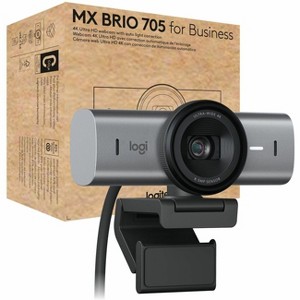
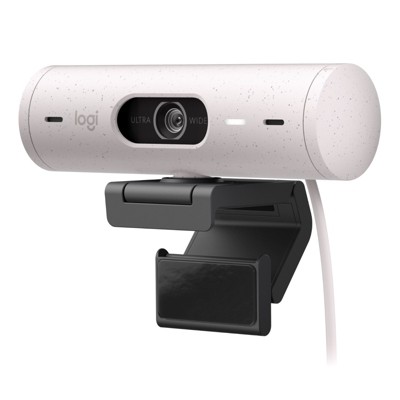
Logitech MX Brio 705 for Business 4K Webcam with Auto Light Correction, Ultra HD, Auto-Framing, Show Mode, USB-C, Works with Microsoft Teams, Zoom,...
$199.99
In Stock

Free & easy returns
Return this item by mail or in store within 30 days for a full refund.
Sold & shipped by antonline
Eligible for registries and wish lists
At a glance
About this item
Additional product information and recommendations
Discover more options
- $62.99reg $69.99 Sale4.4 out of 5 stars with 78 ratings
- $649.00reg $699.00 Sale
- $153.83reg $298.50 Sale
Frequently bought together
Guests also viewed
- $54.99was $67.99 New lower price3.7 out of 5 stars with 27 ratings
- $119.99reg $139.99 Sale
- $49.99reg $69.99 Sale
- $153.83reg $298.50 Sale
Related Categories
4.5 out of 5 stars with 56 reviews
5 out of 5 stars
17 May, 2026
originally posted on Logitech

Works great!
I've got limited interest in technology and simply wanted a way to project Zoom onto my 27" monitor from my 13" MacBook Air. Voila! Plug and play works great :)
5 out of 5 stars
4 May, 2026
originally posted on Logitech
MX a sold improvement to the Brio
Solves the backlight problem and has a more robust lens cap.
5 out of 5 stars
30 April, 2026
originally posted on Logitech
good product with excellent picture quality
Good product with excellent picture quality. i have always relied on Logitech when it comes to purchasing quality value products. There is no competitor even close.
5 out of 5 stars
26 April, 2026
originally posted on Logitech
Solid recommend
My old studio display camera no longer works with my modern system, so this Brio is a great replacement. It has better resolution and general function than the old one and has good security features that are absolutely required these days.
5 out of 5 stars
20 February, 2026
originally posted on Logitech
Great device!
Worked within seconds of installing on my Windows 11 desktop computer. I recommend Logitech technology.
3 out of 5 stars
6 February, 2026
originally posted on Logitech
Good camera, but...
At this price there is no reason to not support Windows Hello. My old Brio did, but not this "better" and more expensive version.
1 out of 5 stars
27 January, 2026
originally posted on Logitech
Very glitchy
I kinda hate this webcam and wish I could return it . It is not very user friendly and my built in camera is just as good.
5 out of 5 stars
13 January, 2026
originally posted on Logitech
Great camera
Its a terrific camera. Much clearer, brighter, and more vivid colors teams/zoom.
1 reply from Customer Care team - 3 months ago
Hey! Thank you so much for your positive feedback! We are thrilled that you are enjoying the camera and that it is meeting your expectations in terms of clarity, brightness, and colors. If you have any further feedback or suggestions, please feel free to reach out. We appreciate your support!
4 out of 5 stars
13 January, 2026
originally posted on Logitech
Nice camera but doesn't support Windows Hello
While it is a very good camera and microphone, it does not provide support for Windows Hello. I missed this when I purchased it, so it did not replace the Hello-compatible camera I was using previously. It does give you better control over angle-of-view and image quality, alleviating the need to use third-party software to manage my appearance on video sessions.
1 reply from Customer Care team - 3 months ago
Hey! Thank you for sharing your experience with the MX Brio. We apologize for any inconvenience caused by the lack of Windows Hello support. We appreciate your feedback. If you have any other questions or concerns, please feel free to reach out to us.
5 out of 5 stars
4 January, 2026
originally posted on Logitech
Amazing!
The clarity and sound ion this product has been amazing. Easy to install and performing updates.
1 reply from Customer Care team - 3 months ago
Awesome to hear the sound quality and setup have been smooth! Glad it's delivering a great experience right out of the box.
5 out of 5 stars
28 December, 2025
originally posted on Logitech
Great image, works great in low light
Seemless startup, great customization, and works great in low light. I am able to get a terrific image without complicated lighting situation, and since I wear glasses eliminating glare is important. Using lower intensity and indirect light got a high def image with almost no shadow and no glare in my glasses.
1 reply from Customer Care team - 3 months ago
Hey! Thank you for sharing such a detailed and thoughtful review. We're delighted to hear MX Brio is delivering excellent image quality even in low-light conditions. Reducing glare for glasses wearers is something we take seriously, and your results are great to hear. We truly appreciate you trusting us for your professional setup!
2 out of 5 stars
13 December, 2025
originally posted on Logitech
Settings not applied correctly
Settings are not applied when the camera is reconnected
5 out of 5 stars
2 December, 2025
originally posted on Logitech
Best camera ever!
This is a great camera I bought it for my work meetings but I also use it for my streaming YT channel and it works perfectly
5 out of 5 stars
28 November, 2025
originally posted on Logitech
Clear video
The quality of this webcam is really amazing. Love the clarity for my YouTube videos. It attaches to your monitor but I use it with a tripod so I was able to screw it in to that. It works great!
5 out of 5 stars
23 November, 2025
originally posted on Logitech
MX Brio
Seems to work very well. Powers up audio and video work. Look forward to exciting times on Zoom.
4 out of 5 stars
24 October, 2025
originally posted on Logitech
MX Brio Webcam Pros & Cons
Like all monitor mounted cameras, the viewing angle is not ideal. I've come up with a way to position the remote viewing window so that the I am able to look the person I'm speaking with in the eye. Otherwise, It works really well. Good resolution, nice color.
5 out of 5 stars
14 October, 2025
originally posted on Logitech
Vivid picture on an adjustable platform
Very easy set-up. Vivid image that adjusts for lighting exceptionally well. My home office lighting created an annoying glare with my previous camera. No amount of adjusting the dimmer or positioning worked. This camera did the trick. I like the multiple hinges that allow me to adjust the angle of the camera when I raise or lower my stand-up desk. Overall, I am very satisfied with this purchase.
2 out of 5 stars
5 October, 2025
originally posted on Logitech
Not worth the price
The build and image quality don’t really justify the high price. For the same money, you can easily find webcams with better performance and features from other brands. The software experience is also disappointing — installing the driver on Windows 11 was a real headache.
5 out of 5 stars
10 September, 2025
originally posted on Logitech
Great camera!
Great camera!! I wish the privacy camera blocker would open automatically when my computer wants my image to log into Windows.
5 out of 5 stars
18 August, 2025
originally posted on Logitech
Great quality video; Easy setup and configuration.
Great quality video; Easy setup and configuration.