Target New ArrivalsGift Ideas for DadFourth of JulyClothing, Shoes & AccessoriesHome & DecorKitchen & DiningOutdoor Living & GardenGroceryHousehold EssentialsBabyBeautyPersonal CareSports & OutdoorsHealthWellnessLuggageSchool & Office SuppliesToys & GamesElectronicsVideo GamesMovies, Music & BooksParty SuppliesGift IdeasGift CardsPetsUlta Beauty at TargetShop by CommunityTarget OpticalDealsClearanceNew ArrivalsGift Ideas for DadBack to SchoolCollegeTop DealsTarget Circle DealsWeekly AdShop Order PickupShop Same Day DeliveryRegistryRedCardTarget CircleFind Stores
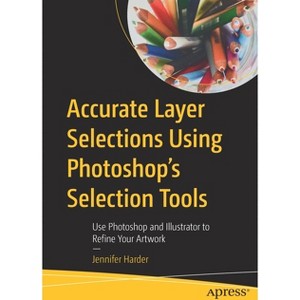
Accurate Layer Selections Using Photoshop's Selection Tools - by  Jennifer Harder (Paperback) - 1 of 1

Accurate Layer Selections Using Photoshop's Selection Tools - by Jennifer Harder (Paperback)

$64.99

In Stock

Free & easy returns

Free & easy returns

Return this item by mail or in store within 90 days for a full refund.
Eligible for registries and wish lists

About this item

Highlights

  • Take your hand-drawn illustrations to the next level by using various selection tools in Photoshop to clean up the artwork, and Illustrator for final refinement.
  • About the Author: Jennifer Harder has worked in the graphic design industry for over 10 years.
  • 938 Pages
  • Computers + Internet, Software Development & Engineering

Description


Book Synopsis


Take your hand-drawn illustrations to the next level by using various selection tools in Photoshop to clean up the artwork, and Illustrator for final refinement. Also, learn to save your artwork as vector images to be used for web, print, or even stills for character animation.

Author Jennifer Harder begins by showing you how to use basic tools in Photoshop to clean up your artwork, followed by Marquee tools and more. Next, you will see how to use more advanced tools such as Lasso, Magic Wand, the Object Selection tool, and so on. You'll then get a demonstration of how to control the type of selection using the selection main menu, how to copy selections to another layer, and how to use the focus area. This is followed by a chapter that covers paths, channels, and layer masks that you will master to clean up your artwork.

To round things out, you will learn how to use Illustrator's different features to further enhance your work. On completing the book, you will have mastered how to make your artwork and illustrations portfolio-ready.

What You Will Learn

  • Master each selection tool found in Photoshop
  • Choose the right tools for cleaning and refining artwork
  • Save selections for other projects
  • Make your artwork scalable in Illustrator using various methods

Who Is This Book For

Readers with little-to-intermediate-level experience with Photoshop.


From the Back Cover


Take your hand-drawn illustrations to the next level by using various selection tools in Photoshop to clean up the artwork, and Illustrator for final refinement. Also, learn to save your artwork as vector images to be used for web, print, or even stills for character animation.

Author Jennifer Harder begins by showing you how to use basic tools in Photoshop to clean up your artwork, followed by Marquee tools and more. Next, you will see how to use more advanced tools such as Lasso, Magic Wand, the Object Selection tool, and so on. You'll then get a demonstration of how to control the type of selection using the selection main menu, how to copy selections to another layer, and how to use the focus area. This is followed by a chapter that covers paths, channels, and layer masks that you will master to clean up your artwork.

To round things out, you will learn how to use Illustrator's different features to further enhance your artwork. On completing the book, you will have mastered how to make your artwork and illustrations portfolio-ready.

You will:

  • Master each selection tool found in Photoshop
  • Choose the right tools for cleaning and refining artwork
  • Save selections for other projects
  • Make your artwork scalable in Illustrator using various methods


About the Author


Jennifer Harder has worked in the graphic design industry for over 10 years. She has a degree in Graphic Communications and is currently teaching Acrobat, InDesign, and Dreamweaver courses at Langara College. As a freelancer, Jennifer frequently works with Adobe PDFs to help enhance websites. She enjoys talking about Adobe Software and her interests include writing, illustration, and working on her websites.
Dimensions (Overall): 10.0 Inches (H) x 7.0 Inches (W) x 1.88 Inches (D)
Weight: 3.58 Pounds
Suggested Age: 22 Years and Up
Number of Pages: 938
Genre: Computers + Internet
Sub-Genre: Software Development & Engineering
Publisher: Apress
Format: Paperback
Author: Jennifer Harder
Language: English
Street Date: December 19, 2021
TCIN: 1011990866
UPC: 9781484274927
Item Number (DPCI): 247-22-3116
Origin: Made in the USA or Imported
If the item details aren’t accurate or complete, we want to know about it.

Shipping details

Estimated ship dimensions: 1.88 inches length x 7 inches width x 10 inches height
Estimated ship weight: 3.58 pounds
We regret that this item cannot be shipped to PO Boxes.
This item cannot be shipped to the following locations: American Samoa (see also separate entry under AS), Guam (see also separate entry under GU), Northern Mariana Islands, Puerto Rico (see also separate entry under PR), United States Minor Outlying Islands, Virgin Islands, U.S., APO/FPO, Alaska, Hawaii

Return details

This item can be returned to any Target store or Target.com.
This item must be returned within 90 days of the date it was purchased in store, delivered to the guest, delivered by a Shipt shopper, or picked up by the guest.
See the return policy for complete information.

Q: What is the main purpose of this book?

submitted by AI Shopping Assistant - 2 days ago
  • A: The main purpose is to elevate hand-drawn illustrations using Photoshop and Illustrator techniques.

    submitted byAI Shopping Assistant - 2 days ago
    Ai generated

Q: What software does the book focus on for illustration?

submitted by AI Shopping Assistant - 2 days ago
  • A: The book primarily focuses on Photoshop for cleaning artwork and Illustrator for final refinement.

    submitted byAI Shopping Assistant - 2 days ago
    Ai generated

Q: Who is the target audience for this book?

submitted by AI Shopping Assistant - 2 days ago
  • A: This book is aimed at readers with little to intermediate experience in Photoshop.

    submitted byAI Shopping Assistant - 2 days ago
    Ai generated

Q: What skills will I learn from this book?

submitted by AI Shopping Assistant - 2 days ago
  • A: You will master selection tools in Photoshop, refine artwork, and save selections for future projects.

    submitted byAI Shopping Assistant - 2 days ago
    Ai generated

Q: How does the author enhance the learning experience?

submitted by AI Shopping Assistant - 2 days ago
  • A: Jennifer Harder provides demonstrations on using various selection tools and techniques throughout the book.

    submitted byAI Shopping Assistant - 2 days ago
    Ai generated

Additional product information and recommendations

Discover more options

Best-selling Computers & Technology Books

Get top deals, latest trends, and more.

Privacy policy