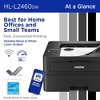
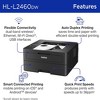
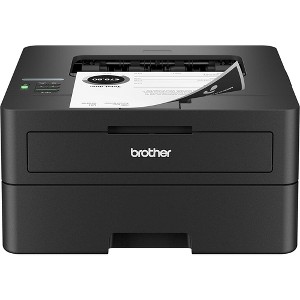
Brother SOHO Wireless Black & White Eligible Laser Printer
$238.62 reg $287.49
$48.87 off
In Stock

Free & easy returns
Return this item by mail or in store within 30 days for a full refund.
Sold & shipped by Beach Camera
Eligible for registries and wish lists
About this item
Additional product information and recommendations
Discover more options
- $509.99reg $5,369.46 Sale
Guests also viewed
Related Categories
Guests are saying
The Brother HL-2460DW monochrome printer is praised for its excellent print quality, ease of setup, and reliable wireless functionality. Guests appreciate its compact design and duplex printing capabilities, making it suitable for home and office use. However, some users have experienced issues with the duplex tray and connectivity, which can be frustrating. Overall, it is a solid choice for those seeking a dependable black and white printer.
Summary created by AI from text of reviews reflecting recent feedback provided across different star ratings (includes incentivized reviews)
4.1 out of 5 stars with 470 reviews
1 out of 5 stars
30 June, 2026
originally posted on brother-usa.com

RETIRED 78 YEAR OLD MAN
I HAVE TRIED TO GET MY BROTHER MONOCHROME PRINTER MODEL HL-2460DW ON LINE AND RUNNING SO I CAN PRINT BLACK AND WHITE LETTERS BUT TO NO AVAIL MY WINDOWS 11 LENOVA ALL IN ONE DESKTOP COMPUTER AND BROTHER EVIDENTLY NOT PAIRING AND I DO NOT KNOW THE REASON WHY. WHILE TRYING TO SET UP THE PRINTER I LOOK ON THE INDICATION AND IT IS SLEEP. WOW WHAT A RIP OFF.
From Brother team
We are sorry to hear about the difficulties you’ve experienced while trying to set up your Brother HL‑2460DW printer. We understand how frustrating it can be when devices don’t connect as expected, and this is never the experience we want for our customers. The “Sleep” indication you mentioned is a normal power‑saving feature. Our support team would be happy to walk you through the setup process and help resolve the pairing issue so you can begin printing without further delay. Please contact us at your earliest convenience—we are ready and eager to assist you. www.brother-usa.com/contact-us
4 months ago
2 out of 5 stars
20 June, 2026
originally posted on brother-usa.com
poorly designed duplex tray
Bad Duplex tray from day 1. The printer cannot print without duplex tray in it. Brother doesnt sell replacement duplex tray. Workaround is to disable 2 sided printing from windows settings, but that inconvenient because cant use features like test page from the front console. Unfortunately a poorly designed duplex tray with complex and fragile gears/clutches downgrades an otherwise well working product.
From Brother team
We apologize for the inconvenience this has caused and understand how frustrating this must be for you. We would appreciate the opportunity to resolve this matter. Please contact our customer support team at your earliest convenience. https://www.brother-usa.com/contact-us
4 months ago
1 out of 5 stars
12 June, 2026
originally posted on brother-usa.com
lousy printer
I bought 4 printers. 1 day it will print. another it will not. super bad product
From Brother Customer Support team
We apologize for for the experience to had with your brother machine, We would like to help. Please contact brother customer support https://www.brother-usa.com/contact-us
4 months ago
5 out of 5 stars
26 May, 2026Verified purchase
(no review title)
Great performance.
5 out of 5 stars
13 May, 2026
originally posted on brother-usa.com
Goodbye inkjet
I really like this printer. I bought it to print wirelessly from a new iPad that wouldn’t work with my wired only inkjet. But I love the wireless feature being able to print from all of my devices. And the laser prints are so much more stable if they get a drop of water on them! Good, crisp prints and easy two sided prints too. So far so good.
5 out of 5 stars
6 May, 2026
originally posted on brother-usa.com
Easy!
Couldn't be easier to set up and use. Quality of print is excellent.
4 out of 5 stars
6 May, 2026
originally posted on brother-usa.com
Flashlight Required
This is a great printer. Everything works as expected. However, I would have given a 5 star rating except for two critical issues: 1) When setting the machine up (or if you need to reconnect to wifi) you need a flashlight in order to read the menu screen - oh Brother; and 2) I'm frequently being asked to update the utility software and firmware with no clear indication of whether it was successfully installed or not.
4 out of 5 stars
5 May, 2026
originally posted on brother-usa.com
Printer is good, but app is very bad
The printer is ok, but the app is horrible! 1) tried to register for extended warranty, uploaded proof of purchase file successfully, then nothing! 2) tried to order toner from the app and filled out all the information, except when it came to credit card info it asked for name on the card - and that's all. So could not place an order from the app.
5 out of 5 stars
5 May, 2026
originally posted on brother-usa.com
Brother printer
Really like the printer so far! Hope it’s better than the epson one!
2 out of 5 stars
4 May, 2026
originally posted on brother-usa.com
Brother Scanning need assistance
The printer is supposed to have scan capibilities but it is not working.
From Brother team
I’m sorry for the confusion this model does not have scanning capability. The Brother HL‑L2460DW is a print‑only printer, so it cannot scan or copy documents. If you need scan and copy features, we recommend looking at a Brother DCP or MFC series model. If you’d like help choosing the right model, please contact Brother Support here: https://www.brother-usa.com/support
6 months ago
1 out of 5 stars
2 May, 2026
originally posted on brother-usa.com
Terrible printer - not simple
Not recommended, could only get the Wifi to work once. Terrible user interface. Directed you to a complex and useless phone app. Wanted a simple printer, not simple. What ever happened to plugging it in via USB to print something. That would have been nice. Printer gone in trash.
From Brother team
We are sorry to hear about your experience. The Brother HL‑L2460DW offers plug‑and‑play setup via USB cable, with wireless setup available as an option. If you still have the unit, our team would be more than happy to assist in resolving this for you. Please contact us at: https://www.brother-usa.com/contact-us
6 months ago
5 out of 5 stars
30 April, 2026
originally posted on brother-usa.com
Awesome printer
Very happy with my brother printer. I don't print that often, so my old printer's ink would dry out
3 out of 5 stars
30 April, 2026
originally posted on brother-usa.com
Updated to newest brother printer
Toner doesn’t last long. I had an older brother laser printer that I could shake the toner and continue to reuse without replacing immediately. This one doesn’t do that. It just ceases to work until I replace it.
From Brother team
We are sorry for the inconvenience you have experienced. Page yields may vary based on overall usage. If the actual number of pages yielded was significantly less than the estimated amount, please contact us at https://www.brother-usa.com/contact-us
6 months ago
4 out of 5 stars
28 April, 2026
originally posted on brother-usa.com
Small but Mighty!
Print quality is great! Set up, not so great. Wireless set up didn't work. Had to buy a connector to make it work! Screen size is about 1/2 inch by two inches--not easy to read, Luckily, my print needs are basic.
5 out of 5 stars
27 April, 2026
originally posted on brother-usa.com
Good printer
Works great - Setting up the wifi was to hard to figure out so i just ran a cable to the computer.
5 out of 5 stars
26 April, 2026
originally posted on brother-usa.com
Good value easy to set up and use
reasonable cost, easy for me to set up (and I'm a 79-year-old lady), works like a dream with my iPhone and my iPad. I've printed one sheet and I've printed 17 double sided sheets. It works,no color but I don't need it. It's at my second house a it may not be used for a couple of weeks at a time, but it starts off immediately.
5 out of 5 stars
24 April, 2026
originally posted on brother-usa.com
Nice printer
Works very well easy to get started. I’m not very good with setting up equipment and this has been the easiest of the other 3 brands.
5 out of 5 stars
22 April, 2026
originally posted on brother-usa.com
New Brother printer replaces 1994 model
We replaced a 1994 Brother HL-5250DN laser printer with an HLL2460DW. Same superb design; three times the speed; two-thirds the size. Excellent products. Thank you.
4 out of 5 stars
22 April, 2026
originally posted on brother-usa.com
Nice printer for home office
Good b&w printer for home office use. High quality printouts, holds large amount of paper, prints 2 sided. Only complaint is that it's noisy.
5 out of 5 stars
20 April, 2026
originally posted on brother-usa.com
Breath of fresh air!
A breath of fresh air! So simple to set up. Glad i choose Brother Laser Printer. Past printers were HP and got fed up with the ink issuses. Recommend this printer for home or office!