Target New ArrivalsGift Ideas for MomClothing, Shoes & AccessoriesHome & DecorKitchen & DiningOutdoor Living & GardenGroceryHousehold EssentialsBabyBeautyPersonal CareHealthWellnessLuggageSports & OutdoorsToysElectronicsVideo GamesMovies, Music & BooksSchool & Office SuppliesParty SuppliesGift IdeasGift CardsPetsUlta Beauty at TargetShop by CommunityTarget OpticalDealsClearanceTarget New ArrivalsSpring OutfitsGift Ideas for MomWomen’s Festival OutfitsTop DealsTarget Circle DealsWeekly AdShop Order PickupShop Same Day DeliveryRegistryRedCardTarget CircleFind Stores
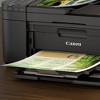
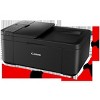
Canon PIXMA TR4720 Wireless All-in-One Printer (Black) - 5074C002AA - 2 of 4Canon PIXMA TR4720 Wireless All-in-One Printer (Black) - 5074C002AA - 3 of 4Canon PIXMA TR4720 Wireless All-in-One Printer (Black) - 5074C002AA - 4 of 4
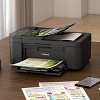
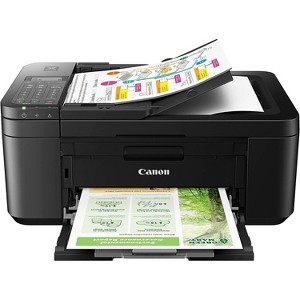
Canon PIXMA TR4720 Wireless All-in-One Printer (Black) - 5074C002AA - 1 of 4

Canon PIXMA TR4720 Wireless All-in-One Printer (Black) - 5074C002AA

$99.99 reg $107.99
Sale save $8.00 (7% off)

In Stock

Free & easy returns

Free & easy returns

Return this item by mail or in store within 30 days for a full refund.
Sold & shipped by Beach Camera
Eligible for registries and wish lists

About this item

Highlights

  • 4-in-1 Performance That Works Hard for You: Print, scan, copy, and fax—all from one compact, powerful machine.
  • Professional-Quality Results Every Time: Crisp, sharp text and vibrant color bring documents, photos, and projects to life.
  • Instant Wireless Freedom: Print from your smartphone or tablet in seconds with fast, easy Wi-Fi setup.
  • Built for Real-World Spaces: Sleek, space-saving design fits perfectly on desks, shelves, or home office setups.
  • Print Straight Out of the Box: Comes with starter black and color cartridges so you can start printing immediately.

Description

For all your work or home printing needs, the PIXMA TR4720 Wireless All-in-One Printer has you covered. Big on performance, the PIXMA TR4720 is a true 4-in-1 with the ability to print, copy, scan, and fax. With a variety of connectivity options, you'll be able to do it all from your PC or mobile devices— plus, the PIXMA TR4720 is compatible with Canon apps for printing, scanning, creative projects and more. Simple, productive office and home printing in a compact size— that’s the PIXMA TR4720. Print from your phone in seconds. Scan and copy multi-page documents with ease. Save time and paper with automatic 2-sided printing. This is the printer that keeps up with your life — efficient, simple, and built to perform. Perfect for families, students, home offices, and anyone who wants professional results
Dimensions (Overall): 7 inches (H) x 17 inches (W) x 11 inches (D)
Weight: 12 pounds
B&W Print Speed: 9 pages per minute
Color Print Speed: 4 pages per minute
Electronics Condition: New
Maximum Resolution: 4800 x 1200 (Black and White)
Wireless Technology: Wi-Fi
Printer Ink Color: Multiple Colors
Compatible With: Up to 8.5" x 11" Documents
Ink Series: PG-275
Battery: No Battery Used
Warranty: 1 Year Limited Warranty. To obtain a copy of the manufacturer's or supplier's warranty for this item prior to purchasing the item, please call Target Guest Services at 1-800-591-3869
TCIN: 1008302694
UPC: 013803340648
Origin: imported
The above item details were provided by the Target Plus™ Partner. Target does not represent or warrant that this information is accurate or complete. On occasion, manufacturers may modify their items and update their labels.
We recommend that you do not rely solely on the information presented. If you have a specific question about this item, you may consult the item's label, contact the manufacturer directly or call Target Guest Services at 1-800-591-3869.
If the item details aren’t accurate or complete, we want to know about it.

Shipping details

Estimated ship dimensions: 15 inches length x 18 inches width x 10 inches height
Estimated ship weight: 16 pounds
This item cannot be shipped to the following locations: American Samoa (see also separate entry under AS), Guam (see also separate entry under GU), Northern Mariana Islands, Puerto Rico (see also separate entry under PR), United States Minor Outlying Islands, Virgin Islands, U.S., APO/FPO, Alaska, Hawaii
item ships from third party seller: Beach Camera

Return details

This item can be returned to any Target store or Target.com.
This item must be returned within 30 days of the date it was purchased in store, delivered to the guest, delivered by a Shipt shopper, or picked up by the guest.
See the return policy for complete information.

Q: Does this printer automatically connect to laptop with amd processor

submitted by Alice - 1 month ago
  • A: Hi, thanks for reaching out about Canon PIXMA TR4720 Wireless All-in-One Printer (Black) - 5074C002AA. Yes, the Canon PIXMA TR4720 will work perfectly with a laptop that has an AMD processor, but it usually does not "automatically" connect in the sense of being ready the moment you open the lid. You will need to perform a brief one-time setup to link the two. Here is the breakdown of how the connection works with your specific hardware: 1. Processor Compatibility (AMD vs. Intel) There is no difference in how this printer handles an AMD processor versus an Intel processor. Both are "x86/x64" architectures that Canon’s standard Windows drivers fully support. The Only Exception: If your laptop uses a Snapdragon (ARM) processor (which is becoming common in 2026 laptops), you would need to use basic Windows "built-in" drivers rather than Canon's full software suite. Since you have an AMD chip, you can use the full Canon software without issue. If you have any additional questions, we welcome you to contact MyTGTtech at 833-848-8324 every day, between 7am-11pm CST.

    submitted byJoe - 1 month ago
    Target staff support

Q: Does this printer print from your PC AND your smartphone/tablet? The one we currently have it can't be both.

submitted by Country kid - 2 months ago
  • A: Hi, thank you for reaching out about Canon PIXMA TR4720 Wireless All-in-One Printer (Black) - 5074C002AA. Yes, the Canon PIXMA TR4720 is designed to print from both your PC and your smartphone/tablet, as it features built-in Wi-Fi connectivity. It supports Apple AirPrint, Mopria Print Service, and the Canon PRINT app for mobile devices, while Windows/Mac computers can use wireless drivers for simultaneous use. If you have any additional questions, we welcome you to contact MyTGTtech at 833-848-8324 every day, between 7am-11pm CST.

    submitted byMatt - 2 months ago
    Target expert support

Q: Does this printer have automatic two sided printing or do I have to manually take the paper out and flip it for it to print on the other side

submitted by Tt - 3 months ago
  • A: Hi, thanks for reaching out about Canon PIXMA TR4720 Wireless All-in-One Printer (Black) - 5074C002AA. Yes, the Canon PIXMA TR4720 does have automatic two-sided (duplex) printing. If you have any additional questions, we welcome you to contact MyTGTtech at 833-848-8324 every day, between 7am-11pm CST.

    submitted byJoe - 3 months ago
    Target staff support

Q: What # ink cartridge does it use? my current canon printer uses 240

submitted by Debbie - 4 months ago
  • A: Hi, thanks for reaching out about Canon PIXMA TR4720 Wireless All-in-One Printer (Black) - 5074C002AA The Canon PIXMA TR4720 uses the Canon 275 and 276 ink cartridges. Even though they look very similar to your current 240/241 cartridges, they are not interchangeable. The printer's software is programmed to only recognize the newer 275/276 series. If you have any additional questions, we welcome you to contact MyTGTtech at 833-848-8324 every day, between 7am-11pm CST.

    submitted byMike - 4 months ago
    Target expert support

Q: does this printer have sd & usb memory slots.

submitted by Gene - 4 months ago
  • A: Hi, thanks for reaching out about Canon PIXMA TR4720 Wireless All-in-One Printer (Black) - 5074C002AA No, this printer does not have a way to connect an external drive, like a memory card or USB Flash drive. If you have any additional questions, we welcome you to contact MyTGTtech at 833-848-8324 every day, between 7am-11pm CST.

    submitted byMike - 4 months ago
    Target expert support

Q: does this machine scans multi papers or has to be one by one

submitted by jaime balas - 4 months ago
  • A: Hi, thanks for reaching out about the Canon PIXMA TR4720 Wireless All-in-One Printer (Black) - 5074C002AA The Canon PIXMA TR4720 is designed to scan multiple pages automatically. It features an ADF (Automatic Document Feeder) on the top of the machine, so you don't have to scan pages one by one on the glass. If you have any additional questions, we welcome you to contact MyTGTtech at 833-848-8324 every day between 7 am and 11 pm CST.

    submitted byRena - 4 months ago
    Target expert support

Additional product information and recommendations

Discover more options

Guests also viewed

2.4 out of 5 stars with 138 reviews
quality: 1 out of 5
value: 1 out of 5
50% would recommend
2 recommendations
1 out of 5 stars
9 April, 2026
originally posted on usa.canon.com
Image

Do not buy!

I bought this about a month ago. I am a homeschooling parent and needing a new one that has a Wi-Fi feature,thinking I hit the jack-pot. Unfortunately,no and this printer is absolutely awful! Its very large, difficult to setup and connects/prints when it wants to. I should have read the reviews first.
SCB90
Did you find this review helpful?
2 out of 5 stars
23 March, 2026
originally posted on usa.canon.com
Image

Go to another brand.

This machine was hard to set up and its hard to use . Not elderly people approved.
TOOoldToLearn
Did you find this review helpful?
1 out of 5 stars
10 March, 2026
originally posted on usa.canon.com
Image

One copy and it failed ,error codes , repeated trying to self correct

DO NOT BUY THIS PRODUCT It did not work after one copy . I bought it because I needed one copy . Then got an error code . 5100 . paper jam ? nope. ……packaging material stuck in machine ? nope . Then try cleaning contacts. ??? WHAT ? It made one copy !
nonick26
Did you find this review helpful?
5 out of 5 stars
16 February, 2026
originally posted on usa.canon.com
Image

TR4720 printer

The TR4720 replaced my six-year old TR4520 and it works fine. I got a lot of help from Canon's helper service to get the new printer into operation.
Ebanezer
Did you find this review helpful?
4 out of 5 stars
23 January, 2026
originally posted on usa.canon.com
Image

Canon Pixma printer

The Canon PIXMA printer works well, but I did not realize that there was an internal ink reservoir that can become saturated and cause the printer to not work. This ink collection system is not repairable, and the printer needs to be replaced.
Claudine
3 guests found this review helpful. Did you?
1 out of 5 stars
12 January, 2026
originally posted on usa.canon.com
Image

The Worst Printer of All Time

You get what you pay for! This is the worst printer on the planet. You may have better luck buying a printer on temu or digging in your local dumpster. This is the most useless waste of space I have ever had the displeasure of keeping in my home. I would rather go to prison and request to use a printer there than ever buy one of these printers again. My life is infinitely worst for having attempted to use this printer.
Justadadtryingtoprint
7 guests found this review helpful. Did you?
1 out of 5 stars
2 January, 2026
originally posted on usa.canon.com
Image

Does not like current version of Windows 11.

Stopped working on windows 11. Had Dell tech working over an hour trying to get drivers to download after Windows 11 reinstall. Wasted a day trying to get this printer to work. Complicated piece of junk with overpriced ink for good measure.
Raygun
1 guest found this review helpful. Did you?
1 out of 5 stars
Thumbs down graphic, would not recommend
1 January, 2026

Junk printer never has ink

Every time I go to print I have to replace the ink. It cost me more in ink ($50-100) every six months (1-2 pages) than the cost of a new printer. Piece of junk!
Aly
quality: 1 out of 5
value: 1 out of 5
2 guests found this review helpful. Did you?
1 out of 5 stars
25 December, 2025
originally posted on usa.canon.com
Image

Junk

My 3=month old printer lost contact with my PC. I have spent two hours trying to reconnect. 20 years ago I could have gone to the website and downloaded a driver in 2 minutes. Now I can't even connect by any means.I think that this is my last Canon.
Morose
2 guests found this review helpful. Did you?
4 out of 5 stars
Thumbs up graphic, would recommend
20 December, 2025

design

nice design
Johnny
Did you find this review helpful?
1 out of 5 stars
30 November, 2025
originally posted on usa.canon.com
Image

High cost ink, works 50% of the time, maybe

Worked once per cartridge, don't anticipate that you will get very hight quality printing and high volume from this printer. I purchased it in a pinch and got 2 pages out of the first cartridge and 3 pages out of the second page. Yes, I have infrequent use, but I have a brand new cartridge and the printer tells me my ink is out. I guess it did let me print the document I needed but didn't know I would need to buy a new cartridge every time I wanted to print a few pages. I recommend saving your money on something more robust.
kyle2
1 guest found this review helpful. Did you?
3 out of 5 stars
26 September, 2025
originally posted on usa.canon.com
Image

PAY MORE MONEY AND HAVE LESS HEADACHES

I love Canon printers but this one has been lots of trouble. I wanted a fax machine and it has that but the instructions for use is all online and you have to hunt to find the manual on Canon's website. My calls were being cut off and the fax sound rang in the ears of whoever was talking to me because I missed a setting on receiving a fax and didn't go to the advice setting. I had to buy a longer telephone cord so I could move the printer in a further spot from the modem because I still wanted to use the landline fax feature. It uses too much black ink also. Now that I have fixed most of the problems I enjoy the doublesided printing and faxing important documents. If you are a good tech person you can eventually figure it out, but I have another Canon Printer, The Prixma MG3600 and I go back and forth using them. GOOD LUCK
GrandmafromMpls
1 guest found this review helpful. Did you?
1 out of 5 stars
25 September, 2025
originally posted on usa.canon.com
Image

AWFUL!!!!

worst printer I've ever had. doesn't even print. No instructions. the couple of times I got it to print, it was so light you couldn't read anything. bought new ink cartridges for new printer and still same results. Do not buy. What a piece of crap.
jbw
1 guest found this review helpful. Did you?
1 out of 5 stars
18 September, 2025
originally posted on usa.canon.com
Image

Pita printer is black hole for time

This printer is awful because it's supposed to be wifi but it's actually USB-based & doesn't communicate well with Netgear43 Gateway. It's also incompatible with Windows 11 and has communication errors constantly, the print spooler needs to be emptied manually & reset repeatedly. No firmware updates are available to fix these issues, & the Printer Management App does not work with Windows 11 Home Edition. It only works with Windows 11 Pro. Had I known all these things I would not have purchased this Pita printer that's completely incompatible with my VPN, no matter how I try because it is not a wifi-based printer so split tunneling does not work. Canon "Easy setup" does not work at all and printer control panel is very hard to see & type correctly. I used to love my last Canon copier, but not this one. Last windows 11 cumulative update has caused worst print spooler problems that require more frequent fixes. I would have paid more money for a better Canon printer, but this was only one available for my laptop with windows 11 home edition! Unfortunately, I'll be shopping for a new printer to replace this one that I just bought a few months ago.
Chisan
Did you find this review helpful?
5 out of 5 stars
26 August, 2025
originally posted on usa.canon.com
Image

Ready when I am ...

This printer does everything I need it to do. The auto duplex is a really nice feature to have.
DesertFox 5921
Did you find this review helpful?
1 out of 5 stars
13 August, 2025
originally posted on usa.canon.com
Image

No more Canon

My partner needed a printer fast and this one was in stock. Biggest mistake ever! We have had so many issues with it. Whether we are printing from a phone, tablet or laptop there is always an issue. This has been the only printer that I have to print through the app. And that still isn't a guarantee. Even without high usage the ink dries out quickly. I've had a Canon in the past but if this is what to expect I'm done.
PrintPro75
1 guest found this review helpful. Did you?
1 out of 5 stars
27 July, 2025
originally posted on usa.canon.com
Image

Stay away from this product!

Terrible product. Ink evaporates over a couple of months. Spent at least 5 time more for ink than the printer itself. Ink cost per copy is enormous.
wht
1 guest found this review helpful. Did you?
1 out of 5 stars
27 June, 2025
originally posted on usa.canon.com
Image

Horrible Product

I have had nothing but trouble with this printer since I bought it. It constantly disconnects from my wifi causing me to reinstall and re-enter password. The keypad for that is ridiculous - not very user friendly. Whenever I have to install a new ink cartridge, it gives me error messages, and this time when trying to change my color ink cartridge, it is giving me the error message but this time I can't get around it. I paid a pretty penny for the ink. I can't just throw it away because it's not working with my printer. (It is the correct ink, the correct number, and it is a cannon product.) I am ready to toss this printer and buy a different brand.
DisappointedandFrustrated
1 guest found this review helpful. Did you?
5 out of 5 stars
6 June, 2025
originally posted on usa.canon.com
Image

Better than Expected

I've had wireless printers before, this model seamlessly configures to laptop, phone for easy printing. Trying out the auto-ink program, let's see how it works.
Easy Printer
Did you find this review helpful?
5 out of 5 stars
13 May, 2025
originally posted on usa.canon.com
Image

Easy to use printer

Everything works and is easy to use. It was easy to set up..
doctorcarl
Did you find this review helpful?

Get top deals, latest trends, and more.

Privacy policy

Footer

About Us

About TargetCareersNews & BlogTarget BrandsBullseye ShopSustainability & GovernancePress CenterAdvertise with UsInvestorsAffiliates & PartnersSuppliersTargetPlus

Help

Target HelpReturnsTrack OrdersRecallsContact UsFeedbackAccessibilitySecurity & FraudTeam Member ServicesLegal & Privacy

Stores

Find a StoreClinicPharmacyTarget OpticalMore In-Store Services

Services

Target Circle™Target Circle™ CardTarget Circle 360™Target AppRegistrySame Day DeliveryOrder PickupDrive UpFree 2-Day ShippingShipping & DeliveryMore Services
PinterestFacebookInstagramXYoutubeTiktokTermsCA Supply ChainPrivacy PolicyCA Privacy RightsYour Privacy ChoicesInterest Based AdsHealth Privacy Policy