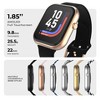
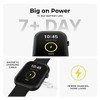
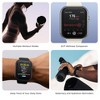
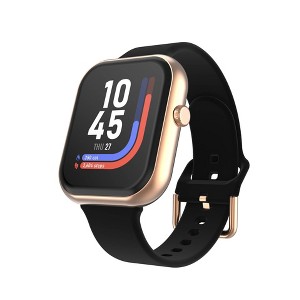
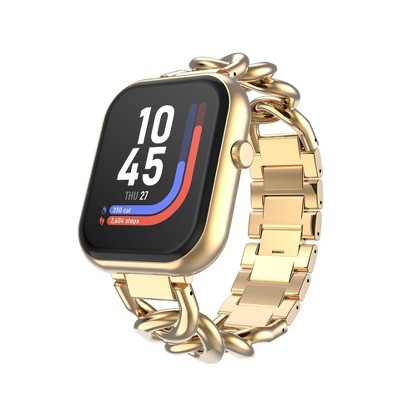
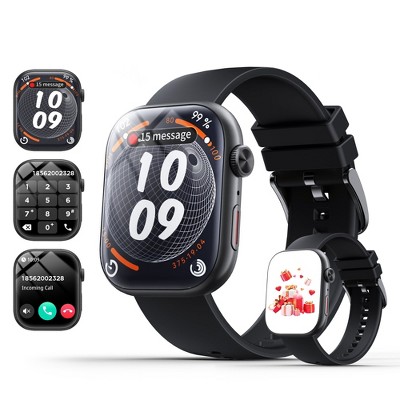
iTouch Air 5 Smartwatch with Solid Silicone Strap - Rosegold/Black
New at target
$39.99 reg $59.99
Sale save $20.00 (33% off)
In Stock

Free & easy returns
Return this item in store within 30 days for a full refund.
Eligible for registries and wish lists
At a glance
About this item
Additional product information and recommendations
Discover more options
- $54.99
- $39.99reg $59.99 - $62.99 Sale3.3 out of 5 stars with 3 ratings
Frequently bought together
- Highly rated$189.99reg $249.99 SaleGet the AirPods Pro 3 starting at $24/mo.3.9 out of 5 stars with 1940 ratings
- $149.99reg $449.99 Sale
- $159.99 - $169.99reg $349.99 Sale4.2 out of 5 stars with 3576 ratings
Guests also viewed
- $54.99
- $219.99 - $299.99reg $249.99 - $329.99 SaleGet the Apple Watch SE 3 starting at $24/mo. on select items4.1 out of 5 stars with 641 ratings
- Highly rated$299.99 - $429.99reg $399.99 - $529.99 SaleGet the Apple Watch Series 11 starting at $38/mo. on select items4.3 out of 5 stars with 1227 ratings
Related Categories
Guests are saying
This smartwatch is a versatile companion for busy guests, offering a sleek design and a bright, easy-to-read display. It excels in fitness tracking, including heart rate and sleep monitoring, while also providing essential notifications. The long battery life and comfortable magnetic strap enhance daily usability. With features like voice assistance and various health metrics, it caters to both fitness enthusiasts and casual users alike, making it a great choice for anyone looking to stay connected and active.
Summary created by AI from text of reviews reflecting recent feedback provided across different star ratings (includes incentivized reviews)
4.7 out of 5 stars with 97 reviews
quality: 4 out of 5
value: 4 out of 5
95% would recommend
41 recommendations
5 out of 5 stars
Thumbs up graphic, would recommend
5 July, 2026
originally posted on Sozie

Sleek style and big screen!
[This review was collected as part of a promotion.] As a busy mom, I need gadgets that keep up with my day, this watch has been a great fit! It looks so sleek while still having a big bright screen that is easy to read at a glance. I am excited to start using it more for my workouts to help track my progress and keep me moving towards my goals. I also love the voice and teaching features. The important alerts come, through right away, so I never miss what matters. Best of all even when I forget to charge it the battery just keeps going!
5 out of 5 stars
Thumbs up graphic, would recommend
24 June, 2026
originally posted on Sozie
Simple stylish and easy to use
[This review was collected as part of a promotion.] I have really been enjoying this smartwatch. It was very easy to learn and navigate and I quickly got comfortable with all the features it offers. The battery last a long time and charges without any hassle which makes it convenient for daily use. Pairing it with my phone and other devices was straightforward, and I like how reliably it connects. Overall it has a clean stylish look and fits well into my everyday routine without feeling complicated or overwhelming.
3 out of 5 stars
16 June, 2026Verified purchase
Highly Annoyed
This watch is enormous. Great for seeing the information clearly! However, I give this a lower rating for 2 primary reasons. Firstly, as a buyer, please note - there are very few options for aftermarket bands that actually fit (FYI, the pins on these are narrower than most '20mm' bands use), so be sure to buy the band you wanted in the first place, for you likely won't find another. Secondly, and more importanly, the watch does not retain your information for multiple days, so you must sync your data to the app DAILY to have any hope of logging your wellness journey beyond whatever your watch shows right now. Outside of those 2 primary reasons, please also note that the watch does not recognize any steps taken while pushing a lawnmower... Lastly (and just a personal preference), while I do appreciate that you can change the watch face with quite a few options, in no circumstance do I need the battery percentage amount to be the predominant feature being measured/shown at any given time. I do want the battery percentage to show, but it shouldn't be the biggest focus on any face option.
1 reply from iTouch Team team - 2 months ago
Hi there! Thank you for your detailed feedback—we truly appreciate you taking the time to share your experience with the iTouch Air 5 and are glad to hear you’re enjoying its large, clear display. Regarding band compatibility, the watch uses a 22 mm pin width, so we recommend checking this measurement carefully when purchasing replacement bands to ensure a proper fit. Concerning data syncing, the watch needs to remain connected to the app for consistent tracking; interruptions can prevent auto-syncing, so we highly recommend performing a manual sync daily, especially before bedtime, by opening the app, confirming the connection, and pulling down the refresh arrow on the dashboard to update your data and goals. We also appreciate your note about step tracking during activities like pushing a lawnmower, as certain movements may limit detection. The pedometer works with a mechanism within the device that, as you step and move your arm, tracks the steps you have taken. Your device is always counting steps, although they won't register on-screen until a minimum number of steps have been counted (typically 15 or more). Lastly, while battery visibility may vary by watch face, the battery icon is available on select faces, and you can quickly check the battery percentage anytime by swiping down from the main watch face. Your feedback is invaluable to us, and we’re always here if you need further assistance. For any other inquiries or if you require assistance, please feel free to reach out to us via email at reviews@itouchwearables.com.
5 out of 5 stars
Thumbs up graphic, would recommend
3 June, 2026
originally posted on Sozie
Amazing watch for a great price!
[This review was collected as part of a promotion.] I’ve been using this watch for overall fitness tracking and it’s a solid value for the price. The display is sharp and is easy to see even when in the sun. The battery life is good. It’s nice to see be able to use this to track sleep, monitor heart rate and smartphone notifications. I would recommend this watch for people of all ages.
5 out of 5 stars
Thumbs up graphic, would recommend
28 May, 2026
originally posted on Sozie
Really cool smart watch with several features
[This review was collected as part of a promotion.] This watch is awesome. It tracts your heart rate, oxygen, stress levels, and workouts. It also has a calculator, alarm, and timers. Sync your phone to it to answer calls. It also has the weather, a sleep monitor, music, stopwatch, and a flashlight. What more could you need. I can’t wait to track my exercises on this app. I love the different colors the band comes in.
4 out of 5 stars
Thumbs up graphic, would recommend
25 May, 2026
originally posted on Sozie
Decent budget wearable tracker
[This review was collected as part of a promotion.] This watch provides decent metrics. I've worn it for four days before providing my review. I have found that it is not the most accurate wearable, but will give a good sense of your activity level. I'm sure there are more functions than I've tried so far, but I'm pleased with it so far. I've only charged it once, 2 days ago and it is still at 84 percent battery. I noticed this morning when it synced, it didn't update all of my steps from yesterday, just stopped at whatever the last it synced yesterday which shorted me about 500 steps or so. Like I said, not the most accurate, but a good entry level tracker.
1 reply from iTouch Team team - 3 months ago
Hi there! Thank you for sharing your feedback. We’re thrilled to hear that you love the watch itself, and we truly appreciate your honesty about the experience.Since the watch is connected through Bluetooth, which is a wireless connection, there are a number of reasons why your watch and app is not syncing. This includes Bluetooth interference, like when the watch goes outside of the phone's Bluetooth range (typically 15 ft - 33 ft), OS updates, or when the phone or watch battery is completely drained, which causes the Bluetooth connection to accidentally drop. Turning off either the watch or your phone could also be one of the reasons why your watch could get disconnected from the app, a reason for it to also not sync. To ensure all data syncs, open the app before bedtime and refresh the dashboard (pull arrow down). Feel free to email us at reviews@itouchwearables.com for immediate support.
5 out of 5 stars
Thumbs up graphic, would recommend
24 May, 2026
originally posted on Sozie
So Smooth and Cool Looking
[This review was collected as part of a promotion.] My son had been begging me for a smart watch for a long time, but I wanted to make sure that I was getting him something that he could use to practice getting more responsible with electronic devices. This watch is not left his wrist and he absolutely loved it and is very careful about maintaining it. It’s fantastic .
5 out of 5 stars
Thumbs up graphic, would recommend
21 May, 2026
originally posted on Sozie
Amazing item. I love this.
[This review was collected as part of a promotion.] This is amazing product. When you expecting important phone calls you don’t have to worry about carrying your phone with you. You get your phone calls through your watch. Besides Bluetooth calling it’s also have heart rate monitor, 24 hours sleep monitor, calorie tracker etc. I wish I purchased it long time ago. I also love this bracelet. I would highly recommend.
5 out of 5 stars
Thumbs up graphic, would recommend
20 May, 2026
originally posted on Sozie
Very Pleasant Surprise, Nice Looking Basic Watch
[This review was collected as part of a promotion.] I bought this for my husband because he said he needed a new watch strap. It was very well packaged when I gave it to him but he promptly gave it right back saying “this isn’t an a strap, it’s a watch!” I was surprised to hear that because it was priced about what I expected to pay for a strap. Since my watch had stopped working a few months ago, I thought I would try this one myself. It was easy to connect to my phone and it does all the basics that I need from a smart watch. My favorite thing about it is how lightweight it is — I don’t even know that it’s there. The strap attaches with a magnetic closure. It’s strong enough to stay on during working out and washing dishes, but it’s pretty easy to remove even for my toddler. Overall, I’m very happy with this watch. It was a pleasant surprise and I would recommend it.
5 out of 5 stars
Thumbs up graphic, would recommend
18 May, 2026
originally posted on Sozie
Great product for the price
[This review was collected as part of a promotion.] This is a great product for the price. It’s similar to the Apple Watch but with a much lower price point but some limitations on functionality as well. The most useful feature for me is getting notifications on my wrist when I receive texts and phone calls. There’s also tracking of movement and health stats. The one draw back is you can’t ping the phone (you can do the reverse), which is actually one of the best features of the Apple Watch, but missing here unfortunately. I still think it deserves 5 stars for the value.
5 out of 5 stars
Thumbs up graphic, would recommend
15 May, 2026
originally posted on Sozie
I love the watch and how it looks
[This review was collected as part of a promotion.] I love the watch I got the rose gold colour. It easy to charge and hold it’s battery it give me all the information I would need when I need to work out I love how easy it is to set up and use I will for sure be recommending it to my friends and family it is also a great watch go give to the teenager to make them healthy and aware
5 out of 5 stars
Thumbs up graphic, would recommend
14 May, 2026
originally posted on Sozie
What a wonderful fitness tracker!
[This review was collected as part of a promotion.] I was looking for a watch to help me track my vitals and work towards my fitness goals and didn't want to change phone brands and spend a ton. This watch was the perfect choice for me! It has heart rate and blood oxygen level tracking, exercise timer, and sleep quality measurements. I chose the magnetic band and it's amazing! Fast to put on and off, not loose or weak once on and so comfortable. It uses a cable to charge and isn't compatible with wireless charging which is a bummer, but it lasts for days on a charge so it's not too bad. Overall I am thrilled with this and will be getting one as a gift for an upcoming birthday in my family!
5 out of 5 stars
Thumbs up graphic, would recommend
13 May, 2026
originally posted on Sozie
No issues connecting to the phone
[This review was collected as part of a promotion.] My son wanted a smart watch and this one was reasonably priced. He liked the various options for the face frame and band. It took him a bit to connect to the phone but I think that is because it was his first time. He really likes the features dish as step tracking and changing the face picture. He is very satisfied.
5 out of 5 stars
Thumbs up graphic, would recommend
13 May, 2026
originally posted on Sozie
Black iTouch Air 5 Smartwatch
[This review was collected as part of a promotion.] I am thoroughly impressed with this watch. It has many great features - It is sleek, comfortable, and works well. You can take phone calls on it, track sleep, exercise & more. The display is also bright which makes seeing it easier (even in sunlight). My husband opted for the black band which is magnetic and he loves it!
4 out of 5 stars
Thumbs up graphic, would recommend
12 May, 2026
originally posted on Sozie
Great alternative to other phone watches
[This review was collected as part of a promotion.] Affordable smartwatch that I paired to my android phone. Amazing battery life, I had it on for 5 days and I’m still at 80 percent! Connects to my calls and texts, I can use voice assist to respond to texts while I’m working. A ton of lock screen options which I like to switch out depending on my mood. The raise to wake is not super sensitive but that is probably why the battery lasts so long . I love that it reminds me to hydrate.
5 out of 5 stars
Thumbs up graphic, would recommend
12 May, 2026
originally posted on Sozie
Great smartwatch with tons of features
[This review was collected as part of a promotion.] It came packaged really nicely and was super easy to set up right out of the box. The battery came almost fully charged, and my husband has been using it for 4 days and it still has a lot of battery life left. He did turn off the constant heart monitoring, so that it would also preserve some battery life. His texts and phone calls come through it and the call quality was great. It has been great for activity tracking and sleep monitoring. There was so much functionality jam packed into this watch, he can’t wait to keep using it.
5 out of 5 stars
Thumbs up graphic, would recommend
12 May, 2026
originally posted on Sozie
Sweet looking Smartwatch!
[This review was collected as part of a promotion.] I like the look, feel and battery power of this smartwatch. I like how it keeps track of workouts, heart rate, steps, calories, etc. You can set goals in the app and the watch tracks it for you. It was very easy to pair it to my phone and I didn’t have any issues with that. It’s comfortable on my arm and it looks very sleek. I would buy another for my daughter.
5 out of 5 stars
Thumbs up graphic, would recommend
11 May, 2026
originally posted on Sozie
Awesome Smartwatch with App Compatibility
[This review was collected as part of a promotion.] The iTouch Air 5 Smartwatch Strap is incredibly comfortable and was easy to pair to my iOS device via Bluetooth. There are way more features that it offers than we will ever use but it functions quite well and has a long battery life per charge. I bought this for my husband who was a longtime FitBit user and I as someone who has used the mainstream Apple alternative, I find that this watch functions nearly the same for a fraction of the price. Highly recommend this neat little gadget!
5 out of 5 stars
Thumbs up graphic, would recommend
11 May, 2026
originally posted on Sozie
Loving this smartwatch so far
[This review was collected as part of a promotion.] Honestly I am loving this smartwatch so far! I’ve had other similar smartwatches that cost a lot more but had pretty much the same features as this one. I like that it’s compatible with my phone and other devices to get messages when connected to Bluetooth. I can track a lot of health metrics as well. I really like the magnetic strap because it’s comfortable and easy to use.
5 out of 5 stars
Thumbs up graphic, would recommend
11 May, 2026
originally posted on Sozie
Love The Magnetic Strap!
[This review was collected as part of a promotion.] The magnetic strap on this watch is so strong and holds on perfectly along your wrist. You can adjust the strap easily by just pulling the magnetic strip front door backwards or by pulling it all the way off the watch itself works great with android and iOS systems so you’re able to communicate with all of your friends at any time.