Target New ArrivalsGift Ideas for MomClothing, Shoes & AccessoriesHome & DecorKitchen & DiningOutdoor Living & GardenGroceryHousehold EssentialsBabyBeautyPersonal CareHealthWellnessLuggageSports & OutdoorsToysElectronicsVideo GamesMovies, Music & BooksSchool & Office SuppliesParty SuppliesGift IdeasGift CardsPetsUlta Beauty at TargetShop by CommunityTarget OpticalDealsClearanceNew ArrivalsSpring OutfitsGift Ideas for MomWomen’s Festival OutfitsTop DealsTarget Circle DealsWeekly AdShop Order PickupShop Same Day DeliveryRegistryRedCardTarget CircleFind Stores
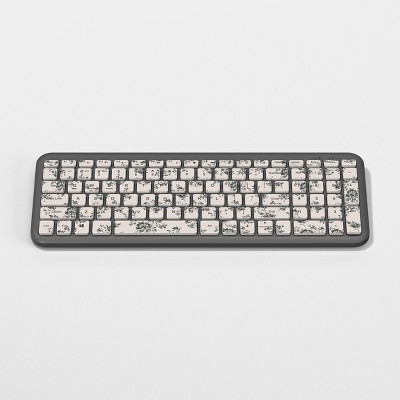
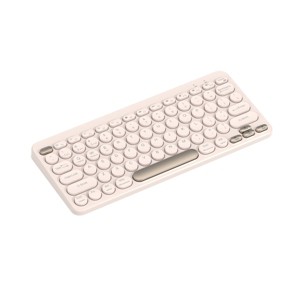
North Compact Round Key Wireless Keyboard - 2 of 3North Compact Round Key Wireless Keyboard - 3 of 3
North Compact Round Key Wireless Keyboard - 1 of 3

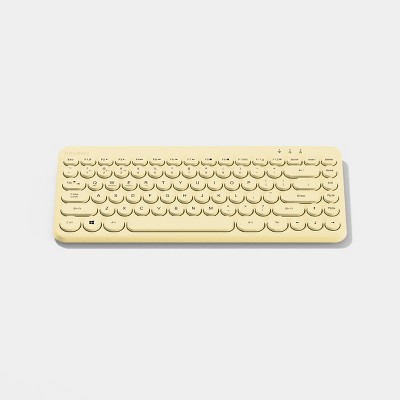
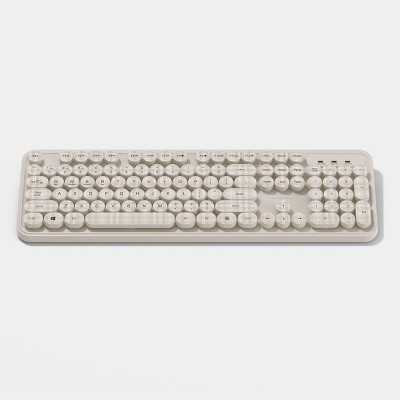
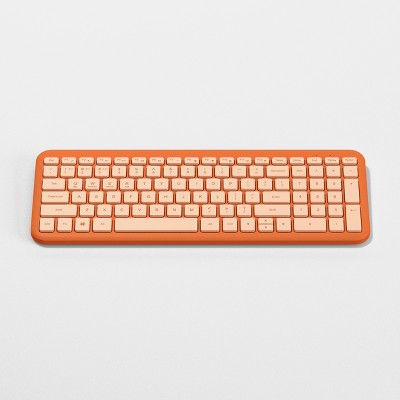
North Compact Round Key Wireless Keyboard - Beige

$14.99

ColorBeige

In Stock

Eligible for registries and wish lists

About this item

Highlights

  • Dual wireless connection modes: 2.4GHz & wireless pairing
  • Low profile keys for quiet and smooth keystrokes
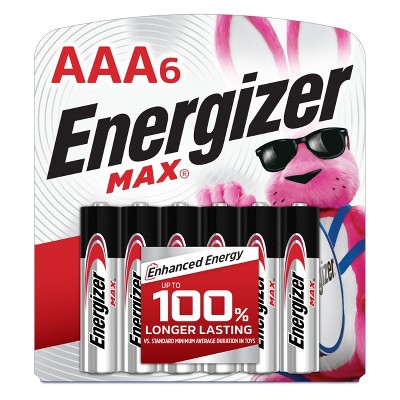
  • 2x AAA battery powered (not included)
  • 78 keys

Description


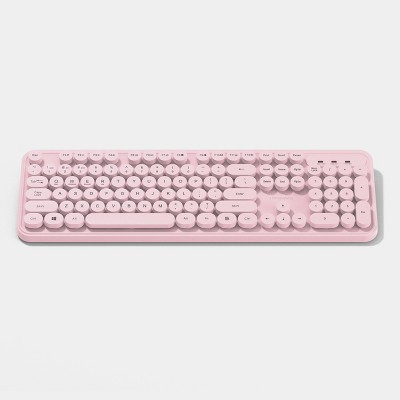
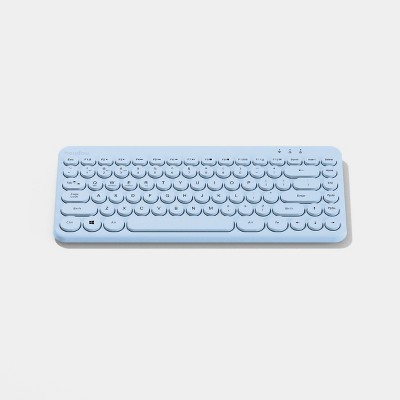
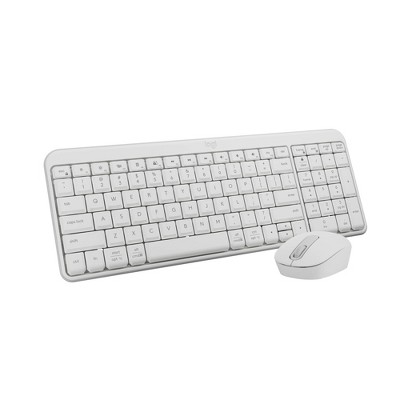
Streamline your setup with this North Wireless Compact Keyboard, designed for smooth performance in a space-saving layout. It supports both 2.4GHz connection and wireless pairing for your convenience. The low-profile keys offer quiet, comfortable typing, perfect for both work and everyday use. Powered by two AAA batteries (not included), it delivers reliable performance without the clutter of cords. Featuring 78 essential keys, it's a sleek and efficient addition to any workspace.
Dimensions (Overall): .83 Inches (H) x 5 Inches (W) x 11.84 Inches (D)
Weight: 250 Grams
Electronics Features: Low-Profile Keys, Compact
Connection Type: No Wired Connection Ports
Wireless Technology: Radio Frequency
Switch Type: Membrane
Primary use: Home
Number of buttons or keys: 78
Backlit Keyboard: No Backlit Keyboard
Battery: 2 AAA Alkaline, Required, Not Included
TCIN: 94419241
UPC: 810125119507
Item Number (DPCI): 056-00-3536
Origin: Imported
If the item details aren’t accurate or complete, we want to know about it.

Shipping details

Estimated ship dimensions: 1.73 inches length x 7.81 inches width x 12.95 inches height
Estimated ship weight: 0.89 pounds

Return details

This item can be returned to any Target store or Target.com.
This item must be returned within 30 days of the date it was purchased in store, delivered to the guest, delivered by a Shipt shopper, or picked up by the guest.
See the return policy for complete information.

Q: How on earth do I turn this keyboard on? It does not have any sort of on and off switch. And yes, the batteries are in correctly.

submitted by Z - 10 months ago
  • A: Once you have the batteries inserted, you are able to turn it on by pressing Fn and 3 (2.4g) at the same time. I hope this helps anyone who is having issues!

    submitted byKeyboard Warrior - 8 months ago
  • A: Hey, I literally disessambled and reassembled the keyboard to be able to tell you that this thing does NOT have an on/off switch. It will turn on when the batteries are inserted properly = +- +-

    submitted byIchiban99 - 10 months ago
  • A: Hi Z, thanks for reaching out about the North Compact Round Key Wireless Keyboard The North Compact Round Key Wireless Keyboard, have a physical power switch. This switch is usually located on the: Underside of the keyboard, Side of the keyboard or Top right corner of the keyboard. It's often a small slide switch that you move to the "On" or "Off" position. If you have any additional questions, we welcome you to contact MyTGTtech at 833-848-8324 every day between 7 am and 11 pm CST.

    submitted byRena - 10 months ago
    Target expert support

Q: How do I turn it on?

submitted by Mm - 10 months ago
  • A: There is no on/off switch. It will turn on automatically when the batteries are inserted properly, which is negative end to positive end. To power off, remove one of the batteries (to extend the bat.)

    submitted byIchiban99 - 10 months ago
  • A: Hi Mm, thanks for reaching out about the North Compact Round Key Wireless Keyboard The North Compact Round Key Wireless Keyboard, have a physical power switch.0 This switch is usually located on the: Underside of the keyboard, Side of the keyboard or Top right corner of the keyboard. It's often a small slide switch that you move to the "On" or "Off" position. If you have any additional questions, we welcome you to contact MyTGTtech at 833-848-8324 every day between 7 am and 11 pm CST.

    submitted byRena - 10 months ago
    Target expert support

Q: I didn’t get an instruction manual with my keyboard. How do I turn it on, pair, and turn on the back lighting?

submitted by Megan - 11 months ago
  • A: Keyboard turns on automatically when batteries are inserted properly (+-/+-). To BluTooth pair, hold FN + the number 1 key with BluTooth open on your device. Appears as PCCK-001

    submitted byIchiban99 - 10 months ago
  • A: Hi Megan, thanks for reaching out about North Compact Round Key Wireless Keyboard. -To pair a North Compact Round Key Wireless Keyboard, you'll need to first turn it on and then put it into pairing mode. This usually involves pressing and holding a specific button (like "Connect", "Pairing", or a Bluetooth button) for a few seconds. -To turn on the backlighting on your North Compact Round Key Wireless Keyboard, you will need to utilize the function (Fn) key in combination with another key such as Fn + Lightbulb Key. If you have any additional questions, we welcome you to contact MyTGTtech at 833-848-8324 every day, between 7am-11pm CST.

    submitted byMatt - 11 months ago
    Target expert support

Q: Where is the on/off switch?

submitted by JW1234 - 11 months ago
  • A: No switch. It will turn on when batteries are inserted (+-/+-). Remove battery to save power and "turn off."

    submitted byIchiban99 - 10 months ago
  • A: Hi JW1234, thanks for reaching out about North Compact Round Key Wireless Keyboard For most compact keyboards the power switch is located on the bottom. If you have any additional questions, we welcome you to contact MyTGTtech at 833-848-8324 every day, between 7am-11pm CST.

    submitted byJustin - 11 months ago
    Target expert support

Q: How many keys are included on the keyboard?

submitted by AI Shopping Assistant - 1 month ago
  • A: This keyboard features a total of 78 keys for a complete typing experience.

    submitted byAI Shopping Assistant - 1 month ago
    Ai generated

Q: What is the weight of the compact keyboard?

submitted by AI Shopping Assistant - 1 month ago
  • A: The compact keyboard weighs 250 grams, making it lightweight and portable.

    submitted byAI Shopping Assistant - 1 month ago
    Ai generated

Q: What type of batteries does the keyboard require?

submitted by AI Shopping Assistant - 1 month ago
  • A: The keyboard requires 2 AAA alkaline batteries, which are not included with the purchase.

    submitted byAI Shopping Assistant - 1 month ago
    Ai generated

Q: What type of keys does the keyboard use?

submitted by AI Shopping Assistant - 1 month ago
  • A: The keyboard utilizes low-profile membrane keys for a sleek and comfortable typing experience.

    submitted byAI Shopping Assistant - 1 month ago
    Ai generated

Q: How does this keyboard connect to devices?

submitted by AI Shopping Assistant - 1 month ago
  • A: It connects wirelessly using radio frequency technology, eliminating the need for wired connections.

    submitted byAI Shopping Assistant - 1 month ago
    Ai generated

Q: how do i type on this keyboard? it used to work but now when i connect the battery light comes on for a second but WILL NOT TYPE and now the lock button is flashing blue and before that there was a red light flashing but went away

submitted by J - 2 months ago
  • A: Hi, thanks for reaching out about the North Compact Round Key Wireless Keyboard Flashing Red Light: This was your Low Battery warning. Flashing Blue Light: This means the keyboard is in Pairing Mode. Reset the connection: If it still won't type, unplug the USB receiver, take one battery out for 10 seconds, put it back in, and try the Fn + 1 (USB) or Fn + 2 (Bluetooth) command again. If you have any additional questions, we welcome you to contact MyTGTtech at 833-848-8324 every day between 7 am and 11 pm CST.

    submitted byRena - 2 months ago
    Target expert support

Additional product information and recommendations

Discover more options

Frequently bought together
Guests also viewed

Guests are saying

The wireless keyboard offers a stylish and compact design, making it a great choice for guests seeking a portable typing solution. Many guests appreciate its easy connectivity and responsive keys, ideal for both work and casual use. However, some have experienced issues with functionality and battery life, which may affect overall satisfaction. Despite mixed reviews, its aesthetic appeal and lightweight nature make it a popular option for those on the go.
    Summary created by AI from text of reviews reflecting recent feedback provided across different star ratings (includes incentivized reviews)
    3.1 out of 5 stars with 87 reviews
    quality: 1.52 out of 5
    value: 1.48 out of 5
    49% would recommend
    63 recommendations
    1 out of 5 stars
    Thumbs down graphic, would not recommend
    30 April, 2026

    Not worth it!

    Did not connect and already wasted previous time trying to set up.
    Marcie
    Did you find this review helpful?
    1 out of 5 stars
    Thumbs down graphic, would not recommend
    15 April, 2026Verified purchase

    Will not reconnect

    It’s so cute and worked for 6 weeks but it’s been more trouble than it’s worth. It disconnects sometimes and I can’t get it to reconnect now. Super frustrating and such a bummer because it’s perfect for my space.
    Allison
    quality: 1 out of 5
    value: 1 out of 5
    1 guest found this review helpful. Did you?
    1 out of 5 stars
    Thumbs down graphic, would not recommend
    9 April, 2026

    Defective potential fire hazard

    Straight out of the box it overheated the (new) batteries so badly I could feel it through the plastic casing. They were too hot to handle when I tried taking them out, and the battery shriveled up. This was in less than ten minutes, and I never even connected it to my computer.
    JCR
    quality: 1 out of 5
    value: 1 out of 5
    Did you find this review helpful?
    1 out of 5 stars
    Thumbs down graphic, would not recommend
    15 March, 2026Verified purchase

    DO NOT BUY! READ FIRST

    Zero stars if I could. Please listen to the reviews. Was working fine, now the low battery light is on with new batteries. Tried 2 different brands. Thanks for ruining my one recent chance to get a lot done.
    Molly1234
    quality: 1 out of 5
    value: 1 out of 5
    Did you find this review helpful?
    5 out of 5 stars
    Thumbs up graphic, would recommend
    10 March, 2026Verified purchase

    Affordable Keyboard!

    I did read other reviews on this keyboard, and so far it's been great! There isn't an on/off switch on the keyboard because once batteries are placed in it, it automatically "turns on." It doesn't really shut off. The keys feel nice, it's very responsive with my desktop. I just wanted something that was easy to use and wireless. Rather than using a wired keyboard. I really am happy with my purchase!
    Courtney
    quality: 5 out of 5
    value: 4 out of 5
    1 guest found this review helpful. Did you?
    1 out of 5 stars
    10 February, 2026

    (no review title)

    Stopped working in less than a month
    Erika
    Did you find this review helpful?
    1 out of 5 stars
    Thumbs down graphic, would not recommend
    6 February, 2026

    No Quality Control At Target, I Guess

    I wish I had read the reviews before purchasing, I was looking forward to being extra productive at work tomorrow. Does Target corporate even look at what they purchase to carry in their physical stores? Don't listen to the AI generated "tech help" in the Q&A, there is no on/off switch even though it's referenced in the included manual. And even with the best efforts of other frustrated customers (seriously, thank you all), mine never turned on even with fresh batteries inserted correctly and all the arcane button presses suggested.
    Cassandra
    quality: 1 out of 5
    value: 1 out of 5
    Did you find this review helpful?
    1 out of 5 stars
    Thumbs down graphic, would not recommend
    1 February, 2026

    DO NOT PURCHASE

    Completely stopped working after a few weeks. Battery light flashed blue I've tried brand new batteries. NOTHING! I wish I would've read the reviews before purchasing. It seems we all had the same experience. Would not recommend. Target needs for stop selling this product.
    Kimberly
    quality: 1 out of 5
    value: 1 out of 5
    Did you find this review helpful?
    1 out of 5 stars
    Thumbs down graphic, would not recommend
    25 January, 2026Verified purchase

    CRAPY KEYBOARD!!!!

    This keyboard was working for ONE DAY THEN NEXT BROCKEN! The light turns on. The battery’s are fine ITS THE KEYBOARD. Never bying their products again.
    Kenz
    quality: 1 out of 5
    value: 1 out of 5
    Did you find this review helpful?
    1 out of 5 stars
    Thumbs down graphic, would not recommend
    21 January, 2026Verified purchase

    worked, but then....

    worked for a few weeks but now it keeps showing a blue light like its low on battery. I've replaced the batteries multiple times and it doesn't work anymore
    Alex
    quality: 1 out of 5
    value: 1 out of 5
    Did you find this review helpful?
    5 out of 5 stars
    Thumbs up graphic, would recommend
    21 January, 2026Verified purchase

    (no review title)

    Really easy to use and sounds good
    Isabella
    quality: 5 out of 5
    value: 5 out of 5
    Did you find this review helpful?
    1 out of 5 stars
    Thumbs down graphic, would not recommend
    21 January, 2026

    Don't buy!

    I’ve put the batteries in multiple different ways, and I still can’t get it to work.
    alexthrowingfits
    quality: 1 out of 5
    value: 1 out of 5
    2 guests found this review helpful. Did you?
    5 out of 5 stars
    Thumbs down graphic, would not recommend
    18 January, 2026Verified purchase

    Litle cutie 💓

    Cute little keyboard 😍. Works great.
    Dani
    Did you find this review helpful?
    1 out of 5 stars
    Thumbs down graphic, would not recommend
    11 January, 2026Verified purchase

    do not purchase!

    Waste of money. This keyboard worked for a week and now does nothing. save your money.
    Trisha
    quality: 1 out of 5
    value: 1 out of 5
    1 guest found this review helpful. Did you?
    1 out of 5 stars
    Thumbs down graphic, would not recommend
    4 January, 2026Verified purchase

    (no review title)

    Overheated, did not want to connect at all. Do not buy
    Zitlaly
    quality: 1 out of 5
    value: 1 out of 5
    Did you find this review helpful?
    1 out of 5 stars
    27 December, 2025Verified purchase

    (no review title)

    Can ANYONE help me understand how to turn this dang thing on???
    nance
    Did you find this review helpful?
    1 out of 5 stars
    Thumbs down graphic, would not recommend
    22 December, 2025Verified purchase

    (no review title)

    It's unclear how to turn on (I figured it out after googling extensivley)...and then it shows up on my bluetooth and won't connect. I wish I would have read these reviews before I wasted my money on this crappy keyboard. It's so cute and the North mouse I bought works great, I just think this keyboard sucks!
    Lauren
    quality: 1 out of 5
    value: 1 out of 5
    1 guest found this review helpful. Did you?
    1 out of 5 stars
    Thumbs down graphic, would not recommend
    21 December, 2025Verified purchase

    (no review title)

    awful keyboard
    Elsa
    Did you find this review helpful?
    1 out of 5 stars
    Thumbs down graphic, would not recommend
    4 December, 2025Verified purchase

    Trash!!!

    Absolute trash!!! Save your $20 and buy yourself Starbucks, at least you will enjoy it. Keyboard is horrible. No on/off button and doesn't stay connected.
    Angie
    quality: 1 out of 5
    value: 1 out of 5
    3 guests found this review helpful. Did you?
    2 out of 5 stars
    Thumbs down graphic, would not recommend
    3 December, 2025Verified purchase

    Stops working.

    The functionality and connectivity are just fine, but I haven’t had it for long at all and it’s not working properly. It either won’t type, or I’ll be missing letters/words/sentences.
    Kelli
    quality: 2 out of 5
    value: 2 out of 5
    Did you find this review helpful?

    Get top deals, latest trends, and more.

    Privacy policy