New ArrivalsGift Ideas for MomClothing, Shoes & AccessoriesHomeKitchen & DiningOutdoor Living & GardenFurnitureGroceryHousehold EssentialsBabyBeautyPersonal CareHealthWellnessBackpacks & LuggageSports & OutdoorsToysElectronicsVideo GamesMovies, Music & BooksSchool & Office SuppliesParty SuppliesGift IdeasGift CardsPetsUlta Beauty at TargetShop by CommunityTarget OpticalDealsClearanceTarget New ArrivalsHome Decor Ideas & TrendsTop DealsTarget Circle DealsWeekly AdShop Order PickupShop Same Day DeliveryRegistryRedCardTarget CircleFind Stores
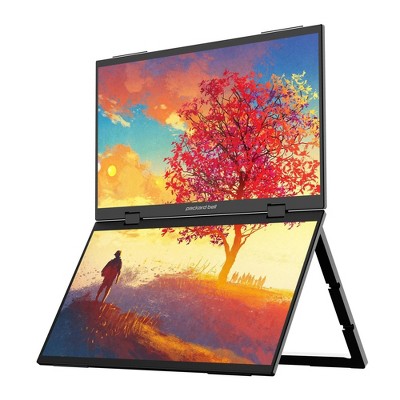
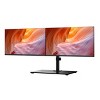
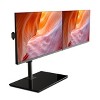
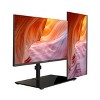
Packard Bell airFrame 43" Dual Monitor Workstation: High-Definition VA Panel, HDMI, 75Hz - 2 of 4Packard Bell airFrame 43" Dual Monitor Workstation: High-Definition VA Panel, HDMI, 75Hz - 3 of 4Packard Bell airFrame 43" Dual Monitor Workstation: High-Definition VA Panel, HDMI, 75Hz - 4 of 4
Packard Bell airFrame 43" Dual Monitor Workstation: High-Definition VA Panel, HDMI, 75Hz - 1 of 4

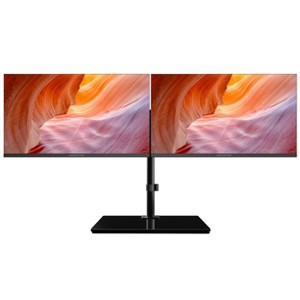
Packard Bell airFrame 43" Dual Monitor Workstation: High-Definition VA Panel, HDMI, 75Hz

$159.99

In Stock

Eligible for registries and wish lists

About this item

Highlights

  • ENHANCED PRODUCTIVITY - Packard Bell Workstation featuring dual 21.5" monitors, facilitating multitasking and efficient workflow management.
  • VERSATILE MOUNTING OPTIONS - VESA mount included, allowing easy installation and customization for optimal viewing angles.
  • SMOOTH VISUALS - Monitors offer a 75Hz refresh rate and 5ms response time, ensuring fluid graphics and reduced motion blur.
  • FLEXIBLE CONNECTIVITY - Supports VGA and HDMI connections, enabling compatibility with various devices for seamless integration.
  • MULTIPLE USAGE SCENARIOS - Suitable for both professional tasks and recreational activities, providing a versatile solution to cater to different user needs.

Description


The airFrame Series is a line of affordable but high-quality monitors that are perfect for both gaming and office work, as well as for students. The series offers a variety of sizes and specs to choose from, so you can find the perfect monitor for your needs and budget. Whether you need a larger display for immersive gaming or a smaller one for more efficient work, the airFrame Series has you covered. The monitors in this series are designed with sleek, modern frames that look great in any setting. With crisp and clear visuals, fast refresh rates, and responsive performance, these monitors provide an enjoyable and seamless experience for any task. Whether you're a gamer, a student, or a professional, the airFrame Series offers a range of options to fit your needs and budget.
Dimensions (Overall): 14.09 Inches (H) x 19.37 Inches (W) x 6 Inches (D)
Weight: 25.79 Pounds
Number of USB ports: 0
Electronics Features: High-Definition Display, Adjustable Tilt, Adjustable Height, Wall Mountable
Connection Type: HDMI, VGA
Aspect Ratio: 17:9 Aspect Ratio
Response Time: 5ms Response Time
Contrast Ratio: 1000:1 Static Contrast Ratio
Screen Resolution: 1920 x 1080
Native screen refresh rate: 75 Hz
Screen Brightness (cd/m2): 250
Screen Size: 43 Inches
Number of DVI ports: 0
Number of VGA Ports: 1
Industry or Government Certifications: Not Listed or Certified
Display Type: VA Panel
VESA Mounting Standard: 100x100
Number of display ports: 0
Number of HDMI ports: 1
Warranty: 1 Year Limited Warranty. To obtain a copy of the manufacturer's or supplier's warranty for this item prior to purchasing the item, please call Target Guest Services at 1-800-591-3869
TCIN: 91695887
UPC: 680079022679
Item Number (DPCI): 056-18-0010
Origin: Imported
If the item details aren’t accurate or complete, we want to know about it.

Shipping details

Estimated ship dimensions: 13 inches length x 22.4 inches width x 16.5 inches height
Estimated ship weight: 26.44 pounds
This item ships in its manufacturer’s packaging, revealing what’s inside. ·

Return details

This item can be returned to any Target store or Target.com.
This item must be returned within 30 days of the date it was purchased in store, delivered to the guest, delivered by a Shipt shopper, or picked up by the guest.
See the return policy for complete information.

Q: How many HDMI cords are necessary to connect this to a laptop? Do I need to buy a splitter? Do the cords come with the monitor?

submitted by Hafsah - 2 years ago
  • A: Does it have built in speakers?

    submitted byJulieC - 6 months ago
  • A: Hi Hafsah, thanks for reaching out about Packard Bell airFrame 43" Dual Monitor Workstation The Airframe includes 2 HDMI cables in the box with the device. However, most laptops will require a docking station that supports multiple displays to connect to both monitors. To better understand your individual needs, we welcome you to contact MyTGTtech at 833-848-8324 every day, between 7am-11pm CST.

    submitted byJustin - 2 years ago
    Target expert support
  • A: Two HDMI cords and two power cords come with it... kinda ridiculous if you ask me but for the price its decent. You need to get an hdmi splitter if you are connecting it to a laptop with 1 hdmi port.

    submitted byguy with two monitors - 1 year ago

Q: I bought this and just assembled. Everything is fine except that the screens are tilting down everytime. They are not staying upright or wherever I keep. Please help

submitted by Sudheer kuppili - 2 years ago
  • A: The allen wrench provided doesn’t fit properly. I used another allen wrench that I had to tighten the section of the arm connecting to the monitor

    submitted byPriyanka - 1 year ago
  • A: Hi Sudheer kuppili, thanks for reaching out about the Packard Bell airFrame 43" Dual Monitor Workstation. We apologize for the issue you are experiencing and we advise you to contact Target Guest Services at 1.800.440.0680 to discuss options.

    submitted byRena - 2 years ago
    Target expert support

Q: I bought it but need help. One of the monitors faces outward as it should. The other monitor tilts completely horizontal so that the screen is facing the desk. It won't stay upright. Help with this?

submitted by mkjulie - 2 years ago
  • A: The allen wrench provided doesn’t fit properly. I used another allen wrench that I had to tighten the section of the arm connecting to the monitor

    submitted byPriyanka - 1 year ago
  • A: Hi mkjulie, thanks for reaching out about Packard Bell airFrame 43" Dual Monitor Workstation We apologize for the issue you are experiencing! It sounds like a screw may need to be tightened or something similar needing to be adjusted on the arm that holds the monitor with the problem. If you continue to have trouble with this, we welcome you to contact MyTGTtech at 833-848-8324 every day, between 7am-11pm CST.

    submitted byMike - 2 years ago
    Target expert support

Q: I have a Microsoft work computer. Will this connect? What type of docking station should I get to connect these monitors?

submitted by Dray - 22 days ago
  • A: Hi, thanks for reaching out about Packard Bell airFrame 43" Dual Monitor Workstation: High-Definition VA Panel, HDMI, 75Hz To better understand your unique needs, we welcome you to contact MyTGTtech at 833-848-8324 every day, between 7am-11pm CST.

    submitted byJustin - 21 days ago
    Target expert support

Q: Is it possible to extend the one frame onto both monitors, rather than having 2 monitors of the exact same screen? I.e, one LARGE video game across the two screens?

submitted by bk - 1 month ago
  • A: Hi, thanks for reaching out about Packard Bell airFrame 43" Dual Monitor Workstation: High-Definition VA Panel, HDMI, 75Hz. Yes, it is possible to "extend" your desktop so that each monitor acts as one half of a larger screen, but there are a few technical hurdles to clear—especially if you want to use it for gaming. The Packard Bell airFrame 43" isn't actually one 43-inch screen; it is two separate 21.5-inch monitors packaged together on a single mounting bracket. Because your computer sees them as two distinct devices, you have to "trick" it into treating them as one. 1. Extending the Desktop (Standard Use) For regular work (web browsing, spreadsheets), this is easy. In your Windows or Mac settings, you simply choose "Extend these displays." This allows you to drag a window from the left screen to the right screen. However, a single window (like a video game) will usually "snap" to only one of the two monitors unless you follow the steps below. 2. Spanning a Game Across Both (Gaming) To play one large game across both screens, you need to use a feature called "Display Spanning." * NVIDIA Graphics Cards: Use the NVIDIA Control Panel and look for "Configure Surround, PhysX." Check the box for "Span displays with Surround." AMD Graphics Cards: Use AMD Software: Adrenalin Edition and look for the "Eyefinity" setting. 3. The "Bezel" Problem Since this setup consists of two monitors side-by-side, there will be a plastic border (bezel) right in the middle of your "large" screen. For Gaming: This can be frustrating because in many games (especially Shooters), your crosshairs or your character will be cut exactly in half by the plastic frame. For Work: This is less of an issue, as you can just place different windows on each side. 4. Hardware Requirements Because these are two separate monitors, they each need their own cable plugged into your computer. If your laptop only has one HDMI port, you cannot simply use a "splitter" (which would just show the same image on both). You will likely need a USB-C Docking Station or an adapter that supports dual HDMI outputs to actually "extend" the image. If you have any additional questions, we welcome you to contact MyTGTtech at 833-848-8324 every day, between 7am-11pm CST.

    submitted byJoe - 1 month ago
    Target staff support

Q: The dual monitors stay on red and when I push they stay on blue for a few seconds then go back to red I have unplugged and tried multiple times no change

submitted by Norman - 1 month ago
  • A: Hi, thanks for reaching out about Packard Bell airFrame 43" Dual Monitor Workstation: High-Definition VA Panel, HDMI, 75Hz. It sounds like your Packard Bell airFrame monitors are stuck in a "standby" or "no signal" loop. Generally, with these specific panels, the Red light indicates Standby mode (power is getting to the monitor, but no video signal is detected), and the Blue light indicates an Active signal (it's trying to wake up). If you have any additional questions, we welcome you to contact MyTGTtech at 833-848-8324 every day, between 7am-11pm CST.

    submitted byJoe - 1 month ago
    Target staff support

Q: I can’t seem to adjust the brightness. How do I do that?

submitted by Jae - 1 month ago
  • A: Hi, thanks for reaching out about Packard Bell airFrame 43" Dual Monitor Workstation: High-Definition VA Panel, HDMI, 75Hz. Adjusting the brightness on the Packard Bell airFrame 43" Workstation (which is actually two 21.5" monitors mounted on a single bracket) can be tricky because the buttons are often tucked away to keep the "bezel-less" look. Since Windows usually can't control the brightness of external monitors directly via the software slider, you have to use the physical controls on the monitors themselves. 1. Locate the Physical Buttons Each of the two screens has its own set of controls. Look at the bottom-right edge or the back-right side of each monitor. You should feel a row of small buttons or a single directional "joystick." Menu Button: Press this to bring up the On-Screen Display (OSD). Navigation: Use the (+) and (-) buttons (or the up/down arrows) to find the "Picture" or "Brightness/Contrast" menu. Confirm: Press the Menu button again to enter that sub-menu, adjust your brightness level, and then wait a few seconds for it to save and disappear. 2. The "Software" Solution (Easier Way) If you don't want to reach behind the monitors every time, you can use a free app that allows you to control the hardware brightness using your mouse or keyboard. Monitorian (Recommended): This is a free app available in the Microsoft Store. Once installed, it adds a brightness slider to your Windows taskbar that actually works for both of your airFrame monitors individually. Twinkle Tray: Another great free alternative that lets you sync the brightness of both screens so they always match. 3. Check for "Eco Mode" If the brightness is greyed out or you can't move the slider, the monitor might be in an "Eco" or "Standard" preset mode. In the monitor's menu, look for "Picture Mode" or "Eco Mode" and set it to "User" or "Standard." This "unlocks" the manual brightness slider. If you have any additional questions, we welcome you to contact MyTGTtech at 833-848-8324 every day, between 7am-11pm CST.

    submitted byJoe - 1 month ago
    Target staff support

Q: how big is the base of this computer

submitted by packard bell airframe - 2 months ago
  • A: Hi, thanks for reaching out about Packard Bell airFrame 43" Dual Monitor Workstation: High-Definition VA Panel, HDMI, 75Hz. The Packard Bell airFrame 43" Dual Monitor Workstation (Model WS21500) utilizes a heavy-duty, single-pole VESA mount system. Because it is designed to hold two 21.5" monitors (the "43 inches" refers to the combined diagonal screen real estate), the base is significantly larger and heavier than a standard monitor stand to prevent tipping. If you have any additional questions, we welcome you to contact MyTGTtech at 833-848-8324 every day, between 7am-11pm CST.

    submitted byJoe - 2 months ago
    Target staff support

Q: Is the brightness able to be adjusted on the monitors?

submitted by Ebony - 2 months ago
  • A: Hi, thanks for reaching out about Packard Bell airFrame 43" Dual Monitor Workstation: High-Definition VA Panel, HDMI, 75Hz. Yes, you can adjust the brightness on the Packard Bell airFrame 43" Dual Monitor Workstation, but because this is an external monitor setup rather than a laptop, you have to do it through the physical buttons on the monitors themselves or through your computer's graphics software. If you have any additional questions, we welcome you to contact MyTGTtech at 833-848-8324 every day, between 7am-11pm CST.

    submitted byJoe - 2 months ago
    Target staff support

Q: Does it have built-in speakers?

submitted by JulieC - 6 months ago
  • A: Hi, thank you for reaching out about Packard Bell airFrame 43" Dual Monitor Workstation: High-Definition VA Panel, HDMI, 75Hz. No, it does not have built in speakers. If you have any additional questions, we welcome you to contact MyTGTtech at 833-848-8324 every day, between 7am-11pm CST.

    submitted byMatt - 6 months ago
    Target expert support

Additional product information and recommendations

Guests are saying

The Packard Bell Airframe Dimension Dual Monitor Workstation offers a solid solution for enhancing productivity at home or in the office. With its generous screen size, excellent display quality, and adjustable features, it caters to various work needs. While some guests experienced initial setup challenges, many found the monitors to be bright and crisp once configured. The sturdy stand and cable management options further enhance the overall user experience, making it a worthwhile investment for multitaskers.
    Summary created by AI from text of reviews reflecting recent feedback provided across different star ratings (includes incentivized reviews)
    3.3 out of 5 stars with 90 reviews
    quality: 3 out of 5
    value: 3.24 out of 5
    57% would recommend
    56 recommendations
    1 out of 5 stars
    Thumbs down graphic, would not recommend
    12 March, 2026Verified purchase

    Did not work

    Didn’t work for my needs. Sent as a return and it still not showing up it was picked up by fed ex Monday march 9,2026 do better!
    Bmww5974
    quality: 3 out of 5
    value: 2 out of 5
    Did you find this review helpful?
    5 out of 5 stars
    Thumbs up graphic, would recommend
    27 February, 2026Verified purchase

    (no review title)

    Super easy to put together and beautiful screens.
    Megan
    quality: 5 out of 5
    value: 5 out of 5
    Did you find this review helpful?
    1 out of 5 stars
    Thumbs down graphic, would not recommend
    27 February, 2026Verified purchase

    (no review title)

    Worse product i have ever bought. With in 4 months one of two screen started getting green. Tried all troubleshooting replaced cables but no fix. Called target and they router me to manufacturer that goes to a lady who is tired of getting calls and told me she have requested target to remove her number. Target customer support gave me additional numbers those are no longer in service. It said 1 yr warranty but all doors shut to claim one.
    Zak
    quality: 1 out of 5
    value: 1 out of 5
    3 guests found this review helpful. Did you?
    1 out of 5 stars
    Thumbs down graphic, would not recommend
    25 February, 2026

    Short Lifespan

    I have had this less than two years and one of the screens has stopped working completely.
    Crocra2
    quality: 1 out of 5
    value: 3 out of 5
    2 guests found this review helpful. Did you?
    5 out of 5 stars
    Thumbs up graphic, would recommend
    25 February, 2026

    Functionality

    Just got this yesterday, and the monitors work really really well for the price. I’m an occasional gamer, and wanted this setup to be able to see my friend’s streams while playing my own games as well. The base, while big, is necessary for the balance of the two monitors. The monitors are also very light, which made for easy assembly. I personally took on of the extensions off of the arms to make on of my monitors as flush to the wall as I could, and it worked really well. This is a perfect setup for any beginner or just someone who doesn’t really need the fancy specs of other monitors. The stand/monitors can also be used with other monitors/stands as well, so if you need to upgrade, it’s super easy to. Matte finish on the screens so there is little to no glare. I have my second monitor off at the moment, but it does work really well. The base is also a heavy glass, so no need to worry about it tilting or falling.
    Jo
    quality: 5 out of 5
    value: 5 out of 5
    Did you find this review helpful?
    1 out of 5 stars
    20 February, 2026Verified purchase

    (no review title)

    stopped working
    Janay
    3 guests found this review helpful. Did you?
    2 out of 5 stars
    20 February, 2026

    (no review title)

    Very disappointed in this product. The screens will not stay in their elevated position unless I stack items underneath. Have attempted multiple times to rectify this issue with no success.
    Jennie
    quality: 3 out of 5
    value: 3 out of 5
    2 guests found this review helpful. Did you?
    5 out of 5 stars
    Thumbs up graphic, would recommend
    4 February, 2026Verified purchase

    Better thsn i expected!

    I’m really enjoying this setup! It looks killer and it greatly improved my efficiency! I have this linked to my MacBook and I’ve had no issues at all. The resolution looks good to me! T
    Beau
    quality: 5 out of 5
    value: 5 out of 5
    1 guest found this review helpful. Did you?
    5 out of 5 stars
    Thumbs up graphic, would recommend
    19 December, 2025Verified purchase

    I recomnend this

    I like that it swivels and can be verticals or horizontal.
    Fashion
    value: 5 out of 5
    1 guest found this review helpful. Did you?
    5 out of 5 stars
    Thumbs up graphic, would recommend
    13 December, 2025Verified purchase

    Dual screen

    Bought this so I can play game and watch YouTube.
    Tagetian
    quality: 5 out of 5
    value: 4 out of 5
    Did you find this review helpful?
    1 out of 5 stars
    2 December, 2025Verified purchase

    (no review title)

    I’ve only had this item for four months. The monitor stopped working and would not connect despite changing the adapters. I am super disappointed.
    kris
    2 guests found this review helpful. Did you?
    5 out of 5 stars
    Thumbs up graphic, would recommend
    28 November, 2025Verified purchase

    Great machine - READ!

    Reviews that say only one screen works and if it does is too blurry does not know how to properly set this up. First of all, you need an HDMI splitter in order to view two screens - this is an additional cost, but still much cheaper than buying two monitor screens. Additionally, you can change the resolution to be as crispy as you want. I believe I have mine set at 1080. This is 100% worth the price, and actually one of the best deals out there. It took some time to set up, but once you get it it works wonders. Please do your research, and don’t take some of these other reviews to heart.
    Lexi
    quality: 5 out of 5
    value: 5 out of 5
    8 guests found this review helpful. Did you?
    1 out of 5 stars
    Thumbs down graphic, would not recommend
    26 November, 2025Verified purchase

    (no review title)

    I’ve been setting up and using dual monitors for quite a while, and this set didn’t meet expectations. The monitor arms were difficult to set up—seems like the design wasn’t fully thought through. The bigger concern was the monitor quality and contrast. Both screens displayed poor image quality, and adjusting brightness or contrast wasn’t intuitive or effective. I originally chose this package because it seemed like a convenient and affordable all-in-one dual monitor solution. Unfortunately, it ended up costing more time and effort to return everything and purchase better-quality monitors and arms separately. The only positive was that the return process was smooth, easy, and processed instantly.
    Haleem
    1 guest found this review helpful. Did you?
    1 out of 5 stars
    Thumbs down graphic, would not recommend
    19 November, 2025Verified purchase

    Poor quality

    Only one monitor works at a time.
    Customer
    quality: 1 out of 5
    value: 1 out of 5
    1 guest found this review helpful. Did you?
    1 out of 5 stars
    Thumbs down graphic, would not recommend
    4 November, 2025Verified purchase

    (no review title)

    TERRIBLE MONITOR QUALITY. ONLY 1 OF THE 2 MONITORS WOULD TURN ON. CUSTOMER SERVICE FOR USA SENT TO INDIA-HORRIBLE CUSTOMER SERVICE
    DON
    quality: 1 out of 5
    value: 1 out of 5
    2 guests found this review helpful. Did you?
    5 out of 5 stars
    Thumbs up graphic, would recommend
    4 November, 2025Verified purchase

    (no review title)

    Works great!! Absulutely love the monitors.
    Joshua
    quality: 5 out of 5
    value: 5 out of 5
    Did you find this review helpful?
    4 out of 5 stars
    2 November, 2025Verified purchase

    (no review title)

    Good product
    Hari
    Did you find this review helpful?
    1 out of 5 stars
    Thumbs down graphic, would not recommend
    21 October, 2025Verified purchase

    Blurry monitors

    I got fooled by good reviews. The monitors are extremely blurry, not crisp at all. Buy only if you want to ruin your eyes. Returning it.
    1 reply from Robert S. team - 5 months ago
    Hello, thank you for your feedback. We appreciate your thoughts and would like to help solve the issue you are experiencing. Can you please share more details with us via support@customersupport123.com? We look forward to helping you and resolving.
    Alina
    quality: 1 out of 5
    value: 3 out of 5
    1 guest found this review helpful. Did you?
    5 out of 5 stars
    Thumbs up graphic, would recommend
    15 October, 2025Verified purchase

    Deskop

    It's perfect for work
    Janice
    quality: 4 out of 5
    value: 3 out of 5
    Did you find this review helpful?
    1 out of 5 stars
    Thumbs down graphic, would not recommend
    17 September, 2025Verified purchase

    Screen stopped working after 2 weeks

    I bought this set-up after my back surgey on 8.13.25, the left monitor stopped working about 2 weeks after I purchased it. I had a friend bring me a new DC adapter to see if that would work and it fixed the problem for 5mins and now it's back out. Waste of money.
    1 reply from Robert S. team - 5 months ago
    Hello, thank you for your feedback. We appreciate your thoughts and would like to help solve the issue you are experiencing. Can you please share more details with us via support@customersupport123.com? We look forward to helping you and resolving.
    TK
    quality: 1 out of 5
    value: 1 out of 5
    3 guests found this review helpful. Did you?

    Get top deals, latest trends, and more.

    Privacy policy

    Footer

    About Us

    About TargetCareersNews & BlogTarget BrandsBullseye ShopSustainability & GovernancePress CenterAdvertise with UsInvestorsAffiliates & PartnersSuppliersTargetPlus

    Help

    Target HelpReturnsTrack OrdersRecallsContact UsFeedbackAccessibilitySecurity & FraudTeam Member ServicesLegal & Privacy

    Stores

    Find a StoreClinicPharmacyTarget OpticalMore In-Store Services

    Services

    Target Circle™Target Circle™ CardTarget Circle 360™Target AppRegistrySame Day DeliveryOrder PickupDrive UpFree 2-Day ShippingShipping & DeliveryMore Services
    PinterestFacebookInstagramXYoutubeTiktokTermsCA Supply ChainPrivacy PolicyCA Privacy RightsYour Privacy ChoicesInterest Based AdsHealth Privacy Policy