
Target New ArrivalsGift Ideas for MomClothing, Shoes & AccessoriesHome & DécorKitchen & DiningOutdoor Living & GardenFurnitureGroceryHousehold EssentialsBabyBeautyPersonal CareHealthWellnessLuggageSports & OutdoorsToysElectronicsVideo GamesMovies, Music & BooksSchool & Office SuppliesParty SuppliesGift IdeasGift CardsPetsUlta Beauty at TargetShop by CommunityTarget OpticalDealsClearanceTarget New ArrivalsSpring OutfitsGift Ideas for MomWomen’s Festival OutfitsTop DealsTarget Circle DealsWeekly AdShop Order PickupShop Same Day DeliveryRegistryRedCardTarget CircleFind Stores
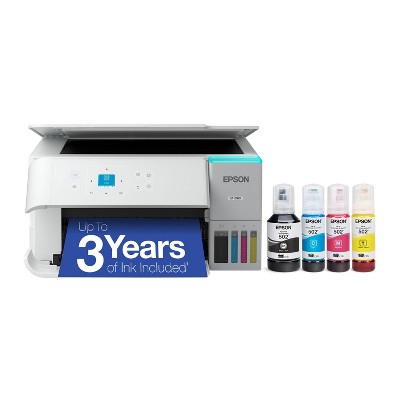
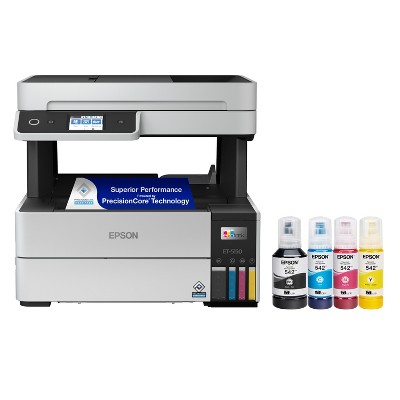
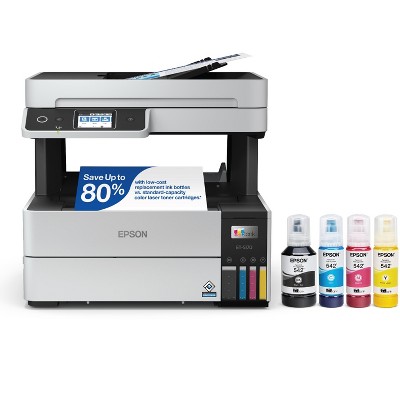
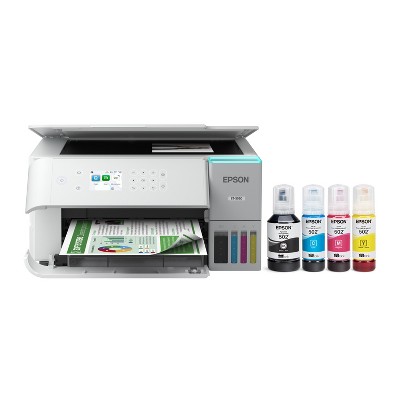
Refurbished: Epson EcoTank ET-4800 Wireless All-in-One Cartridge-Free Supertank Printer - Manufacturer Refurbished - 2 of 4Refurbished: Epson EcoTank ET-4800 Wireless All-in-One Cartridge-Free Supertank Printer - Manufacturer Refurbished - 3 of 4Refurbished: Epson EcoTank ET-4800 Wireless All-in-One Cartridge-Free Supertank Printer - Manufacturer Refurbished - 4 of 4
Refurbished: Epson EcoTank ET-4800 Wireless All-in-One Cartridge-Free Supertank Printer - Manufacturer Refurbished - 1 of 4

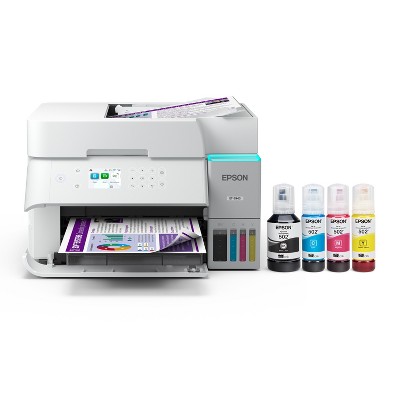
Refurbished: Epson EcoTank ET-4800 Wireless All-in-One Cartridge-Free Supertank Printer - Manufacturer Refurbished

$169.99

In Stock

Sold & shipped by Epson
Eligible for registries and wish lists

About this item

Highlights

  • Innovative Cartridge-Free Printing ― No more tiny, expensive ink cartridges; each ink bottle set is equivalent to about 80 individual cartridges
  • Dramatic Savings on Replacement Ink ― Save up to 90% with replacement ink bottles vs. ink cartridges – that’s enough to print up to 4,500 pages black/7,500 color
  • Stress-Free Printing — Up to 2 years of ink in the box – and with every replacement ink set – for fewer out of ink frustrations
  • High-Capacity Ink Tanks – Epson’s exclusive EcoFit ink bottles make filling easy and worry-free
  • Zero Cartridge Waste – By using an EcoTank printer, you can help reduce the amount of cartridge waste ending up in landfills
  • Impressive Print Quality ― Unique Micro Piezo Heat Free technology produces sharp text – plus impressive color photos and graphics – on virtually any paper type
  • Built-In Scanner & Copier ― High-resolution flatbed scanner and a color display for easy document copying and navigation
  • Modern Connectivity ― Features Ethernet and wireless, plus hands-free voice-activated printing. Easily print from your smart device with the intuitive Epson Smart Panel app
  • Use Genuine Epson Ink ― For optimal print quality and performance. Non-genuine ink could cause damage not covered by the printer’s limited warranty

Description

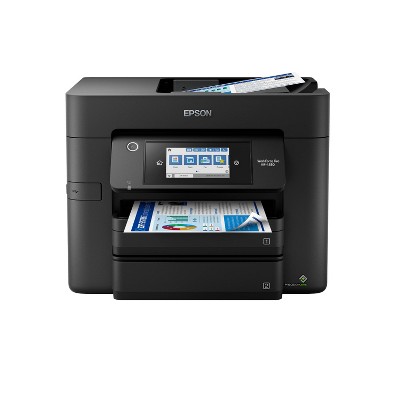
Your home office needs a printer that’s fast, affordable, and easy to use. That’s why we developed the EcoTank ET-4800 – an innovative cartridge-free solution that uses high-capacity, easily refillable ink tanks. So you’ll worry less about running out of ink, and save a lot on replacement ink. The ET-4800 features genuine Epson print quality, an auto document feeder, fax, a high-resolution flatbed scanner, and convenient color display – making it the perfect basic home office printer.
Dimensions (Overall): 9.3 inches (H) x 14.8 inches (W) x 13.7 inches (D)
Weight: 11 pounds
B&W Print Speed: 10 pages per minute
Color Print Speed: 10 pages per minute
Electronics Condition: New
Connection Type: USB-A
Compatible With: Up to 8.5" x 14" Documents
Maximum Resolution: 5760 x 1440 (Color)
Wireless Technology: Wi-Fi, Apple AirPrint
Printer Ink Color: Multiple Colors
Model name: C11CJ65201-N
Ink Series: Epson T522 series
Battery: No Battery Used
Warranty: 1 Year Limited Warranty. To obtain a copy of the manufacturer's or supplier's warranty for this item prior to purchasing the item, please call Target Guest Services at 1-800-591-3869
TCIN: 1002298808
UPC: 010343967632
Origin: imported
The above item details were provided by the Target Plus™ Partner. Target does not represent or warrant that this information is accurate or complete. On occasion, manufacturers may modify their items and update their labels.
We recommend that you do not rely solely on the information presented. If you have a specific question about this item, you may consult the item's label, contact the manufacturer directly or call Target Guest Services at 1-800-591-3869.
If the item details aren’t accurate or complete, we want to know about it.

Shipping details

Estimated ship dimensions: 19.5 inches length x 17.5 inches width x 12.8 inches height
Estimated ship weight: 15.5 pounds
item ships from third party seller: Epson

Return details

This item can be returned to any Target store or Target.com.
This item must be returned within 30 days of the date it was purchased in store, delivered to the guest, delivered by a Shipt shopper, or picked up by the guest.
See the return policy for complete information.

Q: So what USB? Connectivity is there a port or is it 110 powered statement is confusing thank you.

submitted by Sandy BEACHES - 2 months ago
  • A: Hi, thanks for reaching out about Refurbished: Epson EcoTank ET-4800 Wireless All-in-One Cartridge-Free Supertank Printer - Manufacturer Refurbished. I can see why that's confusing! Most printer listings mash all the technical specs together, making it sound like "USB" and "Power" are the same thing. To clear that up: Yes, there is a physical USB port, but it is separate from the power cord. 1. The USB Port (Data) The ET-4800 has a USB Type-B port on the back. This is the "square-ish" plug typically used for printers. What it’s for: If your Wi-Fi is spotty or you don't want to use wireless printing, you can plug this directly into your computer. The Catch: Epson (and most manufacturers) does not include the USB cable in the box. If you want to print via wire, you’ll need to buy a "USB 2.0 Printer Cable" separately. 2. The Power Statement (110V) When the listing says "110 Powered," it is simply telling you that the printer plugs into a standard North American wall outlet. It uses a standard removable power cord (usually a "figure-8" style) that comes in the box. It does not draw power from the USB port; it must be plugged into the wall to turn on. If you have any additional questions, we welcome you to contact MyTGTtech at 833-848-8324 every day, between 7am-11pm CST.

    submitted byJoe - 2 months ago
    Target staff support

Q: What is the heaviest weighted/ thickest paper able to use?

submitted by Paper weight - 3 months ago
  • A: Hi, thanks for reaching out about Refurbished: Epson EcoTank ET-4800 Wireless All-in-One Cartridge-Free Supertank Printer - Manufacturer Refurbished The Epson EcoTank ET-4800 is a great "workhorse" for office documents, but it is somewhat limited when it comes to very thick cardstock because of its internal roller design. This printer does support: Standard Plain Paper: Up to 24 lb (90 g/m²). Glossy Photo Paper: Up to approx. 68 lb or 255 g/m² (specifically Epson’s Premium Glossy Photo Paper). The "Max" Spec: Epson technically lists a maximum of 300 g/m² (about 110 lb cover) only if using Epson Ultra Glossy Photo Paper. This is because photo paper is smoother and easier for the rollers to "grab" than rough cardstock. If you have any additional questions, we welcome you to contact MyTGTtech at 833-848-8324 every day, between 7am-11pm CST.

    submitted byMike - 3 months ago
    Target expert support

Q: Just opened my refurbished Epson et-4800 and when I was trying to set it up and turned the printer on the scanner error came on and can’t continue to set it up.

submitted by Veronica - 3 months ago
  • A: Hi, thanks for reaching out about the Refurbished: Epson EcoTank ET-4800 Wireless All-in-One Cartridge-Free Supertank Printer - Manufacturer Refurbished 1. The "Power Cycle" Reset 2. Check for a Transportation Lock Open the scanner lid and look at the glass. Check the back or bottom of the printer for a small sliding switch marked with a Lock/Unlock icon or a Transport icon. Ensure it is set to the Unlocked (Print) position. If it is locked, the motor will try to move the bulb, fail, and trigger the "Scanner Error." Since this is a Manufacturer Refurbished unit, it is covered by an Epson warranty (typically 1 year). If these steps don't clear the error within 10 minutes, I recommend contacting the seller immediately for a replacement, as a "Scanner Error" right out of the box usually points to a hardware failure. If you have any additional questions, we welcome you to contact MyTGTtech at 833-848-8324 every day between 7 am and 11 pm CST.

    submitted byRena - 3 months ago
    Target expert support

Q: Can this printer print on homemade paper?

submitted by Craftyperson - 4 months ago
  • A: Hi, thanks for reaching out about the Refurbished: Epson EcoTank ET-4800 Wireless All-in-One Cartridge-Free Supertank Printer - Manufacturer Refurbished The Epson EcoTank ET-4800 is not recommended for use with homemade or handmade paper, and doing so carries a high risk of damaging the printer or causing severe paper jams. If you have any additional questions, we welcome you to contact MyTGTtech at 833-848-8324 every day between 7 am and 11 pm CST.

    submitted byRena - 3 months ago
    Target expert support

Q: What type of warranty does this come with?

submitted by Print me - 5 months ago
  • A: Hi, thank you for reaching out about Refurbished: Epson EcoTank ET-4800 Wireless All-in-One Cartridge-Free Supertank Printer - Manufacturer Refurbished. The manufacturer-refurbished Epson EcoTank ET-4800 Wireless All-in-One Cartridge-Free Supertank Printer comes with a 1-year limited warranty. If you have any additional questions, we welcome you to contact MyTGTtech at 833-848-8324 every day, between 7am-11pm CST.

    submitted byMatt - 5 months ago
    Target expert support

Q: Does the refurbish printers have cleaned ink tanks ?

submitted by Ink mom - 5 months ago
  • A: Hi, thanks for reaching out about Refurbished: Epson EcoTank ET-4800 Wireless All-in-One Cartridge-Free Supertank Printer - Manufacturer Refurbished. You can be confident that the manufacturer refurbished process includes a deep cleaning and/or component replacement to ensure the internal ink system (tanks, tubes, and print head) is free of old, potentially dried ink. However, you will need to refill the tanks with the provided new ink bottles during the initial setup before you can use the printer. If you have any additional questions, we welcome you to contact MyTGTtech at 833-848-8324 every day, between 7am-11pm CST.

    submitted byJoe - 5 months ago
    Target staff support

Q: Is the ink tanks completely cleaned out?

submitted by Ink mom - 5 months ago
  • A: Hi, thanks for reaching out about Refurbished: Epson EcoTank ET-4800 Wireless All-in-One Cartridge-Free Supertank Printer - Manufacturer Refurbished For questions about the refurbishing process for this Target Plus Item please call Target Guest Services at 1-800-591-3869. If you have any additional questions, we welcome you to contact MyTGTtech at 833-848-8324 every day, between 7am-11pm CST.

    submitted byJustin - 5 months ago
    Target expert support

Q: Where does the paper go in a tray or in the back

submitted by Theresa Credeur - 6 months ago
  • A: Hi, thank you for reaching out about Refurbished: Epson EcoTank ET-4800 Wireless All-in-One Cartridge-Free Supertank Printer - Manufacturer Refurbished. The paper goes in the front tray. If you have any additional questions, we welcome you to contact MyTGTtech at 833-848-8324 every day, between 7am-11pm CST.

    submitted byMatt - 6 months ago
    Target expert support

Q: Does this refurbished printer come with ink included?

submitted by Mike - 7 months ago
  • A: Hi, thanks for reaching out about Refurbished: Epson EcoTank ET-4800 Wireless All-in-One Cartridge-Free Supertank Printer - Manufacturer Refurbished Yes, Epson manufacturer-refurbished printers, particularly EcoTank models, typically include ink. The included ink is often a set of starter ink bottles or cartridges sufficient for initial setup and a limited amount of printing, though it's not a full replacement set and yields may be lower than normal. If you have any additional questions, we welcome you to contact MyTGTtech at 833-848-8324 every day, between 7am-11pm CST.

    submitted byJustin - 7 months ago
    Target expert support

Q: Does it have a USB por?

submitted by Joe Markovich - 7 months ago
  • A: Hi, thank you for reaching out about Refurbished: Epson EcoTank ET-4800 Wireless All-in-One Cartridge-Free Supertank Printer - Manufacturer Refurbished. Yes, the Epson EcoTank ET-4800 has a Hi-Speed USB port for wired connectivity, located on the back panel of the printer. However, a USB cable is not included in the box, so you must purchase one separately to use this connection method. If you have any additional questions, we welcome you to contact MyTGTtech at 833-848-8324 every day, between 7am-11pm CST.

    submitted byMatt - 7 months ago
    Target expert support

Additional product information and recommendations

Frequently bought together
3.2 out of 5 stars with 33 reviews
quality: 3 out of 5
value: 3 out of 5
40% would recommend
5 recommendations
1 out of 5 stars
Thumbs down graphic, would not recommend
10 March, 2026

(no review title)

never even shipped it and doesn't look like their going to ship even though I paid for it.
Roger
quality: 1 out of 5
value: 1 out of 5
Did you find this review helpful?
5 out of 5 stars
Thumbs up graphic, would recommend
2 February, 2026Verified purchase

(no review title)

works much better than the older model, great price
Carla
quality: 5 out of 5
value: 5 out of 5
Did you find this review helpful?
5 out of 5 stars
Thumbs up graphic, would recommend
29 January, 2026Verified purchase

A bargain

Great price and like new.
Kathy S
quality: 5 out of 5
value: 5 out of 5
Did you find this review helpful?
3 out of 5 stars
27 December, 2025
originally posted on epson.com

Image

Printing issues

The printer is good and fast. However it won’t print on all types of paper and I print on vellum paper a lot so it’s not working out very well.
1 reply from The Epson Team team - 4 months ago
Hi Calor, please visit www.epson.com/support/et4800 for useful product information on optimizing print settings and avoiding paper jams. Your Epson includes free technical support for the life of your product. Our Epson Support Team would be happy to help you and can be reached at (562) 276-4382; Hours: Monday – Friday, 7 a.m. to 4 p.m. (PT). We appreciate your purchase, and we value your feedback. Sincerely, Joseph – The Epson Team.
Calor
Did you find this review helpful?
5 out of 5 stars
22 November, 2025Verified purchase

(no review title)

Excellent product, and very cheap.
Milanyelly
Did you find this review helpful?
1 out of 5 stars
16 October, 2025

(no review title)

Delivery date changed 4 times, I called target twice for an update and they said it’s out of their hands I would have to wait. If you need a printer in a time crunch please order somewhere else.
Jacqueline
Did you find this review helpful?
5 out of 5 stars
8 September, 2025
originally posted on epson.com
Image

printer 4800

it’s great
zen w
Did you find this review helpful?
5 out of 5 stars
28 August, 2025
originally posted on epson.com
Image

Good value

I have been very pleased with my purchase of my Eco tank 4800. It is a very well designed unit and performs well. Sometimes the software can’t be a little confusing and the set up process was a little overdone. But all in all a great purchase.
David the nacho
Did you find this review helpful?
1 out of 5 stars
Thumbs down graphic, would not recommend
5 August, 2025Verified purchase

Epson 4800

I bought this printer as a replacement for the same model one I already had, that the color ink did not work. After setting this new printer up, the magenta ink did not work. Poor quality.
Printerlife
quality: 1 out of 5
value: 1 out of 5
1 guest found this review helpful. Did you?
1 out of 5 stars
14 May, 2025
originally posted on epson.com
Image

Epson 4800 not working

Epson 4800 Out of the box would not setup Showed a error.
1 reply from The Epson Team team - 11 months ago
Hi Broken, we are sorry to hear you are having issues with your Epson printer. Your ET-4800 includes a 1-year limited warranty plus free technical support for the life of your product. Our Epson Support Team would be happy to hear from you and can be reached at (562) 276-4382; Hours: Monday – Friday, 7 a.m. to 4 p.m. (PT). Sincerely, Joseph – The Epson Team.
Broken
1 guest found this review helpful. Did you?
1 out of 5 stars
8 May, 2025
originally posted on epson.com
Image

Would not buy refurbished again.

Refurbished - Did not work due to Ink Pad issues.
1 reply from The Epson Team team - 11 months ago
Hi R G, we are sorry to hear you are having issues with your Epson printer. Your ET-4800 includes a 1-year limited warranty plus free technical support for the life of your product. Our Epson Support Team would be happy to hear from you and can be reached at (562) 276-4382; Hours: Monday – Friday, 7 a.m. to 4 p.m. (PT). Sincerely, Joseph – The Epson Team.
R G
Did you find this review helpful?
1 out of 5 stars
Thumbs down graphic, would not recommend
5 May, 2025

Bad shipping

It’s been 10 days and my item still has not shipped. I’ve been given different shipping dates further and further away. It wasn’t on back order or anything and said it would be here 7 days ago.
Jackie
1 guest found this review helpful. Did you?
1 out of 5 stars
5 May, 2025
originally posted on epson.com
Image

ET 4800

very slow, print quality marginal, photo quality on plain paper very poor, small screen and controls are very difficult to use .
1 reply from The Epson Team team - 11 months ago
Dear James 80, we appreciate your business and are sorry to hear you are not completely satisfied with your purchase. Your Epson ET-4800 includes free technical support for the life of your product. Please reach out to our Epson Support Team for assistance at (562) 276-4382; Hours: Monday – Friday, 7 a.m. to 4 p.m. (PT). We’re here to help. Sincerely, Joseph – The Epson Team.
James 80
Did you find this review helpful?
1 out of 5 stars
26 April, 2025
originally posted on epson.com
Image

Epson 4800

Printer is extremely slow, display panel is too small to read easily, operation controls are awkward and confusing .
1 reply from The Epson Team team - 1 year ago
Hi wjc203, we are sorry to hear you are having issues with your Epson printer. Your ET-4800 includes a 1-year limited warranty plus free technical support for the life of your product. Our Epson Support Team would be happy to hear from you and can be reached at (562) 276-4382; Hours: Monday – Friday, 7 a.m. to 4 p.m. (PT). Sincerely, Joseph – The Epson Team.
wjc203
Did you find this review helpful?
5 out of 5 stars
3 April, 2025
originally posted on epson.com
Image

The best ever Printer

The Best Printer I have ever bought, and very cheap to print, with the years supply of ink that comes with it.
Navy seabee
Did you find this review helpful?
5 out of 5 stars
14 March, 2025
originally posted on epson.com
Image

Very good

Very good!
Taras
Did you find this review helpful?
4 out of 5 stars
3 January, 2025
originally posted on epson.com
Image

An excellent printer with a reasonable price

It is functioning great! There was some discrepancies in the set-up instructions between the printed note and the on-air version. It turns out that one should ignore the printed version and stick with website version.
Susum
Did you find this review helpful?
5 out of 5 stars
22 December, 2024
originally posted on epson.com
Image

Great little printer

Works great. Have had no problems with. So easy to fill the ink and get started printing. Hooked up to my WiFi with ease. Works great for the small printing I do. Quality of printing is great for what I print. If you want a high quality print would get a different printer.
Waggz
1 guest found this review helpful. Did you?
5 out of 5 stars
1 October, 2024
originally posted on epson.com
Image

Epson Echo-Tank

I am an Epson fan to begin with, best printer for my uses! I am truly in love with my Epson Eco Tank 4800. It has all the bases covered………
Did you find this review helpful?

Get top deals, latest trends, and more.

Privacy policy

Footer

About Us

About TargetCareersNews & BlogTarget BrandsBullseye ShopSustainability & GovernancePress CenterAdvertise with UsInvestorsAffiliates & PartnersSuppliersTargetPlus

Help

Target HelpReturnsTrack OrdersRecallsContact UsFeedbackAccessibilitySecurity & FraudTeam Member ServicesLegal & Privacy

Stores

Find a StoreClinicPharmacyTarget OpticalMore In-Store Services

Services

Target Circle™Target Circle™ CardTarget Circle 360™Target AppRegistrySame Day DeliveryOrder PickupDrive UpFree 2-Day ShippingShipping & DeliveryMore Services
PinterestFacebookInstagramXYoutubeTiktokTermsCA Supply ChainPrivacy PolicyCA Privacy RightsYour Privacy ChoicesInterest Based AdsHealth Privacy Policy