Sponsored


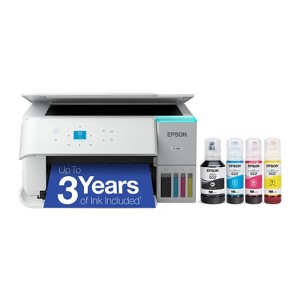
Epson EcoTank ET-2980 Wireless All-in-One Color Supertank Printer - White: Automatic 2-Sided Printing, Borderless Photos, Print From Mobile Device
In Stock
Sponsored
About this item
Highlights
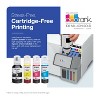
- INCREDIBLE VALUE — Epson EcoTank includes enough ink to last up to 3 years. And if you run low, you’ll save up to 90% with replacement ink bottles vs. ink cartridges
- WORRY-FREE PRINTING — Epson EcoTank comes with enough ink to print up to 6,600 pages black/5,500 color for fewer out-of-ink frustrations. Each replacement ink bottle set is equivalent to about 80 cartridges
- SIMPLE INK REFILLING — Supersized ink tanks and uniquely keyed EcoFit bottles make refilling ink simple—no mess, no stress and no ink bottle mix-ups
- THE WORLD’S #1 SELLING SUPERTANK PRINTER — Epson invented EcoTank to revolutionize the way people print; we’ve sold 100 million EcoTanks worldwide and this is our 7th generation of cartridge-free printers
- ADVANCED PRODUCTIVITY FEATURES — Fast 15 black/8 color ISO ppm print speeds with zero warmup time, built-in scanner, 100-sheet paper tray, auto duplex printing and a 1.44" color display for easy navigation
- STUNNING PRINT QUALITY — High 4800 x 1200 dpi print resolution for exceptional photos and text; enjoy amazing image quality on a wide range of media
- WIRELESS MOBILE PRINTING — Print and scan from the convenience of your smart device with enhanced mobile printing from the Epson Smart Panel app; supports Apple AirPrint
- ENGINEERED FOR RELIABILITY — Epson PrecisionCore Heat-Free technology delivers a unique permanent printhead designed to last the life of the printer, plus professional-grade reliability with duty cycle more robust than its predecessor
- ZERO CARTRIDGE WASTE — Join the club with the millions of EcoTank owners who’ve already helped to reduce millions of pounds of plastic from going into landfills
- USE GENUINE EPSON INK ― For optimal print quality and performance. Non-genuine ink could cause damage not covered by the printer’s limited warranty
Description
Shipping details
Return details
Q: Can this printer be used for standard non photo printing/ scanning and copying? Or is this only for printing photos? What kind of paper can be used?
A: Hello SunnyD. Yes, the ET-2980 is a multipurpose printer that can handle documents, graphics, and photos. It works with all kinds of paper, including plain sheets, cardstock, and photo paper. For the full list of supported types, check the User Guide on Epson’s official Support page. Regards, Kevin - The Epson Team.
submitted byEpson - 1 month agoBrand expertA: Hi, thanks for reaching out about the Epson EcoTank ET-2980 Wireless All-in-One Color Supertank Printer - White: Automatic 2-Sided Printing, Borderless Photos, Print From Mobile Device The Epson EcoTank ET-2980 is a versatile All-in-One printer designed for general home and family use, not just photos. Standard Printing: Yes, it is fully capable of printing standard black and white documents and color documents at speeds suitable for home use (up to 15 pages per minute black / 8 pages per minute color). If you have any additional questions, we welcome you to contact MyTGTtech at 833-848-8324 every day between 7 am and 11 pm CST.
submitted byRena - 1 month agoTarget expert support
Q: Does the wifi need 2.4 or 5 gh?
A: Hello Bernadine. Yes, the ET-2980 is compatible with dual-band Wi-Fi routers, which allows it to connect to both 2.4GHz and 5GHz networks. Regards, Kevin - The Epson Team.
submitted byEpson - 1 month agoBrand expertA: Hi, thanks for reaching out about Epson EcoTank ET-2980 Wireless All-in-One Color Supertank Printer - White: Automatic 2-Sided Printing, Borderless Photos, Print From Mobile Device This printer is compatible with both 2.4 GHz and 5 GHz Wi-Fi networks. If you have any additional questions, we welcome you to contact MyTGTtech at 833-848-8324 every day, between 7am-11pm CST.
submitted byMike - 1 month agoTarget expert support
Q: does it have auto document feeder
A: Hello cn1123. Unfortunately, the ET-2980 does not include an auto document feeder. Regards, Kevin - The Epson Team.
submitted byEpson - 3 months agoBrand expertA: Hi, thanks for reaching out about Epson EcoTank ET-2980 Wireless All-in-One Color Supertank Printer - White: Automatic 2-Sided Printing, Borderless Photos, Print From Mobile Device No. This model does not have an auto document feeder. If you have any additional questions, we welcome you to contact MyTGTtech at 833-848-8324 every day, between 7am-11pm CST.
submitted byJustin - 3 months agoTarget expert support
Q: Can you print on heat transfer paper?
A: Hello Sandybrue24. The ET-2980 will work with Epson Iron-on Cool Peel Transfer Paper, which can be used with t-shirts. Other transfer papers may work, but we haven’t tested them, so results can vary depending on the brand. Regards, Kevin - The Epson Team.
submitted byEpson - 15 days agoBrand expert
Q: Can it print different size envelopes?
A: Hello Fran. Yes, the ET-2980 can print on No. 10-sized envelopes. You can load approximately ten envelopes total in the rear paper feeder. Regards, Kevin - The Epson Team.
submitted byEpson - 16 days agoBrand expert
Q: Does it require special paper
A: Hello. The ET-2980 is a multipurpose printer that can handle documents, graphics, and photos. No special paper is required, as it works with a wide range of media, including plain sheets, cardstock, and photo paper. For the full list of supported types, check the User Guide on Epson’s official Support page. Regards, Kevin - The Epson Team.
submitted byEpson - 21 days agoBrand expert
Q: Does this print heavy weight cardstock such as 110lb cardstock?
A: Hello Yuh. The ET-2980 can print on cardstock, but feeding reliability can vary when using third-party paper based on the brand, texture, thickness, and weight. We recommend testing a sample first to make sure it works well, since Epson doesn’t guarantee compatibility with all paper types. Regards, Kevin - The Epson Team.
submitted byEpson - 22 days agoBrand expert
Q: Does it print from last to first page or first to last
A: Hello RT. The ET-2980 supports both printing modes. You can choose either normal or reverse page order directly from the print settings. Regards, Kevin - The Epson Team.
submitted byEpson - 29 days agoBrand expert
Q: Do you have to register online for usage Hp has charged us for using too much paper and we have a monthly fee even though we stopped subscription for ink
A: Hello TA. No, the ET-2980 does not require a subscription to use the printer. Regards, Kevin - The Epson Team.
submitted byEpson - 1 month agoBrand expert
Q: can i have the option of turning off two sided printing
A: Hello Bambi312. Yes, the option for two-sided printing can be enabled/disabled from the print settings window on the computer. Regards, Kevin - The Epson Team.
submitted byEpson - 1 month agoBrand expert
Frequently bought together

Guests also viewed




Discover more options
Related Categories
Guests are saying
(no review title)
(no review title)
(no review title)
1 reply from Epson team - 2 days ago
(no review title)

It was time to replace our old scanner/printer
Very Reliable
Poorly designed
1 reply from Epson team - 21 days ago
(no review title)
Old Reliable Replaced with a New Beauty
Too soon to know
Connectivity problems
1 reply from The Epson Team team - 2 months ago
This printer will pay for itself in just over a year.
Great Printer!
Eco Tank Journey
Best Printer Ever
Prints great has issues
1 reply from The Epson Team team - 3 months ago
Issues connecting to internet
1 reply from The Epson Team team - 3 months ago
Great choice for a single feed printer
Great All in one