New ArrivalsChristmasHoliday Hosting & EntertainingGift IdeasAI Gift FinderClothing, Shoes & AccessoriesToysElectronicsBeautyGift CardsHomeFurnitureCharacter ShopBabyKitchen & DiningGroceryHousehold EssentialsSchool & Office SuppliesVideo GamesMovies, Music & BooksSports & OutdoorsBackpacks & LuggagePersonal CareHealthPetsUlta Beauty at TargetTarget OpticalParty SuppliesClearanceTarget New Arrivals Target Finds #TargetStyleHanukkahStore EventsAsian-Owned Brands at TargetBlack-Owned or Founded Brands at TargetLatino-Owned Brands at TargetWomen-Owned Brands at TargetLGBTQIA+ ShopTop DealsTarget Circle DealsWeekly AdShop Order PickupShop Same Day DeliveryRegistryRedCardTarget CircleFind Stores
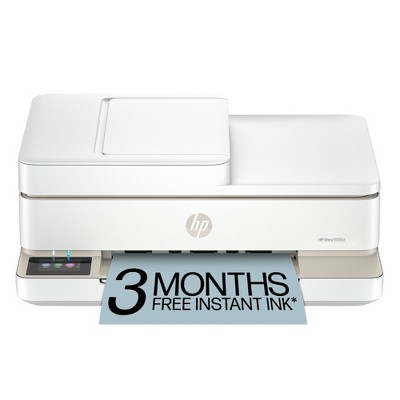
HP DeskJet 2825e Wireless All-in-One Color Printer, Scanner, Copier with 3 Months Free Instant Ink (6W7F4A) - 2 of 4HP DeskJet 2825e Wireless All-in-One Color Printer, Scanner, Copier with 3 Months Free Instant Ink (6W7F4A) - 3 of 4HP DeskJet 2825e Wireless All-in-One Color Printer, Scanner, Copier with 3 Months Free Instant Ink (6W7F4A) - 4 of 4
HP DeskJet 2825e Wireless All-in-One Color Printer, Scanner, Copier with 3 Months Free Instant Ink (6W7F4A) - 1 of 4

HP DeskJet 2825e Wireless All-in-One Color Printer, Scanner, Copier with 3 Months Free Instant Ink (6W7F4A)

$49.99 reg $84.99
Sale save $35.00 (41% off)

In Stock

Eligible for registries and wish lists

Sponsored

About this item

Highlights

  • Best for home printing
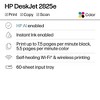
  • Print, scan, copy and fax on the go with HP Smart app
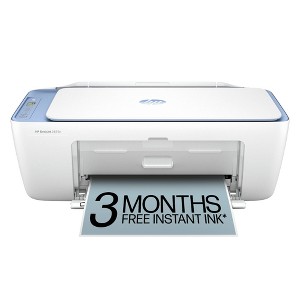
  • 3 months of free Instant Ink included + 1 bonus month for a limited time, with code: HOLIDAY25
  • Built-in wireless
  • Easy mobile setup
  • Print up to 7.5 pages per minute (black), 5.5 pages per minute (color)
  • USB 2.0

Description

The HP Deskjet 2825e delivers color printing, 60-sheet paper capacity, and a flatbed scanner for easy scanning and copying. It also includes 3 months of free Instant Ink with HP+ activation at printer setup.

FROM AMERICA'S MOST TRUSTED PRINTER BRAND: The Deskjet 2825e is perfect for homes printing to-do lists, letters, financial documents and recipes. Print speeds up to 5.5 ppm color, 7.5 ppm black.

Bonus 1 month of Instant Ink
Enter code "HOLIDAY25" to get 1 bonus month in addition to the 3 months of free Instant Ink service already included with this printer.

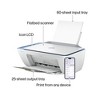
KEY FEATURES: Color printing, copy, scan, and a 60-sheet input tray.

WIRELESS PRINTING: Stay connected with our most reliable Wi-Fi®, which automatically detects and resolves connection issues.

HP APP: Print, scan, copy, or fax right from your smartphone with the easiest-to-use print app.

3 MONTHS OF FREE INK when you activate HP+: Subscribe to Instant Ink delivery service to get ink delivered directly to your door before you run out. After 3 months, monthly fee applies unless cancelled, and you save up to 50%.

COMPACT DESIGN: Made to fit any home.

ICON LCD: Print your basic documents with ease from the intuitive control panel.

SUSTAINABLE DESIGN: Made with at least 60% recycled plastic. Meets industry efficiency standards and is Energy Star® and EPEAT® certified.

DYNAMIC SECURITY: This printer is intended to work only with cartridges with original HP chips or circuitry and will block cartridges using non-HP chips or circuitry. Periodic firmware updates will maintain the effectiveness of these measures. More at www.hp.com/learn/ds.
Dimensions (Overall): 13.94 Inches (H) x 18.7 Inches (W) x 7.52 Inches (D)
Weight: 10.1 Pounds
B&W Print Speed: 7.5 Pages per Minute
Color Print Speed: 5 Pages per Minute
Electronics Condition: New
Electronics Features: Printer
Connection Type: USB
Maximum capacity: 60 Sheets
Operating System Compatibility: Microsoft Windows, macOS
Maximum Resolution: 1200 x 1200 (Color)
Wireless Technology: Wi-Fi
Printer Ink Color: White
Compatible With: Up to 8.5" x 14" Documents
Ink Series: Printer
Battery: No Battery Used
Warranty: 1 Year Limited Warranty. To obtain a copy of the manufacturer's or supplier's warranty for this item prior to purchasing the item, please call Target Guest Services at 1-800-591-3869
TCIN: 94816185
UPC: 198990334080
Item Number (DPCI): 056-03-0052
Origin: Imported
If the item details aren’t accurate or complete, we want to know about it.

Shipping details

Estimated ship dimensions: 18.7 inches length x 13.8 inches width x 7.3 inches height
Estimated ship weight: 10.35 pounds

Return details

This item can be returned to any Target store or Target.com.
This item must be returned within 30 days of the date it was purchased in store, shipped, delivered by a Shipt shopper, or made ready for pickup.
See the return policy for complete information.

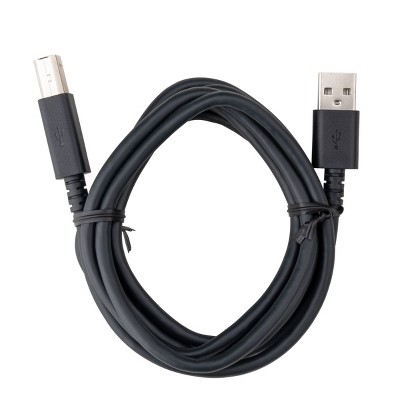
Q: Is there a way to connect the printer to a computer without using wireless? Like is there a cord or something I can buy to connected to my computer?

submitted by This girl has a question - 1 month ago
  • A: Yes, you can connect using a Printer USB Cable

    submitted byDLou - 1 month ago
  • A: Hi, thanks for reaching out about HP DeskJet 2825e Wireless All-in-One Color Printer Scanner Copier with 3 Months Free Instant Ink (6W7F4A) Yes, the HP DeskJet 2825e supports a USB connection, which can be used to connect it to a computer for printing, scanning, and copying. While the printer is designed for wireless use, it also has a USB 2.0 port and can be used with a USB cable for a wired connection to a PC or Mac. If you have any additional questions, we welcome you to contact MyTGTtech at 833-848-8324 every day, between 7am-11pm CST.

    submitted byJustin - 1 month ago
    Target expert support

Q: I am getting an E0 Code - unusable cartridge. I just set this up with the cartridges that were provided in the box. I do not understand how they can be "unusable". Please help. Thank You.

submitted by Patrai - 17 days ago
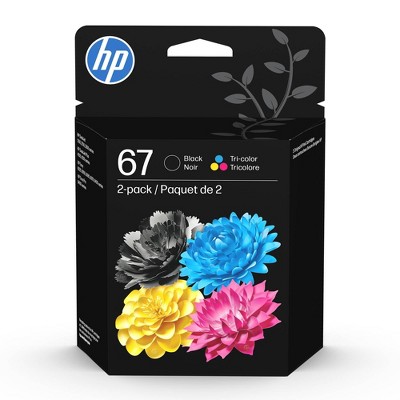
  • A: Same happened to me. Call HP (very hard to get a person but don’t give up) and they will analyze it and send you a free hp67 cartridge. Mine came in less than a week and it works. The inks provided with printer are just set up size and don’t last for nothing!

    submitted bySD - 10 days ago
  • A: Hi, thanks for reaching out about the HP DeskJet 2825e Wireless All-in-One Color Printer, Scanner, Copier with 3 Months Free Instant Ink (6W7F4A) E0 Cartridge Troubleshooting Steps 1. Reseat the Cartridges (Check Installation) 2. Perform a Power Reset (Clear the Glitch) 3. Clean the Contacts (Communication Issue) If the E0 error continues after trying all three steps above, it is very likely that one or both of the original SETUP cartridges are defective. Since the cartridges came directly from HP in the box, they are covered under your printer's warranty. You should contact HP Support directly to request a free replacement for the faulty cartridge(s). If you have any additional questions, we welcome you to contact MyTGTtech at 833-848-8324 every day between 7 am and 11 pm CST.

    submitted byRena - 16 days ago
    Target expert support

Q: Does this printer come with ink in the box?

submitted by Vbb - 17 days ago
  • A: The cartridges that come with printer are SetUp size, not much in them

    submitted bySD - 10 days ago
  • A: Hi, thanks for reaching out about HP DeskJet 2825e Wireless All-in-One Color Printer, Scanner, Copier with 3 Months Free Instant Ink (6W7F4A) Yes, the HP DeskJet 2825e comes with starter ink tanks so you can begin printing immediately after setup. Additionally, the purchase includes a 3-month free trial of HP Instant Ink, which requires HP+ activation at setup. If you have any additional questions, we welcome you to contact MyTGTtech at 833-848-8324 every day, between 7am-11pm CST.

    submitted byJustin - 17 days ago
    Target expert support

Q: What ink does the printer use

submitted by Pam - 3 days ago

Q: Do you have to install an app just to copy something

submitted by Leotat2 - 5 days ago
  • A: Hi, thanks for reaching out about HP DeskJet 2825e Wireless All-in-One Color Printer, Scanner, Copier with 3 Months Free Instant Ink (6W7F4A) You can use the copy feature of this printer using only the physical buttons on the machine, no other software or hardware is needed for to make a copy. If you have any additional questions, we welcome you to contact MyTGTtech at 833-848-8324 every day, between 7am-11pm CST.

    submitted byMike - 4 days ago
    Target expert support

Q: Will it print photos

submitted by Will iit print photos - 6 days ago
  • A: Hi, thank you for reaching out about HP DeskJet 2825e Wireless All-in-One Color Printer, Scanner, Copier with 3 Months Free Instant Ink (6W7F4A). Yes, the HP DeskJet 2825e can print photos on photo paper (like 4x6 or 5x7), but it's designed for casual home use, not professional quality, with color accuracy being fair and details sometimes lacking compared to dedicated photo printers. You'll use the HP Smart app and select "photo paper" as the media type for the best results, loading the glossy side up in the photo tray. If you have any additional questions, we welcome you to contact MyTGTtech at 833-848-8324 every day, between 7am-11pm CST.

    submitted byMatt - 5 days ago
    Target expert support

Q: Can this printer print color photos on photo paper?

submitted by Kathleen - 7 days ago
  • A: Hi, thank you for reaching out about HP DeskJet 2825e Wireless All-in-One Color Printer, Scanner, Copier with 3 Months Free Instant Ink (6W7F4A). Yes, the HP DeskJet 2825e can print color photos on photo paper. The printer is a color inkjet model that supports various media types, including plain paper, brochure paper, and specialty inkjet photo papers. If you have any additional questions, we welcome you to contact MyTGTtech at 833-848-8324 every day, between 7am-11pm CST.

    submitted byMatt - 7 days ago
    Target expert support

Q: Is this a sublimation printer?

submitted by Patti - 9 days ago
  • A: Hi, thanks for reaching out about the HP DeskJet 2825e Wireless All-in-One Color Printer, Scanner, Copier with 3 Months Free Instant Ink (6W7F4A) The HP DeskJet 2825e is not a sublimation printer. If you have any additional questions, we welcome you to contact MyTGTtech at 833-848-8324 every day between 7 am and 11 pm CST.

    submitted byRena - 8 days ago
    Target expert support

Q: Which ink does this printer use. I need a printer that uses HP 61

submitted by MARBY - 10 days ago
  • A: Hi, thanks for reaching out about HP DeskJet 2825e Wireless All-in-One Color Printer, Scanner, Copier with 3 Months Free Instant Ink (6W7F4A) The HP DeskJet 2825e uses HP 67 series ink cartridges. The HP 61 ink cartridges you asked about are compatible with a large number of older models of HP printers. Please note that HP stopped manufacturing new printers that use the HP 61 series around 2016, so these are generally older models. If you have any additional questions, we welcome you to contact MyTGTtech at 833-848-8324 every day, between 7am-11pm CST.

    submitted byMike - 10 days ago
    Target expert support

Q: What ho printer do you have that uses xl65 ink cartridges.

submitted by Sarah - 10 days ago
  • A: Hi, thanks for reaching out about HP DeskJet 2825e Wireless All-in-One Color Printer, Scanner, Copier with 3 Months Free Instant Ink (6W7F4A). That is a great question to help you find a compatible printer! First, to clarify: the HP DeskJet 2825e printer you listed actually uses HP 67 or HP 67XL cartridges, not HP 65XL cartridges. If you are specifically looking for an HP printer that uses the HP 65 or HP 65XL ink cartridges (the high-yield version), those cartridges are compatible with many older and some newer HP DeskJet and ENVY printer models. Here is a selection of the most common HP printers that use the HP 65/65XL ink series: 🖨️ HP Printers Using HP 65/65XL Ink HP DeskJet Series HP DeskJet 2600 Series (e.g., 2622, 2624, 2652, 2655) HP DeskJet 3700 Series (e.g., 3720, 3722, 3755) HP ENVY Series HP ENVY 5000 Series (e.g., 5010, 5020, 5030, 5055) HP AMP Series HP AMP 100, HP AMP 130 If you are considering purchasing a new printer and want one that uses the HP 65XL, I recommend checking a current retailer's website or the HP official site for a compatible model that is currently in stock. If you have any additional questions, we welcome you to contact MyTGTtech at 833-848-8324 every day, between 7am-11pm CST.

    submitted byJoe - 10 days ago
    Target staff support

Related Categories

4.2 out of 5 stars with 549 reviews
quality: 3 out of 5
value: 3.44 out of 5
42% would recommend
19 recommendations
5 out of 5 stars
Thumbs up graphic, would recommend
16 December, 2025Verified purchase

Quick, easy setup when following the directions step by step!

Purchased this HP Desk Jet 2825e printer on sale. Set up was super easy. I followed the instructions step by step that were included in the box. Not sure why people are saying it took 4 hours??? Each step illustrates what to do to unbox, set up, install ink, and print. I did google how to load paper for printing and You Tube had easy to follow videos! The directions are easy to follow pictures. The set up for connecting the internet walked you through on an app. I’m not tech savvy and was able to do it. It took about 15-20 minutes from opening the box to printing a sample. Follow the directions inside the box!!!! Printing was perfect. Only used for one day so far. Time will tell. Happy with the price and the quick easy setup!
Lisa
quality: 4 out of 5
value: 5 out of 5
1 guest found this review helpful. Did you?
1 out of 5 stars
Thumbs down graphic, would not recommend
14 December, 2025Verified purchase

Slow printer

Dislike this printer very much. Extremely slow What something should take 3 minutes takes 30. I wouldn’t recommend this printer at all I have to reset it each time.
Alexandra
quality: 1 out of 5
value: 1 out of 5
Did you find this review helpful?
2 out of 5 stars
Thumbs down graphic, would not recommend
13 December, 2025Verified purchase

HP PRINT QUALITY IS BAD FOR THIS PRINTER

I have a another hp printer that is more older and it prints better than this one and the speed for this printer is very slow
bashar
quality: 2 out of 5
value: 2 out of 5
Did you find this review helpful?
5 out of 5 stars
Thumbs up graphic, would recommend
13 December, 2025Verified purchase

(no review title)

Very easy to set up
Frank
quality: 5 out of 5
value: 5 out of 5
Did you find this review helpful?
1 out of 5 stars
11 December, 2025

(no review title)

Just got the app started up and it consistently loads and freezes..
Sophie
2 guests found this review helpful. Did you?
5 out of 5 stars
Thumbs up graphic, would recommend
8 December, 2025Verified purchase

Happy

Great
Mary
quality: 5 out of 5
value: 5 out of 5
Did you find this review helpful?
3 out of 5 stars
Thumbs down graphic, would not recommend
5 December, 2025Verified purchase

It Prints... Sometimes.

It gets the job done.... for an average of 2 hours. This is my fourth time trying to convince it to print my study material, and it has given up about six times into this process alone. I use the HP Smart extension, but that works about 1/5 of the time. But keeping in mind, this thing is CHEAP. It will do a CHEAP job. It isn't terrible for the money that I paid for it. Just prepare yourself for a long wait.
India
quality: 2 out of 5
value: 4 out of 5
1 guest found this review helpful. Did you?
1 out of 5 stars
Thumbs down graphic, would not recommend
3 December, 2025Verified purchase

Absolutely garbage

Slow, doesn’t print accurately, drains ink too fast, prints different every time
Anonymous
1 guest found this review helpful. Did you?
5 out of 5 stars
30 November, 2025
originally posted on hp.com
Image

Excellent for home use!

This printer exceeded my expectations. The setup is easy, and the software (app) makes it easier to use. The fact that it operates entirely on wifi might make the printing experience sometimes a bit sluggish, and I honestly would appreciate having a cable cord in case wifi isn't working or not an option. The printing quality is great!!! For the price, this product is just amazing!!!
Negash
Did you find this review helpful?
5 out of 5 stars
27 November, 2025Verified purchase

(no review title)

Good
rehana
Did you find this review helpful?
5 out of 5 stars
Thumbs up graphic, would recommend
25 November, 2025

Works Great

It's easy to set up as long as you follow the steps it gives you. Easy and convient. Very glad about purchasing this printer, plus I got it while on sale, things I love! 🥰
Laura
quality: 4 out of 5
value: 5 out of 5
1 guest found this review helpful. Did you?
5 out of 5 stars
Thumbs up graphic, would recommend
24 November, 2025Verified purchase

hp printer

excellent choice . easy to set up. works great . price was awesome
joelle
quality: 5 out of 5
value: 5 out of 5
1 guest found this review helpful. Did you?
1 out of 5 stars
Thumbs down graphic, would not recommend
24 November, 2025

DO NOT PURCHASE THIS JUNK!!!

DO NOT WASTE YOUR MONEY ON THIS PRINTER!!! I bought it about a week ago, it was on sale. It printed 2 pages and hasn’t worked since. I called Hewlett Packards customer service line. I was told they could fix it with new software drives. I paid $49 on sale. HP said it would be $249 to install the new software drives…..FOR A PRINTER I JUST PURCHASED!!!!!!! I will NEVER purchase another thing from Hewlett Packard!!!!
Andrew
quality: 1 out of 5
value: 1 out of 5
5 guests found this review helpful. Did you?
5 out of 5 stars
Thumbs up graphic, would recommend
23 November, 2025Verified purchase

(no review title)

price was great keeping it boxed..mobing
susanne
quality: 5 out of 5
value: 5 out of 5
Did you find this review helpful?
5 out of 5 stars
23 November, 2025
originally posted on store.hp.com
Image

HP DeskJet 2820e All-in-One Printer

Received quickly nil issues. I had trouble with printing but realized it was due to my vpn once that was disconnected it prints quickly and efficiently
1 guest found this review helpful. Did you?
5 out of 5 stars
Thumbs up graphic, would recommend
21 November, 2025Verified purchase

(no review title)

Easy to install
judith
quality: 5 out of 5
value: 5 out of 5
1 guest found this review helpful. Did you?
5 out of 5 stars
Thumbs up graphic, would recommend
21 November, 2025Verified purchase

(no review title)

Love this printer
Gma
quality: 5 out of 5
value: 5 out of 5
1 guest found this review helpful. Did you?
1 out of 5 stars
Thumbs down graphic, would not recommend
21 November, 2025

(no review title)

Affordable but it’s so bad. Super slow and funky. Doesn’t function properly and also doesn’t print everything. I would miss a few pages so would have to reprint the whole thing again (I know I can customize the pages but it gets too complicated). Wish there was also a black and white option. There’s a print on both sides option but does not work as well. Anytime I have to print something, I hate coming to this printer.
Sara
quality: 1 out of 5
value: 1 out of 5
4 guests found this review helpful. Did you?
4 out of 5 stars
20 November, 2025
originally posted on hp.com
Image

printer

hard to get the printer to print
frost101
Did you find this review helpful?
5 out of 5 stars
20 November, 2025
originally posted on hp.com
Image

(no review title)

So quick on delivery and now up and running in no time at all
Cliff 192
Did you find this review helpful?

Get top deals, latest trends, and more.

Privacy policy

Footer

About Us

About TargetCareersNews & BlogTarget BrandsBullseye ShopSustainability & GovernancePress CenterAdvertise with UsInvestorsAffiliates & PartnersSuppliersTargetPlus

Help

Target HelpReturnsTrack OrdersRecallsContact UsFeedbackAccessibilitySecurity & FraudTeam Member ServicesLegal & Privacy

Stores

Find a StoreClinicPharmacyTarget OpticalMore In-Store Services

Services

Target Circle™Target Circle™ CardTarget Circle 360™Target AppRegistrySame Day DeliveryOrder PickupDrive UpFree 2-Day ShippingShipping & DeliveryMore Services
PinterestFacebookInstagramXYoutubeTiktokTermsCA Supply ChainPrivacy PolicyCA Privacy RightsYour Privacy ChoicesInterest Based AdsHealth Privacy Policy