Sponsored
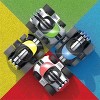


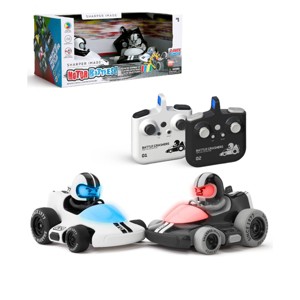
Sharper Image RC Motor Battles Team Battle Racers: Plastic Battery-Powered Remote Control Vehicles, 4 Pieces
In Stock
At a glance
Sponsored
About this item
Highlights
- Compatible with multiple sets for massive multiplayer games
- Wireless remote control with a range of up to 100 feet.
- 3 hits per car to knock them out of the game.
- 4 LED light color choices for team play.
- Two remote-controlled battle cars with hit sensors.
- Unique gift idea
Description
Shipping details
Return details
Q: what age are these suggested for
A: The recommended age is 6+ for this item. Thank you
submitted byMS Customer Service - 18 days agoBrand expert
Q: what age group are these cars for?
A: The recommended age is 6+ for this item. Thank you
submitted byMS Customer Service - 18 days agoBrand expert
Q: If you buy 2 sets, will the controller run both cars?
A: No, these use 2.4 GHz wireless controllers which allow you to have multiple sets of cars in the same area without interference. Thank you
submitted byMS Customer Service - 25 days agoBrand expert
Q: Do these cars "go to sleep" when they are not being played with to save on battery use?
A: Yes, after 5 minutes of not being used the cars will go to sleep. Thank you
submitted byMS Customer Service - 25 days agoBrand expert
Q: Do these contain any button batteries or only the required AAs?
A: No, these do not contain button batteries. The cars will use AA batteries while the remote controls use AAA batteries. Thank you
submitted byMS Customer Service - 5 months agoBrand expert
Q: Hi, can anyone tell me how fast these go?
A: The cars go approximately 5 MPH. Thank you
submitted byMS Customer Service - 11 months agoBrand expert
Q: The white car will not move
A: For warranty service and troubleshooting product issues, contact us at 1-800-374-2744 or fill out a form at https://mscustomercare.com. Thank you
submitted byMS Customer Service - 11 months agoBrand expert
Q: Do they work on carpeted floor ?
A: probably depends on how thick your carpet is. we have a pretty flat carpet and it works fine, but we can't get it to drive on the couch, too variable/squishy of a surface i think.
submitted bytwin mom - 1 year ago
Q: Can you turn off the "touch" inactivation feature?
A: No, you cannot turn off the activation feature. Thank you
submitted byMS Customer Service - 11 months agoBrand expert
Q: What constitutes the 6+ age recommendation?
Frequently bought together
Guests also viewed
Discover more options