New ArrivalsEasterClothing, Shoes & AccessoriesHomeKitchen & DiningOutdoor Living & GardenFurnitureGroceryHousehold EssentialsBabyBeautyPersonal CareHealthWellnessBackpacks & LuggageSports & OutdoorsToysElectronicsVideo GamesMovies, Music & BooksSchool & Office SuppliesParty SuppliesGift IdeasGift CardsPetsUlta Beauty at TargetShop by CommunityTarget OpticalDealsClearanceTarget New ArrivalsHome Decor Ideas & TrendsTop DealsTarget Circle DealsWeekly AdShop Order PickupShop Same Day DeliveryRegistryRedCardTarget CircleFind Stores
North Full Size Wireless Keyboard with Built-in Phone/Tablet Stand - Lavender - 2 of 3North Full Size Wireless Keyboard with Built-in Phone/Tablet Stand - Lavender - 3 of 3
North Full Size Wireless Keyboard with Built-in Phone/Tablet Stand - Lavender - 1 of 3

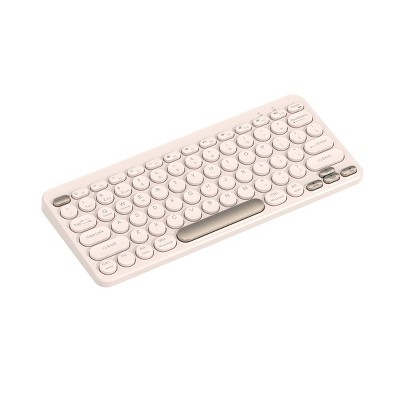
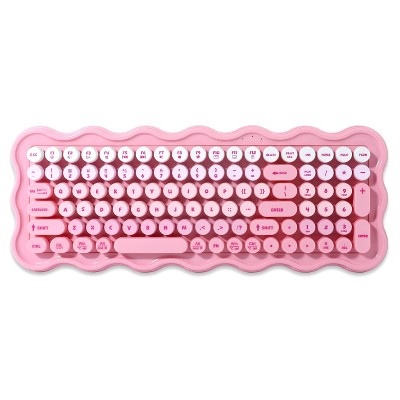
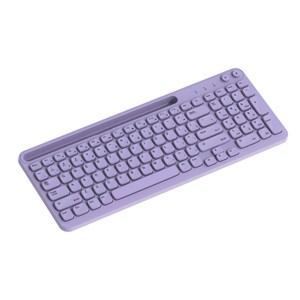
North Full Size Wireless Keyboard with Built-in Phone/Tablet Stand - Lavender

$22.99

In Stock

Eligible for registries and wish lists

About this item

Highlights

  • Dual wireless connection modes: 2.4GHz & wireless pairing
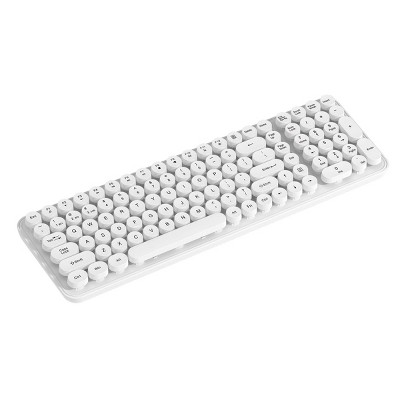
  • Low profile, rounded square keys for smooth keystrokes
  • AAA battery powered (not included)
  • Full size keyboard with number pad and phone holder

Description

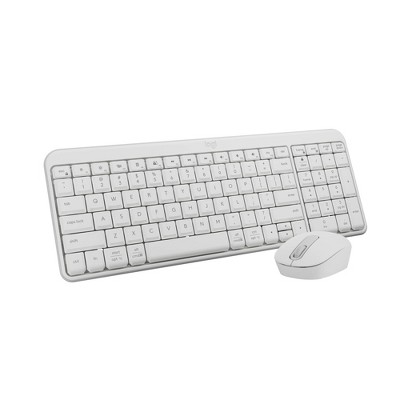
Upgrade your workspace with this sleek North Full-Size Wireless Keyboard, designed for both comfort and versatility. It supports both 2.4GHz connection and wireless pairing for your convenience. The low-profile, rounded square keys provide smooth, quiet keystrokes. The built-in number pad and phone holder adds convenience to your setup. AAA battery powered (not included), it’s perfect for everyday use at home or in the office. A stylish and functional solution for all your typing needs!
Dimensions (Overall): 1.42 Inches (H) x 14.76 Inches (W) x 5.91 Inches (D)
Weight: 440 Grams
Electronics Features: Tablet Stand, Phone Stand, Low-Profile Keys
Connection Type: No Wired Connection Ports
Wireless Technology: Radio Frequency
Switch Type: Membrane
Primary use: Home
Number of buttons or keys: 102
Backlit Keyboard: No Backlit Keyboard
Battery: 1 AAA Alkaline, Required, Not Included
TCIN: 94419215
UPC: 810125119552
Item Number (DPCI): 056-00-5740
Origin: Imported
If the item details aren’t accurate or complete, we want to know about it.

Shipping details

Estimated ship dimensions: 16.6 inches length x 7.3 inches width x 1.6 inches height
Estimated ship weight: 1.4 pounds

Return details

This item can be returned to any Target store or Target.com.
This item must be returned within 30 days of the date it was purchased in store, delivered to the guest, delivered by a Shipt shopper, or picked up by the guest.
See the return policy for complete information.

Q: Hi! How do you switch the power on? The instructions say to switch the power on but I don’t see an on button.

submitted by User25 - 7 months ago
  • A: There is no power button on the back, side or underneath.

    submitted byLF - 6 months ago
  • A: Hi, thanks for reaching out about the North Full Size Wireless Keyboard with Built-in Phone/Tablet Stand - Lavender: Backlit, Membrane Switch, Radio Frequency Look for a slider switch. On the back or side of the keyboard, there will be a small slider switch If you have any additional questions, we welcome you to contact MyTGTtech at 833-848-8324 every day between 7 am and 11 pm CST.

    submitted byRena - 7 months ago
    Target expert support

Q: How do you turn on the backlight?

submitted by Karenaye - 8 months ago
  • A: Hi, thank you for reaching out about North Full Size Wireless Keyboard with Built-in Phone/Tablet Stand - Lavender: Backlit, Membrane Switch, Radio Frequency. To enable the backlight on the North Full Size Wireless Keyboard with built-in phone/tablet stand, you typically need to press a specific key combination, which is usually the "Fn" key along with one of the function keys (F1-F12), or potentially a dedicated backlight key. If you have any additional questions, we welcome you to contact MyTGTtech at 833-848-8324 every day, between 7am-11pm CST.

    submitted byMatt - 8 months ago
    Target expert support

Q: How do you connect it to your device

submitted by Harper - 17 days ago
  • A: Hi, thanks for reaching out about North Full Size Wireless Keyboard with Built-in Phone/Tablet Stand - Lavender This Wireless Keyboard is a dual-mode device, meaning you can connect it using either the included USB receiver or via Bluetooth. This specific model does not have a physical ON/OFF switch. It powers on automatically once the battery is inserted. If you have any additional questions, we welcome you to contact MyTGTtech at 833-848-8324 every day, between 7am-11pm CST.

    submitted byMike - 16 days ago
    Target expert support

Q: The lock light keeps coming on and off and we've tried caps lock, num lock, and fn lock and the keyboard will not work. Any other tricks to try??

submitted by Joey - 1 month ago
  • A: Hi, thanks for reaching out about the North Full Size Wireless Keyboard with Built-in Phone/Tablet Stand - Lavenderg  We apologize for the issue you are experiencing and have a few suggestions that may help:1. The "Power Cycle" Reset (Most Likely Fix) 2.Force Re-Pairing (The ESC + K Trick) 3. Check for "USB Selective Suspend" If you have any additional questions, we welcome you to contact MyTGTtech at 833-848-8324 every day between 7 am and 11 pm CST.

    submitted byRena - 1 month ago
    Target expert support

Q: Why aren't the keys correct? The symbols are not the ones shown on the keys.

submitted by Adriana - 2 months ago
  • A: Hi, thanks for reaching out about North Full Size Wireless Keyboard with Built-in Phone/Tablet Stand - Lavender. It sounds like your keyboard’s hardware is fine, but the software settings on your device (computer, tablet, or phone) don't match the physical layout of the keys. This is a very common "language barrier" between the keyboard and your screen. Here are the most likely reasons and how to fix them: 1. Wrong Keyboard Layout (Most Common) If you press Shift + 2 and get " instead of @, or if other symbols are swapped, your device likely thinks you are using a UK English layout instead of a US English layout. On Windows: Go to Settings > Time & Language > Language & Region. Ensure "English (United States)" is at the top. Click the three dots (...) next to it, go to Language Options, and make sure the keyboard layout is set to US (QWERTY). On Mac: Go to System Settings > Keyboard > Input Sources. Ensure it is set to U.S. On iOS/Android: Go to Settings > General > Keyboard > Physical Keyboard. Make sure it is set to "English (US)." 2. The "Function" Lock (Fn) Since your North keyboard is a compact wireless model, many keys have dual purposes. If you are trying to type a number and getting a symbol (or vice versa), check if your Fn (Function) key is "locked." Try pressing Fn + Esc (often the Fn Lock) to toggle between standard keys and special shortcut keys. 3. Operating System Mode Multi-device keyboards like yours often have specific modes for different systems (iOS, Android, or Windows). If the keyboard is in "Android mode" while connected to a Windows PC, the shortcuts and symbols can act strangely. Look for keys labeled Q (iOS), W (Android), or E (Windows). Hold Fn and press the letter corresponding to your device to "sync" the layout logic. Quick Test Try this right now: Press Shift + 2. If you get @, your layout is correct (US). If you get ", your device is set to UK English. If you have any additional questions, we welcome you to contact MyTGTtech at 833-848-8324 every day, between 7am-11pm CST.

    submitted byJoe - 2 months ago
    Target staff support

Q: Is this keyboard Bluetooth compatible?

submitted by Llholmes - 2 months ago
  • A: Hi, thank you for reaching out about Backbone Pro Black Controller: USB-C & Bluetooth Game Controller for Android & iPhone. Yes, the Backbone Pro (USB-C & Bluetooth) works with Apple Arcade on Apple TV. Its Bluetooth capability allows it to connect wirelessly to Apple TV, iPad, and Mac, enabling gameplay for Apple Arcade and other controller-supported titles. It acts as a standard, compatible controller for Apple's ecosystem, supporting both handheld mobile gaming and external screen use. If you have any additional questions, we welcome you to contact MyTGTtech at 833-848-8324 every day, between 7am-11pm CST.

    submitted byMatt - 2 months ago
    Target expert support

Q: Where is the on/off switch. I saw a previous to this question. But I don't see a slider switch anywhere on this keyboard. Please attach an image or give very specific instructions as to where it is.

submitted by Very nice - 2 months ago
  • A: Hi, thanks for reaching out about North Full Size Wireless Keyboard with Built-in Phone/Tablet Stand - Lavender. It can be incredibly frustrating when a manual tells you to "flip a switch" that doesn't actually exist. For the North Full Size Wireless Keyboard (Lavender), the confusion often stems from generic instructions that don't match this specific hardware design. The Short Answer: There Is No Switch The North Lavender Full-Size keyboard does not have a physical on/off slider switch. Despite what some generic tech support or manuals might suggest, this specific model is designed to be "always ready." How to Power It On Insert Batteries: Open the battery compartment on the underside and insert one AAA battery (ensure the polarity is correct: the flat negative end usually goes against the spring). Automatic Activation: The keyboard powers on the moment the battery is securely in place. Waking It Up: If it has been sitting idle, it will enter a "sleep mode" to save power. Simply tap any key (like the Shift or Space bar) and wait 1–2 seconds for it to reconnect to your device. If you have any additional questions, we welcome you to contact MyTGTtech at 833-848-8324 every day, between 7am-11pm CST.

    submitted byJoe - 2 months ago
    Target staff support

Q: Does this keyboard connect via a c plug fir a 11 generation ipad?

submitted by LL - 2 months ago
  • A: Hi, thanks for reaching out about North Full Size Wireless Keyboard with Built-in Phone/Tablet Stand - Lavender No, this device doesn't support wired connections. If you have any additional questions, we welcome you to contact MyTGTtech at 833-848-8324 every day, between 7am-11pm CST.

    submitted byJustin - 2 months ago
    Target expert support

Q: Will this keyboard connect to a desktop with Bluetooth or is this just for table/phone?

submitted by Ash - 3 months ago
  • A: Hi, thanks for reaching out about the North Full Size Wireless Keyboard with Built-in Phone/Tablet Stand - Lavender Yes, this keyboard will connect to a desktop computer, but there is an important detail about how it connects depending on your specific setup.   If you have any additional questions, we welcome you to contact MyTGTtech at 833-848-8324 every day between 7 am and 11 pm CST.

    submitted byRena - 3 months ago
    Target expert support

Q: Are the key caps removal for changing out with new decor caps?

submitted by CM - 3 months ago
  • A: Hi, thanks for reaching out about North Full Size Wireless Keyboard with Built-in Phone/Tablet Stand - Lavender No, the keycaps on the North Full Size Wireless Keyboard are not intended to be removed or swapped for custom decor caps. This is because this specific keyboard uses a membrane switch system rather than a mechanical one. In membrane keyboards, the keys are typically part of a specific plastic frame and don't use the standard "cross-shaped" (+ ) stems found on mechanical keyboards. If you have any additional questions, we welcome you to contact MyTGTtech at 833-848-8324 every day, between 7am-11pm CST.

    submitted byMike - 3 months ago
    Target expert support

Additional product information and recommendations

2.4 out of 5 stars with 55 reviews
quality: 1.58 out of 5
value: 1.42 out of 5
35% would recommend
37 recommendations
4 out of 5 stars
29 March, 2026Verified purchase

Really like but coukd be better

Pretty lilac color, silent keys, and sits pretty one my desk with the matching Logitech wireless mouse. My two issues: the stall when you do not use the keyboard for more than 3 minutes. It takes time for the keyboard to connect back; the kickstands are flimsy and do not stay in place causing the keyboard to fall down flat.
AngelCakeCurls
Did you find this review helpful?
1 out of 5 stars
Thumbs down graphic, would not recommend
21 March, 2026Verified purchase

waste of money

Waste of money. Continuously disconnects while typing. I've had it for a few days and it no longer works properly.
Brittany
quality: 1 out of 5
value: 1 out of 5
Did you find this review helpful?
1 out of 5 stars
Thumbs down graphic, would not recommend
20 March, 2026Verified purchase

Keys occacionally quit working

The keys quit working intermittenly. The ridges on the edge of the keys are easily mistaken for the home key locators. Would not recommend.
Potential Customer
quality: 1 out of 5
value: 1 out of 5
Did you find this review helpful?
1 out of 5 stars
Thumbs down graphic, would not recommend
16 March, 2026Verified purchase

Waste of money

Like others have said, breaks fast. I have maybe had this keyboard for 3 months and it just quit working. Cut but a waste of money.
dianalynn06
quality: 3 out of 5
value: 1 out of 5
Did you find this review helpful?
1 out of 5 stars
Thumbs down graphic, would not recommend
12 March, 2026Verified purchase

broken

lasted about 6 months, stopped working. cuts out in the middle of typing.
cbat
quality: 1 out of 5
value: 1 out of 5
1 guest found this review helpful. Did you?
1 out of 5 stars
Thumbs down graphic, would not recommend
11 March, 2026Verified purchase

do not purschase

I wasted my money; pull it off the shelf immediately. Not all of my alpha keys work, which is disappointing.
keisha
quality: 1 out of 5
value: 1 out of 5
Did you find this review helpful?
1 out of 5 stars
9 March, 2026Verified purchase

(no review title)

Purchased in store on 3/5/2026... Quit working by 3/9/2026. Don't waste your money!
Erika
Did you find this review helpful?
1 out of 5 stars
Thumbs down graphic, would not recommend
19 February, 2026

Dissapointed

I loved this keyboard!! I loved the quality and the sound it makes when it types. I’ve used LOGI brand keyboards and this was my favorite out of all of them(went for this one cuz it had a number pad). Literally broke after 1 month of use. Glad it’s only $20 but like what a waste of $20. Back to Logi I go since they’ve never let me down 🙃
Victoria
quality: 1 out of 5
value: 1 out of 5
Did you find this review helpful?
1 out of 5 stars
Thumbs down graphic, would not recommend
8 January, 2026Verified purchase

Didnt last long

Purchased a month and a half ago and already stopped working. Changed out the battery several times. Just stops working while I’m typing. Love the color and small design but still a full keyboard. Just wish it would’ve lasted longer.
Eharris
quality: 1 out of 5
value: 1 out of 5
1 guest found this review helpful. Did you?
1 out of 5 stars
Thumbs down graphic, would not recommend
27 December, 2025Verified purchase

skip to another one

there’s no on or off button on this and it’s needed to work and i couldn’t bluetooth as it couldn’t sync to anything. don’t waste your time and money.
ljoyeb
quality: 4 out of 5
value: 1 out of 5
2 guests found this review helpful. Did you?
1 out of 5 stars
Thumbs down graphic, would not recommend
23 December, 2025Verified purchase

(no review title)

This keyboard cuts out every 2 seconds. It will stop working in the middle of you typing.
tina
quality: 1 out of 5
value: 1 out of 5
3 guests found this review helpful. Did you?
1 out of 5 stars
Thumbs down graphic, would not recommend
10 December, 2025Verified purchase

Breaks fast

Broke after 5 days
CB
quality: 1 out of 5
value: 1 out of 5
3 guests found this review helpful. Did you?
1 out of 5 stars
Thumbs down graphic, would not recommend
24 November, 2025Verified purchase

(no review title)

Broke after a week, stopped connecting to my computer maybe had 4 days of use
Kimberly
quality: 1 out of 5
value: 1 out of 5
2 guests found this review helpful. Did you?
1 out of 5 stars
Thumbs down graphic, would not recommend
30 October, 2025Verified purchase

(no review title)

Like others have commented, this product was amazing until it wasn’t. My keyboard stopped working almost exactly a month after purchase, as soon as entering its non-refund era. My computer is connected to the dongle, but the keyboard does not transmit. The light at the top, which was also always on when it works, occasionally turns back on momentarily, and then turns off. Even when this light is on, the keyboard does not transmit. There is also no manual, help number, or record of anyone being able to fix this issue.
Kathleen
quality: 1 out of 5
value: 1 out of 5
7 guests found this review helpful. Did you?
1 out of 5 stars
Thumbs down graphic, would not recommend
29 October, 2025Verified purchase

Terrible Keyboard

I’ve had the keyboard for 2 days and it keeps connecting and disconnecting while I’m typing. Don’t buy!
Lindsey
quality: 1 out of 5
value: 1 out of 5
3 guests found this review helpful. Did you?
4 out of 5 stars
Thumbs up graphic, would recommend
25 October, 2025

Calm down, its fine!

I bought this for the fun color and crossed my fingers that it would work. I’ve used it for approximately 160 hours so far and works great. The keys aren’t quiet but I don’t mind them and it’s a full size keyboard that also saves some space. I had no trouble adjusting after having used a slightly larger keyboard for 10+ years. Batteries are still good one month in.
Mplsgirl
quality: 4 out of 5
value: 4 out of 5
5 guests found this review helpful. Did you?
1 out of 5 stars
21 October, 2025Verified purchase

(no review title)

Stopped working after one month! Don’t waste your money. Also couldn’t return it at target.
Georgette
Did you find this review helpful?
1 out of 5 stars
12 October, 2025Verified purchase

Defective after 1 month!

Read Reviews! I wish I would’ve read the reviews on this item. Purchased 10/4, and stopped working a little over a month later. To note, I didn’t use this keyboard full time, only the few days I worked from home. Fortunately, my target was able to refund me. Save your money & buy better quality keyboard.
ANON
Did you find this review helpful?
1 out of 5 stars
Thumbs down graphic, would not recommend
4 October, 2025Verified purchase

Stopped working less than a month of having it.

I have had this for less than a month and it stopped working. I was only able to use it successfully once. Unfortunately stuck with it since I threw away the box.
Bells
quality: 1 out of 5
value: 1 out of 5
Did you find this review helpful?
1 out of 5 stars
Thumbs down graphic, would not recommend
3 October, 2025Verified purchase

Horrible

DO NOT PURCHASE! I wish I read the reviews before I bought. Keys randomly stop working after a month of use and batteries require frequent replacing. Concidentally this is after the return window and there's nothing they can do to replace or refund. This product is defective!!!!!
SG
quality: 1 out of 5
value: 1 out of 5
Did you find this review helpful?

Get top deals, latest trends, and more.

Privacy policy

Footer

About Us

About TargetCareersNews & BlogTarget BrandsBullseye ShopSustainability & GovernancePress CenterAdvertise with UsInvestorsAffiliates & PartnersSuppliersTargetPlus

Help

Target HelpReturnsTrack OrdersRecallsContact UsFeedbackAccessibilitySecurity & FraudTeam Member ServicesLegal & Privacy

Stores

Find a StoreClinicPharmacyTarget OpticalMore In-Store Services

Services

Target Circle™Target Circle™ CardTarget Circle 360™Target AppRegistrySame Day DeliveryOrder PickupDrive UpFree 2-Day ShippingShipping & DeliveryMore Services
PinterestFacebookInstagramXYoutubeTiktokTermsCA Supply ChainPrivacy PolicyCA Privacy RightsYour Privacy ChoicesInterest Based AdsHealth Privacy Policy