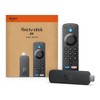
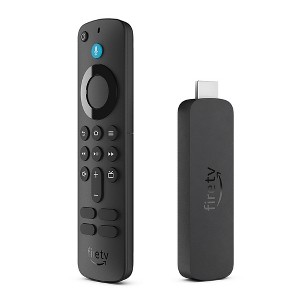
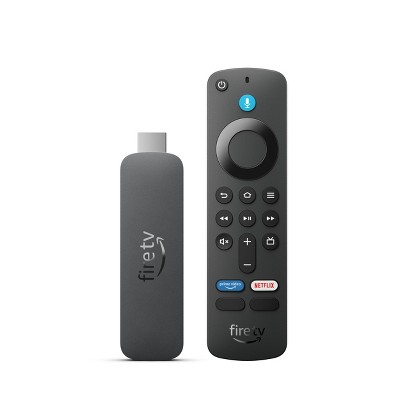
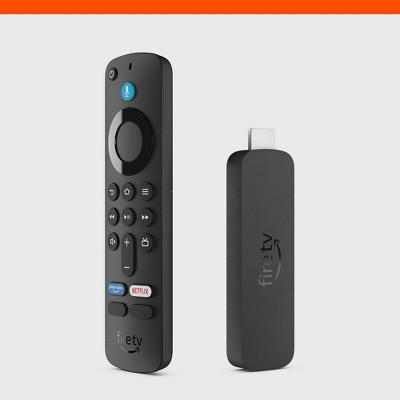
Amazon Fire TV Stick 4K (2024)
$49.99
Out of Stock

Free & easy returns
Return this item by mail or in store within 30 days for a full refund.
Find alternative
Eligible for registries and wish lists
About this item
Additional product information and recommendations
Frequently bought together
- $27.45 - $29.68Select items on sale

4.5 out of 5 stars with 330 reviews
ease of use: 4.69 out of 5
features: 4.54 out of 5
quality: 4.45 out of 5
value: 4.5 out of 5
78% would recommend
56 recommendations
3 out of 5 stars
Thumbs up graphic, would recommend
3 September, 2026Verified purchase
(no review title)
It works really good
1 out of 5 stars
Thumbs down graphic, would not recommend
23 July, 2026Verified purchase
Does not work
Does not work . I have to plug and unplug if I’m watching just 30 minutes of tv. It freezes up everyday. I gave up watching tv I will have to figure out something else
From Amazon Devices Customer Support team
Hi Sue, Thank you for sharing your experience, and we're truly sorry the Fire TV Stick 4K has been so frustrating. Having to unplug and replug your device every 30 minutes just to watch TV is completely unacceptable — we understand why you've given up, and you shouldn't have to deal with that. What you're describing — frequent freezing requiring a power cycle — is not normal behavior and could indicate a defective unit or a fixable software issue. Before you give up on it entirely, here are a few quick troubleshooting steps that may help: Unplug the device for 60 seconds (a full reset, not just a quick unplug) and reconnect Check for software updates: Settings > My Fire TV > About > Check for Updates Clear the cache: Settings > Applications > Manage Installed Applications > select the app that freezes > Clear Cache Try a different HDMI port or use the HDMI extender cable that came in the box — overheating from being plugged directly into the TV can cause freezing If none of these resolve the issue, your device may be defective and eligible for replacement. Please reach out to our support team at 1-888-280-4331 or through Amazon's online chat, and they can help get you a working unit. You deserve to enjoy your TV time without the hassle. Thank you for letting us know — your feedback helps us improve.
3 months ago
1 out of 5 stars
Thumbs down graphic, would not recommend
16 July, 2026Verified purchase
Maybe i got a Lemon
All my fire sticks still work I’ve purchased many over the years ..I don’t know what happen, but one year in the remote failed to work..and now everytime I turn off the TV I have to reset the fire stick to make it work. Also Alexa can’t see h anything in apps you have to be at the Home Screen to Alexa search
From Amazon Devices Customer Support team
Hello Ketogirl, Thank you for your feedback on the Fire TV Stick 4K. I appreciate your loyalty to the Fire TV product line over the years, and I am sorry to hear about the issues that have developed with your current device, particularly with the remote and the need to reset after powering off. Regarding the remote that stopped working, here are some steps that can help restore functionality. Remove the batteries from the remote, wait 30 seconds, then reinsert them and press and hold the Home button for 10 seconds to re-pair the remote with your Fire TV Stick. If the remote still does not respond, try using fresh batteries, as degraded battery power can cause intermittent connectivity loss between the remote and the device. For the issue of needing to reset the Fire TV Stick every time you turn off your TV, this is often related to the HDMI-CEC settings or power supply. To help resolve this, go to Settings > Display & Sounds > HDMI CEC Device Control and ensure it is enabled, which allows your TV and Fire Stick to communicate power states properly. Additionally, make sure your Fire TV Stick is plugged into a wall outlet using the included power adapter rather than a USB port on the TV, as TV USB ports often cut power when the TV is turned off, causing the device to lose its connection and require a restart. Regarding Alexa voice search within apps, the search functionality does vary depending on the app. Alexa's universal voice search works best from the Home Screen, where it can search across multiple supported apps simultaneously. Within individual apps, voice search capabilities depend on whether that app has integrated with Alexa's search feature. This is a known limitation, though Amazon continues to expand Alexa integration with more streaming apps over time. I hope this information helps and again thank you for your feedback. Have a great day.
3 months ago
1 out of 5 stars
25 May, 2026Verified purchase
Where is it
Never arrived
5 out of 5 stars
Thumbs down graphic, would not recommend
16 May, 2026Verified purchase
(no review title)
good job 👏
5 out of 5 stars
Thumbs up graphic, would recommend
21 April, 2026Verified purchase
Firestick
My picture clarity on my Tv is so much better with the Fire TV Stick 4 K !
5 out of 5 stars
27 March, 2026Verified purchase
(no review title)
I am enjoying my Firestick
1 out of 5 stars
Thumbs down graphic, would not recommend
26 March, 2026Verified purchase
(no review title)
It keeps cutting off
From Amazon Devices Customer Support team
Hello Brain! Thank you for sharing your experience with the Fire TV Stick 4K. I'm sorry to hear that your device keeps cutting off unexpectedly. This interruption can be incredibly frustrating when you're trying to enjoy your streaming content. The most common causes of a Fire TV Stick cutting off are power supply issues, overheating, or loose connections. Here are comprehensive troubleshooting steps to resolve this problem: Power Supply Solutions: The Fire TV Stick 4K requires a stable power source to function properly. Always use the original Amazon power adapter and USB cable that came with your device, as third-party adapters may not provide sufficient power. If possible, plug the power adapter directly into a wall outlet rather than using your TV's USB port, as TV USB ports often don't supply enough power for consistent operation. If you've been using your TV's USB port, this is likely the primary cause of the cutting off issue. Connection and Placement: Ensure the Fire TV Stick is firmly inserted into your TV's HDMI port. If the connection feels loose, try a different HDMI port on your television. Avoid placing the Fire TV Stick in enclosed spaces or directly behind your TV where heat can build up. The device needs adequate ventilation to prevent overheating, which can cause it to shut down automatically as a protective measure. If your Fire TV Stick is positioned in a tight space, consider using an HDMI extender cable (often included with the device) to position it away from heat sources and improve airflow. Device Restart and Reset: Unplug the Fire TV Stick from both the HDMI port and power source. Wait for at least 60 seconds to allow the device to fully power down and cool off. Then reconnect everything and power it back on. This simple restart often resolves temporary glitches causing the cutting off behavior. Check for Overheating: If the device feels hot to the touch, overheating is likely causing the shutdowns. Ensure there's proper ventilation around the device, move it away from other heat-generating electronics, and consider using a small USB-powered fan to improve airflow if the problem persists. Software Updates: Once your device is running stably, navigate to Settings > My Fire TV > About > Check for Updates to ensure you have the latest software, which often includes fixes for stability issues. If these steps don't resolve the cutting off issue and your Fire TV Stick 4K continues to shut down unexpectedly, there may be a hardware defect with the device itself. Amazon Customer Service is available 24/7 at 1-888-280-4331 to assist with further troubleshooting or discuss replacement options if your device is still under warranty. They can also verify whether your specific unit has any known issues and provide additional technical support tailored to your situation. The Fire TV Stick 4K is designed to deliver reliable 4K Ultra HD streaming with Dolby Vision and Dolby Atmos audio, and with the proper power supply and ventilation, it should operate continuously without interruption. Hope you have a great day!
7 months ago
5 out of 5 stars
12 March, 2026Verified purchase
Overpriced, works we
Overpriced for the basic model but works great, easy set up.
5 out of 5 stars
10 February, 2026Verified purchase
(no review title)
Quick ship
5 out of 5 stars
Thumbs up graphic, would recommend
26 January, 2026Verified purchase
(no review title)
great job I like it
5 out of 5 stars
4 January, 2026Verified purchase
(no review title)
Excellent
5 out of 5 stars
29 December, 2025Verified purchase
(no review title)
Extremely easy to connect. Instructions simple. Great service! Purchased for kitchen area, so I can cook/bake while watching a movie, etc.
5 out of 5 stars
Thumbs up graphic, would recommend
27 December, 2025Verified purchase
(no review title)
Great product
5 out of 5 stars
Thumbs up graphic, would recommend
15 December, 2025Verified purchase
White elephant
White elephant gift. I'm sure whoever gets it will love it.
5 out of 5 stars
Thumbs up graphic, would recommend
14 December, 2025Verified purchase
Go to Travel Accessory
Bought this for traveling - i like to watch my own shows while on vacation so this is part of my travel supplies. This is my second Fire Stick for this purpose and it works out perfectly! Set up is easy, just plug in, connect to internet and do a few updates and done. Simple menu and user friendly.
4 out of 5 stars
Thumbs up graphic, would recommend
9 December, 2025Verified purchase
(no review title)
Works as advertised
5 out of 5 stars
Thumbs up graphic, would recommend
9 December, 2025Verified purchase
(no review title)
Nice
5 out of 5 stars
Thumbs up graphic, would recommend
5 December, 2025Verified purchase
(no review title)
Great product
1 out of 5 stars
4 December, 2025Verified purchase
(no review title)
Never received
From Amazon Devices Customer Support team
Hi! Thank you for sharing your feedback. I'm sorry you never received your Fire TV Stick 4K. While I cannot address delivery issues, I want you to know what to expect once your device arrives. When you receive your Fire TV Stick 4K, ensure you have a strong Wi-Fi connection, the Alexa app downloaded, and plug the device directly into a wall outlet for optimal performance. For assistance with your delivery issue, Amazon Customer Support is available 24/7 at 1-888-280-4331. I appreciate you sharing your experience with us.
11 months ago