Target New ArrivalsGift Ideas for MomClothing, Shoes & AccessoriesHomeKitchen & DiningOutdoor Living & GardenFurnitureGroceryHousehold EssentialsBabyBeautyPersonal CareHealthWellnessLuggageSports & OutdoorsToysElectronicsVideo GamesMovies, Music & BooksSchool & Office SuppliesParty SuppliesGift IdeasGift CardsPetsUlta Beauty at TargetTarget OpticalDealsClearanceTarget New ArrivalsEasterWomen’s Western OutfitsHome Decor Ideas & TrendsTop DealsTarget Circle DealsWeekly AdShop Order PickupShop Same Day DeliveryRegistryRedCardTarget CircleFind Stores
HP DeskJet 4255e Wireless All-in-One Color Printer Scanner Copier with 3 Months Free Instant Ink (588S6A) - 2 of 4HP DeskJet 4255e Wireless All-in-One Color Printer Scanner Copier with 3 Months Free Instant Ink (588S6A) - 3 of 4HP DeskJet 4255e Wireless All-in-One Color Printer Scanner Copier with 3 Months Free Instant Ink (588S6A) - 4 of 4
HP DeskJet 4255e Wireless All-in-One Color Printer Scanner Copier with 3 Months Free Instant Ink (588S6A) - 1 of 4

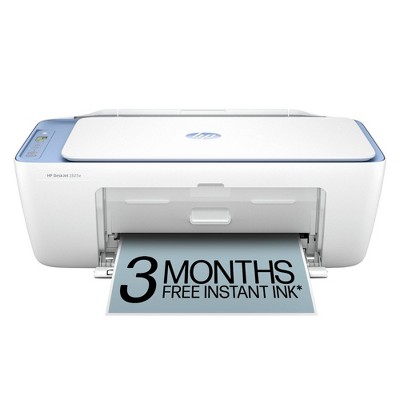
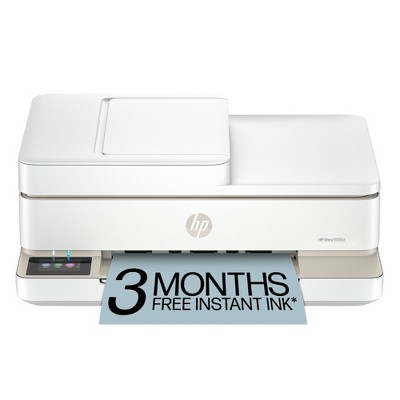
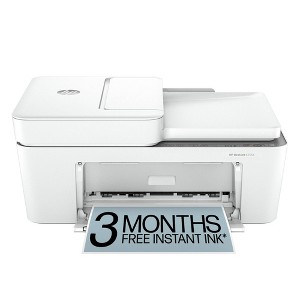
HP DeskJet 4255e Wireless All-in-One Color Printer Scanner Copier with 3 Months Free Instant Ink (588S6A)

$49.99 reg $109.99
Sale save $60.00 (55% off)

In Stock

Eligible for registries and wish lists

About this item

Highlights

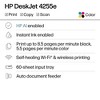
  • Best for home printing
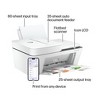
  • Print, scan, copy and fax on the go with HP Smart app
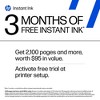
  • 3 months of free Instant Ink included + 1 bonus month for a limited time, with code: TAXTIME26
  • Built-in wireless with single band wifi
  • Easy mobile setup
  • Print up to 8.5 pages per minute (black), 5.5 pages per minute (color)
  • 35-sheet auto document feeder
  • USB 2.0

Description

The HP DeskJet 4255e delivers color printing, 60-sheet paper capacity, and an auto document feeder for easy scanning and copying. It also includes 3 months of free Instant Ink with HP+ activation at printer setup.

FROM AMERICA'S MOST TRUSTED PRINTER BRAND: The DeskJet 4255e is perfect for homes printing to-do lists, letters, financial documents and recipes. Print speeds up to 5.5 ppm color, 8.5 ppm black.

Bonus 1 Month of Instant Ink
Enter code "TAXTIME26" to get 1 bonus month in addition to the 3 months of free Instant Ink service already included with this printer.

KEY FEATURES: Color printing, copy, scan, auto document feeder, and a 60-sheet input tray

WIRELESS PRINTING: Stay connected with our most reliable Wi-Fi®, which automatically detects and resolves connection issues

HP APP: Print, scan, copy, or fax right from your smartphone with the easiest-to-use print app

3 MONTHS OF FREE INK when you activate HP+: Subscribe to Instant Ink delivery service to get ink delivered directly to your door before you run out. After 3 months, monthly fee applies unless cancelled, and you save up to 50%.

COMPACT DESIGN: Made to fit any home

ICON LCD: Print your basic documents with ease from the intuitive control panel

SUSTAINABLE DESIGN: Made with at least 60% recycled plastic

ENERGY STAR® AND EPEAT® CERTIFIED: Save energy with a printer that meets industry efficiency standards

DYNAMIC SECURITY: This printer is intended to work only with cartridges with original HP chips or circuitry and will block cartridges using non-HP chips or circuitry. Periodic firmware updates will maintain the effectiveness of these measures. More at www.hp.com/learn/ds.
Dimensions (Overall): 15.94 Inches (H) x 18.7 Inches (W) x 9.53 Inches (D)
Weight: 13.65 Pounds
B&W Print Speed: 8.5 Pages per Minute
Color Print Speed: 5.5 Pages per Minute
Electronics Condition: New
Electronics Features: Printer
Connection Type: USB
Maximum capacity: 60 Sheets
Operating System Compatibility: Microsoft Windows
Maximum Resolution: 1200 x 1200 (Black and White)
Wireless Technology: Wi-Fi
Printer Ink Color: Multiple Colors
Compatible With: Up to 8.5" x 14" Documents
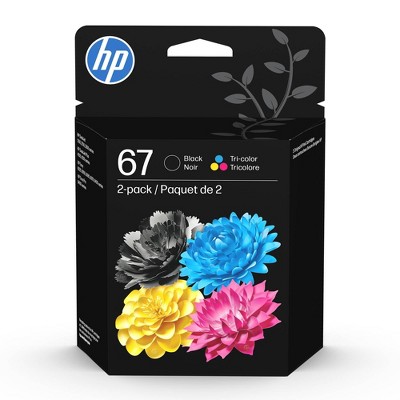
Ink Series: HP 67 series
Battery: No Battery Used
Warranty: 1 Year Limited Warranty. To obtain a copy of the manufacturer's or supplier's warranty for this item prior to purchasing the item, please call Target Guest Services at 1-800-591-3869
TCIN: 90895939
UPC: 196337380103
Item Number (DPCI): 056-03-0042
Origin: Imported
If the item details aren’t accurate or complete, we want to know about it.

Shipping details

Estimated ship dimensions: 18.6 inches length x 15.7 inches width x 9.5 inches height
Estimated ship weight: 14.25 pounds

Return details

This item can be returned to any Target store or Target.com.
This item must be returned within 30 days of the date it was purchased in store, delivered to the guest, delivered by a Shipt shopper, or picked up by the guest.
See the return policy for complete information.

Q: Is this printer an ink jet or laser printer? Can you print on vellum with this printer?

submitted by AH - 1 year ago
  • A: Can you just plug it in and it will start ? . I need something simple out the box . I need something just to strictly print with nothing else . I won’t be hooking up the printer to anything . Will this work ?

    submitted byJMarie - 10 days ago
  • A: Can you print an index card 3x5

    submitted byD - 1 year ago
  • A: Hello and thank you for asking. The HP DeskJet 4255e printer can print on ink jet rated vellum. There’s no guarantee that the printer will print on the vellum you choose or yield satisfactory results since HP can’t test every paper on every printer. You may need to use a carrier sheet to feed the vellum. We have successfully printed on 30 lb. (44 gm2) vellum paper with an HP OfficeJet Pro printer.

    submitted byHP Team - 1 year ago
    Brand expert
  • A: Hi AH, thanks for reaching out about HP DeskJet 4255e Wireless All-in-One Color Printer Scanner Copier with Instant Ink and HP+. The HP DeskJet 4255e is an inkjet printer. Printing on Vellum: While inkjet printers can generally print on a variety of paper types, including vellum, there are a few things to consider: Vellum Thickness: If the vellum is too thick, it may cause paper jams. Ink Absorption: Vellum may not absorb ink as well as regular paper, which could result in smudging or bleeding. Printer Compatibility: Some inkjet printers may not be designed to handle the thickness or texture of vellum. If you have any additional questions, we welcome you to contact MyTGTtech at 833-848-8324 every day, between 7am-11pm CST.

    submitted byJoe - 1 year ago
    Target staff support

Q: Can I use stencil paper on this printer? Like a thermal printer

submitted by Daved - 11 months ago
  • A: Hello and thank you for asking. The HP DeskJet 4255e printer is an ink jet printer. If you wish to print on stencil paper rated for use with an ink jet printer, and the paper is within the weight range of the printer, then you can use it to print on stencil paper. Please note the DeskJet 4255e printer is not compatible with thermal paper, as it does not use heat to print on such paper. It is also not capable of making an impression on the print, such as for use with carbon paper to make multiple copies, or on most transfer paper.

    submitted byHP Team - 11 months ago
    Brand expert
  • A: Hi Daved, thanks for reaching out about HP DeskJet 4255e Wireless All-in-One Color Printer Scanner Copier with Instant Ink and HP+ (588S6A) Stencil paper is not supported on this printer. If you have any additional questions, we welcome you to contact MyTGTtech at 833-848-8324 every day, between 7am-11pm CST.

    submitted byMike - 11 months ago
    Target expert support

Q: Is this like a dtf printer ? so that i can print and use a heat press for my t- shirts

submitted by Review - 1 year ago
  • A: Hello and thank you for asking. The HP DeskJet 4255e printer can print on iron-on transfer paper, which can then be applied to a t-shirt.

    submitted byHP Team - 1 year ago
    Brand expert
  • A: Hi Review, thanks for reaching out about HP DeskJet 4255e Wireless All-in-One Color Printer Scanner Copier with Instant Ink and HP+ (588S6A) You can use this printer to print designs for heat transfer onto shirts. Here's a summary of what you need for heat transfers with the HP DeskJet 4255e: HP DeskJet 4255e printer Inkjet heat transfer paper Heat press T-shirt or other fabric If you have any additional questions, we welcome you to contact MyTGTtech at 833-848-8324 every day, between 7am-11pm CST.

    submitted byMike - 1 year ago
    Target expert support

Q: Would I be able to print out designs and use a heat press to add it on a shirt?

submitted by Review - 1 year ago
  • A: Hi Review, thanks for reaching out about HP DeskJet 4255e Wireless All-in-One Color Printer Scanner Copier with Instant Ink and HP+ (588S6A) Yes, you can use this printer to print designs for heat transfer onto shirts.Here's a summary of what you need for heat transfers with the HP DeskJet 4255e: HP DeskJet 4255e printer Inkjet heat transfer paper Heat press T-shirt or other fabric If you have any additional questions, we welcome you to contact MyTGTtech at 833-848-8324 every day, between 7am-11pm CST.

    submitted byMike - 1 year ago
    Target expert support
  • A: Hello and thank you for asking. The HP DeskJet 4255e printer can print on iron-on transfer paper, which can then be applied to a t-shirt.

    submitted byHP Team - 1 year ago
    Brand expert

Q: can it copy more than one at a time?

submitted by misskjf - 2 years ago
  • A: Hi there. Thank you for your question! The HP Deskjet 4255e does feature an auto document feeder on top which can be used to copy or scan multiple pages consecutively, automatically. The auto document feeder can hold up to 35 sheets. If your question was referring to the ability to make multiple copies of a single document, you do also have the ability to do that.

    submitted byHP Team - 2 years ago
    Brand expert
  • A: Hello and thank you for asking. The HP DeskJet 4255e printer has an automatic document feeder on top of the printer that lets you copy or scan multiple page documents easily.

    submitted byHP Team - 2 years ago
    Brand expert

Q: Does it come with ink when you order the printer?

submitted by Mamaof4 - 2 years ago
  • A: Yes, it comes with ink.

    submitted byMomshopper - 2 years ago
  • A: Thank you for your question. Yes, the HP Deskjet 4255e printer comes with the 67 setup ink cartridges.

    submitted byHP Team - 2 years ago
    Brand expert

Q: Does it work with Apple computers? Specifically Sonoma 14.5?

submitted by Lil Lady - 2 years ago
  • A: Hi Lil Lady, thanks for reaching out about HP DeskJet 4255e Wireless All-in-One Color Printer, Scanner, Copier - White Yes, this printer does work on Mac Operating Systems. The HP Smart printing app Requires macOS 10.14 or later. If you have any additional questions, we welcome you to contact MyTGTtech at 833-848-8324 every day, between 7am-11pm CST.

    submitted byMike - 2 years ago
    Target expert support
  • A: Hi, thanks for your question! The HP DeskJet 4255e can work with any Apple computer running MacOS Sonoma 14.5.

    submitted byHP Team - 2 years ago
    Brand expert

Q: What USB printer cable is needed?

submitted by MJ - 2 years ago
  • A: Thanks for your question. You can connect the HP DeskJet 4255e All-in-One printer to your computer with the USB A to B 2.0 cable. If you don't have one, you need to purchase one.

    submitted byHP Team - 2 years ago
    Brand expert

Q: Print double sided automatically?

submitted by Qt - 2 years ago
  • A: Hi. Thanks for your question. The Deskjet 4255e doesn't print duplex automatically. You'll need to flip each page over manually to get it to print on the back side of the paper.

    submitted byHP Team - 2 years ago
    Brand expert

Q: can it scan more than 1 page at a time

submitted by minj - 2 months ago
  • A: Yes, the HP DeskJet 4255e can scan more than one page at a time. It features a 35-sheet Automatic Document Feeder (ADF) on top, allowing for the scanning or copying of multi-page documents automatically.

    submitted byMatt - 2 months ago
    Target expert support
  • A: Hi, thank you for reaching out about HP DeskJet 4255e Wireless All-in-One Color Printer Scanner Copier with 3 Months Free Instant Ink (588S6A). Yes, the HP DeskJet 4255e can scan more than one page at a time. It features a 35-sheet Automatic Document Feeder (ADF) on top, allowing for the scanning or copying of multi-page documents automatically. If you have any additional questions, we welcome you to contact MyTGTtech at 833-848-8324 every day, between 7am-11pm CST.

    submitted byMatt - 2 months ago
    Target expert support

Additional product information and recommendations

Guests are saying

The HP DeskJet 4255e is a versatile all-in-one printer that excels in printing, scanning, and copying, making it ideal for home and small office use. Guests appreciate its compact design, ease of setup, and the convenience of wireless printing from multiple devices. However, some have experienced issues with connectivity and paper jams, particularly with the document feeder. Overall, it offers good print quality and is a great choice for those needing a reliable printer for everyday tasks.
    Summary created by AI from text of reviews reflecting recent feedback provided across different star ratings (includes incentivized reviews)
    3.6 out of 5 stars with 632 reviews
    quality: 2.14 out of 5
    value: 2.16 out of 5
    32% would recommend
    158 recommendations
    1 out of 5 stars
    Thumbs down graphic, would not recommend
    7 April, 2026Verified purchase

    Worthless Offer from HP. A trouble printer.

    A complicated printer. Does not print in both sides automatically, you should do it by hand. Problems with wireless connection and I never a have a color priting even I put the color ink. Worthless. Cheaper? yes
    Nella
    quality: 1 out of 5
    value: 1 out of 5
    Did you find this review helpful?
    1 out of 5 stars
    Thumbs down graphic, would not recommend
    5 April, 2026Verified purchase

    Dont waste your money

    If i could rate this printer a 0 stars I would. The worst printer I’ve ever encountered. Don’t waste your money even the sale price doesn’t make it worth it and to think they’re originally charging someone $100 for this crap when it’s not on sale. They need to be in jail
    Antoinette
    quality: 1 out of 5
    value: 1 out of 5
    Did you find this review helpful?
    1 out of 5 stars
    Thumbs down graphic, would not recommend
    4 April, 2026

    Didn't last and ink is bad

    If I could rate it 0 stars I would. Worst printer ever and it has never worked when I needed it to. Power button will flash but it never turns on. DO NOT BUY!!!!
    Cattledog1555
    quality: 1 out of 5
    value: 1 out of 5
    Did you find this review helpful?
    1 out of 5 stars
    Thumbs down graphic, would not recommend
    4 April, 2026Verified purchase

    (no review title)

    This is the worst printer I’ve ever had. Setting it up took about 6 hours. It kept failing and crashing and freezing. Tried on the entire family’s phones, computers, laptops and it was just a nightmare. Printed 10 pages beautifully before it started to refuse to connect again and it’s been a problem ever since every time we go to print something. This experience has been so terrible, we’re not buying another HP printer. This is a $110 machine, there’s no reason for it to act like it’s 10 years old. I read other people’s reviews of the same issue and assumed it would be fine for us but it seems like it’s every printer. Everything about this printer is faulty. Don’t waste your time or money buying it.
    m
    quality: 1 out of 5
    value: 1 out of 5
    Did you find this review helpful?
    1 out of 5 stars
    4 April, 2026

    Run away, HP is now the worst

    Do not buy this printer, cheap, but really frustrating. I was always an HP buyer, Upper Management has destroyed this company. They force you to buy their ink for 3X the price. Should get quality then right? Nothing but connection issues and frustration. They are now trash, don't be fooled by the low price of this one. Windows 11 doen't connect.
    George
    quality: 2 out of 5
    value: 1 out of 5
    Did you find this review helpful?
    1 out of 5 stars
    Thumbs down graphic, would not recommend
    2 April, 2026

    (no review title)

    The printer was low on ink and was dirty and filled with hair and had no instructions
    Jocelyn
    quality: 1 out of 5
    value: 1 out of 5
    Did you find this review helpful?
    5 out of 5 stars
    1 April, 2026Verified purchase

    (no review title)

    As described
    Mike
    Did you find this review helpful?
    1 out of 5 stars
    1 April, 2026Verified purchase

    (no review title)

    Not good !! Waste of $$$
    ROCIO
    1 guest found this review helpful. Did you?
    5 out of 5 stars
    31 March, 2026Verified purchase

    (no review title)

    Great price and quality printing
    Karen
    quality: 5 out of 5
    value: 5 out of 5
    Did you find this review helpful?
    5 out of 5 stars
    Thumbs down graphic, would not recommend
    29 March, 2026Verified purchase

    (no review title)

    Ease of setup, Detailed-easy to read manual.
    A
    Did you find this review helpful?
    1 out of 5 stars
    Thumbs down graphic, would not recommend
    27 March, 2026Verified purchase

    (no review title)

    Target promised next day delivery and delivered 2 days and I needed to us this product ASAP so I bought at Staples and will be returning this product....such a waster bad marketing by Target and I lose my $5 ins coverage...i wont be back there for a long time
    jim
    quality: 1 out of 5
    value: 1 out of 5
    1 guest found this review helpful. Did you?
    5 out of 5 stars
    24 March, 2026Verified purchase

    (no review title)

    I need to get new inks
    John
    Did you find this review helpful?
    1 out of 5 stars
    Thumbs down graphic, would not recommend
    23 March, 2026

    Not very functional

    Ink goes far, but you cannot print very many pages at a time and you must use the hp app for everything
    Stacey
    2 guests found this review helpful. Did you?
    5 out of 5 stars
    Thumbs up graphic, would recommend
    23 March, 2026Verified purchase

    functional and cheap

    what a steal
    Dena
    quality: 5 out of 5
    value: 5 out of 5
    1 guest found this review helpful. Did you?
    1 out of 5 stars
    23 March, 2026
    originally posted on hp.com
    Image

    The Worst HP experience yet!!!

    It is very difficult to connect it to my wifi!!!
    M. Wright
    Did you find this review helpful?
    5 out of 5 stars
    Thumbs up graphic, would recommend
    22 March, 2026Verified purchase

    (no review title)

    Thank you so much for the quick delivery. The printer is just what I needed
    Marilyn
    quality: 5 out of 5
    value: 5 out of 5
    2 guests found this review helpful. Did you?
    1 out of 5 stars
    Thumbs down graphic, would not recommend
    22 March, 2026Verified purchase

    Dont waste your time

    I genuinely cannot believe how bad this printer is. It disconnects from WiFi constantly for absolutely no reason, like it just decides it’s done being a printer for the day. I’m lucky if it prints 1 out of every 10 attempts, and when it does actually work, it moves at a pace that feels borderline offensive. Printing something as simple as a single page turns into a 10 minute ordeal of reconnecting, restarting, repeat. It has taken something that should be effortless and turned it into one of the most frustrating experiences in my house. At this point, the only thing stopping me from drop kicking it into the street is the fact that I’d have to deal with reconnecting to WiFi again just to print the return label. Avoid at all costs.
    Billy
    quality: 1 out of 5
    value: 1 out of 5
    2 guests found this review helpful. Did you?
    4 out of 5 stars
    22 March, 2026Verified purchase

    (no review title)

    I jus can't get it to print off my emails it keep saying error on my computer
    Laquette
    Did you find this review helpful?
    5 out of 5 stars
    22 March, 2026
    originally posted on hp.com
    Image

    Worth the money for routine printing.

    Great basic printer.
    RudieR
    Did you find this review helpful?
    5 out of 5 stars
    Thumbs up graphic, would recommend
    17 March, 2026Verified purchase

    HP Printer

    great price and it came a day earlier that expected!
    Cathy
    quality: 5 out of 5
    value: 5 out of 5
    Did you find this review helpful?

    Get top deals, latest trends, and more.

    Privacy policy

    Footer

    About Us

    About TargetCareersNews & BlogTarget BrandsBullseye ShopSustainability & GovernancePress CenterAdvertise with UsInvestorsAffiliates & PartnersSuppliersTargetPlus

    Help

    Target HelpReturnsTrack OrdersRecallsContact UsFeedbackAccessibilitySecurity & FraudTeam Member ServicesLegal & Privacy

    Stores

    Find a StoreClinicPharmacyTarget OpticalMore In-Store Services

    Services

    Target Circle™Target Circle™ CardTarget Circle 360™Target AppRegistrySame Day DeliveryOrder PickupDrive UpFree 2-Day ShippingShipping & DeliveryMore Services
    PinterestFacebookInstagramXYoutubeTiktokTermsCA Supply ChainPrivacy PolicyCA Privacy RightsYour Privacy ChoicesInterest Based AdsHealth Privacy Policy