Sponsored
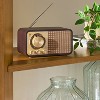
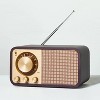
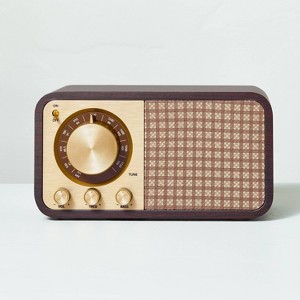
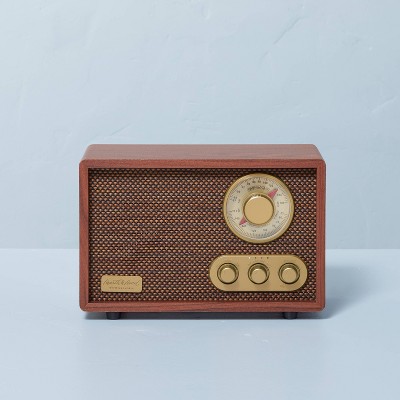
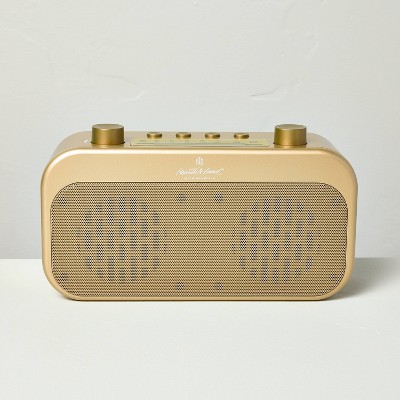
Small Wood Finish with Brass Retro Radio - Hearth & Hand™ with Magnolia
In Stock
At a glance
Sponsored
About this item
Highlights
- Small AM/FM Bluetooth Radio
- Retro style in wood finish and brass
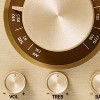
- Manual tuner controls for volume, tone and frequencies
- Charging cable and audio cable
- Connection type — USB-C
- AUX, Bluetooth, mic input and HDMI electronic features
- Requires 1 non-universal lithium ion battery (included)
Description
Hearth & Hand™ with Magnolia: Gather • Create • Enjoy
Shipping details
Return details
Q: I see this comes with a battery but also has a charging cable. How exactly does the radio charge? Will it need continuous battery replacements?
A: Hello RadioHead, Thank you for reaching out. We are the manufacturer and wanted to add a little more information to the retailer answer you already received. This Hearth & Hand Brass Retro Radio come with a single Built-In Battery: 3.7V DC, 1200mAh. This is a rechargeable battery that need to be hooked up to a Power Input: 5V- 1A charging block using the USC-C charging cable that is included. A full charge usually takes about 3 hours. Obviously the length of time between charges will depend on the amount of use, which is why there was no definite length of time named in the user manual. I know that in my personal experience with a similar Hearth & Hand with Magnolia radio a full charge lasts about 6 weeks, but I only use this radio for a few hours 1-3 times a week. Our Engineering Team stated that in their testing they found that if the radio is not turned on at all, then the battery charge will last about 8 months. However for playing sound, since each user's habits are different, the team based their testing on playing pink noise continuously with the volume set to 50%, and the charge lasted about 8 hours. We hope this additional information helps. Thank you! And have a great week!
submitted byTT Innovation - 18 days agoBrand expertA: Hey RadioHead - Thank you for your interest in this radio. Classy choice! This radio includes 1 Non-Universal Lithium Ion which can be recharged using the USB-C charging cable which is also included. Hope this helps! - Josh
submitted byJosh - 21 days agoTarget staff support
Q: Are the treble and bass knobs supposed to actually work? Mine do nothing when I turn them. This is very poor. I left a good review before noticing this. Now I am sorry I did.
A: Hello spider702, Thank you for reaching out! I represent the manufacturer of this radio and have confirmed with our Product Engineering Dept. that yes, the treble and bass EQ knobs do function, but only in BT (Bluetooth) and AUX modes. They are unable to function in FM/AM mode. We hope this information helps. If you need further assistance please email us directly at support@ttinno.com. Thank you!
submitted byTT Innovation - 3 months agoBrand expertA: Hi, Spider702 - Thanks for asking! The functioning controls on the radio are the power/volume knob and the tuning dial. Manual tuner controls for volume, tone and frequencies. To get further assistance with this issue, we kindly request you to reach out to our phone specialist team at 1-800-591-3869 during the business hours between 7 AM CST to 8 PM CST. Have a great day! - Rob
submitted byRyan - 3 months agoTarget staff support
Q: Every couple of minutes the song I am playing stops and it makes a loud beeping noise. I’ve tried plugging it in in case charge is the problem but it keeps happening. Please help
A: Hello ary099, We’re very sorry to hear about the issue you’re experiencing. First, please try switching the radio to AUX or AM/FM mode to see if the beeping only occurs in Bluetooth mode—this will help determine whether the issue is related to the Bluetooth connection. If the beeping happens only when using Bluetooth, please try playing music from a different audio source device (such as another phone or tablet) to see if the problem continues. It’s great that you’ve already tried charging the radio, as having a full battery is important to eliminate any power-related interruptions. If the issue persists after these steps, please contact us directly through our Tech Support Team at support@ttinno.com so we can assist further and make this right for you. We hope this information helps! Thank you again, and have a fabulous week!
submitted byTT Innovation - 1 month agoBrand expert
Q: Is there a way to turn Bluetooth off on this radio? So that there is no signal attempting to connect? I’m trying to limit the amount of wireless products in my house.
A: Hello KS, Yes—you can disable Bluetooth by pressing the Mode button to switch the radio to FM, AM, or AUX mode. In any of these modes, Bluetooth is inactive and no wireless signal is transmitted. If the radio is left in Bluetooth mode without connecting to a device, it will automatically stop broadcasting after about 30 seconds. You can also press and hold the Mode button for 2 seconds to unpair any connected device or prevent it from reconnecting. Additionally, you can always toggle the power switch to turn the radio off completely, and when powered off, the Bluetooth function is fully disabled and no signal is being sent. We hope this information helps! If you need further assistance please reach out to our Tech Support Team at support@ttinno.com. Thank you again and have a fabulous week!
submitted byTT Innovation - 1 month agoBrand expert
Q: How do you switch this radio to am/fm. I only seem to be able to use Bluetooth.
A: Hello R, Thank you for reaching out! Bluetooth Mode is the default mode when you turn this radio on. To switch out of default mode and between the other modes find the button labeled "M" on the back of the radio and press it one push at a time (do not hold) until you reach FM Mode. Then use the FM/AM tuning control knob on the front of the radio to select the desired radio station. Make sure the telescopic antenna is fully extended and rotate it to find the best reception for your desired channel. The step by step instructions for this process can also be found in the user manual that came with the radio, but if you do not have it feel free to email our Tech Support Team at support@ttinno.com to receive a PDF version via email. Thank you!
submitted byTT Innovation - 4 months agoBrand expert
Q: Is this a speaker that you can play say, Spotify through?
A: Hello Justaskin, Thank you for reaching out! Yes, this beautiful Hearth & Hand Brass Retro Radio has Bluetooth capabilities. Meaning that you can connect your smart phone or tablet to the radio and then play Spotify or any other media app through the speaker on the radio. We hope this information helps! If you need further assistance please reach out to our Tech Support Team at support@ttinno.com. Thank you again and have a fabulous day!
submitted byTT Innovation - 5 months agoBrand expert
This product is featured in a recent Target Finds story

Frequently bought together
Guests also viewed
Discover more options