

New ArrivalsEasterClothing, Shoes & AccessoriesHomeKitchen & DiningOutdoor Living & GardenFurnitureGroceryHousehold EssentialsBabyBeautyPersonal CareHealthWellnessBackpacks & LuggageSports & OutdoorsToysElectronicsVideo GamesMovies, Music & BooksSchool & Office SuppliesParty SuppliesGift IdeasGift CardsPetsUlta Beauty at TargetShop by CommunityTarget OpticalDealsClearanceTarget New ArrivalsHome Decor Ideas & TrendsTop DealsTarget Circle DealsWeekly AdShop Order PickupShop Same Day DeliveryRegistryRedCardTarget CircleFind Stores
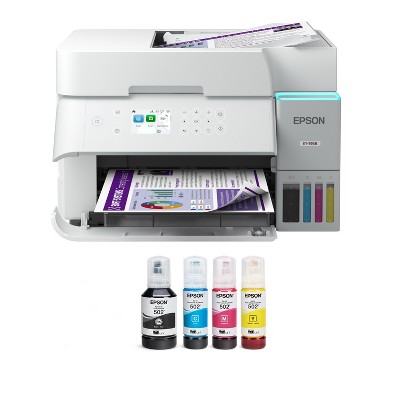
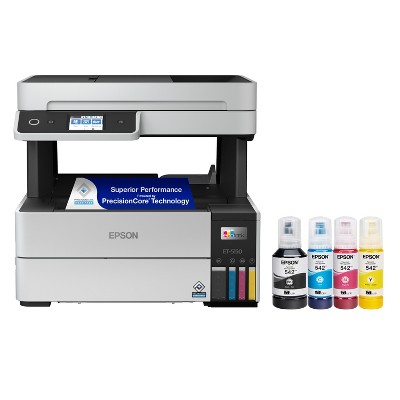
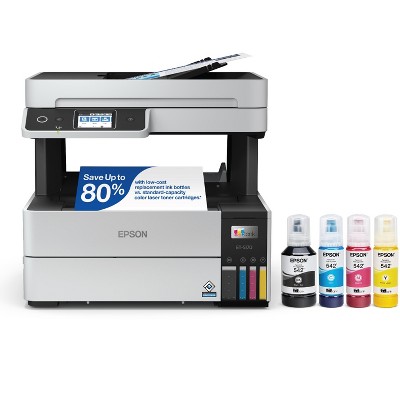
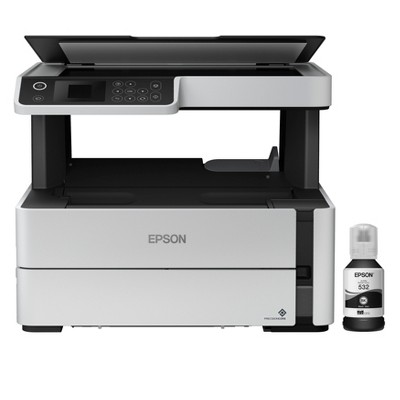
Refurbished: Epson EcoTank ET-3850 Wireless Color All-in-One Cartridge-Free Supertank Printer - Manufacturer Refurbished - 2 of 4Refurbished: Epson EcoTank ET-3850 Wireless Color All-in-One Cartridge-Free Supertank Printer - Manufacturer Refurbished - 3 of 4Refurbished: Epson EcoTank ET-3850 Wireless Color All-in-One Cartridge-Free Supertank Printer - Manufacturer Refurbished - 4 of 4
Refurbished: Epson EcoTank ET-3850 Wireless Color All-in-One Cartridge-Free Supertank Printer - Manufacturer Refurbished - 1 of 4

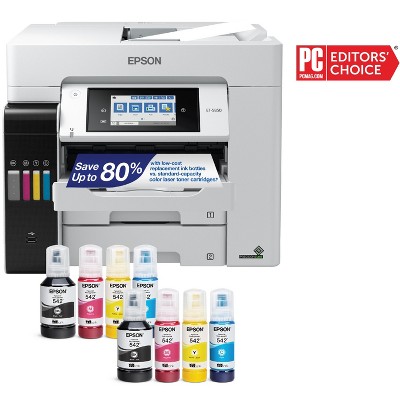
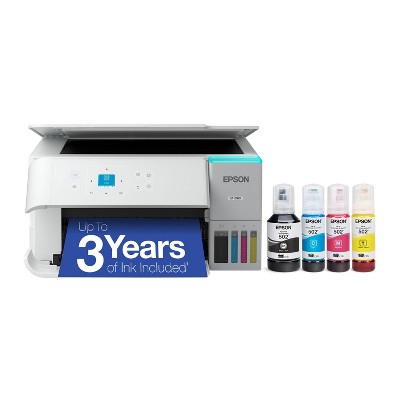
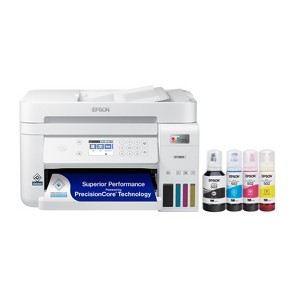
Refurbished: Epson EcoTank ET-3850 Wireless Color All-in-One Cartridge-Free Supertank Printer - Manufacturer Refurbished

$159.99 reg $199.99
Sale save $40.00 (20% off)

In Stock

Sold & shipped by Epson
Eligible for registries and wish lists

About this item

Highlights

  • Innovative Cartridge-Free Printing ― No more tiny, expensive ink cartridges; each ink bottle set is equivalent to about 80 individual cartridges
  • Dramatic Savings on Replacement Ink ― Save up to 90% with replacement ink bottles vs. ink cartridges – that’s enough to print up to 7,500 pages black/6,000 color
  • Stress-Free Printing — Up to 2 years of ink in the box – and with every replacement ink set – for fewer out of ink frustrations
  • High-Capacity Ink Tanks – Epson’s exclusive EcoFit ink bottles make filling easy and worry-free
  • Zero Cartridge Waste – By using an EcoTank printer, you can help reduce the amount of cartridge waste ending up in landfills
  • Impressive Print Quality ― Unique PrecisionCore Heat-Free technology and pigment black ink produce extremely sharp text – plus impressive color photos and graphics – on virtually any paper type
  • Robust Paper Handling ― Auto Document Feeder, paper-saving auto 2-sided printing and a 250-sheet paper tray for high productivity
  • Built-In Scanner & Copier ― High-resolution flatbed scanner and a 2.4" color display for easy document copying and navigation
  • Modern Connectivity ― Features Ethernet and wireless, plus hands-free voice-activated printing. Easily print from your smart device with the intuitive Epson Smart Panel app
  • Use Genuine Epson Ink ― For optimal print quality and performance. Non-genuine ink could cause damage not covered by the printer’s limited warranty

Description

Your busy office needs a printer that’s fast, affordable, easy to use, and has great features. That’s why we developed the EcoTank ET-3850 – an innovative cartridge-free solution that uses high-capacity, easily refillable ink tanks. So you’ll worry less about running out of ink, and save a lot on replacement ink. The ET-3850 features an auto document feeder, fast printing with outstanding print quality, productive paper handling, a high-resolution flatbed scanner, and a large color display – making it the perfect printer for your home office.
Dimensions (Overall): 9.1 inches (H) x 14.8 inches (W) x 13.7 inches (D)
Weight: 16.1 pounds
B&W Print Speed: 15.5 pages per minute
Color Print Speed: 15.5 pages per minute
Electronics Condition: New
Connection Type: USB-A
Compatible With: Up to 8.5" x 14" Documents
Maximum Resolution: 4800 x 1200 (Color)
Wireless Technology: Wi-Fi, Apple AirPrint
Printer Ink Color: Multiple Colors
Model name: C11CJ61201-N
Ink Series: Epson T502 series
Battery: No Battery Used
Warranty: 1 Year Limited Warranty. To obtain a copy of the manufacturer's or supplier's warranty for this item prior to purchasing the item, please call Target Guest Services at 1-800-591-3869
TCIN: 1002298809
UPC: 010343967601
Origin: imported
The above item details were provided by the Target Plus™ Partner. Target does not represent or warrant that this information is accurate or complete. On occasion, manufacturers may modify their items and update their labels.
We recommend that you do not rely solely on the information presented. If you have a specific question about this item, you may consult the item's label, contact the manufacturer directly or call Target Guest Services at 1-800-591-3869.
If the item details aren’t accurate or complete, we want to know about it.

Shipping details

Estimated ship dimensions: 19.9 inches length x 16 inches width x 12.2 inches height
Estimated ship weight: 19.1 pounds
item ships from third party seller: Epson

Return details

This item can be returned to any Target store or Target.com.
This item must be returned within 30 days of the date it was purchased in store, delivered to the guest, delivered by a Shipt shopper, or picked up by the guest.
See the return policy for complete information.

Q: Ink Bottles - does this come with new / full ink bottles or used?

submitted by ND - 2 months ago
  • A: Hi, thank you for reaching out about Refurbished: Epson EcoTank ET-3850 Wireless Color All-in-One Cartridge-Free Supertank Printer - Manufacturer Refurbished. Manufacturer-refurbished Epson EcoTank ET-3850 printers typically include a new, full set of Epson 502 ink bottles in the box, designed to provide the same initial yield as a new unit—enough ink to last for up to 2 years. If you have any additional questions, we welcome you to contact MyTGTtech at 833-848-8324 every day, between 7am-11pm CST.

    submitted byMatt - 2 months ago
    Target expert support

Q: What's is the warranty on this item

submitted by Warranty - 4 months ago
  • A: Hi, thanks for reaching out about Refurbished: Epson EcoTank ET-3850 Wireless Color All-in-One Cartridge-Free Supertank Printer - Manufacturer Refurbished. 1 Year Limited Warranty. To obtain a copy of the manufacturer's or supplier's warranty for this item prior to purchasing the item, please call Target Guest Services at 1-800-591-3869 If you have any additional questions, we welcome you to contact MyTGTtech at 833-848-8324 every day, between 7am-11pm CST.

    submitted byJoe - 4 months ago
    Target staff support

Q: Does this printer come with a usb to connect to a laptop?

submitted by Katelyn - 6 months ago
  • A: Hi, thanks for reaching out about the Refurbished: Epson EcoTank ET-3850 Wireless Color All-in-One Cartridge-Free Supertank Printer - Manufacturer Refurbished No, the Epson EcoTank ET-3850 (both new and refurbished models) does not come with a USB cable in the box. If you have any additional questions, we welcome you to contact MyTGTtech at 833-848-8324 every day between 7 am and 11 pm CST.

    submitted byRena - 6 months ago
    Target expert support

Q: Does it print double sided automatically?

submitted by Jay - 8 months ago
  • A: Hi, thanks for reaching out about Epson EcoTank ET-3850 Wireless Color All-in-One Cartridge-Free Supertank Printer (Refurbished) Yes, the Epson EcoTank ET-3850 supports automatic duplex printing, meaning it can print on both sides of a page without manual intervention. This feature helps save paper and is a standard function of this all-in-one printer. If you have any additional questions, we welcome you to contact MyTGTtech at 833-848-8324 every day, between 7am-11pm CST.

    submitted byJustin - 8 months ago
    Target expert support

Q: Is the ink tank new? If not is the ink tank cleaned thoroughly?

submitted by BBujold - 8 months ago
  • A: Hi BBujold, thanks for reaching out about the Epson EcoTank ET-3850 Wireless Color All-in-One Cartridge-Free Supertank Printer (Refurbished) A refurbished Epson EcoTank ET-3850 printer, the ink tanks are typically not "new" in the sense of being freshly manufactured and never used. However, a reputable refurbisher, especially Epson itself through its "Certified ReNew" program, will ensure the printer is brought back to "like-new" quality standards. If you have any additional questions, we welcome you to contact MyTGTtech at 833-848-8324 every day between 7 am and 11 pm CST.

    submitted byRena - 8 months ago
    Target expert support

Q: Who refurbished this printer?

submitted by Catemie - 10 months ago
  • A: Hi Catemie, thanks for reaching out about Epson EcoTank ET-3850 Wireless Color All-in-One Cartridge-Free Supertank Printer (Refurbished) This item is a manufacturer-refurbished product. It has been inspected, cleaned, and repaired to meet manufacturer specifications and is in excellent condition. The refurbishment process includes functionality testing, basic cleaning, inspection, and repackaging. The product ships in a generic box. Only select sellers who maintain a high-performance bar may offer manufacturer-refurbished products on Target.com. If you have any additional questions, we welcome you to contact MyTGTtech at 833-848-8324 every day, between 7am-11pm CST.

    submitted byMike - 10 months ago
    Target expert support

Q: Does it come with ink

submitted by K80 - 11 months ago
  • A: Hi K80, thanks for reaching out about Epson EcoTank ET-3850 Wireless Color All-in-One Cartridge-Free Supertank Printer (Refurbished) Yes, this printer includes four Epson 502 Ink Bottles in the box. That includes Cyan, Magenta, Yellow, and Black. If you have any additional questions, we welcome you to contact MyTGTtech at 833-848-8324 every day, between 7am-11pm CST.

    submitted byMike - 11 months ago
    Target expert support

Q: What is the problem with the printer why are they selling more cheaper?

submitted by Sh - 1 year ago
  • A: Hi Sh, thanks for reaching out about the Epson EcoTank ET-3850 Wireless Color All-in-One Cartridge-Free Supertank Printer (Refurbished) To better understand your individual needs, we welcome you to contact MyTGTtech at 833-848-8324 every day, between 7 am-11 pm CST.

    submitted byRena - 1 year ago
    Target expert support

Q: What does refurbished mean when it comes to printers?! Will the ink tank be used or new ones?

submitted by Faithmekenzie - 1 year ago
  • A: Hi Faithmekenzie, thanks for reaching out about the Epson EcoTank ET-3850 Wireless Color All-in-One Cartridge-Free Supertank Printer (Refurbished) Refurbished products undergo rigorous testing and inspection to ensure they meet the highest standards of quality and works and looks just like new. If you have any additional questions, we welcome you to contact MyTGTtech at 833-848-8324 every day, between 7 am-11 pm CST.

    submitted byRena - 1 year ago
    Target expert support

Additional product information and recommendations

3.9 out of 5 stars with 75 reviews
quality: 5 out of 5
value: 4.67 out of 5
75% would recommend
4 recommendations
1 out of 5 stars
2 March, 2026
originally posted on epson.com

Image

Leaking Ink Tank

Tried to save money and that was a mistake. set the printer up, filled the ink tanks, and one tank drained immediately. Left the machine alone while software was downloading and came back to a desk full of ink.
1 reply from The Epson Team team - 25 days ago
Hi Franz, we're sorry for the disappointing experience you had with your Epson printer. Your ET-3850 includes free technical support for the life of your product. Please give us the opportunity to assist you by calling our Epson Advanced Support Team. We can be reached at 1-800-241-5794; Hours: Monday – Friday, 7 a.m. – 4.p.m. PT. We're here to help. Sincerely, Joseph – The Epson Team.
Franz
Did you find this review helpful?
4 out of 5 stars
28 February, 2026
originally posted on epson.com
Image

Buy a certified renew printer. You will not be disappointed.

I originally had a 3850 eco tank printer. The inks did not work properly, especially yellow. I tried to get rid of any air bubbles but that didn’t work. Instead, whatever I printed turned out to be blue. I decided to get a certified renew 3850 printer. The price was very good and I am most pleased with the printer. It works just as good as the original one.
Martha Shirai
Did you find this review helpful?
5 out of 5 stars
27 February, 2026
originally posted on epson.com
Image

Committed to the ET Printer Family of printers

Just purchased this printer, after having a prior model for five years and 25,000 printed pages, which thought was a very good life. Hope this one works as well for the long term!
PaulBr
Did you find this review helpful?
1 out of 5 stars
24 February, 2026
originally posted on epson.com
Image

RUN AWAY! Today's Epson, is NOT yesterday's Epson. TRASH!!!!

I've worked for Fortune 500 companies as an Administrative Assistant and as a Receptionist, using high-end equipment. Epson USED TO BE A RELIABLE BRAND. But NOT ANYMORE. DON'T BE HEARTBROKEN BY BUYING FROM THIS COMPANY. I bought 2 printers and only used the first one. It's been ONE NIGHTMARE after another and a complete WASTE OF MONEY! Even after the set up, updates and firmware installations, just getting 1 page to print successfully, without me having to run to the printer to fix some "ERROR" is impossible. I spent hundreds on basically a heavy PAPERWEIGHT! I'm pretty good with technical issues. Nonetheless, EVERY option presents another error and nothing is consistent except that I know that there will be an error. VERY INEFFICIENT MACHINE. Not excited about using the 2nd one. I only bought 2 in order to have all the options (including 11"x17" paper printing and traditional faxing). Epson should just go out of business.
1 reply from Epson Service team - 1 month ago
Hi DISSATISFIED2025, we are sorry to hear about the disappointing experience you've encountered with our Customer Support team. Epson takes into consideration all feedback to improve the performance, quality, and support of our products. We will forward your feedback to the relevant department. If the issue still persists, you may reach out directly to our Advanced Epson Support Team at 1-800-241-5794. We appreciate your time and we look forward to your call. Kind Regards, Jacob – The Epson Team.
DISSATISFIED2025
Did you find this review helpful?
5 out of 5 stars
21 February, 2026
originally posted on epson.com
Image

Perfect size, great options and ink supply.

Was worried it was going to be too large for space, but fits perfectly. Nice to know ink supply. Bonus to have copier and scanner also. Replaced older Epson.
Fax BJS
Did you find this review helpful?
5 out of 5 stars
18 February, 2026
originally posted on epson.com
Image

Fast and quiet

Works as advertised
ReneeN
Did you find this review helpful?
5 out of 5 stars
16 February, 2026
originally posted on epson.com
Image

Great printer

This printer has great print quality. Very fast printing. Compact size. Reasonable price. Ink last much longer than cartridge printer.
Plant stand
Did you find this review helpful?
5 out of 5 stars
Thumbs up graphic, would recommend
6 February, 2026Verified purchase

(no review title)

I dont think it was refurbished, it was like new(never used).
Rajdeep
quality: 5 out of 5
value: 5 out of 5
Did you find this review helpful?
1 out of 5 stars
6 February, 2026
originally posted on epson.com
Image

DO NOT BUY - Wifi will disconnect every day

DO NOT BUY. The Wi‑Fi drops every day—sometimes every hour. I’ve rebooted, reconnected, and tried every fix imaginable. This is the worst printer I’ve owned, and I’m tempted to toss it out the window.
1 reply from The Epson Team team - 2 months ago
Hi Pooh3393, we apologize about the disappointing experience you are having with your Epson printer's Wi-Fi connection. Your ET-3850 includes free technical support for the life of your product. Please call and let our Epson Support Team assist. Our support number is (562) 276-4382. Our support hours of operation are Monday – Friday, 7 a.m. to 4 p.m. (PT). We’re here to help. Sincerely, Joseph – The Epson Team.
Pooh3393
Did you find this review helpful?
5 out of 5 stars
31 January, 2026
originally posted on epson.com
Image

Good purchase

Printer is like new & works well so far. It was easy to set up & works flawlessly with computers & phones. I like the ink reservoirs. Seems much better than cartridges. Haven’t used the scanner yet. Guess I should verify everything works while it’s still new.
PapereCricket
Did you find this review helpful?
5 out of 5 stars
Thumbs up graphic, would recommend
25 January, 2026Verified purchase

(no review title)

Previously, I used an HP OfficeJet Pro 8025e (which prints using 910XL ink cartridges). I was printing legal documents and produced about 10,000 pages. Over time, the HP Instant Ink subscription stopped making economic sense—my plan reached about $31 (before tax) while limiting me to only 700 pages per month. The Epson EcoTank ET-3850 solved that problem for me. It runs without any subscription and arrived with a full set of tank ink. In one stretch, I printed over 3,000 pages, and I still have about 40% of the black ink remaining. If you are in a similar situation, I would recommend this printer. Even though it was listed as refurbished, the only thing missing was the original Epson box—it appeared very new to me. Installation took me some time. I set it up through my phone and also by downloading Epson’s printing software. At first, I printed through my phone, which seemed noticeably slower. As soon as I installed the Epson software from Epson’s website, the print quality and speed improved significantly. I also purchased additional Epson 502 ink: two black ink bottles totaling 240 mL, plus cyan, magenta, and yellow bottles (70 mL each), all costing me about $22. Overall, this printer has given me very efficient, low-cost printing—including color printing. I’m giving it 5 stars and would recommend it. While I have scanned some documents, I have not tried the fax feature, but I would still recommend it. January 25, 2026 Evans, GA 30809
quality: 5 out of 5
value: 5 out of 5
Did you find this review helpful?
5 out of 5 stars
12 January, 2026
originally posted on epson.com
Image

Leona Gates

So far I have been very happy using the printer, after I got the yellow ink to work.
Leona Gates
Did you find this review helpful?
5 out of 5 stars
20 December, 2025
originally posted on epson.com
Image

DOES IT ALL

I've had mine for over a year. I've printed about 3 reams of paper and still have more than half of the colored inks left and about half of the black ink. 2 extra bottles of blakc ink were included. I've not had any problems with mine.
Southernbornson
1 guest found this review helpful. Did you?
5 out of 5 stars
16 December, 2025
originally posted on epson.com
Image

This works!!

It always works! The main reason I bought it was because my last few printers didn’t always work. Plus once I got it, super simple set up. Now that I have it, color is great!, print speed is fast. East printing on different papers and transparencies. Print from back actually lines up better than most I’ve tried
Kentucky Jim
1 guest found this review helpful. Did you?
5 out of 5 stars
28 November, 2025
originally posted on epson.com
Image

Satisfied

Works fine, easy to set-up and happy to get the good price for a refurbished one.
George P
Did you find this review helpful?
5 out of 5 stars
20 November, 2025
originally posted on epson.com
Image

Works with Ubuntu Linux With Zero Setup

This is a "I opened the box 30 minutes ago" review so I suppose take with a grain of salt, but the setup was amazing with Linux (Ubuntu 24.04). I plugged an ethernet cable from my router into the printer (for the same network my computer is on), and I had to do literally nothing else for it to connect. Did not install anything, did not reboot anything, printer just automagically showed up as an option to print and scan and both worked (the computer was set up with another printer from another manufacturer so YMMV with a clean install). Maybe this says as much about Linux as about Epson, but Epson is certainly involved, and was a lovely new printer experience.
joemo
Did you find this review helpful?
5 out of 5 stars
31 October, 2025
originally posted on epson.com
Image

Excellent and happy

Excellent quality like how I can now connect directly with router had issues with internet provider switching between 2.4 and 5 gh. Spectrum not able to select default 2.4gh with that provider
Johnny occ
Did you find this review helpful?
3 out of 5 stars
21 October, 2025
originally posted on epson.com
Image

(no review title)

It is complicated, the instructions were minimal. I would not buy it again. I still have a hard time working it.
1 reply from The Epson Team team - 5 months ago
Hi Ruffy1, we are sorry to hear you are having issues with your Epson printer. Your ET-3850 includes a 1-year limited warranty plus free technical support for the life of your product. Our Epson Support Team would be happy to hear from you and can be reached at (562) 276-4382; Hours: Monday – Friday, 7 a.m. to 4 p.m. (PT). Sincerely, Joseph
Ruffy1
Did you find this review helpful?
4 out of 5 stars
2 September, 2025
originally posted on epson.com
Image

Rebuilt Epson Eco-Tank Very Good

Had the printer for a couple weeks. Set-up was reasonably easy - a few things to figure out but not bad. It's a pretty basic printer for a pretty basic price. I wish it had USB port or to for using a thumb drive. And it won't duplex scans - so no double sided scanning. You can put scans together again in software. But so far so good.
Dean2020
Did you find this review helpful?
1 out of 5 stars
18 August, 2025
originally posted on epson.com
Image

Lasted less than on month!

Purchased July 24th and going into the garbage can August 17, 2025. The printer worked ok for about two weeks or so. Then it begin giving various sporadic error messages that seemed unrelated...ink level issues, print head cleaning needed (on a new printer?), paper clogs when there were none, and finally error messages in the que. I tried everything from power downs to resets to new firmware to new drivers to spooler resets. I would have tried the Epson diagnostic program, but once downloaded, it wanted a password which i didn't have. (Because it's refurbished?) I googled and I AI'd and the only thing i learned was that this particular printer is known for these bugs, particularly the ink level alerts on full tanks. I wish I'd known that before I purchased this thing. That's on me. As far as being refurbished, I've purchased many electronic and computer peripherals and never had a single issue. Ever. But I would think twice now. I've seen other people say that they would give zero stars in a rating if it were possible. Now I understand that. Why would I give any stars to a printer that won't print? My advice if you're looking for a dependable home office printer, stick with HP or Canon. I've had HPs that worked flawlessly for years, and I have a Canon Ink Tank printer right now. It's slow as heck printing color photos, but at least it prints!
1 reply from The Epson Team team - 7 months ago
Hi BruceHCA, we are sorry to hear you are having issues with your Epson printer. Your ET-3850 includes a 1-year limited warranty plus free technical support for the life of your product. Our Epson Support Team would be happy to hear from you and can be reached at (562) 276-4382; Hours: Monday – Friday, 7 a.m. to 4 p.m. (PT). Sincerely, Joseph
BruceHCA
1 guest found this review helpful. Did you?

Get top deals, latest trends, and more.

Privacy policy

Footer

About Us

About TargetCareersNews & BlogTarget BrandsBullseye ShopSustainability & GovernancePress CenterAdvertise with UsInvestorsAffiliates & PartnersSuppliersTargetPlus

Help

Target HelpReturnsTrack OrdersRecallsContact UsFeedbackAccessibilitySecurity & FraudTeam Member ServicesLegal & Privacy

Stores

Find a StoreClinicPharmacyTarget OpticalMore In-Store Services

Services

Target Circle™Target Circle™ CardTarget Circle 360™Target AppRegistrySame Day DeliveryOrder PickupDrive UpFree 2-Day ShippingShipping & DeliveryMore Services
PinterestFacebookInstagramXYoutubeTiktokTermsCA Supply ChainPrivacy PolicyCA Privacy RightsYour Privacy ChoicesInterest Based AdsHealth Privacy Policy