
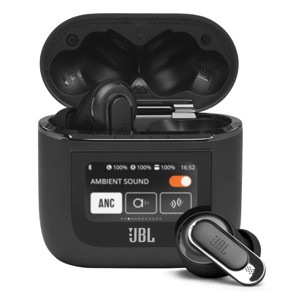
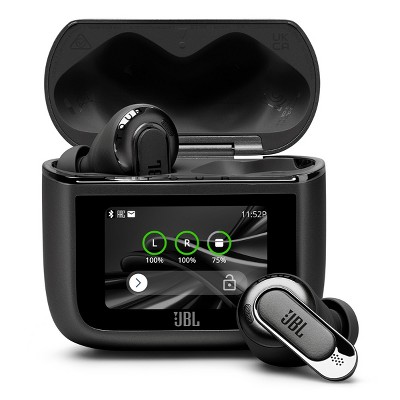
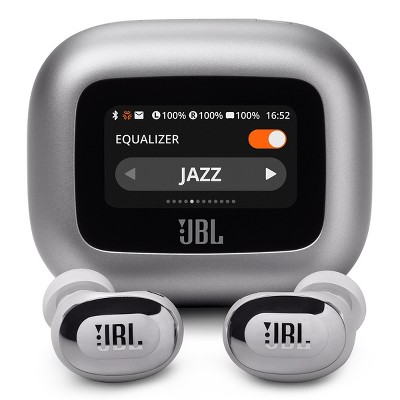
JBL Tour Pro 2 Noise Cancelling True Wireless Earbuds with Smart Case (Black)
$249.95
In Stock
Eligible for registries and wish lists
At a glance
About this item
Additional product information and recommendations
Discover more options
Frequently bought together



Guests also viewed
$169.95
reg $229.95 Sale
4.3 out of 5 stars with 85 ratings
$129.99 - $179.99
Get the AirPods 4 starting at $13/mo. on select items
3.9 out of 5 stars with 4244 ratings
4.4 out of 5 stars with 151 reviews
material quality: 5 out of 5
sound quality: 5 out of 5
value: 5 out of 5
100% would recommend
1 recommendations
5 out of 5 stars
Thumbs up graphic, would recommend
10 December, 2025Verified purchase
(no review title)
I received soon
4 out of 5 stars
9 November, 2025
originally posted on jbl.com

Good product
Been using this product for about 2weeks. The sound quality is amazing. It pauses automatically when one ear bud is taken off; saves you the stress of pausing a song yourself when you’re listening to someone. Additionally, the fit in the ear canal is better compared to other JBL products I have used like the Tune buds. The only downside is that the person on the other end of the call, sometimes finds it difficult to hear me.
1 out of 5 stars
28 October, 2025
originally posted on jbl.com
Tour Pro 2 Earbuds - Will Not Activate
I bought JBL Tour Pro 2 earbuds and they will not activate or pair.
1 reply from Customer Support team - 5 months ago
Thanks for your feedback. To set up your JBL Tour Pro 2 for the first time, charge or press the button on the charging case for 2 seconds, place the earbuds in the case and close it, then open the lid to power on and search for “JBL Tour Pro 2” in your device’s Bluetooth settings to connect. For your reference, you can check out the "Quick Start Guide" to know how to use the unit. If you need further assistance, please contact us.
5 out of 5 stars
27 September, 2025
originally posted on jbl.com
Great product
I brought these for my daughter. She loves them. Really good sound and the noise cancelling is perfect.
4 out of 5 stars
24 September, 2025
originally posted on jbl.com
Nice quality
High quality airbuds I recommend 👍🏾👌🏾🔥 great item
5 out of 5 stars
14 July, 2025
originally posted on jbl.com
Best sound ever!
I’ve bought many top brand names in headphones audio and these have far exceeded my expectations and sound better than any I’ve ever purchased before.
3 out of 5 stars
9 July, 2025
originally posted on jbl.com
Sound great but I had trouble with fitment.
I bought these earbuds because I lost my last pair by a competitor. These sounded very good as far as playing music and such. My issue was with the fit. I tried all 3 sizes of earpieces, but I could not get them to stay in my ears to save my life. Just walking around and they would wiggle out. They need a supplementary rubber ring around them to better affix themselves to the ear. Several times I had to catch them as they fell out. The ANC also left alot to be desired. They do not even compare to the competitor's that I lost that I could go shooting with. These hardly quieted down a conversation someone was having 20 ft from me.
1 reply from Customer Support team - 9 months ago
Thanks for your feedback. To enjoy the best audio experience, you can try our JBL Fit Checker tools with the "check my best fit" option to see if it helps.
4 out of 5 stars
26 June, 2025
originally posted on jbl.com
Great sound, but dont stay in my ears
I bought these about a month ago. I love the sound they put out. Only draw back is they keep falling out my ears when I move around. Should've bought the sport kind that loops around my ear so they wouldn't fall out. If I could trade them in for a different style I would.
2 out of 5 stars
23 June, 2025
originally posted on harmanaudio.com

Good for music, terrible for calls
Like the function of the box, noise cancelation and sound quality but is terrible on calls. Truly disappointed in the call quality
1 reply from Customer Support team - 9 months ago
We recommend trying to connect your earbuds to another device. If the issue persists, please try resetting your earbuds by wearing either the left or right side, then tapping twice and holding the button on the third tap for over 5 seconds. You also need to 'forget' the headphones in your device's Bluetooth settings before pairing them again. If the problem continues, please contact us directly.
1 out of 5 stars
10 May, 2025
originally posted on jbl.com
never jbl again
So not worth the money, case software bad, sound quality worse then imagined, battery is unstable
1 reply from Customer Support team - 11 months ago
We appreciate your time in providing your feedback on our JBL Tour Pro 2. This is not the kind of experience we want you to have. Please note that this product comes with a one-year warranty. Should you need more help, please contact our customer support.
1 out of 5 stars
24 April, 2025
originally posted on jbl.com
Keep falling off from Ear
What a waste of money, it keeps falling off my ear, have tried all the rubber pieces no luck…please don’t buy if you want to use it for gym or cycling
1 reply from Customer Support team - 11 months ago
We appreciate you taking the time to provide us with your feedback. For your JBL Tour Pro 2 to give you the best audio response, you must create a tight seal within your ear canal. To do this, angle the ear tip slightly downward to make it easier to insert into your ear canal, gently twist the earbud to fit it securely into the shape of your ear, and continue turning the earbud into your ear canal to achieve the best seal and secure fit. If you need more help, please get in touch with our customer support.
5 out of 5 stars
17 April, 2025
originally posted on jbl.com
Perfect
Absolutely love these, I prefer them over my airpod pro 2 as I can connect 2 phones together. Sound is full of base and very clear. No problems with wearing them all day.
2 out of 5 stars
12 February, 2025
originally posted on harmanaudio.com
Music playback is great; phone calls not so much.
I have had these for over 6 months now. Continuously receive complaints from the parties on the other end that the background noise is overwhelming. It seems that the noise canceling does not perform well for the other party, which is truly disappointing for the price I paid. I have owned numerous JBL BT earphones over the years and seriously contemplate this as my last purchase.
1 reply from Customer Support team - 1 year ago
We appreciate your feedback. We understand you're experiencing issues with background noise affecting call quality. We're here to help. We advise that you begin by performing a factory reset of your unit and then testing its functionality. Reset procedure for JBL Tour Pro 2: With both earbuds on, and not charging, tap two times and hold the button on the third tap for more than 5 seconds. You may need to 'forget' the headphones in Bluetooth settings on your phone/tablet in order to pair them again. Should the problem remain unresolved, we can assist you with initiating a warranty claim. Please contact us at your convenience so we can provide further support.
5 out of 5 stars
6 September, 2024
originally posted on harmanaudio.com
Best headphones they make
I bought these after my other pair was stolen, as mad as I was about spending more money I couldn’t be happier with these headphones. The fit is awesome and the sound quality and ease of use is much better than my other pair!
1 out of 5 stars
18 August, 2024
originally posted on jbl.com
Never JBL again
This device is design and software DISASTER. Stupid useless and pointless "touch screen" produces false touches while in the pocket. No possibility to disable touch controls on case. Unable to update charging case due to connectivity loss on 99% (have tried 10 times).
1 reply from Customer Support team - 2 years ago
Thanks for your feedback. We're always looking for ways to improve. With our JBL Tour Pro 2, you can try setting the screen timeout to the minimum duration to reduce the chances of accidental touches. To update your JBL Tour Pro 2, use the JBL app and make sure you have the latest version of the JBL Headphone app installed. Restart both your phone and the charging case before attempting the update again. Lastly, resetting the earbuds and the charging case can help resolve the issue. To reset, with both earbuds on and not charging, tap two times and hold the button on the third tap for more than five seconds. You may need to 'forget' the headphones in the Bluetooth settings on your phone or tablet in order to pair them again. If you need more help, please contact our customer support.
1 out of 5 stars
18 August, 2024
originally posted on jbl.com
Never againg...
This device is design and software DISASTER. Stupid useless and pointless "touch screen" produces false touches while in the pocket. No possibility to disable touch controls on case. Unable to update charging case due to connectivity loss on 99% (have tried 10 times).
1 reply from Customer Support team - 2 years ago
We appreciate the feedback you've provided to us. We understand that our JBL Tour Pro 2 did not meet your expectations. We're always looking for ways to improve so we'll make sure to submit your feedback to the right department.
5 out of 5 stars
17 August, 2024
originally posted on jbl.com
Good Quality
Great sound quality, the ambient aware and noise cancellation modes work very well. The ear buds are very lightweight and you can barely feel that they are there!
5 out of 5 stars
24 July, 2024
originally posted on jbl.com
JBL knocks it out of the park with these!!!
Bought these for work, and can't wait to use them... sound quality is amazing, controls on the touchscreen, ambient noise, and spatial sound. 👍🏼👍🏼
5 out of 5 stars
23 July, 2024
originally posted on jbl.com
anazing
absltutely amazing and i love it. its nice...........
5 out of 5 stars
21 July, 2024
originally posted on jbl.com
Perfect purchase
So easy to set up . Easy controls and fantastic sound. The noise cancelling works as expected . Money well spent