
Target New ArrivalsGift Ideas for MomClothing, Shoes & AccessoriesHome & DecorKitchen & DiningOutdoor Living & GardenGroceryHousehold EssentialsBabyBeautyPersonal CareHealthWellnessLuggageSports & OutdoorsToysElectronicsVideo GamesMovies, Music & BooksSchool & Office SuppliesParty SuppliesGift IdeasGift CardsPetsUlta Beauty at TargetShop by CommunityTarget OpticalDealsClearanceTarget New ArrivalsSpring OutfitsGift Ideas for MomWomen’s Festival OutfitsTop DealsTarget Circle DealsWeekly AdShop Order PickupShop Same Day DeliveryRegistryRedCardTarget CircleFind Stores
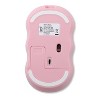
iJoy Wireless Wavy Computer Mouse - 2 of 4iJoy Wireless Wavy Computer Mouse - 3 of 4iJoy Wireless Wavy Computer Mouse - 4 of 4
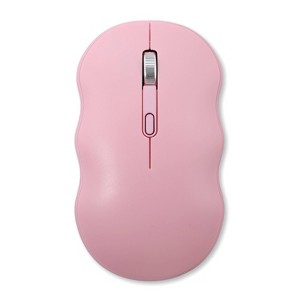
iJoy Wireless Wavy Computer Mouse - 1 of 4

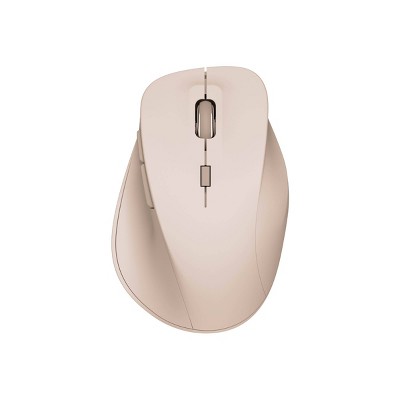
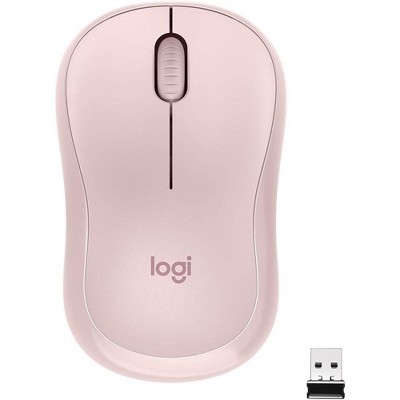
iJoy Wireless Wavy Computer Mouse - Pink

$12.99

ColorPink

In Stock

Eligible for registries and wish lists

About this item

Highlights

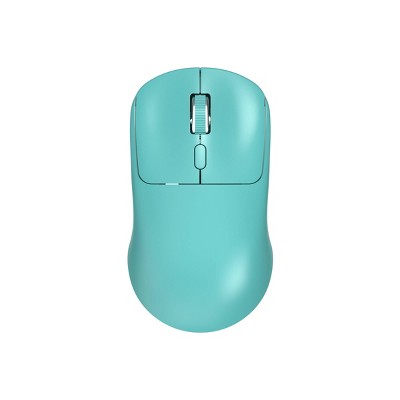
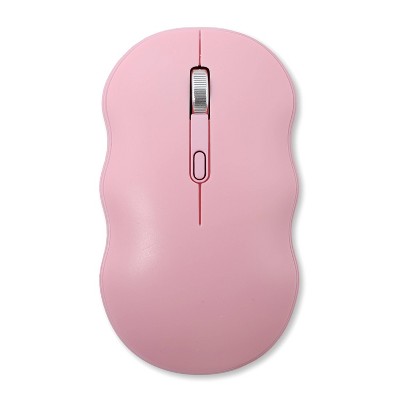
  • Ergonomic Wavy Design: Its unique wavy shape provides a comfortable fit for prolonged use, reducing strain.
  • Wireless Connectivity: Features a USB-A receiver for seamless connection to laptops, desktops, and more.
  • Adjustable DPI Levels: Offers three settings (800/1200/1600 DPI) for customizable sensitivity.
  • Battery Powered: Operates with 1 AA battery (not included) for cord-free convenience.
  • Portable and Lightweight: Easy to carry and perfect for on-the-go use.

Description

Upgrade your setup with the iJoy Wireless Wavy Mouse, designed for comfort and versatility! Its ergonomic wavy shape fits naturally in your hand, reducing strain during long sessions. Enjoy wireless freedom with a USB-A receiver, connecting effortlessly to laptops, desktops, and more. Customize your precision with three adjustable DPI levels (800/1200/1600), perfect for work or play. Battery-powered for cord-free convenience (batteries not included), this lightweight mouse is ideal for home or on-the-go use. Get yours today and experience the difference!
Dimensions (Overall): 4.21 Inches (L), 2.4 Inches (W), 1.18 Inches thick
Weight: .12 Pounds
Electronics Features: Slim Design
Material: ABS (Acrylonitrile Butadiene Styrene), Metal
Battery: Required, Not Included
TCIN: 94434077
UPC: 198926005923
Item Number (DPCI): 056-00-9260
Origin: Imported
If the item details aren’t accurate or complete, we want to know about it.

Shipping details

Estimated ship dimensions: 6.6 inches length x 3.3 inches width x 2.1 inches height
Estimated ship weight: 0.15 pounds

Return details

This item can be returned to any Target store or Target.com.
This item must be returned within 30 days of the date it was purchased in store, delivered to the guest, delivered by a Shipt shopper, or picked up by the guest.
See the return policy for complete information.

Q: Why is there no USB chip to go in the computer/laptop?

submitted by Love it - 2 months ago
  • A: Hi, thanks for reaching out about iJoy Wireless Wavy Computer Mouse The USB chip (or "dongle") is actually hiding inside the mouse itself for safekeeping during shipping. Because these chips are so tiny, manufacturers "park" them inside the body of the mouse so they don't get lost in the box. Flip the mouse over and slide off the battery cover. Look right next to where the AA battery goes. You should see a small rectangular slot with a tiny USB-A plug tucked inside. Give it a firm tug or use your fingernail to pull it out. If it isn't inside the battery door, look at the very bottom of the mouse near the optical sensor (the part that glows). Some iJoy models have a dedicated "parking" slot on the exterior base where the chip clicks into place. If you have any additional questions, we welcome you to contact MyTGTtech at 833-848-8324 every day, between 7am-11pm CST.

    submitted byMike - 2 months ago
    Target expert support

Q: Why is there no USB chip to go in a computer/laptop?

submitted by Love it - 2 months ago
  • A: Hi, thanks for reaching out about iJoy Wireless Wavy Computer Mouse The USB chip (or "dongle") is actually hiding inside the mouse itself for safekeeping during shipping. Because these chips are so tiny, manufacturers "park" them inside the body of the mouse so they don't get lost in the box. Flip the mouse over and slide off the battery cover. Look right next to where the AA battery goes. You should see a small rectangular slot with a tiny USB-A plug tucked inside. Give it a firm tug or use your fingernail to pull it out. If it isn't inside the battery door, look at the very bottom of the mouse near the optical sensor (the part that glows). Some iJoy models have a dedicated "parking" slot on the exterior base where the chip clicks into place. If you have any additional questions, we welcome you to contact MyTGTtech at 833-848-8324 every day, between 7am-11pm CST.

    submitted byMike - 2 months ago
    Target expert support

Q: Where is the usb a receiver?

submitted by Mimi - 3 months ago
  • A: Hi, thanks for reaching out about iJoy Wireless Wavy Computer Mouse For almost all iJoy wireless mice, including the Wavy model, the USB-A receiver isn't loose in the box. You’ll find it tucked away inside the mouse itself to keep it safe during shipping. Flip the mouse over and slide off the battery cover. Look right next to the battery slot; there is a small dedicated "parking spot" where the tiny USB dongle is stored. If it is not there, on some specific iJoy versions, the receiver is tucked into a small rectangular slot on the bottom exterior of the mouse (near the sensor), rather than inside the battery door. If you have any additional questions, we welcome you to contact MyTGTtech at 833-848-8324 every day, between 7am-11pm CST.

    submitted byMike - 3 months ago
    Target expert support

Q: Can this mouse connect to an iPad?

submitted by Jonathan - 6 months ago
  • A: Hi, thanks for reaching out about iJoy Wireless Wavy Computer Mouse. Whether the iJoy Wireless Wavy Computer Mouse can connect to your iPad depends on the mouse's connection type and the adapters you have. Based on the product information, this mouse primarily uses a 2.4 GHz USB-A Receiver (a small dongle), not standard Bluetooth. If you have any additional questions, w

    submitted byJoe - 6 months ago
    Target staff support

Q: The mouse is kind of all over the place with a purple line with two circles, one on top the other on bottom. Would like to reset for it to be standard. Why does my mouse timeout when I am away

submitted by Whitey - 8 months ago
  • A: Hi, thanks for reaching out about iJoy Wireless Wavy Computer Mouse To better understand your individual needs, we welcome you to contact MyTGTtech at 833-848-8324 every day, between 7am-11pm CST.

    submitted byJustin - 7 months ago
    Target expert support

Q: Is this compatible to a MacBook Air ?

submitted by Jenn - 8 months ago
  • A: Hi, thanks for reaching out about the iJoy Wireless Wavy Computer Mouse The mouse itself is compatible with the macOS operating system, but you'll need a simple and inexpensive adapter to connect the USB receiver to your MacBook Air. If you have any additional questions, we welcome you to contact MyTGTtech at 833-848-8324 every day between 7 am and 11 pm CST.

    submitted byRena - 8 months ago
    Target expert support

Q: The mouse did not come with a USB receiver so I'm not sure how to connect it. I tried via bluetooth, device is powered on but it doesn't come up. Please help!

submitted by Meghan - 9 months ago
  • A: Hi, thanks for reaching out about IJoy Wavy Mouse - Pink The IJoy Wavy Mouse - Pink typically uses one AA battery. The mouse is wireless, and the battery is typically located under a removable cover on the bottom of the mouse. If you have any additional questions, we welcome you to contact MyTGTtech at 833-848-8324 every day, between 7am-11pm CST.

    submitted byMel - 9 months ago
    Target staff support

Q: What kind of batteries does it need?

submitted by Margie - 10 months ago
  • A: Hi Margie, thanks for reaching out about IJoy Wavy Mouse - Pink The IJoy Wavy Mouse - Pink typically uses one AA battery. The mouse is wireless, and the battery is typically located under a removable cover on the bottom of the mouse. You can use either alkaline, lithium, or rechargeable AA batteries If you have any additional questions, we welcome you to contact MyTGTtech at 833-848-8324 every day, between 7am-11pm CST.

    submitted byJustin - 10 months ago
    Target expert support

Q: Is there a manual? I’m having trouble connecting it to my desktop.

submitted by Manual - 10 months ago
  • A: Hi Manual, thanks for reaching out about the IJoy Wavy Mouse - Pink We apologize for the issue you are experiencing and have a few suggestions that may help: Check Batteries: Power On/Off: USB Receiver (If applicable): Try plugging the USB receiver into a different USB port on your desktop.If you're using a USB 3.0 port (often blue inside), try a USB 2.0 port instead. Sometimes USB 3.0 can cause interference with 2.4GHz wireless devices. Unplug the USB receiver, wait a few seconds, and then plug it back in. Restart Your Computer: Pairing Mode (If Bluetooth): Ensure your mouse is actively in pairing mode when trying to connect via Bluetooth. If you have any additional questions, we welcome you to contact MyTGTtech at 833-848-8324 every day between 7 am and 11 pm CST.

    submitted byRena - 10 months ago
    Target expert support
WARNING: This Product can expose you to chemicals including Bisphenol A (BPA), which is know to the State of California to cause birth defects or other reporductive harm. For more information go to www.P65Warnings.ca.gov. For more information, go to https://www.p65warnings.ca.gov/

Additional product information and recommendations

Discover more options
Frequently bought together

Guests also viewed
Guests are saying

The reviews indicate significant issues with the mouse's functionality, as many guests report it failing to connect or work properly despite multiple attempts with different batteries and devices. However, some guests appreciate its cute design and quiet clicks. The product seems to appeal to those looking for a stylish accessory, but the reliability concerns may deter potential buyers. Guests suggest considering alternatives if functionality is a priority.
    Summary created by AI from text of reviews reflecting recent feedback provided across different star ratings (includes incentivized reviews)
    2.6 out of 5 stars with 53 reviews
    quality: 1.86 out of 5
    value: 1.76 out of 5
    16% would recommend
    25 recommendations
    1 out of 5 stars
    Thumbs down graphic, would not recommend
    20 April, 2026Verified purchase

    Narcoleptic....

    Second time using it and it works for a second and then stops. It's like what I imagine a mouse would do if it had narcolepsy.
    S M
    quality: 1 out of 5
    value: 1 out of 5
    Did you find this review helpful?
    1 out of 5 stars
    Thumbs down graphic, would not recommend
    31 March, 2026Verified purchase

    Horrible connectivity

    Horrible Hconnectgr ttr35
    Rashelle
    quality: 1 out of 5
    value: 1 out of 5
    Did you find this review helpful?
    1 out of 5 stars
    Thumbs down graphic, would not recommend
    30 March, 2026Verified purchase

    (no review title)

    Did not work - exchanged it for the same one and that one did not work either.
    Brooke
    quality: 1 out of 5
    value: 2 out of 5
    Did you find this review helpful?
    1 out of 5 stars
    30 March, 2026Verified purchase

    (no review title)

    I bought 2 and neither have worked I bought because I have same brand and color in a wireless keyboard but the mouse will not work
    jessica
    Did you find this review helpful?
    1 out of 5 stars
    Thumbs down graphic, would not recommend
    17 February, 2026

    Trash.

    Just bought it over the weekend. Put the battery into it today at work and it turned on for a second then shut off. Will not connect to my computer at all even after switching batteries, usb ports, and restarting computer. Do not waste the money on this item.
    Kiley
    quality: 1 out of 5
    value: 1 out of 5
    Did you find this review helpful?
    1 out of 5 stars
    Thumbs down graphic, would not recommend
    10 February, 2026

    So disappointed

    Don't do it. This mouse is garbage. Stops working even with brand new batteries. So frustrating. I like that it matched my keyboard but it's just not worth it.
    CyndiB
    quality: 3 out of 5
    value: 1 out of 5
    Did you find this review helpful?
    1 out of 5 stars
    Thumbs down graphic, would not recommend
    20 January, 2026Verified purchase

    (no review title)

    It just randomly stops working no matter how many times I’ve changed the batteries
    HM9517
    quality: 1 out of 5
    value: 1 out of 5
    1 guest found this review helpful. Did you?
    1 out of 5 stars
    13 January, 2026Verified purchase

    (no review title)

    No stars. I bought 3 and not one of them worked! It turns on for a split second then goes off.
    Julissa
    Did you find this review helpful?
    1 out of 5 stars
    Thumbs down graphic, would not recommend
    29 December, 2025

    READ THE REVIEWS

    I wish I could give 0 stars and I certainly wish I had read the reviews before purchasing this mouse. It sucks. It doesn’t even turn on. The light comes on for a split second then shuts off. I’ve replaced the batteries several times. My computer displays a device error when trying to connect the mouse. It does NOT come with any sort of instructions and there is nothing that I can find online, other than that it just doesn’t work. DO NOT WASTE YOUR MONEY ON THIS!! Or the keyboard. They suck.
    Jordan
    quality: 1 out of 5
    value: 1 out of 5
    1 guest found this review helpful. Did you?
    1 out of 5 stars
    Thumbs down graphic, would not recommend
    8 December, 2025

    Dosent work with anything but a computer

    Does not work with an iPad or a phone
    Orla
    quality: 2 out of 5
    value: 1 out of 5
    Did you find this review helpful?
    1 out of 5 stars
    24 November, 2025

    Wireless mouse

    Did not work after installing batteries
    Unknown
    1 guest found this review helpful. Did you?
    1 out of 5 stars
    12 November, 2025Verified purchase

    (no review title)

    They delivered an open box and mouse did not work
    Collette
    Did you find this review helpful?
    1 out of 5 stars
    Thumbs down graphic, would not recommend
    12 November, 2025Verified purchase

    Do NOT purchase.

    I’ve exchanged 3 times and none have worked! Total waste of time! Disappointed because I really love the keyboard. Returning both for refund.
    Jamie
    quality: 1 out of 5
    value: 1 out of 5
    2 guests found this review helpful. Did you?
    5 out of 5 stars
    5 November, 2025Verified purchase

    (no review title)

    It is very cute exactly what I wanted
    Shara
    Did you find this review helpful?
    1 out of 5 stars
    Thumbs down graphic, would not recommend
    9 October, 2025Verified purchase

    Does NOT work

    Do NOT recommend. It does not connect to the PC. I have purchased two and neither one worked. Tried different batteries, different PCs and different usb ports and none worked.
    Isaaaaa
    quality: 1 out of 5
    value: 1 out of 5
    4 guests found this review helpful. Did you?
    1 out of 5 stars
    Thumbs down graphic, would not recommend
    5 October, 2025Verified purchase

    doesn't work brand new

    didn't work. tried changing the batteries- would turn on and light up but not actually work when plugged in
    Ang
    3 guests found this review helpful. Did you?
    1 out of 5 stars
    Thumbs down graphic, would not recommend
    3 October, 2025Verified purchase

    simply doesn't work

    Does not work. WIll not connect. Changed the battery twice and still would not work properly. Will be returned to the store for a refund. (I really hate it, because it's super cute) :(
    Miss
    quality: 1 out of 5
    value: 1 out of 5
    2 guests found this review helpful. Did you?
    2 out of 5 stars
    Thumbs down graphic, would not recommend
    1 October, 2025Verified purchase

    Mouse

    Gets stuck when trying to navigate
    Mari
    quality: 2 out of 5
    value: 2 out of 5
    Did you find this review helpful?
    1 out of 5 stars
    Thumbs down graphic, would not recommend
    14 September, 2025Verified purchase

    Didnt work

    Bought this brand new in the store and it wouldn’t work. Tried 7 different batteries to make sure it wasn’t me or my computer. It would turn on but not respond to anything
    Amanda
    quality: 1 out of 5
    value: 1 out of 5
    2 guests found this review helpful. Did you?
    1 out of 5 stars
    Thumbs down graphic, would not recommend
    8 September, 2025Verified purchase

    Would not recommend

    Drains the battery within a two week period! I have spent more on batteries than the actual product!
    Mouse user
    quality: 1 out of 5
    value: 1 out of 5
    1 guest found this review helpful. Did you?

    Get top deals, latest trends, and more.

    Privacy policy