Sponsored
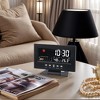
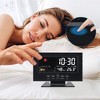
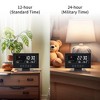
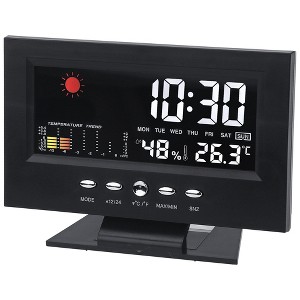
REGALWOVEN Electric Weather Forecast Battery Backup Alarm Clock, 5.9"L x 2.2"W x 4.7"H 1 Pc
$19.99 reg $26.69
Sale
save $6.70 (25% off)colorblack


In Stock
Eligible for registries and wish lists
Sponsored
About this item
Highlights
- Voice-Activated Screen Wake-Up: The alarm clock supports voice activation to light up the screen.
- Weather Forecast Function: This clock provides real-time weather updates, including temperature, humidity, and weather conditions, helping you plan your day better.
- Snooze Function: If you’re still sleepy when the alarm rings, a quick tap on the snooze button lets you take a nap for extra rest.
- Electric Alarm Clock with Outage Backup: Powered by an adapter, its battery backup (requires 2 AAA, not included).
- Home Decor Clock: This clock has a sleek and modern look, making it a good addition to your home decor. You can place it on your nightstand, bedside table, or desk.
Description
Electric Alarm Clock - Redefine Your Morning RoutineIntroduction:This electric alarm clock combines advanced technology with innovative features to provide you with a personalized and convenient waking - up experience. It's not just an alarm clock, but a smart companion for your daily life.
Product Specifications:Dimensions:5.9" x 2.2" x 4.7" / 15cm x 5.5cm x 12cm (LxWxH)Power Supply:DC 5V (included USB cable), or powered by 2 AAA batteries (batteries not included)Display Type:LEDWhat's in the Box:1 x Digital Alarm Clock1 x USB Cable1 x Manual1 x Alarm Clock Stand
Product Description:1.SETTING THE TIMEPress and hold MODE for 3 seconds to enter time setting mode (hour digits blink).Set hour by pressing ▲12/24▼ ℉/℃.Press MODE again (minute digits blink).Set minute by pressing ▲12/24▼ ℉/℃.2.SETTING THE ALARMView Alarm Time: Press MODE.Press and hold MODE for 3 seconds to enter alarm setting mode (hour digits blink).Set hour by pressing ▲12/24▼ ℉/℃.Press MODE again (minute digits blink).Set minute by pressing ▲12/24▼ ℉/℃.3.SETTING THE CALENDARView Calendar: Press MODE.Press and hold MODE for 3 seconds to enter calendar setting mode (year digits blink).Set year by pressing ▲12/24▼ ℉/℃.Press MODE again (month digits blink).Set month by pressing ▲12/24▼ ℉/℃.Press MODE again (day digits blink).Set day by pressing ▲12/24▼ ℉/℃.4.ALARM ON/OFFPress ▲12/24 to turn alarm on/off.5.MAX/MINView Max Temperature & Humidity Record: Press MAX/MIN.View Min Temperature & Humidity Record: Press MAX/MIN again.6.12/24 FORMAT HOURPress ▲12/24 for 3 seconds to switch between 12 or 24-hour format.7.TEMPERATURE DISPLAY FORMATPress ℉/℃ to switch between ℉/℃ display.8.SNOOZE/LIGHTWhen alarm rings, press SNZ/LIGHT to start snooze (alarm repeats after 8 minutes).Press other button to cancel alarm.
Product Specifications:Dimensions:5.9" x 2.2" x 4.7" / 15cm x 5.5cm x 12cm (LxWxH)Power Supply:DC 5V (included USB cable), or powered by 2 AAA batteries (batteries not included)Display Type:LEDWhat's in the Box:1 x Digital Alarm Clock1 x USB Cable1 x Manual1 x Alarm Clock Stand
Product Description:1.SETTING THE TIMEPress and hold MODE for 3 seconds to enter time setting mode (hour digits blink).Set hour by pressing ▲12/24▼ ℉/℃.Press MODE again (minute digits blink).Set minute by pressing ▲12/24▼ ℉/℃.2.SETTING THE ALARMView Alarm Time: Press MODE.Press and hold MODE for 3 seconds to enter alarm setting mode (hour digits blink).Set hour by pressing ▲12/24▼ ℉/℃.Press MODE again (minute digits blink).Set minute by pressing ▲12/24▼ ℉/℃.3.SETTING THE CALENDARView Calendar: Press MODE.Press and hold MODE for 3 seconds to enter calendar setting mode (year digits blink).Set year by pressing ▲12/24▼ ℉/℃.Press MODE again (month digits blink).Set month by pressing ▲12/24▼ ℉/℃.Press MODE again (day digits blink).Set day by pressing ▲12/24▼ ℉/℃.4.ALARM ON/OFFPress ▲12/24 to turn alarm on/off.5.MAX/MINView Max Temperature & Humidity Record: Press MAX/MIN.View Min Temperature & Humidity Record: Press MAX/MIN again.6.12/24 FORMAT HOURPress ▲12/24 for 3 seconds to switch between 12 or 24-hour format.7.TEMPERATURE DISPLAY FORMATPress ℉/℃ to switch between ℉/℃ display.8.SNOOZE/LIGHTWhen alarm rings, press SNZ/LIGHT to start snooze (alarm repeats after 8 minutes).Press other button to cancel alarm.
Dimensions (Overall): 4.7 inches (H) x 2.2 inches (W) x 5.9 inches (D)
Weight: 1.0 pounds
Electronics Features: Alarm
Display Type: Digital
Clock Face Color: White
Frame Color: Black
Material: Plastic
Battery: Required, Not Included
TCIN: 1007623006
UPC: 614553325857
Origin: imported
The above item details were provided by the Target Plus™ Partner. Target does not represent or warrant that this information is accurate or complete. On occasion, manufacturers may modify their items and update their labels.
We recommend that you do not rely solely on the information presented. If you have a specific question about this item, you may consult the item's label, contact the manufacturer directly or call Target Guest Services at 1-800-591-3869.
If the item details aren’t accurate or complete, we want to know about it.
Shipping details
Estimated ship dimensions: 8.66 inches length x 5.51 inches width x 1.57 inches height
Estimated ship weight: 0.57 pounds
This item cannot be shipped to the following locations: American Samoa (see also separate entry under AS), Guam (see also separate entry under GU), Northern Mariana Islands, Puerto Rico (see also separate entry under PR), United States Minor Outlying Islands, Virgin Islands, U.S., APO/FPO, Alaska, Hawaii
item ships from third party seller: Unique Bargains
Return details
This item can be returned to any Target store or Target.com.
This item must be returned within 30 days of the date it was purchased in store, shipped, delivered by a Shipt shopper, or made ready for pickup.
See the return policy for complete information.