Sponsored
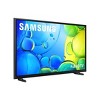
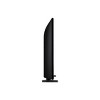
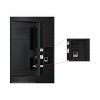
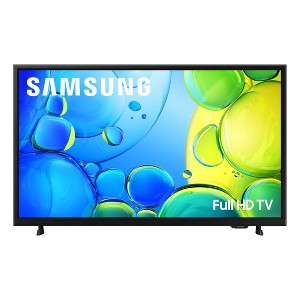
Samsung 40" FHD 1080p Smart LED TV: Bluetooth & Wi-Fi, HDR10+, Alexa Compatible
In Stock
At a glance
Sponsored
About this item
Highlights
- HDR -See your content as it’s meant to be seen - from the subtle highlights in a dark, moody alleyway to the deep shadows cast on a bright and sunny afternoon. High Dynamic Range (HDR) expands the contrast between the lightest and darkest parts of a scene, so you can enjoy a wide spectrum of colors and details.
- Object Tracking Sound Lite -Motion-based sound: Feel like you're part of the scene with audio that follows objects on screen. Featuring a virtual top channel, every sound is placed in space and moves with the action, enhancing your sense of immersion. Whether it is a car chase, an intense shootout, or a romantic dinner conversation, you’ll feel like you're right in the middle of it all.
- Samsung Knox Security -Your TV experiences are secured. Samsung Knox Security protects you from harmful attacks by automatically blocking unauthorized apps and phishing websites. It also safeguards your IoT devices connected to your TV, plus your sensitive information, including your PIN codes and passwords. With regular updates, your TV is always kept safe. *Personal data includes directly input PIN-codes and passwords, and IoT device information shared through the SmartThings app. The latest software is required.
- One UI Tizen -One UI Tizen is a personalized TV platform designed to bring together all your favorite apps and the latest features from Samsung*. Work out with a trainer, follow recipes and binge watch endless shows from your favorite streaming services-all with just a few clicks. One UI Tizen will receive automatic updates for 7 years.***Samsung Account required for network-based smart services, including streaming apps and other smart features. Computer, mobile or other device may be necessary to create/log in to Samsung Account (free to download and create). Without Account log in, only external device connections (e.g., via HDMI) and terrestrial/over-the-air TV (only for TVs with tuners) available. **Based on model year; requires Internet connection.
- Endless Content -Access 2,700+ free channels, including over 400 premium Samsung TV Plus channels with just your Wi-Fi connection. With Samsung TV Plus, get live national and local news, sports, movies, music, kids' shows, K-Content and reality TV - all for free. Plus enjoy thousands of free movies and shows, on demand. With content frequently added, there’s always something new to explore. Plus, discover a diverse lineup of channels from free streaming TV services like Pluto TV and Freeze. There’s content for every occasion or mood. *Samsung Account required for network based smart services, including streaming apps and other smart features. A computer, mobile or other device may be necessary to create/log in to Samsung Account (free to download and create). Without Account log in, only external device connections (e.g., via HDMI) and terrestrial/over the air TV (only for TVs with tuners) available. Channels may vary by location and are subject to change. UI is subject to change without prior notice.
- Slim Look with 3 Bezel-less Design -An elegant design with thin bezels that minimizes distractions. Add a minimalistic touch to your room and an uncluttered view, so you can focus entirely on your favorite sitcom or action movie.
- PurColor -Enjoy your favorite shows and movies with vibrant colors that look like real life. Get a huge spectrum of hues - from the deep blues of the ocean to the vibrant greens of a forest - for lifelike picture quality that enhances every scene.
- Q-Symphony - Unlock more robust, nuanced sound when your Samsung TV and soundbar speakers work together as one. Most soundbars mute the TVs speakers when activated. Why choose between your TV and soundbar to play sound, when you can have them all work together? Enjoy optimized surround sound, hear clear dialogue, and dive into a cinematic sound experience. * Requires a compatible 2020-2025 Q-Series, S-Series, B750F or B650F soundbar (sold separately). For more information, check soundbar specifications.
- Mega Contrast -Forget about adjusting your TV settings to achieve a better picture. Your TV automatically adjusts brightness and contrast, enhancing the difference between light and dark areas on the screen, so you can enjoy stunning picture quality. Catch every detail, regardless of how dark or bright the scene is.
- Mobile to TV - Mirror your screen and audio and enjoy endless scrolling, watch shows and movies, stream your favorite content, and even make video calls on your TV. Just link your device using SmartThings, AirPlay 2 to cast to your TV.* *Screen mirroring may vary by mobile app.
Description
Shipping details
Return details
Q: Does this tv have dual Bluetooth audio?
A: Hi, thank you for reaching out about Samsung 40" FHD 1080p Smart LED TV: Bluetooth & Wi-Fi, HDR10+, Alexa Compatible. Yes, the Samsung TV model UN40F6000FFXZA supports Bluetooth connectivity. This feature allows you to wirelessly connect Bluetooth-enabled devices, such as headphones, soundbars, or speakers, directly to the TV. If you have any additional questions, we welcome you to contact MyTGTtech at 833-848-8324 every day, between 7am-11pm CST.
submitted byMatt - 2 months agoTarget expert supportA: Hi Taylor, No, the F6000F does not offer Dual Bluetooth Audio. ~Samsung Advisor
submitted bySamsung - 2 months agoBrand expert
Q: Does this TV remote have numeric buttons?
A: Hi, thank you for reaching out about Samsung 40" FHD 1080p Smart LED TV: Bluetooth & Wi-Fi, HDR10+, Alexa Compatible. The original remote for the Samsung 40" UN40F6000FFXZA TV does not have physical numeric buttons (0-9). Instead, it is a "Smart Remote" designed for modern interfaces, which uses a virtual numeric pad. If you have any additional questions, we welcome you to contact MyTGTtech at 833-848-8324 every day, between 7am-11pm CST.
submitted byMatt - 10 days agoTarget expert support
Q: HOW MANY WAYS CAN YOU CONNECT CABLE TO THIS TV
A: Hi, thanks for reaching out about the Samsung 40" FHD 1080p Smart LED TV: Bluetooth & Wi-Fi, HDR10+, Alexa Compatible Your Samsung 40" FHD 1080p Smart LED TV offers three primary ways to connect to or access cable programming. 1. HDMI (The Best Way) 2. Direct Coaxial Cable (Limited) 3. Streaming App (The Smart Way) If you have any additional questions, we welcome you to contact MyTGTtech at 833-848-8324 every day between 7 am and 11 pm CST.
submitted byRena - 10 days agoTarget expert support
Q: Can this tv be used with just an antenna no cable or wifi? Just hd antenna?
A: Hi, thanks for reaching out about Samsung 40" FHD 1080p Smart LED TV: Bluetooth & Wi-Fi, HDR10+, Alexa Compatible. Yes, this TV can be used with just an antenna and no Wi-Fi or cable connection. If you have any additional questions, we welcome you to contact MyTGTtech at 833-848-8324 every day, between 7am-11pm CST.
submitted byJoe - 1 month agoTarget staff support
Q: Does the tv have USB port ?
A: Hi, thank you for reaching out about Samsung 40" FHD 1080p Smart LED TV: Bluetooth & Wi-Fi, HDR10+, Alexa Compatible. Yes, the UN40F6000FFXZA television has one USB-A port. It is typically located on the back or side of the TV, along with the HDMI and Ethernet ports. If you have any additional questions, we welcome you to contact MyTGTtech at 833-848-8324 every day, between 7am-11pm CST.
submitted byMatt - 2 months agoTarget expert support
Q: My TV has no sound coming from the TV but will work with my small Bluetooth speaker. Is this how it supposed to work?
A: Hi, thanks for reaching out about theSamsung 40" FHD 1080p Smart LED TV: Bluetooth & Wi-Fi, HDR10+, Alexa Compatible Check Sound Output Settings:On your TV's remote, press the Home or Menu button. Go to Settings. Select Sound and then Sound Output. Make sure that "TV Speaker" is selected. If it's not, select it and then check if the sound is working. Run a Sound Test: Many Samsung TVs have a built-in diagnostic tool. Go to Settings > Support > Self Diagnosis > Sound Test. If you have any additional questions, we welcome you to contact MyTGTtech at 833-848-8324 every day between 7 am and 11 pm CST.
submitted byRena - 3 months agoTarget expert support
Q: Dose this TV have Legs/Stand to sit on a Entertainment / Wall Unit ?
A: Hi Targetuser247, thanks for reaching out about Samsung 40" FHD 1080p Smart LED TV Yes, this TV comes with a stand that screw into the bottom of the unit. If you have any additional questions, we welcome you to contact MyTGTtech at 833-848-8324 every day, between 7am-11pm CST.
submitted byJustin - 4 months agoTarget expert support
Q: Will it work with a wireless
A: Hi Hf, Yes, the F6000F TV is Wi-Fi-enabled. ~Samsung Advisor
submitted bySamsung - 4 months agoBrand expert
Q: Can you add the MLB app?
A: Hi rc, Yes, the MLB app is available for download. ~Samsung Advisor
submitted bySamsung - 4 months agoBrand expert
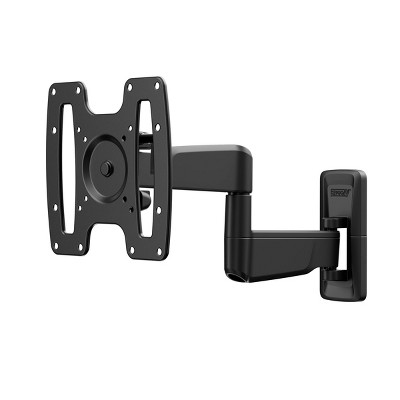
Q: Can you mount this TV onto a universal rectanglular wall bracket? Does it come with two hangers or just the stand feet?
A: Hi Tyson Corner, Yes, you will need a universal mount compatible with a VESA Map of 200x200mm. ~Samsung Advisor
submitted bySamsung - 4 months agoBrand expert
Frequently Also Added

Guests also viewed
Discover more options
Related Categories
Guests are saying
(no review title)

Overall it is a nice TV for the price
Perfect For Gaming
Love thie details.
No Optical audio out jack or any audio out jack.
1 reply from Samsung Advisor team - 14 days ago
Samsung tv
I love samsung products
Mr charlie
Great Product
Not too bad
Lack of attention to detail
1 reply from Samsung Advisor team - 26 days ago
This product has great features
I love it
Great TV for Our Pation
This TV has great features and picture quality
It works amazing!!!! Way better them my last TV...
First rate viewing
I like Samsung
easy set up, nice picture