


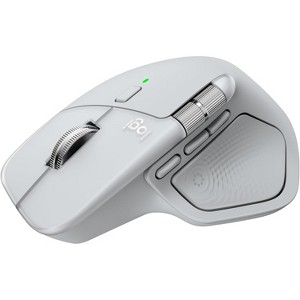
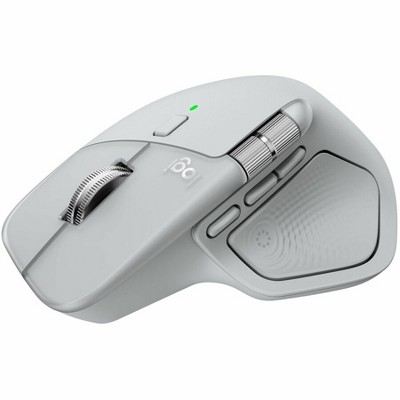
Logitech MX Master 4 for Mac Bluetooth Mouse with Haptic Feedback White Silver
$126.99
In Stock

Free & easy returns
Return this item in store within 30 days for a full refund.
Sold & shipped by Spacebound
Eligible for registries and wish lists
At a glance
About this item
Additional product information and recommendations
Discover more options
- $49.99reg $59.99 Sale
- $39.99reg $49.99 Sale
- $17.99 - $21.99reg $29.99 Sale5 out of 5 stars with 1 ratings
- $44.99reg $54.99 Sale3.6 out of 5 stars with 5 ratings









Frequently bought together





Guests also viewed
- $15.99reg $29.99 Sale1.8 out of 5 stars with 5 ratings

Related Categories
Guests are saying
This mouse is designed for multitasking and professional workflows, offering ergonomic comfort and a range of features that enhance productivity. Guests appreciate its precise control and customizable options, making it ideal for tasks like video editing and CAD programs. While some find the connection to devices erratic and the button layout awkward, the overall functionality and improved battery life make it a worthwhile investment for those seeking a reliable and feature-rich mouse.
Summary created by AI from text of reviews reflecting recent feedback provided across different star ratings (includes incentivized reviews)
4.5 out of 5 stars with 45 reviews
1 out of 5 stars
24 April, 2026
originally posted on Logitech

MX Master 4 incompatible with Big Sur
It did not seem clear to me that the MX Master 4 for Mac is incompatible with macOS 11.7 Big Sur. I did not make this discovery until I attempted to download the instructions.
5 out of 5 stars
21 April, 2026
originally posted on Logitech
Next-level productivity
Ergonomic, precise, and feature-rich. Ideal for multitasking and professional workflows.
5 out of 5 stars
10 April, 2026
originally posted on Logitech
Useful
[This review was collected as part of a promotion.] find it very useful - the middle button it not used often though
4 out of 5 stars
24 March, 2026
originally posted on Logitech
What it’s like on the fingers
It feels good in the hand, primary and secondary button and wheel feels nice to the touch. The radial texture for the thumb button still feels odd, to thick of a ribbing, the gap between the raised is too wide, sometimes it feels electric, a low buzzing feeling. May fill it in with sugru to smooth it out.
3 out of 5 stars
13 March, 2026
originally posted on Logitech
Could be better…
Connection to the MacBook is erratic at times, requires disconnection, restart, battery removal, its inconvenient. The pointer “jumps” on the screen, becomes hard to control. I also find the top small button’s position hard to access, awkward. The ergonomic design does help with wrist pain.
3 out of 5 stars
13 March, 2026
originally posted on Logitech
Good, but miss the old model.
Some very nice features like bluetooth, popup menu, etc., but the ergonomics are anywhere close to the old models. The 2S is my favorite, which I still use - it is well-formed to the average hand, but the latest version seems to want to come out of your hand when lifting it off the mouse pad. Squeezing too much activated the thumb menu button, which is annoying. Battery life is much improved and I've used for well over a month without recharging. In all, well worth the money and better than any options out there.
5 out of 5 stars
22 February, 2026
originally posted on Logitech
MX Master is for Mac
For Mac users that need a little more speed than the track pad, this is the mouse for you. Easy to set up and customize. Great for video editing.
4 out of 5 stars
23 January, 2026
originally posted on Logitech
Great Mouse for CAD
I purchased this mouse to work with the CAD program Fusion 360. It works very well for that program. It can be customized to add additional functionality specifically for Fusion. The mouse to very ergonomic and does not tire your wrist.
5 out of 5 stars
7 January, 2026
originally posted on Logitech
Functional design with exceptional quality
Very functional. New features are great. Exceptional quality.
1 reply from Customer Care team - 3 months ago
Awesome! Glad to know that our product is serving you well.
5 out of 5 stars
6 December, 2025
originally posted on Logitech
Best Productivity tool ever
Pest productivity mouse ever so easy to use and connection is amazing
5 out of 5 stars
29 November, 2025
originally posted on Logitech
Best mouse of 2026
Can’t describe how good this one is, excellent product
4 out of 5 stars
13 November, 2025
originally posted on Logitech
Ecellent Mouse which adds features to MacOS
I do like the features of this mouse and the feel of it in my hand. It is easy to hold and pretty ergonomic. Need to use Logitech software to enable all features. My only issue is that it does not show up natively in MacOS as a mouse.
4 out of 5 stars
10 November, 2025
originally posted on Logitech
Amazing mouse, awesome functionality.
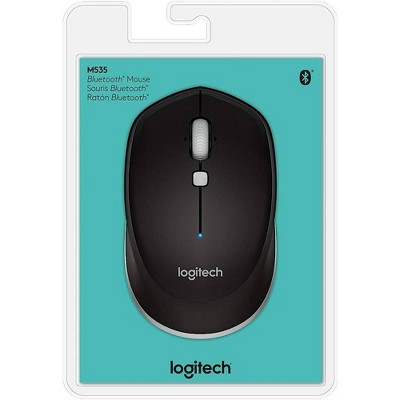
Amazing mouse, awesome functionality. Took a minute to get the balance of it. Heavier than I care for. Upgraded from the M535 which I have used for 15+ years (still works like a champ). Love that one for the size and weight. This one has the same grip width, awesome, awesome, but is noticeably heavier. I also love the grip-ability of both of them. Easy to hold, pickup, and move. The side-to-side scroll is a game-changer; so is the quick and click up and down scroll. All and all major with.